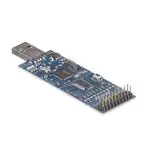
AT97SC3205T-SDK2
AT97SC3205P-SDK2
Atmel TPM I2C/SPI Development Kit
USER GUIDE
2
Atmel I C/SPI Demonstration Kit
Introduction
®
The Atmel TPM™ Development Kit includes examples of how to use the Trusted Platform Module
(TPM) in an embedded and PC application. Source code is provided to enable an embedded designer to
make quick progress in understanding and utilizing the TPM.
®
2
The TPM Development Kits are based on the Atmel SAM4S ARM with an added I C or SPI TPM
device. The TPM demonstration code and evaluation software are included on a USB flash drive which
2
comes with the kits. The board includes a SPI or I C TPM, a SAMS4 processor, a board reset button, a
JTAG connector, and detachable segments to allow for engineering system integration as shown in
Figure 1.
Complete SAM4S ARM documentation can be found on the Atmel web site at the following link:
http://www.atmel.com/Images/Atmel_11100_32-bit-Cortex-M4-Microcontroller_SAM4S_Datasheet.pdf
This TPM Development Kit User Guide documents the features specific to the TPM and references the
SAM4S ARM documentation where appropriate.
Atmel-8528D-TPM-I2C-SPI-Development-Kit-UserGuide_052014
�Features
2
The TPM kit is a custom board containing an I C TPM or SPI TPM and related circuitry connected to the
SAM4S ARM board. Interface signals on the board are:
•
Power
•
SCL
•
Ground
•
SCLK
•
PIRQ
•
MOSI
•
Chip Select (CS)
•
RST
•
MISO
•
GND
•
SDA
•
VCC
The following functional sections are provided on the Embedded TPM kit:
2
•
AT97SC3205 I C or SPI Atmel TPM
•
TPM Reset Switch
•
RC Reset Delay
•
Decoupling Capacitors
•
Pull-Up and Pull-Down Resistors
•
Test Points
USB Drive
The included USB drive includes the following:
•
User Guide
•
Source Code of the Demo
•
Hex Images for Reloading the Demo (If Necessary)
•
Kit Schematics
Figure 1.
2
Atmel I C/SPI Demonstration Kit
Mini JTAG Connector
SAMS4 ARM
Reset Button
TPM
Detachable Segments
2
2
AT97SC3205T/3205P-SDK2 TPM I C/SPI Development Kiti [USER GUIDE]
Atmel-8528D-TPM-I2C-SPI-Development-Kit-UserGuide_052014
JTAG Connector
�Ta bl e of Conte nts
TPM Overview ..................................................................................................................... 4
Power ............................................................................................................................................................. 4
Reset Button .................................................................................................................................................. 4
In-System Programming ................................................................................................................................ 4
Debugging...................................................................................................................................................... 4
Demonstration Software .................................................................................................... 5
Initial One-Time Setup ................................................................................................................................... 6
Demo Menu Commands ................................................................................................................................ 6
Selection 1 - TPM_Startup (ST_CLEAR) .............................................................................................. 6
Selection 2 - TPM_ContinueSelfTest .................................................................................................... 7
Selection 3 - TPM_CreateEKPair.......................................................................................................... 7
Selection 4 - TPM_TakeOwnerShip (Sequence) .................................................................................. 7
Selection 5 - TPM_CreateWrapKey (Sequence)................................................................................... 8
Selection 6 - TPM_Loadkey (Sequence) .............................................................................................. 8
Selection 7 - TPM_Seal (Sequence) ..................................................................................................... 9
Selection a - TPM_UnSeal (Sequence) .............................................................................................. 10
Selection b - TPM_Sign (Sequence) ................................................................................................... 10
Selection c - TPM_VerifySign (Sequence) .......................................................................................... 11
Selection d - TPM_GetPubKey (Sequence) ........................................................................................ 11
Selection t - getCapability_versionVal ................................................................................................. 12
Selection u - TPM_Reset (Clears authSessions) ................................................................................ 12
Selection v - TPM_FlushSpecific (keyHandle) .................................................................................... 12
Selection w - TPM_ForceClear (Sequence) ........................................................................................ 12
Selection x - Enable/Activate TPM (Sequence) .................................................................................. 13
Selection y - Disable/Deactivate TPM (Sequence) ............................................................................. 13
Selection z - Display Known Keys....................................................................................................... 13
Technical Support ............................................................................................................ 13
Hardware Reference Design ............................................................................................ 13
Schematics .................................................................................................................................................. 13
Revision History ............................................................................................................... 14
2
AT97SC3205T/3205P-SDK2 TPM I C/SPI Development Kiti [USER GUIDE]
Atmel-8528D-TPM-I2C-SPI-Development-Kit-UserGuide_052014
3
�TPM Overview
Power
The TPM receives power from the SAM4S ARM through the interface headers. During normal use, the
SAM4S ARM is powered through the USB device connection, which doubles as both a power source
and communication interface to the SAM4S ARM. The SAM4S ARM provides 5V to 3.3V regulated
power for the TPM.
Reset Button
The reset button resets the TPM. Pressing the reset button will only send a Power-On-Reset (POR)
signal to the TPM.
In-System Programming
The SAM4S ARM provided with the TPM differs from a standard SAM4S ARM in that the
pre-programmed application software loaded in Flash memory is the TPM demonstration software, not
the SAM4S ARM demonstration software.
The USB bootloader remains pre-programmed in ROM memory. This bootloader may be used to either
reload the TPM demonstration software images or to load the SAM4S ARM demonstration software.
The kit has a JTAG connector that can be detached from the kit and connected to the mini JTAG
connector on the board. This will allow the reprogramming of the SAM4S ARM.
The TPM demonstration software must remain loaded in Flash memory in order to execute
2
the I C TPM demo.
Instructions on how to utilize the FLexible In-system Programmer (“FLIP”) software in tandem with the
2
USB bootloader to load SPI, I C, or additional application software can be found in the SAM4S ARM
Datasheet. A copy of the FLIP installer is downloadable from www.atmel.com.
For more advanced in-system programming techniques, the In-System Programmer SAM JTAG ICE
®
combined with Atmel Studio can be utilized over the provided JTAG interface port to exercise complete
programming control over the processor.
If a software update is required on the TPM, and the customer does not have a SAM-ICE JAG, the
SAM-BA tool can be downloaded using the following Atmel link:
http://www.atmel.com/tools/atmelsam-bain-systemprogrammer.aspx
Contact crypto@atmel.com for software update instructions.
Debugging
For more advanced development and debugging techniques, the Atmel In-System Programmer
SAM-ICE JTAG combined with the Atmel Studio and the Atmel Studio GCC C Complier can be utilized
over the provided JTAG interface port to exercise complete development and debugging control over
the SAM4S processor.
4
2
AT97SC3205T/3205P-SDK2 TPM I C/SPI Development Kiti [USER GUIDE]
Atmel-8528D-TPM-I2C-SPI-Development-Kit-UserGuide_052014
�Demonstration Software
To start the demonstration software, follow the below steps:
1.
Connect the TPM Demo Kit to an available USB port:
a. Insert the USB drive into the computer, and allow Windows to recognize the drive.
b. Install the Atmel_devices_cdc.inf file from the USB drive. The steps include the following:
c.
2.
•
Open Device Manager.
•
•
Select CDC unknown device.
From the Device Manager main menu, select Action > Update Driver Software….
•
Select Browse my computer for Driver Software…button.
•
Browse to the .inf file folder on the USB drive.
Install the TPM Demo Kit driver software. The TPM Demo Kit device should show as a COM
PORT in the Device Manager.
Launch a terminal emulation software of your choice. The serial default connection default
settings are:
–
Baud rate: 9,600
–
Data: 8 bit
–
Stop: 1 bit
–
Parity: None
–
–
Flow control: None
Echo Type Characters locally (if available).
3.
Associate the terminal emulation software with the virtual COM port established by connecting the
TPM Demo Kit to the system.
4.
Activate the demonstration software by pressing any key while in the active terminal emulation
software window. The below demonstration selection menu should appear.
Demonstration Menu Selections
Available commands:
1)
2)
3)
4)
5)
6)
7)
a)
b)
c)
d)
t)
u)
v)
w)
x)
y)
z)
TPM_Startup(ST_CLEAR)
TPM_ContinueSelfTest
TPM_CreateEKPair
TPM_TakeOwnerShip (sequence)
TPM_CreateWrapKey
TPM_Loadkey
TPM_Seal (sequence)
TPM_UnSeal (sequence)
TPM_Sign (sequence)
TPM_VerifySign
TPM_GetPubKey
TPM_GetCapability(versionVal)
TPM_Reset (clears authSessions)
TPM_FlushSpecifc - keyHandle
TPM_ForceClear (sequence)
enable/activate TPM (sequence)
disable/deactivate TPM (sequence)
display known keys
Please pick a command:
2
AT97SC3205T/3205P-SDK2 TPM I C/SPI Development Kiti [USER GUIDE]
Atmel-8528D-TPM-I2C-SPI-Development-Kit-UserGuide_052014
5
�Pressing the indicated numeral or letter beside each menu selection initiates transmission of a TPM
command or command sequence to the TPM and reception of the TPM command response or
responses back.
Details regarding these Trusted Computed Group (“TCG”) TPM Commands can be found in the “TPM
Main Part 3 Commands” specification, located at: https://www.trustedcomputinggroup.org/specs/TPM/
and on the USB drive located in the TCG Docs folder.
Initial One-Time Setup
To ensure the TPM is in a know state, the below sequence is recommended. This sequence will clear
any data that may have been loaded during manufacturing and testing of the kit. It will allow the user to
complete the first steps that would have been completed during the initial manufacturing process of a
TPM device.
1.
2.
3.
4.
Selection 1 - TPM_Startup (ST_CLEAR)
Selection w - TPM_ForceClear (Sequence)
Selection x - Enable/Activate TPM (Sequence)
Selection 3 - TPM_TakeOwnership (Sequence)
It is important that these four demo commands be executed in the order listed above. See Section,
“Demo Menu Commands” below, for additional details on each command.
The kits are shipped with a pre-generated Endorsement Key which includes an X.509
certificate.
Only one Endorsement Key can be created during the lifetime of a TPM. Attempting to execute
Seletction 3 - TPM_CreateEKPair command will respond with TPM_DISABLED_CMD
return code of 0x00000008 indicating that an Endorsement Key already resides on the
TPM.
After TPM_TakeOwnership, the user should create and load keys that will enable the user to sign,
verify signatures, seal and unseal data, along with exploring other demo functionality. See section,
“Demo Menu Commands” below for more detailed information regarding the available options.
Demo Menu Commands
Selection 1 - TPM_Startup (ST_CLEAR)
The TPM_Startup command initiates a startup on the TPM. This is the first command that must be
executed after a TPM is powered-up or reset. In this case, the demo provided version of
TPM_Startup is TPM_ST_CLEAR.
TPM_Startup(TPM_ST_CLEAR) does not actually clear the TPM. It is a fresh start where all
variables go back to their default or non-volatile state.
TPM_Startup can only be executed once after the TPM is powered-up or reset, returning a
TPM_SUCCESS return code of 0x00000000. If TPM_Startup is executed again, it will return a
TPM_INVALID_POSTINIT return code of 0x00000026. Any attempt to execute other commands
prior to the TPM_Startup command will also return the error code TPM_INVALID_POSTINIT.
6
2
AT97SC3205T/3205P-SDK2 TPM I C/SPI Development Kiti [USER GUIDE]
Atmel-8528D-TPM-I2C-SPI-Development-Kit-UserGuide_052014
�Selection 2 - TPM_ContinueSelfTest
The TPM_ContinueSelfTest command requests the TPM to complete the self-test of all TPM
cryptographic resources when convenient (i.e. when no other commands are being issued to the TPM).
2
2
This command is not required on the I C TPM since the I C TPM automatically completes all self-test
functions on a power-up or reset.
This command is required after a TPM_Startup on the SPI Interface TPM and is provided in the demo
as an example of how to execute it on the TPM.
The expected return code after executing the TPM_ContinueSelfTest command is
TPM_SUCCESS 0x00000000.
Selection 3 - TPM_CreateEKPair
The TPM_CreateEndorsementKeyPair command self-generates the Endorsement Key Pair
(EK) on the TPM.
While the EK is being generated, the message waiting for TPM response... is displayed. Although
normally only a few seconds, since key generation is non-deterministic, EK generation can take up to
five minutes.
The first time TPM_CreateEndorsementKeyPair is executed, resulting in the generation of an
Endorsement Key Pair, the TPM will return a TPM_SUCCESS return code of 0x00000000.
Subsequent executions of TPM_CreateEndorsementKeyPair will return a
TPM_DISABLED_CMD return code of 0x00000008. The inclusion of this command sequence is to
demonstrate and verify that an Endorsement Key is present on the TPM.
Selection 4 - TPM_TakeOwnerShip (Sequence)
The TPM_TakeOwnership command takes or establishes the owner of the TPM, generating a new
Storage Root Key (SRK). The demo command, TPM_TakeOwnerShip, is a sequence comprised of
the following:
1.
2.
3.
4.
5.
6.
7.
8.
A check is made to ensure the EK has been generated on the TPM. If not, then
TPM_CreateEndorsementKeyPair is executed first.
The TPM_GetCapability command is executed to ensure that an owner is not currently
present on the TPM.
Enter a value for the Owner authorization at the prompt enter owner Auth:. Choose a
passphrase of up to 40 characters.
The TPM_BindV20 command is utilized to encrypt the Owner Auth.
Enter a value for the SRK authorization at the prompt enter SRK Auth:. Choose a passphrase of
up to 40 characters.
The TPM_BindV20 command is utilized to encrypt the SRK Auth.
A TPM_OIAP command is executed to establish an authorization session.
The TPM_TakeOwnership command is executed.
While the SRK is being generated, the message Please wait. Generating SRK... is displayed.
Since key generation is non-deterministic, SRK generation can take seconds or up to five
minutes.
10. If TPM_TakeOwnership is successful, the TPM responds back with the public portion of the
SRK and a TPM_SUCCESS return code of 0x00000000.
9.
TPM_TakeOwnerShip cannot be successfully executed again unless the owner has been cleared by
the TPM_ForceClear command.
2
AT97SC3205T/3205P-SDK2 TPM I C/SPI Development Kiti [USER GUIDE]
Atmel-8528D-TPM-I2C-SPI-Development-Kit-UserGuide_052014
7
�Selection 5 - TPM_CreateWrapKey (Sequence)
The TPM_CreateWrapKey command generates a RSA Key pair. Ownership must be taken or
established on the TPM before TPM_CreateWrapKey can generate a RSA Key pair.
The demo command, TPM_CreateWrapKey, is a sequence comprised of the following:
1.
2.
3.
If no keys are loaded on the TPM, the TPM_CreateWrapKey automatically uses the SRK as
the parent key. If keys are loaded on the TPM, then choose either a previously loaded key or the
SRK as the parent key.
Make the selection at the prompt:
known keyHandles:
1: XX XX XX XX
2: XX XX XX XX
X: XX XX XX XX
pick a parent key (0=SRK):
A TPM_OSAP command is executed to establish an authorization session.
Enter a value for the key migration Auth at the prompt enter key migration Auth:. Choose a
passphrase of up to 40 characters.
4.
Enter a value for the key usage Auth at the prompt enter key usage Auth:. Choose a passphrase
of up to 40 characters.
5.
Choose a type for the key, storage, or signing, at the prompt please pick a key type:.
6.
Choose whether the key is migrateable or non-migrateable, at the prompt please pick a key
option:.
Choose whether the key’s authDataUsage is TPM_AUTH_ALWAYS or TPM_AUTH_NEVER, at
the prompt please pick a key option:.
7.
8.
9.
While the key is being generated, the message waiting for TPM response... is displayed. Since
key generation is non-deterministic, key generation can take seconds or up to five minutes.
If the TPM_CreateWrapKey command is successful, the TPM responds back with the public
portion of the key, the encrypted private portion of the key, and a TPM_SUCCESS return code of
0x00000000.
10. The key is now generated, but must be stored so it can be later loaded by TPM_LoadKey2.
The demo supports five cache slots 1 thru 5 in the SAM4S FLASH memory for the temporary
storage of keys or other data. Choose a cache slot for storage of the key at the prompt store key
in which cacheSlot (1-5)?.
These five cache slots are Last In First Out (“LIFI”) and may be overwritten when the stored data
is no longer needed.
Selection 6 - TPM_Loadkey (Sequence)
The TPM_LoadKey2 command loads a previously created key into the TPM for further use. The demo
command, TPM_Loadkey, is a sequence comprised of the following:
1.
2.
8
Choose a cache slot from which to load the key at the prompt load key from which cacheSlot
(1-5)?.
A TPM_OIAP command is executed to establish an authorization session.
2
AT97SC3205T/3205P-SDK2 TPM I C/SPI Development Kiti [USER GUIDE]
Atmel-8528D-TPM-I2C-SPI-Development-Kit-UserGuide_052014
�3.
If no keys are loaded on the TPM, TPM_LoadKey2 automatically uses the SRK as the parent
key. If keys are loaded on the TPM, then choose either a previously loaded key or the SRK as the
parent key.
Make the selection at the prompt:
known keyHandles:
1: XX XX XX XX
2: XX XX XX XX
X: XX XX XX XX
pick a parent key (0=SRK):
Selecting the incorrect parent key will result in a TPM_LoadKey2 failure, and the TPM will return
a TPM_DECRYPT_ERROR return code of 0x00000021.
4.
5.
The key is then loaded from the selected cache slot.
A successful execution of TPM_LoadKey2 returns a TPM_SUCCESS return code of
0x00000000, along with the TPM_KEY_HANDLE.
Selection 7 - TPM_Seal (Sequence)
The TPM_Seal command encrypts private objects that can only be decrypted on the current platform
by using the TPM_Unseal command. Optional current or future configuration information indicated by
the PCR registers can be included in the Seal operation. PCR configuration included in the Seal process
is presently not supported in this demo. The demo command, TPM_Seal, is a sequence comprised of
the following:
1.
2.
3.
4.
5.
6.
If no keys are loaded on the TPM, TPM_Seal automatically uses the SRK as the sealing key. If
keys are loaded on the TPM, then choose either a previously loaded key or the SRK as the sealing
key.
Make the selection at the prompt:
known keyHandles:
1: XX XX XX XX
2: XX XX XX XX
X: XX XX XX XX
pick a sealing key (0=SRK):
The only allowed sealing keys are non-migrate able storage keys. Selecting a non-storage key as
a sealing key will result in a TPM_Seal failure, and the TPM will return a
TPM_INVALID_KEYUSAGE return code of 0x00000024.
A TPM_OSAP command is executed to establish an authorization session.
Enter an authorization value for the sealed blob at the prompt enter auth value for sealed blob:.
Choose a passphrase of up to 40 characters.
Enter the data to seal at the prompt enter data to seal (40 chars max):. Choose data to seal of
up to 40 characters.
A successful execution of the TPM_Seal command returns a TPM_SUCCESS return code of
0x00000000, along with the encrypted data blob.
The encrypted data blob must be stored so it can be later decrypted by the TPM_Unseal
command. The demo supports five cache slots 0 thru 4 in SAM4S FLASH memory for the
temporary storage of keys or other data. Choose a cache slot for storage of the data blob at the
prompt store data blob in which cacheSlot (1-5)?. These five cache slots are LIFI (Last In First
Out) and may be overwritten when the stored data is no longer needed.
2
AT97SC3205T/3205P-SDK2 TPM I C/SPI Development Kiti [USER GUIDE]
Atmel-8528D-TPM-I2C-SPI-Development-Kit-UserGuide_052014
9
�Selection a - TPM_UnSeal (Sequence)
The TPM_Unseal command decrypts private objects which been encrypted on the current platform by
TPM_Seal. If optional current or future configuration information indicated by the PCR registers were
included in the Seal operation, then there must be a match with the present PCR values in order for the
TPM_Unseal command to succeed. The demo command, TPM_UnSeal, is a sequence comprised of
the following:
1.
2.
3.
If no keys are loaded on the TPM, TPM_Unseal automatically uses the SRK as the sealing key.
If keys are loaded on the TPM, then choose either the previously loaded storage key or the SRK
that was used to seal the data blob as the sealing key.
Make the selection at the prompt:
known keyHandles:
1: XX XX XX XX
2: XX XX XX XX
X: XX XX XX XX
pick a sealing key (0=SRK):
A TPM_OIAP command is executed to establish an authorization session.
A TPM_OIAP command is executed to establish an authorization session.
4.
Enter an Auth value for the sealed blob at the prompt enter auth value for sealed blob:. This
must be the same passphrase of up to 40 characters used to seal the blob.
5.
Choose a cache slot from which to load the data blob to unseal at the prompt unseal blob from
which Slot (1-5)?.
A successful execution of the TPM_Unseal command returns a TPM_SUCCESS return code of
0x00000000, along with the unsealed data. An unsuccessful decryption of the data blob returns
a TPM_DECRYPT_ERROR return code of 0x00000021.
6.
Selection b - TPM_Sign (Sequence)
The TPM_Sign command signs an input digest and returns the resulting digital signature. The demo
command, TPM_Sign, is a sequence comprised of the following:
1.
2.
A TPM_OIAP command is executed to establish an authorization session.
TPM_Sign requires a signing key be created with the TPM_CreateWrapKey command and
loaded on the TPM with TPM_LoadKey2 before a digest can be signed. Choose a previously
loaded signing key.
Make the selection at the prompt:
known keyHandles:
1: XX XX XX XX
2: XX XX XX XX
X: XX XX XX XX
pick a signing key:
The only allowed keys for signing are signing keys. Selecting a non-signing key as a signing key
will result in a TPM_Sign failure, and the TPM will return a TPM_INVALID_KEYUSAGE return
code of 0x00000024.
3.
4.
10
Enter the digest to sign at the prompt enter data to sign (40 chars max):. Choose data to sign of
up to 40 characters.
A successful execution of TPM_Sign returns a TPM_SUCCESS return code of 0x00000000,
along with the digital signature.
2
AT97SC3205T/3205P-SDK2 TPM I C/SPI Development Kiti [USER GUIDE]
Atmel-8528D-TPM-I2C-SPI-Development-Kit-UserGuide_052014
�5.
The signature must be stored so it can be later verified by TPM_VerifySignature. The demo
supports five cache slots 1 thru 5 in the EEPROM memory for the temporary storage of keys or
other data. Choose a cache slot for storage of the signature at the prompt store signature in
which cacheSlot (1-5)?.These five cache slots are LIFI and may be overwritten when the stored
data is no longer needed.
Selection c - TPM_VerifySign (Sequence)
The Atmel Specific TPM_VerifySignature TPM command verifies an input digital signature and
returns success or failure. The TPM is provided with the digital signature, the digest that was signed, and
the public key needed to verify the signature. The demo command, TPM_VerifySign, is a sequence
comprised of the following:
1.
2.
A TPM_OIAP command is executed to establish an authorization session.
Choose the signing key that was used to create the signature.
Make the selection at the prompt:
known keyHandles:
1: XX XX XX XX
2: XX XX XX XX
X: XX XX XX XX
select a keyHandle:
3.
Enter the digest that was signed at the prompt enter signature verification data (40 chars
max):. This must be the same digest of up to 40 characters that was signed.
4.
Choose the cache slot from which to load the signature to verify at the prompt verify sign using
signature from which cacheSlot (1-5)?.
A successful execution of the TPM_ VerifySignature command returns a TPM_SUCCESS
return code of 0x00000000, along with the message signature verification complete!. An
unsuccessful verification of the digital signature returns a TPM_INAPPROPRIATE_SIG return
code of 0x00000027.
5.
Selection d - TPM_GetPubKey (Sequence)
The TPM_GetPubKey command returns the public portion of a loaded key. The demo command,
TPM_GetPubKey, is a sequence comprised of the following:
1.
2.
3.
An OIAP is executed to establish an authorization session.
If no keys are loaded on the TPM, TPM_GetPubKey will abort with the failure message
getPubKey failed!. If keys are loaded on the TPM, then read the public portion of a loaded key by
selecting the keyHandle.
Make the selection at the prompt:
known keyHandles:
1: XX XX XX XX
2: XX XX XX XX
X: XX XX XX XX
select a keyHandle:
A successful execution of TPM_GetPubKey returns a TPM_SUCCESS return code of
0x00000000, along with the public portion of the selected loaded key.
2
AT97SC3205T/3205P-SDK2 TPM I C/SPI Development Kiti [USER GUIDE]
Atmel-8528D-TPM-I2C-SPI-Development-Kit-UserGuide_052014
11
�Selection t - getCapability_versionVal
The TPM_GetCapability command returns current information regarding the TPM. The demo
version of TPM_GetCapability has a TPM_CAPABILITY_AREA of TPM_CAP_VERSION_VAL
and returns a TPM_CAP_VERSION_INFO structure.
A successful execution of TPM_GetCapability (TPM_CAP_VERSION_VAL) returns a
TPM_SUCCESS return code of 0x00000000, along with the TPM_CAP_VERSION_INFO structure.
Selection u - TPM_Reset (Clears authSessions)
The TPM_Reset command releases all resources associated with existing authorization sessions.
A successful execution of TPM_Reset returns a TPM_SUCCESS return code of 0x00000000, along
with releasing all authorization session resources.
If another command sequence returns an error code of 0x000015, which indicates that all of the
authorization sessions are active, this command must be executed to clear those existing authorization
sessions.
Selection v - TPM_FlushSpecific (keyHandle)
The TPM_FlushSpecific command flushes a specific handle from the TPM, releasing the
associated resources. The demo command, TPM_FlushSpecific, is limited to the flushing of key
handles:
1.
2.
If no keys are loaded on the TPM, the TPM_FlushSpecific command will abort with the
failure message flushKey failed!. If keys are loaded on the TPM, then choose the key that needs
to be flush.
Make the selection at the prompt:
known keyHandles:
0: XX XX XX XX
1: XX XX XX XX
X: XX XX XX XX
pick a key to flush:
A successful execution of TPM_FlushSpecific flushes the selected key and returns a
TPM_SUCCESS return code of 0x00000000.
Selection w - TPM_ForceClear (Sequence)
The TPM_ForceClear command performs the Clear operation under physical presence. All TPM
state information will be cleared. The demo command, TPM_ForceClear, is a sequence comprised
of the following:
1.
2.
3.
12
Assert Physical Presence by executing the TSC_PhysicalPresence command, setting
TPM_STCLEAR_FLAGS.physicalPresence to TRUE.
Execute the TPM_ForceClear command, clearing the TPM.
A successful execution of TPM_ForceClear returns a TPM_DISABLED return code of
0x00000007, along with clearing the TPM, disabling the TPM, and requesting deactivation of
the TPM at the next reset.
2
AT97SC3205T/3205P-SDK2 TPM I C/SPI Development Kiti [USER GUIDE]
Atmel-8528D-TPM-I2C-SPI-Development-Kit-UserGuide_052014
�Selection x - Enable/Activate TPM (Sequence)
This demo sequence will enable and activate the TPM.
1.
2.
3.
Assert Physical Presence: Execute the TSC_PhysicalPresence command, setting
TPM_STCLEAR_FLAGS.physicalPresence to TRUE.
Enable the TPM: Execute the TPM_PhysicalEnable command setting
TPM_PERMANENT_FLAGS.disable to FALSE.
Request activation of the TPM at the next reset. Execute the
TPM_PhysicalSetDeactivated (FALSE) command, setting
TPM_PERMANENT_FLAGS.deactivated to FALSE.
Selection y - Disable/Deactivate TPM (Sequence)
This demo sequence will disable and deactivate the TPM.
1.
2.
3.
Assert Physical Presence: Execute the TSC_PhysicalPresence command, setting
TPM_STCLEAR_FLAGS.physicalPresence to TRUE.
Request deactivation of the TPM at the next reset. Execute the
TPM_PhysicalSetDeactivated (TRUE) command, setting
TPM_PERMANENT_FLAGS.deactivated to TRUE.
Disable the TPM. Execute the TPM_PhysicalDisable command, setting
TPM_PERMANENT_FLAGS.disable to TRUE.
Selection z - Display Known Keys
This demo command displays the handles for all loaded keys. The resulting keyHandles display is as
follows:
known keyHandles:
0: XX XX XX XX
1: XX XX XX XX
X: XX XX XX XX
Technical Support
For technical support on the TPM Development Kit please contact the local Atmel Field Sales
representative or email crypto@atmel.com.
For technical support on the Atmel SAM4S ARM, please reference the, “Atmel SAM4S ARM Hardware
User Guide” for technical support information.
Hardware Reference Design
Schematics
2
Schematics of the I C and SPI TPM kit PCB in PDF format are found on the included USB Flash Drive in
the Documentation folder, and are also available on the Atmel website. Please reference the “SAM4S
ARM Hardware User Guide” for the SAM4S ARM schematics.
2
AT97SC3205T/3205P-SDK2 TPM I C/SPI Development Kiti [USER GUIDE]
Atmel-8528D-TPM-I2C-SPI-Development-Kit-UserGuide_052014
13
�ATMEL EVALUATION BOARD/KIT IMPORTANT NOTICE AND DISCLAIMER
This evaluation board/kit is intended for user's internal development and evaluation purposes only. It is
not a finished product and may not comply with technical or legal requirements that are applicable to
finished products, including, without limitation, directives or regulations relating to electromagnetic
compatibility, recycling (WEE), FCC, CE or UL. Atmel is providing this evaluation board/kit “AS IS”
without any warranties or indemnities. The user assumes all responsibility and liability for handling and
use of the evaluation board/kit including, without limitation, the responsibility to take any and all
appropriate precautions with regard to electrostatic discharge and other technical issues. User
indemnifies Atmel from any claim arising from user's handling or use of this evaluation board/kit. Except
for the limited purpose of internal development and evaluation as specified above, no license, express or
implied, by estoppel or otherwise, to any Atmel intellectual property right is granted hereunder. ATMEL
SHALL NOT BE LIABLE FOR ANY INDIRECT, SPECIAL, INCIDENTAL, OR CONSEQUENTIAL
DAMGES RELATING TO USE OF THIS EVALUATION BOARD/KIT.
ATMEL CORPORATION
1600 Technology Drive
San Jose, CA 95110
USA
Revision History
14
Doc Rev.
Date
8528D
05/2014
Comments
Update template, logos, disclaimer, and overall user guide to include the
AT97SC3205T/P kits.
2
AT97SC3205T/3205P-SDK2 TPM I C/SPI Development Kiti [USER GUIDE]
Atmel-8528D-TPM-I2C-SPI-Development-Kit-UserGuide_052014
�Atmel Corporation
1600 Technology Drive, San Jose, CA 95110 USA
T: (+1)(408) 441.0311
F: (+1)(408) 436.4200
│
www.atmel.com
© 2014 Atmel Corporation. / Rev.:Atmel-8528D-TPM-I2C-SPI-Development-Kit-UserGuide_052014.
Atmel®, Atmel logo and combinations thereof, Enabling Unlimited Possibilities®, and others are registered trademarks or trademarks of Atmel Corporation in U.S. and
other countries. ARM®, ARM Connected® logo, and others are the registered trademarks or trademarks of ARM Ltd. Other terms and product names may be trademarks
of others.
DISCLAIMER: The information in this document is provided in connection with Atmel products. No license, express or implied, by estoppel or otherwise, to any intellectual property right
is granted by this document or in connection with the sale of Atmel products. EXCEPT AS SET FORTH IN THE ATMEL TERMS AND CONDITIONS OF SALES LOCATED ON THE ATMEL
WEBSITE, ATMEL ASSUMES NO LIABILITY WHATSOEVER AND DISCLAIMS ANY EXPRESS, IMPLIED OR STATUTORY WARRANTY RELATING TO ITS PRODUCTS INCLUDING,
BUT NOT LIMITED TO, THE IMPLIED WARRANTY OF MERCHANTABILITY, FITNESS FOR A PARTICULAR PURPOSE, OR NON-INFRINGEMENT. IN NO EVENT SHALL ATMEL BE
LIABLE FOR ANY DIRECT, INDIRECT, CONSEQUENTIAL, PUNITIVE, SPECIAL OR INCIDENTAL DAMAGES (INCLUDING, WITHOUT LIMITATION, DAMAGES FOR LOSS AND
PROFITS, BUSINESS INTERRUPTION, OR LOSS OF INFORMATION) ARISING OUT OF THE USE OR INABILITY TO USE THIS DOCUMENT, EVEN IF ATMEL HAS BEEN ADVISED
OF THE POSSIBILITY OF SUCH DAMAGES. Atmel makes no representations or warranties with respect to the accuracy or completeness of the contents of this document and reserves
the right to make changes to specifications and products descriptions at any time without notice. Atmel does not make any commitment to update the information contained herein. Unless
specifically provided otherwise, Atmel products are not suitable for, and shall not be used in, automotive applications. Atmel products are not intended, authorized, or warranted for use
as components in applications intended to support or sustain life.
SAFETY-CRITICAL, MILITARY, AND AUTOMOTIVE APPLICATIONS DISCLAIMER: Atmel products are not designed for and will not be used in connection with any applications where
the failure of such products would reasonably be expected to result in significant personal injury or death (“Safety-Critical Applications”) without an Atmel officer's specific written consent.
Safety-Critical Applications include, without limitation, life support devices and systems, equipment or systems 2
for the operation of nuclear facilities and weapons systems. Atmel products
are not designed nor intended for use in military or aerospace applications or environments unless specifically designated by Atmel as military-grade. Atmel products are not designed nor
intended for use in automotive applications unless specifically designated by Atmel as automotive-grade.
Atmel-8528D-TPM-I2C-SPI-Development-Kit-UserGuide_052014
AT97SC3205T/3205P-SDK2 TPM I C/SPI Development Kiti [USER GUIDE]
15
�