AVR 8-bit Microcontrollers
ATtiny817 QTouch Moisture Demo User Guide
USER GUIDE
Description
®
®
The Atmel ATtiny817 QTouch Moisture Demo Kit demonstrates the high
performance capacitive touch support of the Peripheral Touch Controller
(PTC) while achieving best-in-class conducted immunity and moisture
tolerance. It has driven shield for better noise immunity and moisture
tolerance. It implements a robust solution that allows customers to easily
incorporate the Atmel QTouch technology into designs that require a high
level of moisture tolerance.
Features
•
•
•
Four self capacitance buttons
Six LEDs to display touch and power status
On-board Embedded Debugger module for programming/debugging
Atmel-42798A-ATtiny817-QTouch-Moisture-Demo-User-Guide_User Guide-11/2016
�Table of Contents
Description.......................................................................................................................1
Features.......................................................................................................................... 1
1. Overview....................................................................................................................3
2. Hardware Description................................................................................................ 4
3. Pin Configuration....................................................................................................... 5
3.1.
3.2.
Self Capacitance.......................................................................................................................... 5
Indication...................................................................................................................................... 5
4. Unit Assembly............................................................................................................6
5. Embedded Debugger (EDBG)................................................................................... 7
6. Powering Up the Kit................................................................................................... 9
6.1.
Jumper Settings............................................................................................................................9
7. Board Operation.......................................................................................................11
8. Schematic................................................................................................................ 12
9. PCB Design............................................................................................................. 14
10. Bill of Materials........................................................................................................ 15
11. Reference................................................................................................................ 17
12. Revision History.......................................................................................................18
Atmel ATtiny817 QTouch Moisture Demo User Guide [USER GUIDE]
Atmel-42798A-ATtiny817-QTouch-Moisture-Demo-User-Guide_User Guide-11/2016
2
�1.
Overview
This document describes the ATtiny817 QTouch Moisture Demo kit. The kit demonstrates self
capacitance sensors running on Atmel ATtiny817 microcontroller. The associated package for the
ATtiny817 QTouch Moisture Demo kit contains schematics, Gerber, BoM, and firmware.
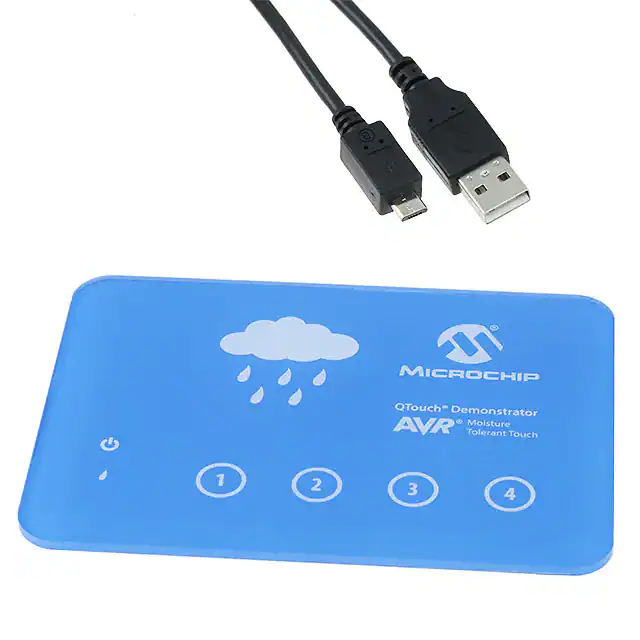
The kit consists of a base board and a front panel. The front panel is glued to the baseboard.
The kit is designed to be used as a standalone unit to evaluate the noise immunity and moisture tolerance
performance.
Figure 1-1. Demo Kit
Atmel ATtiny817 QTouch Moisture Demo User Guide [USER GUIDE]
Atmel-42798A-ATtiny817-QTouch-Moisture-Demo-User-Guide_User Guide-11/2016
3
�2.
Hardware Description
Figure 2-1. Block Diagram
Atmel ATtiny817 QTouch Moisture Demo User Guide [USER GUIDE]
Atmel-42798A-ATtiny817-QTouch-Moisture-Demo-User-Guide_User Guide-11/2016
4
�3.
3.1.
Pin Configuration
Self Capacitance
The demo kit has four touch buttons, which are based on self-capacitance technology. There are four Ylines used. The front panel is pasted directly onto the PCB.
Table 3-1. Pin Configuration of the Self Capacitance Sensors
3.2.
Functionality
MCU pin
MCU pin name
Y0
5
PA4
Y1
6
PA5
Y2
7
PA6
Y3
8
PA7
Indication
This demo kit has six LEDs to indicate the status, out of which four LEDs are for touch detection, one for
power status, and one is user LED.
Table 3-2. Pin Configuration of LEDs
Functionality
MCU pin
MCU pin name
POWER ON LED
11
PB5
USER LED
13
PB3
QTOUCH LED1
9
PB7
QTOUCH LED2
10
PB6
QTOUCH LED3
2
PA3
QTOUCH LED4
21
PC4
Atmel ATtiny817 QTouch Moisture Demo User Guide [USER GUIDE]
Atmel-42798A-ATtiny817-QTouch-Moisture-Demo-User-Guide_User Guide-11/2016
5
�4.
Unit Assembly
There are two separate units for the demo kit:
•
•
Acrylic front panel
Base PCB
Figure 4-1. Board Stack Up
Atmel ATtiny817 QTouch Moisture Demo User Guide [USER GUIDE]
Atmel-42798A-ATtiny817-QTouch-Moisture-Demo-User-Guide_User Guide-11/2016
6
�5.
Embedded Debugger (EDBG)
The demo kit features an on-board Embedded Debugger (EDBG) module. This can be used for
programming and debugging the firmware using Atmel Studio.
Figure 5-1. EDBG Module
EDBG is mounted on the kit as a separate module. By using the EDBG the user can program the QTouch
Moisture Demo kit. The EDBG has been pre-configured to support an ATtiny817 device using UPDI
interface for programming and debugging.
Atmel ATtiny817 QTouch Moisture Demo User Guide [USER GUIDE]
Atmel-42798A-ATtiny817-QTouch-Moisture-Demo-User-Guide_User Guide-11/2016
7
�Figure 5-2. Connecting with EDBG for Programming using Atmel Studio
Atmel ATtiny817 QTouch Moisture Demo User Guide [USER GUIDE]
Atmel-42798A-ATtiny817-QTouch-Moisture-Demo-User-Guide_User Guide-11/2016
8
�6.
Powering Up the Kit
The kit should be powered using USB connected to the EDBG module only. There are multiple
components in the kit which can handle different voltage ratings. Safe operating voltage of ATtiny817
MCU is between 1.8V and 5V. Power supplied to the ATtiny817 MCU can be changed by changing the
jumper settings.
6.1.
Jumper Settings
We have four different jumper settings for powering the ATtiny817 MCU.
1.
5V
Figure 6-1. Jumper Setting for 5V
2.
3.3V
Figure 6-2. Jumper Setting for 3.3V
Atmel ATtiny817 QTouch Moisture Demo User Guide [USER GUIDE]
Atmel-42798A-ATtiny817-QTouch-Moisture-Demo-User-Guide_User Guide-11/2016
9
�3.
2.7V
Figure 6-3. Jumper Settings for 2.7V
4.
1.8V
Figure 6-4. Jumper Settings for 1.8V
However, the LEDs are driven at +3.3V by default to ensure optimum brightness. +3.3V for LEDs and
other components are supplied from the regulator on the EDBG module.
Atmel ATtiny817 QTouch Moisture Demo User Guide [USER GUIDE]
Atmel-42798A-ATtiny817-QTouch-Moisture-Demo-User-Guide_User Guide-11/2016
10
�7.
Board Operation
Figure 7-1. Layout of Sensors on the Kit
There are four individual touch button sensors named 1, 2, 3, and 4. When touching each touch button,
their corresponding LEDs start glowing. Also the power LED will remain glowing to indicate the ON state
of the touch panel.
Atmel ATtiny817 QTouch Moisture Demo User Guide [USER GUIDE]
Atmel-42798A-ATtiny817-QTouch-Moisture-Demo-User-Guide_User Guide-11/2016
11
�8.
Schematic
Figure 8-1. MCU and Sensor Configuration Section
Figure 8-2. EDBG Level Translators
Atmel ATtiny817 QTouch Moisture Demo User Guide [USER GUIDE]
Atmel-42798A-ATtiny817-QTouch-Moisture-Demo-User-Guide_User Guide-11/2016
12
�Figure 8-3. EDBG Headers and Connectors
Atmel ATtiny817 QTouch Moisture Demo User Guide [USER GUIDE]
Atmel-42798A-ATtiny817-QTouch-Moisture-Demo-User-Guide_User Guide-11/2016
13
�9.
PCB Design
Figure 9-1. Top Layer
Figure 9-2. Bottom Layer
Atmel ATtiny817 QTouch Moisture Demo User Guide [USER GUIDE]
Atmel-42798A-ATtiny817-QTouch-Moisture-Demo-User-Guide_User Guide-11/2016
14
�10.
Bill of Materials
Table 10-1. Top Level Bill of Materials
Component
Quantity
Acrylic Front Panel
1
TINY817 QTOUCH MOISTURE DEMO BASE BOARD-PCBA
1
Atmel EDBG-PCBA
1
(Rubber Feet) Bump-on
4
Table 10-2. Bill of Material for the Base Board
Designator
Quantity Value
Description
C102
1
4.7μF
SMD capacitor 0603
C105
1
10μF
SMD tantalum capacitor, ESR = 1.7, 3216-18
(EIA) 1206,
C200, C300,
15
C301, C302,
C303, C304,
C305, C306,
C307, C308,
C309, C310,
C311, C312, C313
100nF
SMD capacitor 0402
C201, C208
2
4.7nF
SMD capacitor 0402
C202, C203,
C204, C205,
C206, C207
6
10nF
SMD capacitor 0603
D200, D201,
D202, D203,
D204, D205
6
LTW-C230DS
Reverse mount SMD white LED
180-450mcd@20mA
J100, J101
2
2x15 pin header, 1.27mm
pitch, Straight, SMD
2x15 pin header, 1.27mm pitch, straight,
SMD
J102
1
1x3 pin header, Right
1x3 pin header, right angle, 2.54mm pitch
angle, 2.54mm pitch SMD SMD
J103
1
TSM-103-01-T-DH-TR
2x3 pin header, right angle, 2.54mm pitch
SMD, tin
J104
1
Horizontal HEADER 1x2
1x2 horizontal pin header, 2.54mm pitch,
SMD
J200
1
20021121-00010C4LF
2x5 pin header, 1.27mm pitch, SMD
JS100, JS101,
JS102
3
SNT-100-BK-G
Jumper cap for 2.54mm pin-header
Atmel ATtiny817 QTouch Moisture Demo User Guide [USER GUIDE]
Atmel-42798A-ATtiny817-QTouch-Moisture-Demo-User-Guide_User Guide-11/2016
15
�Designator
Quantity Value
Description
Q201, Q202,
Q203, Q204,
Q205, Q206
6
BC847W
NPN SMD small signal BJT transistor
Q300, Q301
2
FDC6327C
Dual N/P-ch MOSFET, 20V, 2.7A/-1.9A cont,
8A/-8A pulse,
RDS(ON)