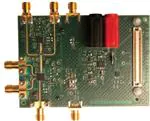
EV-RADAR-MMIC2 User Guide
UG-866
One Technology Way • P.O. Box 9106 • Norwood, MA 02062-9106, U.S.A. • Tel: 781.329.4700 • Fax: 781.461.3113 • www.analog.com
Evaluation Board for the ADF5901, ADF5904, and ADF4159 Chipset
for a 24 GHz FMCW Radar
FEATURES
GENERAL DESCRIPTION
Evaluates the chipset containing the ADF5901 24 GHz Tx MMIC,
the ADF5904 24 GHz Rx MMIC, and the ADF4159 13 GHz PLL
Accompanying software controls all functions from a PC
The EV-RADAR-MMIC2 evaluation board is designed to evaluate
the performance of the ADF5901, a 24 GHz transmitter (Tx)
monolithic microwave integrated circuit (MMIC); the ADF5904,
a 24 GHz receiver (Rx) MMIC; and the ADF4159, a 13 GHz
phase-locked loop (PLL) for a frequency modulated continuous
wave (FMCW) radar system. Figure 1 shows the evaluation
board, which evaluates the ADF5901, ADF5904, and ADF4159
chipset, six high frequency K type connectors for the two Tx
outputs and four Rx inputs, banana connectors for the power
supply, and a connector for a system demonstration platform
(SDP) serial interface.
EVALUATION KIT CONTENTS
EV-RADAR-MMIC2 evaluation board
EV-ADAR-D2S evaluation board
ADDITIONAL EQUIPMENT
PC running Windows XP or a more recent software version
SDP-S or SDP-B board
Spectrum analyzer
Oscilloscope
5 V power supply
±9 V power supply
DOCUMENTS NEEDED
ADF5901 data sheet
ADF5904 data sheet
ADF4159 data sheet
REQUIRED SOFTWARE
Analog Devices, Inc., EV-RADAR-MMIC
PLEASE SEE THE LAST PAGE FOR AN IMPORTANT
WARNING AND LEGAL TERMS AND CONDITIONS.
The EV-ADAR-D2S adapter board contains the eight AD8129
differential receiver amplifiers that convert the baseband ADF5904
differential signals to single-ended signals with a 20 dB gain.
The evaluation kit also contains the Analog Devices EV-RADARMMIC Software, which is compatible with Windows® XP and
later Windows versions to allow easy programming of the device.
The EV-RADAR-MMIC2 evaluation board requires an SDP-S
or SDP-B board (not supplied with the kit). The SDP board
allows software programming of all the devices.
Full specifications for the ADF5901, ADF5904, and ADF4159
are listed in the ADF5901 data sheet, the ADF5904 data sheet,
and the ADF4159 data sheet available from Analog Devices and
should be consulted in conjunction with this user guide when
using the evaluation board.
Rev. B | Page 1 of 28
�UG-866
EV-RADAR-MMIC2 User Guide
TABLE OF CONTENTS
Features .......................................................................................... 1
RF Output Signals .................................................................... 5
Evaluation Kit Contents ............................................................... 1
Channel Mapping ..................................................................... 5
Additional Equipment ................................................................. 1
Default Operation..................................................................... 5
Documents Needed ...................................................................... 1
Evaluation Board Software .......................................................... 6
Required Software ........................................................................ 1
ADF5904 Controls ................................................................... 7
General Description ..................................................................... 1
ADF5901 Controls ................................................................... 8
Revision History ........................................................................... 2
ADF4159 Controls ................................................................... 9
EV-RADAR-MMIC2 Evaluation Board .................................... 3
Evaluation and Test Procedures ................................................ 11
Quick Start Guide ......................................................................... 4
Evaluation Board Schematics and Artwork ............................ 15
Evaluation Board Hardware ........................................................ 5
Ordering Information ................................................................ 27
Power Supplies .......................................................................... 5
Bill of Materials ....................................................................... 27
Input Signals .............................................................................. 5
Related Links ........................................................................... 28
Radio Frequency (RF) Input Signals...................................... 5
REVISION HISTORY
4/2017—Rev. A to Rev. B
Updated EV-RADAR-MMIC2 Link, EV-RADAR-MMIC Link,
and EV-ADAR-D2S Link.............................................. Throughout
2/2017—Rev. 0 to Rev. A
Changes to General Description Section ...................................... 1
Added Figure 24; Renumbered Sequentially and Figure 25 ..... 21
Added Figure 26 and Figure 27..................................................... 22
Added Figure 28.............................................................................. 23
Added Figure 31.............................................................................. 26
Change to Table 2 ........................................................................... 27
Added Table 3.................................................................................. 28
12/2015—Revision 0: Initial Version
Rev. B | Page 2 of 28
�EV-RADAR-MMIC2 User Guide
UG-866
13410-001
EV-RADAR-MMIC2 EVALUATION BOARD
Figure 1.
Rev. B | Page 3 of 28
�UG-866
EV-RADAR-MMIC2 User Guide
QUICK START GUIDE
8.
9.
Follow these steps to evaluate the ADF5901, ADF5904, and
ADF4159 devices:
1.
Connect the power supply to the EV-RADAR-MMIC2.
Supply 5 V to the VSUPPLY (P3) banana connector.
Connect GND to the GND (P2) banana connector.
2. Connect the power supplies to the EV-ADAR-D2S.
a. Supply 9 V to the VPOS SMA connector.
b. Supply −9 V to the VNEG SMA connector.
3. Connect the EV-ADAR-D2S board to the EV-RADARMMIC2 evaluation board.
4. Install the EV-RADAR-MMIC software.
5. Connect the SDP motherboard to the PC and to the EVRADAR-MMIC2.
6. Follow the hardware driver installation procedure that
displays after the SDP motherboard connects to the PC.
7. Connect an antenna or a delay cable to the Tx (J9) and Rx (J6)
connectors (see Figure 8 and Figure 9).
a.
b.
10.
11.
12.
13.
14.
15.
Rev. B | Page 4 of 28
Run the EV-RADAR-MMIC software.
Select the EV-RADAR-MMIC2 (the ADF5901, ADF5904,
and ADF4159 devices) and the SDP board in the Select
Device and Connection tab.
Check that SDP board connected appears on the status bar.
Click the ADF5904 Controls tab and then click Initialize.
Click the ADF4159 Controls tab and then click Write All
Registers.
Click the ADF5901 Controls tab and then click Initialize
ADF5901.
Click the Ramps and Shift Keying tab under the ADF4159
Controls tab to enable the ramp and then click Write R0.
Measure the output baseband signals on the EV-ADARD2S board.
�EV-RADAR-MMIC2 User Guide
UG-866
EVALUATION BOARD HARDWARE
The EV-RADAR-MMIC2 evaluation board requires an SDP-S or
SDP-B motherboard to program the device. These SDP boards are
not included with the evaluation board and must be purchased
separately.
POWER SUPPLIES
The EV-RADAR-MMIC2 evaluation board is powered via one
external supply of 5 V connected to VSUPPLY as described in the
Quick Start Guide section.
The EV-ADAR-D2S board is powered via two external supplies:
+9 V connected to VPOS and −9 V connected to VNEG, as
described in the Quick Start Guide section.
INPUT SIGNALS
The on-board, 100 MHz temperature compensated crystal
oscillator (TCXO) provides the necessary reference signal. Use
an external REFIN signal, if desired.
RADIO FREQUENCY (RF) INPUT SIGNALS
The RF input pins on the ADF5904 contain a dc bias voltage
and must be ac-coupled to the EV-RADAR-MMIC2 evaluation
board. The RF inputs are on the J2 (RX1_RFIN), J3 (RX2_RFIN),
J4 (RX3_RFIN), and J6 (RX4_RFIN) SMA connectors.
RF OUTPUT SIGNALS
The Tx outputs from the ADF5901 contain a dc bias voltage
and must be ac-coupled. The Tx outputs are available on the
J8 (TX_OUT1) and J9 (TX_OUT2) output SMA connectors.
CHANNEL MAPPING
Table 1 shows the pin mapping from the ADF5904 RXx_xx to
baseband outputs on the EV-ADAR-D2S evaluation board.
Table 1. Pin Mapping
EV-RADAR-MMIC2
Connector
J2
J3
J4
J6
ADF5904
Input
RX1_RFIN
RX2_RFIN
RX3_RFIN
RX4_RFIN
EV-ADAR-D2S
Connector
O7
O8
O6
O5
DEFAULT OPERATION
All components necessary for operation are inserted on the board.
Rev. B | Page 5 of 28
�UG-866
EV-RADAR-MMIC2 User Guide
EVALUATION BOARD SOFTWARE
The control software for the EV-RADAR-MMIC2 accompanies
the EV-RADAR-MMIC2 on a CD. For the software installation
procedure, see the UG-476 user guide, PLL Software Installation
Guide.
Confirm that SDP connected displays at the bottom left of the
window on the status bar (see Figure 2). Otherwise, the software
has no connection to the evaluation board.
Note that, when connecting the evaluation board, it takes about
5 sec to 10 sec for the status label to change.
13410-002
To run the software, click the EV-RADAR-MMIC2 file on the
desktop or in the Start menu.
On the Select Device and Connection tab, select EV-RADARMMIC2 (ADF5901, ADF5904, ADF4159) and click Connect.
Figure 2. Select Device and Connection Tab
Rev. B | Page 6 of 28
�EV-RADAR-MMIC2 User Guide
UG-866
ADF5904 CONTROLS
When the device initially powers up, click the Initialize button
to perform the initialization sequence as described in the
ADF5904 data sheet.
The ADF5904 Controls tab controls the ADF5904 device
settings (see Figure 3).
13410-003
General options are available for the ADF5904 in this section,
including power-up and power-down controls and register
readback.
Figure 3. ADF5904 Controls
Rev. B | Page 7 of 28
�UG-866
EV-RADAR-MMIC2 User Guide
ADF5901 CONTROLS
To the right of the RF Settings pane, general options are
available for the registers of the ADF5901, including calibration
control and register readback.
The ADF5901 Controls tab controls the ADF5901 device
settings (see Figure 4).
When the device initially powers up, click Initialize ADF5901 to
perform the initialization sequence as described in the ADF5901
data sheet.
Following the initialization sequence, the device powers up and
all the ADF5901 blocks calibrate.
13410-004
Use the RF Settings pane to control the output frequency. Type
the desired output frequency, in MHz, in the VCO Frequency
field.
Figure 4. ADF5901 Controls
Rev. B | Page 8 of 28
�EV-RADAR-MMIC2 User Guide
UG-866
ADF4159 CONTROLS
The ADF4159 Controls tab controls the ADF4159 device settings
(see Figure 5).
ADF4159 Main Controls
Program the Phase Detector Polarity to negative when using
an inverting active loop filter configuration (use a passive loop
filter on the EV-RADAR-MMIC).
Select the signal that is connected to the output of the
MUXOUT pin from the Muxout drop down menu.
The register values are shown at the bottom of the window.
When the background of a register value is green, it indicates
the value changed and must be written to the device. Clicking the
button below each register value writes that value to the device.
13410-005
Use the Main Controls tab to select the RF and PLL settings. In
the RF Settings pane, set the RF VCO Output Frequency value to
half the ADF5901 VCO output. Set the Reference Frequency value
to the same frequency as the applied reference signal (TCXO or
external signal) as described in the Input Signals section. The
phase frequency detector (PFD) frequency is calculated from the
reference frequency, the R counter, the reference doubler, and
the reference divided by 2. Ensure that the PFD Frequency
value matches the value specified in the loop filter design.
In the PLL Settings section, program the Charge Pump Setting
to the value designed for the loop.
Figure 5. Main Controls Tab
Rev. B | Page 9 of 28
�UG-866
EV-RADAR-MMIC2 User Guide
ADF4159 Ramps and Shift Keying
In the Ramps and Shift Keying tab, configure the ramping
functionality of the ADF4159.
Select the ramp type in the Ramp mode drop down menu; the
various ramp parameters can be set in the CLK1 spin box and
in the Up Ramp pane.
For 200 MHz, the PLL is programmed for a 100 MHz ramp
because the evaluation board uses the ADF5901 auxiliary output
with a 12 GHz output signal. After each parameter is set in the
software, each register must be written to the device.
The other options in this tab allow configuration of the various
ramps and shift keying controls of the ADF4159.
Example of Ramp Setup
13410-006
Figure 6 shows the ramping settings for a continuous triangular
ramp of 1000 up ramp steps over 200 MHz at the ADF5901 Tx
output with a ramp time of 5 ms.
Figure 6. Ramp and Shift Keying Tab
Rev. B | Page 10 of 28
�EV-RADAR-MMIC2 User Guide
UG-866
EVALUATION AND TEST PROCEDURES
9.
To evaluate and test the performance of the ADF5901,
ADF5904, and ADF4159, use the following procedure:
1.
2.
Install the EV-RADAR-MMIC2 evaluation software.
Connect the EV-ADAR-D2S board to the EV-RADARMMIC2 evaluation board.
3. Connect the SDP board to the EV-RADAR-MMIC2.
4. Connect the dc blocked TX_OUT2 connector (J9) to the
spectrum analyzer.
5. Connect the 24.026 GHz, −50 dBm dc blocked signal from
the signal source to the RX4_RFIN connector (J6).
6. Run the EV-RADAR-MMIC software.
7. Select the SDP board and the EV-RADAR-MMIC2
(ADF5901, ADF5904, and ADF4159) device in the Select
Device and Connection tab of the software window.
8. The software is set with default settings for the
following setup:
a. Lock the ADF4159 to 12.0125 GHz (24.025 GHz on the
ADF5901).
b. Calibrate the ADF5901 to 24.125 GHz.
SIGNAL
SOURCE
DC
BLOCK
10.
11.
12.
13.
In the ADF5904 Controls tab, click Initialize to power up
the ADF5904.
In the ADF4159 Controls tab under the Main Controls
section, click Write All Registers to power up the ADF4159.
In the ADF5901 Controls tab, click Initialize ADF5901 to
power up and calibrate the ADF5901. See Figure 7 for a
typical setup.
Measure a 24.025 GHz signal on TX_OUT2 (J9) on the
spectrum analyzer
Measure a 1 MHz baseband output signal on the
O5 connector on the EV-ADAR-D2S board.
SPECTRUM
ANALYZER
DC
BLOCK
PC
SDP
ADAPTOR
BOARD
POWER
SUPPLY
+5V
–9V
+9V
Figure 7. Typical Evaluation Setup
Rev. B | Page 11 of 28
POWER
SUPPLY
13410-007
OSCILLOSCOPE/
SPECTRUMANALYZER
�UG-866
EV-RADAR-MMIC2 User Guide
For another method to evaluate and test the performance of the
ADF5901, ADF5904, and ADF4159, use the following procedure:
1.
2.
3.
4.
5.
6.
7.
Install the EV-RADAR-MMIC evaluation software.
Connect the EV-ADAR-D2S evaluation board to the
EV-RADAR-MMIC2 evaluation board.
Connect the SDP board to the EV-RADAR-MMIC2.
Connect the dc blocked TX_OUT2 (J9) connector to a
delay cable or antenna.
Connect a delay cable or antenna to RX4_RFIN (J6)
connector.
Run the EV-RADAR-MMIC software.
Select the SDP board and the EV-RADAR-MMIC2
(ADF5901, ADF5904, and ADF4159) device in the Select
Device and Connection tab of the software window.
8.
The software is set with default conditions for the
following setup:
a. Lock the ADF4159 to 12.0125 GHz (24.025 GHz on
ADF5901).
b. Calibrate the ADF5901 to 24.125 GHz.
c. Generate a 5 ms, 200 MHz triangular ramp (24.025 GHz
to 24.225 GHz).
9. In the ADF5904 Controls tab, click Initialize to power up
the ADF5904.
10. In the ADF4159 Controls tab under the Main Controls
section, click Write All Registers to power up the ADF4159.
11. In the ADF5901 Controls tab, click Initialize ADF5901 to
power up and calibrate the ADF5901. See Figure 8 and
Figure 9 for the typical setups.
12. In the ADF4159 Ramps and Shift Keying tab, enable the
ramp and click Write R0 to enable the ramping of the
ADF5901 Tx outputs.
13. Measure the baseband output signal on the O5 connector on
the EV-ADAR-D2S board.
Rev. B | Page 12 of 28
�EV-RADAR-MMIC2 User Guide
UG-866
DELAY
CABLES
BLOCKING
CAPACITOR
20dB
FIXED ATTENUATOR
PC
SDP-S
ADAPTOR
BOARD
POWER
SUPPLY
+5V
–9V
+9V
Figure 8. Typical Evaluation Setup with Cables
Rev. B | Page 13 of 28
POWER
SUPPLY
13410-008
OSCILLOSCOPE/
SPECTRUM ANALYZER
�UG-866
EV-RADAR-MMIC2 User Guide
PC
SDP-S
ADAPTOR
BOARD
POWER
SUPPLY
+5V
–9V
+9V
Figure 9. Typical Evaluation Setup with Antenna
Rev. B | Page 14 of 28
POWER
SUPPLY
13410-009
OSCILLOSCOPE/
SPECTRUM ANALYZER
�571-0100
MCLK
Figure 10. Evaluation Board Schematic (Page 1)
VTUNE
MCLK
VIO_B
SCL_B
SDA_B
SPI_CLK
SPI_MISO
SPI_MOSI
SPI_SEL_B
TMR_B
GPIO0
GPIO1
GPIO2
GPIO3
GPIO4
GPIO5
GPIO6
GPIO7
GPIO0
GPIO1
GPIO2
GPIO3
GPIO4
GPIO5
GPIO6
GPIO7
SDP INTERFACE
VIO_B
SDA_B
TMR_B
SCL_B
SPI_CLK
SPI_MISO
SPI_MOSI
SPI_SEL_A
SPI_SEL_B
SPI_SEL_C
SDP
ADAR INTERFACE
ADAR
ATEST_TX
ATEST_RX
RX1_BBOB
RX2_BBO
RX2_BBOB
RX3_BBO
RX3_BBOB
RX4_BBO
RX4_BBOB
RX1_BBO
AVDD
REFERENCE CLOCK
AVDD
REF
REFIN REF_CLK
MCLK
VIO_B
SDA_B
SCL_B
TMR_B
GPIO0
GPIO1
GPIO2
GPIO3
GPIO4
GPIO5
GPIO6
GPIO7
SPI_CLK
SPI_MISO
SPI_MOSI
SPI_SEL_A
SPI_SEL_B
SPI_SEL_C
0
R3 VTUNE
MCLK
VIO_B
SCL_B
SDA_B
TMR_B
GPIO0
GPIO1
GPIO2
GPIO3
GPIO4
GPIO5
GPIO6
GPIO7
SPI_CLK
SPI_MISO
SPI_MOSI
SPI_SEL_B
REFIN
CE
R4
PLL_MUX
TX_MUX
TX_DATA
CLK
CLK_PLL
DATA
DATA_PLL
LE_PLL
LE_RX
SPI
LE_TX
CE_PLL
CE_RX
SPI_CLK
CE_TX
SPI_MOSI
SPI_MISO
DOUT
TMR_B
GPIO0
GPIO1
GPIO2
GPIO3
GPIO4
GPIO5
GPIO6
GPIO7
TP5
CLK
CLK_PLL
DATA
DATA_PLL
LE_PLL
LE_RX
LE_TX
CE_PLL
CE_RX
CE_TX
SPI_MISO
TMR_B
TX_DATA
CP
MUXOUT
ADF4159_PLL
ADF4159
RFINA
RFINB
CLK
DATA
LE
TXDATA
REFIN
0
SPI BUFFER/LEVEL SHIFT
MUX_PLL
MUX_TX
DOUT
GPIO0
GPIO1
GPIO2
GPIO3
GPIO4
GPIO5
GPIO6
GPIO7
SPI_CLK
SPI_MOSI
AUX
AUXB
REFIN
CE_PLL
CLK_PLL
DATA_PLL
LE_PLL
TX_DATA
DVDD_PLL
CPOUT
MUX_PLL
TP19
02K243-40M
02K243-40M
02K243-40M
02K243-40M
CPOUT
LFP
VTUNE
TP7 TP9 TP11 TP13 TP15 TP17
TP6 TP8 TP10 TP12 TP14 TP16 TP18
AGND
AGND
AGND
AGND
AGND
AGND
AGND
RX INPUTS
AGND
J6
AGND
J4
AGND
J3
AGND
J2
LOOP FILTER
CPOUT
142-0701-851
AGND
J7
VTUNE
TP5
VTUNE
REFIN
CLK
DATA
LE_TX
CE_TX
0
R63
VREG
AUX
AUXB
ATEST
ADF5901_TX
DOUT
TX_OUT2
MUXOUT
TX_OUT1
LO_OUT
ADF5901
VTUNE
REFIN
CLK
DATA
LE
CE
AVDD_TX
0
CLK
DATA
LE_RX
CE_RX
LO
RX1_RFIN
RX2_RFIN
RX3_RFIN
RX4_RFIN
AVDD_RX
AUX
AUXB
ATEST
DOUT
RX1_BBO
RX1_BBOB
RX2_BBO
RX2_BBOB
RX3_BBO
RX3_BBOB
RX4_BBO
RX4_BBOB
ADF5904
CLK
DATA
LE
ADF5904_RX
CE
RX4_RFIN
LO_RFIN
RX1_RFIN
RX2_RFIN
RX3_RFIN
DOUT
ATEST_TX
TP37 TP23 TP24
1
R11
LO
TX_OUT1
TX_OUT2
MUX_TX
1
0
R15
TP38 TP28
TP26
AGND
TP2
0
R2
ATEST_TX
0
R1
ATEST_RX
RX1_O
RX1_OB
RX2_O
RX2_OB
RX3_O
RX3_OB
RX4_O
RX4_OB
REF_IN
AVDD_PLL
POWER MANAGEMENT
POWER
AVDD
TP27
AGND
TP1
142-0701-851
AGND
J1
AVDD
0
AVDD_PLL
DVDD_PLL
AVDD_PLL
AVDD_RX
AVDD_TX
AVDD_PLL
DVDD_PLL
0
R5
VP
R7
DVDD
AVDD_RX
AVDD_TX
AVDD_PLL
DVDD_PLL
R8
AHI
VSUPPLY
TX_AHI
AVDD
VDD_1P8
VDD_3P3
R9 0
R10 0
0
VCO_AHI
VSUPPLY
0
AGND
0
P2
0
Rev. B | Page 15 of 28
R12
AVDD
R13
TP3
R14
TP5
LO_AHI
TP21
RX12_AHI
TP22
RX34_AHI
TP4
J8
J9
AGND
AGND
0
DOUT
ATEST_RX R64
ATEST_TX
RX1_O
RX1_OB
RX2_O
RX2_OB
RX3_O
RX3_OB
RX4_O
RX4_OB
TX OUTPUTS
02K243-40M
TX_OUT2
02K243-40M
TX_OUT1
13410-010
571-0100
P3
EV-RADAR-MMIC2 User Guide
UG-866
EVALUATION BOARD SCHEMATICS AND ARTWORK
TP25
TP20
�UG-866
EV-RADAR-MMIC2 User Guide
C11
23
RSET
9
REFIN
21
SW2
20
SW1
5.1K
IO
VP
CP
24
CP
17
MUXOUT
OUT
1000PF
CE
TXDATA
IN
IN
AGND
5
RFINA
4
RFINB
13
CE
12
TXDATA
14
CLK
15
DATA
16
LE
RFINA
RFINB
IN
IN
CLK
DATA
LE
IN
IN
IN
MUXOUT
2
3 AGND
1
CPGND
10
DGND
11
SDGND
PAD
EPAD
1000PF
TBD0603
REFIN
R16
IN
C19
OUT
ADF4159CCPZ
13410-011
C17
AVDD
R17
AGND
U2
8
7
6
18
SDVDD 19
DVDD 22
VP
AVDD
DVDD
IO
IO
AGND
AGND
AGND
10PF
1000PF
0.1UF
C10
C9
C8
10PF
VP
1000PF
C6
0.1UF
C7
C5
10PF
DVDD
1000PF
0.1UF
C4
C3
AVDD
AGND
Figure 11. Evaluation Board Schematic (Page 2)
R20
0
C14
TBD0805
13410-012
R18
OUT
TBD0805
C13
TBD0805
C12
VTUNE
TBD0805
R19
TBD0805
CPOUT
IN
AGND
Figure 12. Evaluation Board Schematic (Page 3)
R22
5.1K
OUT
OUT
RSET
MUXOUT
25
26
AUX
27
OUT
AUXB
28
VTUNE
DATA
21
CLK
20
CE
6
19
AGND
7
18
VREG
8
17
AHI
4
16
14
AHI
15
13
AGND
IN
IN
IN
IO
GEN_LFCSP32-5X5-PAD3_1X3_1B
AHI
12
OUT
IN
IO
OUT
C1
AGND
ATEST
9
TBD0402
ADF5901
AGND
C2
REFIN
R21
1000PF
1000PF
AGND
Figure 13. Evaluation Board Schematic (Page 4)
Rev. B | Page 16 of 28
13410-013
IN
DOUT
5
AGND
10
LO_OUT 11
OUT
C30
C28
0.22UF
TBD0402
C25
0.22UF
C23
TBD0402
C20
0.047UF
29
LE
22
AGND
TX_OUT2
VREG
AGND
30
23
AGND
AGND
31
24
2
3
IO
1
C2
1
AGND
TX_AHI
OUT
1
C1
C2
AGND
TP31
AGND
TX_OUT1
TBD0603
TP30
1
32
PAD
10PF
C31
1000PF
C29
0.1UF
C27
10PF
C26
1000PF
C24
0.1UF
C22
C21
10PF
1000PF
C18
OUT
TP29
ADF5901
AGND
AGND
AGND
C16
C15
0.1UF
VCO_AHI
AHI
C1
VCO_AHI
AGND
TX_AHI
IN
IO
AGND
�EV-RADAR-MMIC2 User Guide
AVDD
IN
TP32
1UF
C32
AVDD_TX
R33
OUT
1UF
0
C36
1
VOUT
2
SENSE
3
GND
4
NC
PAD
PAD
ADP7104
AGND
TP33
1
U7
1UF
C33
R28
0
1
VOUT
2
SENSE
3
GND
4
NC
PAD
ADP7104
AVDD_RX
R34
OUT
0
1UF
8
VIN
7
PG
6
GND
5
EN
C37
R24
PAD
AGND
TP34
U4
1
R29
0
3
EN
NC
4
VOUT
5
1
AVDD_PLL
R31
OUT
0
GND
2
ADP150AUJZ-3.3-R7
C38
1UF
C34
0
VIN
1UF
R25
AGND
TP35
U5
3
EN
NC
42
VOUT
1
DVDD_PLL
R32
OUT
0
GND
1UF
0
5
ADP150AUJZ-3.3-R7
AGND
Figure 14. Evaluation Board Schematic (Page 5)
Rev. B | Page 17 of 28
13410-014
R30
0
VIN
1UF
1
C39
R26
C35
C
R27
0
1N4001
D1
A
8
VIN
7
PG
6
GND
5
EN
0
C
MBR0540T1G
R23
0
A
VSUPPLY
1
U6
D2
IN
UG-866
�UG-866
EV-RADAR-MMIC2 User Guide
FX8-120S-SV(21)
R38
SDA_B
OUT
0
13410-015
R36
100K
R35
100K
1
2
3
6
7
GPIO7
OUT TMR_B
OUT
R6
TBD0603
GPIO6
OUT
OUT
0
U3
8
A0 VCC
EEPROM
A1
5
A2
SDA
SCL
WP
VSS
4 24LC32A-I/MS
GPIO1
OUT
GPIO3
OUT
GPIO5
OUT
R37 VIO_B
VIO
GPIO0
OUT
GPIO2
OUT
GPIO4
OUT
SPI_SEL_B
OUT SPI_SEL_C
OUT
AGND
SPI_SEL_A
OUT
SPI_MOSI
OUT
SPI_MISO
OUT
SPI_CLK
OUT
1
2
3
4
5
6
7
8
9
10
11
12
13
14
15
16
17
18
19
20
21
22
23
24
25
26
27
28
29
30
31
32
33
34
35
36
37
38
39
40
41
42
43
44
45
46
47
48
49
50
51
52
53
54
55
56
57
58
59
60
120
119
118
117
116
115
114
113
112
111
110
109
108
107
106
105
104
103
102
101
100
99
98
97
96
95
94
93
92
91
90
89
88
87
86
85
84
83
82
81
80
79
78
77
76
75
74
73
72
71
70
69
68
67
66
65
64
63
62
61
J5
J5
FX8-120S-SV(21)
AGND
R39
AGND
SCL_B
OUT
0
Figure 15. Evaluation Board Schematic (Page 6)
TP36
10K
Y1
4
VDD
1
3
OUT
E/D
GND
2 CWX823-100.0MHZ
1
R43
REF
OUT
91
AGND
R42
TBD0603
10PF
C41
C40
22UF
R41
2
E1
600OHM
1
R40 AVDD
0
IO
R44
MCLK
IN
TBD0603
IN
13410-016
AGND
R45
REFIN
0
Figure 16. Evaluation Board Schematic (Page 7)
IO
IO
VDD_1P8
VDD_3P3
C42
100NF
C43
3.3V
VDD_3P3
VDD_3P3
10PF
C46
C50
100NF
C47
100NF
10PF
C51
AGND
AGND
3.3V
3.3V
VDD_3P3
VDD_3P3
C67
100NF
3.3V
3.3V
C68
VDD_3P3
VDD_3P3
AGND
AGND
10PF
10PF
C69
C54
100NF
C55
OUT
LE_RX
TX_MUX
OUT
IN
AGND
10K
U12
6
7
VCCA VCCB
DOUT_SELB 2
OE_N
VDD_3P3 10
B1 5
DIR1
DOUT R66
8 A1
IN
0
9
4
B2
A2
VDD_3P3
1
DIR2
R67
AGND
C70
10PF
10K
IN
OUT
1B1
1A2
1B2
2A1
2B1
2A2
2B2
1DIR
BUF_LS
2DIR
1OEB
2OEB GND
10K
IN
LE_TX
R65
CLK
OUT
DATA
CE_RX OUT
OUT
CE_TX
1A1
VCCB
GPIO5 R53
0
GPIO2 R54
0
R55
0
0
GPIO7 R56
VDD_3P3
IN
VCCA
1A1
1B1
1A2
1B2
2A1
2B1
2A2 BUF_LS
2B2
1DIR
2DIR
1OEB
2OEB GND
VCCB
0
0
0
0
VDD_3P3
VCCA
R46
R47
R48
R49
R70 SPI_MISO
OUT
0
R71
0
GND
3 SN74AVC2T245RSWR
AGND
AGND
R69
0
2A1
2A2
1DIR
2DIR BUF_LS
1OEB
2OEB GND
GPIO3 R57 0
R58 0
TMR_B R59 0
R60 0
VDD_3P3
IN
OUT
C57
1A1
1A2
2A1
2A2
1B1
1B2
2B1
2B2
AGND
U13
5
LE_TX 1
R72
A VCC
4
Y
LE_RX 2
0
B GND
SN74LVC1G08DCKR
3
TX_DATA
OUT
0
PLL_MUX
R61
DOUT_SELB
0
10PF
AGND
IN
1DIR
BUF_LS
2DIR
1OEB
2OEB GND
AGND
AGND
Figure 17. Evaluation Board Schematic (Page 8)
Rev. B | Page 18 of 28
13410-017
GPIO6 R50 0
GPIO4 R51 0
VDD_3P3
CLK_PLL
OUT
1B1
DATA_PLL
OUT
1B2
LE_PLL
OUT
2B1
CE_PLL
OUT
2B2
VDD_1P8
VDD_3P3
10PF
VCCB
1A1
1A2
C53
VDD_3P3
100NF
AGND
AGND
VCCA
CLK
DATA
VCCB
10PF
1.8V
R73
100NF
C49
3.3V
10K
IN
VDD_1P8
C52
100NF
R62
IN
1.8V
VDD_3P3
10PF
C56
C48
10K
100NF
C45
AGND
3.3V
R52
C44
VCCA
IN
IN
IN
IN
SPI_CLK
SPI_MOSI
GPIO0
GPIO1
100NF
10PF
R68
AGND
3.3V
�EV-RADAR-MMIC2 User Guide
UG-866
U9
IN
IN
IN
IN
IN
IN
IO
VCCA
1DIR
2DIR
1A1
1A2
2A1
2A2
GND
VCCA
VCCB
1DIR
1OE_N
2DIR
2OE_N
1A1
1B1
1A2
1B2
2A1
2B1
2A2
2B2
GND
GND
VCCB
1OEB
2OEB
1B1
1B2
2B1
2B2
GND
IO
IN
IN
OUT
OUT
OUT
OUT
13410-018
IO
IO
SN74AVC4T245PW
Figure 18. Evaluation Board Schematic (Page 9)
U8
VCCB
VCCA
VCCB
1DIR
1OE_N
2DIR
2OE_N
1DIR
IN
IN
IN
IN
IN
IN
IO
1OEB
2DIR
2OEB
1A1
1B1
1A1
1B1
1A2
1B2
2A1
2B1
2A2
2B2
GND
GND
1A2
1B2
2A1
2B1
2A2
2B2
GND
GND
IO
IN
IN
OUT
OUT
OUT
OUT
IO
SN74AVC4T245PW
13410-019
VCCA
IO
Figure 19. Evaluation Board Schematic (Page 10)
U10
IN
IN
IN
IN
IN
IO
VCCA
1DIR
2DIR
1A1
1A2
2A1
2A2
VCCA
VCCB
1DIR
1OE_N
2DIR
2OE_N
1A1
1B1
1A2
1B2
2A1
2B1
2A2
2B2
GND
GND
GND
VCCB
1OEB
2OEB
IO
IN
IN
1B1
OUT
1B2
OUT
2B1
OUT
2B2
OUT
GND
IO
SN74AVC4T245PW
13410-020
IO
IN
Figure 20. Evaluation Board Schematic (Page 11)
U11
IN
IN
IN
IN
IN
IO
VCCA
1DIR
2DIR
1A1
1A2
2A1
2A2
GND
VCCB
VCCA
VCCB
1DIR
1OE_N
2DIR
2OE_N
1OEB
2OEB
1B1
1A1
1B1
1A2
1B2
2A1
2B1
2A2
2B2
GND
GND
1B2
2B1
2B2
GND
SN74AVC4T245PW
Figure 21. Evaluation Board Schematic (Page 12)
Rev. B | Page 19 of 28
IO
IN
IN
OUT
OUT
OUT
OUT
IO
13410-021
IO
IN
�UG-866
EV-RADAR-MMIC2 User Guide
P1
P1
1
2
3
4
5
6
7
8
9
10
11
12
13
14
15
16
17
18
19
20
21
22
23
RX1_BBOB
IN
29
IN
31
RX2_BBO
IN
RX2_BBOB
IN
26
RX4_BBO
27
28
RX4_BBOB
30
32
RX3_BBO
33
IN
35
IN
34
RX3_BBOB
36
37
38
39
40
41
ATEST_TX
42
ATEST_RX
43
IN
44
IN
45
46
47
OUT
VTUNE
48
49
50
51
52
53
IO
AVDD
OUT
OUT
OUT
OUT
OUT
OUT
OUT
OUT
GPIO0
GPIO1
GPIO2
GPIO3
GPIO4
OUT
61
63
OUT
OUT
65
OUT
67
SPI_MOSI
SPI_CLK
OUT
OUT
SPI_SEL_B
69
GPIO6
71
GPIO7
73
60
SDA_B
62
SPI_MISO
64
66
68
70
72
VIO_B
74
OUT
75
MCLK
58
SCL_B
59
GPIO5
56
IO
57
OUT
54
AVDD
55
76
TMR_B
77
78
OUT
79
80
81
82
83
84
85
AGND
AGND
86
AGND
87
88
AGND
QTE-040-01-L-D-A-SD
QTE-040-01-L-D-A-SD
13410-022
RX1_BBO
IN
IN
24
25
OUT
OUT
OUT
OUT
OUT
IN
Figure 22. Evaluation Board Schematic (Page 13)
RX3_BBO
25
26
LO_AHI
RX3_BBOB
27
28
29
LO_RFIN
RX1_BBO
30
21
5
20
6
19
7
18
17
13
14
15
16
CE
DOUT
ATEST
RX4_BBO
8
12
OUT
4
DATA
AGND
22
11
RX2_BBO
23
3
CLK
RX2_RFIN
IN
24
2
10
C65
10PF
1000PF
C62
0.1UF
C59
RX12_AHI
U1
1
LE
IO
9
RX1_RFIN
IN
RX34_AHI
RX1_BBOB
PAD
AGND
RX2_BBOB
C64
10PF
C61
1000PF
0.1UF
C58
IO
31
RX12_AHI
32
AGND
RX3_RFIN
IN
RX34_AHI
RX4_RFIN
IN
RX4_BBOB
OUT
GEN_LFCSP32-5X5-PAD3_1X3_1B
LO_AHI
Figure 23. Evaluation Board Schematic (Page 14)
Rev. B | Page 20 of 28
13410-023
OUT
OUT
OUT
IN
IN
IN
OUT
AGND
IN
C66
10PF
1000PF
C63
0.1UF
C60
IO
�EV-RADAR-MMIC2 User Guide
UG-866
J1-B
QSE-040-01-X-D-A
J1-A
QSE-040-01-X-D-A
1
3
5
7
9
11
13
15
17
19
21
23
25
27
29
31
33
35
37
39
RX4_IB
RX4_I
RX4_QB
RX4_Q
2
4
6
8
10
12
14
16
18
20
22
24
26
28
30
32
34
36
38
40
41
43
45
47
49
51
53
55
57
59
61
63
65
67
69
71
73
75
77
79
RX1_IB
RX1_I
RX1_QB
RX1_Q
RX2_IB
RX2_I
RX2_QB
RX2_Q
RX3_IB
RX3_I
RX3_QB
RX3_Q
GND
GND
GND
GND
85
86
87
88
13410-026
81
82
83
84
42
44
46
48
50
52
54
56
58
60
62
64
66
68
70
72
74
76
78
80
Figure 24. EV-ADAR-D2S Schematic (Page 1)
VPOS1
VPOS
VPOS
VPOS1
R3
C28
1uF
C26
10pF
C27
100pF
0r
TP4
U2
R4
0r
3
1uF
8 -
RX1_QB
C3
1uF
1 +
PD
C4
+VS
-VS
7
RX1_Q
FB
VNEG
VNEG1
REF
VNEG
OP
C66
6
O2
1uF
AD8130ARZ
2
5
4
TP3
RF
DNP
R6
VPOS1
C22
1uF
C20
10pF
C21
10pF
C24
100pF
VNEG1
U1
3
8 -
C1
1uF
1 +
FB
1uF
PD
+VS
-VS
7
C2
REF
RX1_I
C25
0r
100pF
TP2
RX1_IB
1uF
R5
RG
C23
OP
C65
6
O1
1uF
2 AD8130ARZ
5
4
TP1
RF
0r
R1
RG
C19
10pF
C18
100pF
C17
1uF
13410-027
DNP
R2
Gain 1 AD8130 RF = 0 RG = NC
Gain 10 AD8129 RF = 560 RG = 62
VNEG1
Figure 25. EV-ADAR-D2S Schematic (Page 2)
Rev. B | Page 21 of 28
�UG-866
EV-RADAR-MMIC2 User Guide
VPOS2
C40
1uF
C38
10pF
C39
100pF
VPOS2
VPOS
R9
0r
TP8
U4
8
C7
1uF
1
3
7
PD
1uF
-
+
+VS
-VS
RX2_QB
0r
C8
FB
R10
RX2_Q
REF
VNEG2
VNEG
C68
6
OP
O4
1uF
AD8130ARZ
2
5
4
TP7
RF
0r
DNP
R12
VPOS2
1uF
C35
RG
1uF
C32
10pF
C33
100pF
R11
C34
C37
10pF
C36
100pF
VNEG2
TP6
U3
3
C6
1uF
8 -
RX2_IB
C5
1uF
1 +
7
REF
FB
+VS
-VS
PD
RX2_I
C67
6
OP
AD8130ARZ
O3
1uF
2
5
4
TP5
DNP
R8
RF
C29
1uF
C31
10pF
C30
100pF
0r
13410-028
R7
RG
VNEG2
Gain 1 AD8130 RF = 0 RG = NC
Gain 10 AD8129 RF = 560 RG = 62
Figure 26. EV-ADAR-D2S Schematic (Page 3)
VPOS3
VPOS
VPOS3
R15
C52
1uF
C50
10pF
C51
100pF
0r
TP12
U6
RX3_QB
0r
8 -
C11
1uF
1 +
3
7
O6
+VS
-VS
1uF
FB
R16
C12
PD
RX3_Q
VNEG3
REF
VNEG
5
C70
6
OP
AD8130ARZ
2
1uF
4
TP11
RF
1uF
10pF
R17
RG
C46
C44
100pF
C45
TP10
1uF
1
10pF
C48
100pF
+
7
PD
C9
1uF
C49
3
-
+VS
-VS
8
FB
1uF
REF
RX3_IB
C10
C47
VNEG3
U5
RX3_I
0r
DNP
R18
VPOS3
5
O5
C69
6
OP
AD8130ARZ
1uF
2
4
TP9
RF
DNP
R14
C41
1uF
C43
10pF
C42
100pF
13410-029
R13
RG
0r
VNEG3
Gain 1 AD8130 RF = 0 RG = NC
Gain 10 AD8129 RF = 560 RG = 62
Figure 27. EV-ADAR-D2S Schematic (Page 4)
Rev. B | Page 22 of 28
�EV-RADAR-MMIC2 User Guide
UG-866
VPOS4
VPOS
C64
1uF
C62
10pF
C63
100pF
VPOS4
R21
0r
TP16
U8
R22
RX4_QB
0r
8 -
C15
1uF
1
+
7
+VS
-VS
1uF
PD
3
C16
FB
RX4_Q
VNEG4
REF
VNEG
6
OP
2
C72
1uF
O8
AD8130ARZ
5
4
TP15
RF
0r
DNP
R24
VPOS4
C59
1uF
1uF
C56
10pF
C57
100pF
R23
RG
C58
C61
10pF
C60
100pF
VNEG4
TP14
U7
C13
1uF
1
3
PD
8
-
+
7
+VS
-VS
1uF
FB
RX4_IB
C14
REF
RX4_I
C71
6
OP
AD8130ARZ
2
O7
1uF
5
4
TP13
RF
0r
DNP
R20
C53
1uF
C55
10pF
C54
100pF
Gain 1 AD8130 RF = 0 RG = NC
Gain 10 AD8129 RF = 560 RG = 62
13410-030
R19
RG
VNEG4
Figure 28. EV-ADAR-D2S Schematic (Page 5)
Rev. B | Page 23 of 28
�EV-RADAR-MMIC2 User Guide
13410-024
UG-866
Figure 29. Layer 1 (Component Side)
Rev. B | Page 24 of 28
�UG-866
13410-025
EV-RADAR-MMIC2 User Guide
Figure 30. Layer 4 (Bottom Side)
Rev. B | Page 25 of 28
�EV-RADAR-MMIC2 User Guide
13410-031
UG-866
Figure 31. EV-ADAR-D2S Assembly
Rev. B | Page 26 of 28
�EV-RADAR-MMIC2 User Guide
UG-866
ORDERING INFORMATION
BILL OF MATERIALS
Table 2. EV-RADAR-MMIC2 Board
Qty
4
9
19
1
1
1
9
1
3
1
1
8
1
1
10
1
1
1
2
6
1
1
1
1
34
10
2
1
1
1
15
2
1
1
5
29
2
7
4
1
1
1
1
Reference Designator
C1, C2, C17, C19
C4, C7, C10, C18, C24, C29, C61 to C63
C5, C8, C11, C21, C26, C31, C43, C45, C47,
C49, C51, C53, C55, C57, C64 to C66, C68,
C70
C12
C13
C14
C3, C6, C9, C15, C22, C27, C58 to C60
C16
C20, C25, C30
C23
C28
C32 to C39
C40
C41
C42, C44, C46, C48, C50, C52, C54, C56,
C67, C69
D1
D2
E1
J1, J7
J2 to J4, J6, J8, J9
J5
P1
P2
P3
R1 to R5, R7 to R15, R40, R45 to R51, R53
to R61, R66, R70, R72
R6, R16, R21, R42, R44, R63, R64, R69, R71,
R73
R17, R22
R18
R19
R20
R23 to R34, R37 to R39
R35, R36
R41
R43
R52, R62, R65, R67, R68
TP3 to TP18, TP20 to TP22, TP24 to TP27,
TP29 to TP31, TP36 to TP38
TP1 to TP2
TP19, TP23, TP26, TP32 to TP35
U8 to U11
U12
U13
ADF5901
U1
Description
1 nF capacitors
1 nF capacitors
10 pF capacitors
Manufacturer
AVX
AVX
AVX
Part Number
06035A102JAT2A
04023C102KAT2A
04023A100JAT2A
220 pF capacitor
3.3 nF capacitor
100 pF capacitor
0.1 μF capacitors
47 nF capacitor
Do not insert
0.22 μF capacitor
0.22 μF capacitor
1 μF capacitors
22 μF capacitor
10 pF capacitor
100 nF capacitors
Multicomp
Kemet
Multicomp
AVX
Kemet
Not applicable
Taiyo Yuden
AVX
AVX
Murata
AVX
AVX
MCCA001042
C0805C332J5GACTU
MCCA001040
06033C104JAT2A
C0402C473K3RACTU
Not applicable
JMK105B7224KV-F
06033C224KAT2A
08053C105KAZ2A
GRM21BE70G226ME51L
06035A100JAT2A
04023C104KAT2A
Diode
Schottky diode
Ferrite bead
SMA connectors
3.5 mm K type SMA connectors
120-way connector
High speed connector
Black 4 mm banana socket
Red 4 mm banana socket
0 Ω, resistors
Multicomp
ON Semiconductor
Wuerth Elektronik
Emerson
Rosenberger
Hirose
Samtec
Deltron
Deltron
Multicomp
1N4001
MBR0520LT1G
7427-92642
142-0701-851
02K243-40M
FX8-120S-SV(21)
QTE-040-01-L-D-A-SD
571-0100
571-0500
MC 0.063W 0603 0R
Do not insert
Not applicable
Not applicable
5.1 kΩ resistors
510 Ω resistor
1 kΩ resistor
0 Ω resistor
0 Ω resistors
100 kΩ resistors
Multicomp
Multicomp
Multicomp
Multicomp
Multicomp
Multicomp
10 kΩ resistor
91 Ω resistor
10 kΩ resistors
Test points
Multicomp
Multicomp
Multicomp
Not applicable
MC 0.063W 0603 5k1
MC 0.1W 0805 1% 510R
MC 0.1W 0805 1% 1K
MC 0.1W 0805 0R
MC 0.0625W 0402 1% 0R
MC 0.063W 0603 5%
100K
MC 0.063W 0603 10K
MC 0.063W 0603 1% 91R
MC 0.063W 0603 10K
Not applicable
Black test points
Red test points
4-bit bus transceivers
Dual bus transceiver
IC-TTL single positive and gate
ADF5901, 24 GHz Tx
ADF5904, 24 GHz Rx
Vero
Vero
Texas Instruments
Texas Instruments
Texas Instruments
Analog Devices
Analog Devices
20-2137
20-313137
SN74AVC4T245PW
SN74AVC2T245RSWR
SN74LVC1G08DCKR
ADF5901WCCPZ-U6
ADF5904WCCPZ-U4
Rev. B | Page 27 of 28
�UG-866
EV-RADAR-MMIC2 User Guide
Qty
1
Reference Designator
U2
1
1
1
2
U3
U4
U5
U6, U7
1
Y1
Description
ADF4159, 13 GHz fractional-N
PLL
32 kΩ, I2C serial EEPROM
3.0 V linear regulator
1.8 V linear regulator
Ultralow noise, linear regulators,
3.3 V
Oscillator, 100 MHz
Manufacturer
Analog Devices
Part Number
ADF4159CCPZ
Microchip
Analog Devices
Analog Devices
Analog Devices
24LC32A-I/MS
ADP150AUJZ-3.0
ADP150AUJZ-1.8
ADP7104ARDZ-3.3
Connor-Winfield
CWX113-100.0M
Table 3. EV-ADAR-D2S Board
Reference Designator
C19, C20, C25, C26, C31, C32, C37, C38,
C43, C44, C49, C50, C55, C56, C61, C62
O1, O2, O3, O4, O5, O6, O7, O8, VNEG,
VPOS
U1 to U8
C18 , C21, C24, C27 ,C30, C33, C36, C39,
C42, C45, C48, C51, C54, C57, C60, C63
C1 to C17, C22, C23, C28, C29, C34, C35,
C40, C41, C46, C47, C52, C53, C58, C59,
C64 to C72
R2 to R4, R6, R8 to R10, R12, R14 to R16,
R18, R20 to R22, R24
J1
Description
10 pF capacitors
Manufacturer
AVX
Part Number
04025A100DAT2A
SMA connectors
Emerson
142-0701-851
270 MHz differential amplifiers
100 pF capacitors
Analog Devices
Murata
AD8130ARZ
GRM1555C1H101JD01D
1 nF capacitor
Murata
GRM188R61E105KA12D
0 Ω link resistors
Multicomp
MC 0.063W 0603 0R
80-pin socket connector
Samtec
QSE-040-01-F-D-A
RELATED LINKS
Resource
ADF5901
ADF5904
ADF4159
ADP7104
Description
24 GHz VCO and PGA with 2-channel PA Output
4-Channel, 24 GHz, Receiver Downconverter
Direct Modulation/Fast Waveform Generating, 13 GHz, Fractional-N Frequency Synthesizer
20 V, 500 mA, Low Noise, CMOS LDO
I2C refers to a communications protocol originally developed by Philips Semiconductors (now NXP Semiconductors).
ESD Caution
ESD (electrostatic discharge) sensitive device. Charged devices and circuit boards can discharge without detection. Although this product features patented or proprietary protection
circuitry, damage may occur on devices subjected to high energy ESD. Therefore, proper ESD precautions should be taken to avoid performance degradation or loss of functionality.
Legal Terms and Conditions
By using the evaluation board discussed herein (together with any tools, components documentation or support materials, the “Evaluation Board”), you are agreeing to be bound by the terms and conditions
set forth below (“Agreement”) unless you have purchased the Evaluation Board, in which case the Analog Devices Standard Terms and Conditions of Sale shall govern. Do not use the Evaluation Board until you
have read and agreed to the Agreement. Your use of the Evaluation Board shall signify your acceptance of the Agreement. This Agreement is made by and between you (“Customer”) and Analog Devices, Inc.
(“ADI”), with its principal place of business at One Technology Way, Norwood, MA 02062, USA. Subject to the terms and conditions of the Agreement, ADI hereby grants to Customer a free, limited, personal,
temporary, non-exclusive, non-sublicensable, non-transferable license to use the Evaluation Board FOR EVALUATION PURPOSES ONLY. Customer understands and agrees that the Evaluation Board is provided
for the sole and exclusive purpose referenced above, and agrees not to use the Evaluation Board for any other purpose. Furthermore, the license granted is expressly made subject to the following additional
limitations: Customer shall not (i) rent, lease, display, sell, transfer, assign, sublicense, or distribute the Evaluation Board; and (ii) permit any Third Party to access the Evaluation Board. As used herein, the term
“Third Party” includes any entity other than ADI, Customer, their employees, affiliates and in-house consultants. The Evaluation Board is NOT sold to Customer; all rights not expressly granted herein, including
ownership of the Evaluation Board, are reserved by ADI. CONFIDENTIALITY. This Agreement and the Evaluation Board shall all be considered the confidential and proprietary information of ADI. Customer may
not disclose or transfer any portion of the Evaluation Board to any other party for any reason. Upon discontinuation of use of the Evaluation Board or termination of this Agreement, Customer agrees to
promptly return the Evaluation Board to ADI. ADDITIONAL RESTRICTIONS. Customer may not disassemble, decompile or reverse engineer chips on the Evaluation Board. Customer shall inform ADI of any
occurred damages or any modifications or alterations it makes to the Evaluation Board, including but not limited to soldering or any other activity that affects the material content of the Evaluation Board.
Modifications to the Evaluation Board must comply with applicable law, including but not limited to the RoHS Directive. TERMINATION. ADI may terminate this Agreement at any time upon giving written notice
to Customer. Customer agrees to return to ADI the Evaluation Board at that time. LIMITATION OF LIABILITY. THE EVALUATION BOARD PROVIDED HEREUNDER IS PROVIDED “AS IS” AND ADI MAKES NO
WARRANTIES OR REPRESENTATIONS OF ANY KIND WITH RESPECT TO IT. ADI SPECIFICALLY DISCLAIMS ANY REPRESENTATIONS, ENDORSEMENTS, GUARANTEES, OR WARRANTIES, EXPRESS OR IMPLIED, RELATED
TO THE EVALUATION BOARD INCLUDING, BUT NOT LIMITED TO, THE IMPLIED WARRANTY OF MERCHANTABILITY, TITLE, FITNESS FOR A PARTICULAR PURPOSE OR NONINFRINGEMENT OF INTELLECTUAL
PROPERTY RIGHTS. IN NO EVENT WILL ADI AND ITS LICENSORS BE LIABLE FOR ANY INCIDENTAL, SPECIAL, INDIRECT, OR CONSEQUENTIAL DAMAGES RESULTING FROM CUSTOMER’S POSSESSION OR USE OF
THE EVALUATION BOARD, INCLUDING BUT NOT LIMITED TO LOST PROFITS, DELAY COSTS, LABOR COSTS OR LOSS OF GOODWILL. ADI’S TOTAL LIABILITY FROM ANY AND ALL CAUSES SHALL BE LIMITED TO THE
AMOUNT OF ONE HUNDRED US DOLLARS ($100.00). EXPORT. Customer agrees that it will not directly or indirectly export the Evaluation Board to another country, and that it will comply with all applicable
United States federal laws and regulations relating to exports. GOVERNING LAW. This Agreement shall be governed by and construed in accordance with the substantive laws of the Commonwealth of
Massachusetts (excluding conflict of law rules). Any legal action regarding this Agreement will be heard in the state or federal courts having jurisdiction in Suffolk County, Massachusetts, and Customer hereby
submits to the personal jurisdiction and venue of such courts. The United Nations Convention on Contracts for the International Sale of Goods shall not apply to this Agreement and is expressly disclaimed.
©2015–2017 Analog Devices, Inc. All rights reserved. Trademarks and
registered trademarks are the property of their respective owners.
UG13410-0-4/17(B)
Rev. B | Page 28 of 28
�