EVAL-AD5767SD2Z User Guide
UG-1070
One Technology Way • P.O. Box 9106 • Norwood, MA 02062-9106, U.S.A. • Tel: 781.329.4700 • Fax: 781.461.3113 • www.analog.com
Evaluating the AD5767 16-Channel, 12-Bit Serial Input, Voltage Output DAC
FEATURES
port of a Windows®-based PC using the AD5767 evaluation
software.
Full featured evaluation board for the AD5767 with the
ADP5071 power solution
PC control in conjunction with the Analog Devices, Inc.,
EVAL-SDP-CB1Z system demonstration platform (SDP)
Power solution generated from a single 3.3 V supply
PC software for control using analysis/control/evaluation
(ACE) software
The AD5767 is a 16-channel, 12-bit voltage output denseDAC®.
The DAC generates output ranges from a 2.5 V reference. The
AD5767 also integrates output buffers allowing the device to
source or sink up to 20 mA. The range is software selectable,
and any channel can be routed to the monitor pin for external
monitoring. The integration of the reference and output buffers
allows an easy to use universal solution.
GENERAL DESCRIPTION
The device requires four power supplies. AVDD and AVSS are the
positive and negative high voltage power supplies, AVCC is the
analog supply for the low voltage DAC circuitry, and a VLOGIC
supply pin sets the logic levels for the digital interface pins.
The EVAL-AD5767SD2Z is a fully featured evaluation board that
allows the user to easily evaluate all the features of the AD5767
16-channel, 12-bit, voltage output digital-to-analog converter
(DAC).
The ACE software provides an intuitive graphic user interface
(GUI), allowing all of the AD5767 modes of operation to be
configured over the synchronous serial port (SPORT) interface.
The ACE software also has plugin modules for many other
Analog Devices evaluation boards and Circuits from the Lab®
(CFTL) demo boards.
This board also integrates a power solution using the ADP5071
switching regulator to generate a bipolar supply of +8 V and
−22 V from a +3.3 V input, allowing a DAC voltage output
range of −20 V to +6 V. Alternatively, supplying the DAC with a
linear power supply via the on-board connector (J9) achieves all
ranges.
Complete specifications for the AD5767 are available in the
AD5767 data sheet, which must be consulted in conjunction
with this user guide when using this evaluation board.
The AD5767 can be controlled using the on-board connector
(J10) or the EVAL-SDP-CB1Z SDP board (via J1). The SDP
allows the evaluation board to be controlled through the USB
15163-001
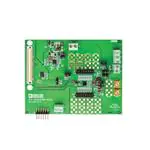
EVALUATION BOARD PHOTOGRAPH
Figure 1.
PLEASE SEE THE LAST PAGE FOR AN IMPORTANT
WARNING AND LEGAL TERMS AND CONDITIONS.
Rev. 0 | Page 1 of 17
�UG-1070
EVAL-AD5767SD2Z User Guide
TABLE OF CONTENTS
Features .............................................................................................. 1
ADP5071 Switching Regulator ....................................................5
General Description ......................................................................... 1
Evaluation Board Software ...............................................................7
Evaluation Board Photograph ......................................................... 1
ACE Software Installation ............................................................7
Revision History ............................................................................... 2
ACE Software Operation ..............................................................7
Evaluation Board Hardware ............................................................ 3
Evaluation Board Schematics and Artwork ................................ 11
Power Supplies/Default Link Options ....................................... 3
Ordering Information .................................................................... 16
On-Board Connectors ................................................................. 5
Bill of Materials ........................................................................... 16
REVISION HISTORY
1/2017—Revision 0: Initial Version
Rev. 0 | Page 2 of 17
�EVAL-AD5767SD2Z User Guide
UG-1070
EVALUATION BOARD HARDWARE
The EVAL-AD5767SD2Z evaluation board can be powered
using the on-board ADP5071, which is supplied with a 3.3 V
supply via the J12 connector. Alternatively, the J9 connector can
provide power to the board instead of the ADP5071 and is
intended for use with well regulated bench supplies. See Figure 2
for a functional block diagram.
POWER SUPPLIES/DEFAULT LINK OPTIONS
Table 1. Quick Start Jumper Configurations for Both
ADP5071 and Bench Supply
Link No.
LK1
LK2
LK3
LK4
LK5
LK7
LK8
LK11
LK12
ADP5071
A
A
A
B
B
A
Inserted
Removed
Removed
Bench Supply
A
A
A
A
A
A
Removed
Removed
Removed
With either option, first set the link options on the evaluation
board for the required operating setup before supplying the board.
Each supply is decoupled to the relevant ground plane with
10 μF and 0.1 μF capacitors. Each device supply pin is again
decoupled with a 10 μF and 0.1 μF capacitor pair to the relevant
ground plane.
The analog and digital planes are connected at one location
close to the DAC. To avoid ground loop problems, do not
connect AGND and DGND elsewhere in the system.
J9
+8V
B A
J12
+3.3V
LK4
ADP5071
–22V
PGND
B A
EXT_AV DD
AGND
EXT_AV SS
LK5
A LK3
B
+3.3V
J11
AVCC AVSS AVDD
EXT_AVCC
B LK2
A
AGND
AD5767
VLOGIC
15163-002
DGND
VLOGIC
J13
Figure 2. Powering the EVAL-AD5767 SDZ Evaluation Board
Table 2. Quick Start
Board Supply
ADP5071
Bench Supply
Compatible Output Voltage Ranges (V)
−20 to 0
−16 to 0
−10 to 0
−10 to +6
−5 to +5
−20 to 0
−16 to +0
−10 to +0
−10 to +6
−12 to +14
−16 to +10
−5 to +5
−10 to +10
Power Supplies Required
AVSS (J9) Maximum (V)
AVDD (J9) Minimum
Not required
Not required
Not required
Not required
Not required
Not required
Not required
Not required
Not required
Not required
−22
2.97
−18
2.97
−12
2.97
−12
8
−14
16
−18
12
−7
7
−12
12
Rev. 0 | Page 3 of 17
J12 Nominal (V)
3.3
3.3
3.3
3.3
3.3
3.3
3.3
3.3
3.3
3.3
3.3
3.3
3.3
�UG-1070
EVAL-AD5767SD2Z User Guide
Power Solution Option (ADP5071)
The EVAL-AD5767SD2Z board is populated with an ADP5071
switching regulator. This regulator generates +8 V and −22 V
supplies from a single +3.3 V supply. The circuit was designed
using the Analog Devices ADIsimPower toolset, which selects
the components and generates the schematic and bill of
materials, and displays the performance specifications. Visit the
ADP5071 product page at www.analog.com/ADP5071 to
download the design tools.
The ADP5071 requires 3.3 V for correct operation. Following
the jumper configuration in Table 1, tie AVCC, VLOGIC, and the
ADP5071 supplies together to operate from a single 3.3 V
supply.
Alternatively, the AVCC header (J11) and VLOGIC header (J13) can
be powered with separate supplies by selecting Position B on
LK3 and LK2, respectively. Refer to Table 3 for full link options.
The −12 V to +14 V, −16 V to +10 V, or −10 V to +10 V output
voltage ranges are not available with the ADP5071 default
configuration because a minimum of 2 V headroom is required.
Refer to the Filtered 3.3 V Supply section for further information,
or supply the board using a bench supply.
Bench Power Supply Option
The evaluation board can be powered using a bench supply to
access all output voltage ranges of the AD5767. A headroom
and footroom of at least 2 V is required. Refer to Table 2 for the
supply requirements. It is important that the voltage across
AVDD to AVSS does not exceed the absolute maximum rating of
34 V. Otherwise, device reliability may be affected.
Following the jumper configuration in Table 2, tie AVCC and
VLOGIC together to operate from the same 3.3 V supply, or AVCC
(via J11) and VLOGIC (via J13) can be powered with separate
supplies by selecting Position B on LK3 and LK2, respectively.
Refer to Table 3 for full link options. Refer to Table 3 for full
link options.
Table 3. Link Options
Link No.
LK1
LK2
LK3
LK4
LK5
LK6
LK7
LK8
LK9
LK10
LK11
LK12
Description
Selects the power supply for the ADR4525 reference; requires a minimum of 3 V for correct operation
Position A: supplied by the 3.3 V supply (J12)
Position B: supplied by the AVCC header (J11)
Selects the power supply for the DAC VLOGIC pin; requires 1.7 V to 5.5 V for correct operation
Position A: supplied by the 3.3 V supply (J12)
Position B: supplied by the VLOGIC header (J13)
Selects the power supply for the DAC AVCC pin; requires 2.97 V to 5.5 V for correct operation
Position A: supplied by the 3.3 V supply (J12)
Position B: supplied by the AVCC header (J11)
Selects the power supply for the DAC AVDD pin; ensure that the voltage between AVDD and AVSS does not exceed 34 V
Position A: supplied by the AVDD header (J9)
Position B: supplied by the ADP5071 power solution
Selects the power supply for DAC AVSS pin; ensure that the voltage between AVDD and AVSS does not exceed 34 V
Position A: supplied by AVSS header (J9)
Position B: supplied by the ADP5071 power solution
Selects the start-up sequence of the ADP5071 outputs
Position A: positive and negative output rails are sequenced based on the state of the EN1 and EN2 pins
Position B: positive and negative output rails power up simultaneously when EN2 is high
No link inserted: manual enable mode
Selects the voltage reference source
Position A: selects the ADR4525 2.5 V reference
Position B: selects an external reference source that can applied at the EXT_VREF SMB connector
Insert link to connect the ADP5071 to the 3.3 V supply header (J12)
Selects the switching frequency of ADP5071; this link is replaced with a 0 Ω resistor to Position A
Position A: 1.2 MHz switching frequency (default)
Position B: 2.4 MHz switching frequency
Selects the slew rate of the ADP5071 output; this link is replaced with a 0 Ω resistor to Position A
Position A: slowest slew rate (best noise performance)
Position B: normal slew rate
Insert link to bypass the LC filter on the ADP5071 positive output
Insert link to bypass the LC filter on the ADP5071 negative output
Rev. 0 | Page 4 of 17
�EVAL-AD5767SD2Z User Guide
UG-1070
PMOD Connector (J10) Pin Configuration and
Descriptions
2
3
4
5
6
7
8
9
10
11
12
Filtering the ADP5071 Outputs
The EVAL-AD5767SD2Z board has an LC filter fitted on the
ADP5071 positive and negative outputs. The filter can be
bypassed by inserting LK11 and LK12.
15163-003
1
ADP5071 SWITCHING REGULATOR
Figure 3. Jumper J10 Pin Configuration
Figure 4 shows the output frequency spectrum of the AD5767
powered by the filtered ADP5071 supply. The dotted red line
represents 10% of 1 LSB using the −10 V to +6 V range. For
comparison, Figure 5 shows the output frequency spectrum of
the AD5767 powered by a bench power supply.
Table 4. Connector J10 Pin Descriptions
Description
SYNC
SDIN/MOSI
SDO/MISO
SCLK
DGND
VLOGIC
NC1
RESET
NC1
NC1
DGND
VLOGIC
20
VOUT x AT CHANNEL 1 = –10V
VOUT x AT CHANNEL 1 = +6V
10
0
SIGNAL POWER (dBmV)
Pin No.
1
2
3
4
5
6
7
8
9
10
11
12
–10
–20
–30
–40
–50
–60
NC means no connection.
–70
100k
ON-BOARD CONNECTORS
There are eight connectors on the EVAL-AD5767SD2Z, as
shown in Figure 3. For the external supply pins, refer to the
Power Supplies/Default Link Options section because AVCC and
VLOGIC can be powered using J12, depending on the jumper
configuration.
Connector
J1
J2
J3
J9
J10
J11
J12
J13
Function
Connection for the EVAL-SDP-CB1Z board
Header pins for VOUT0 to VOUT7 and AGND
Header pins for VOUT8 to VOUT15 and AGND
Supplies AVDD and AVSS externally
Peripheral module (PMOD) connection pins
Supplies AVCC pin externally
3.3 V supply for AVCC, VLOGIC, and the ADP5071
Supplies VLOGIC pin externally
10M
Figure 4. Output of AD5767 with ADP5071 (LC Filtered)
–40
VOUT x AT CHANNEL 1 = –10V
VOUT x AT CHANNEL 1 = +6V
–50
SIGNAL POWER (dBmV)
Table 5. On-Board Connectors
1M
FREQUENCY (Hz)
–60
–70
–80
–90
–100
–110
–120
100k
1M
FREQUENCY (Hz)
Figure 5. Output of AD5767 with Bench Power Supply
Rev. 0 | Page 5 of 17
10M
15163-005
1
�UG-1070
EVAL-AD5767SD2Z User Guide
Filtered 3.3 V Supply
Changing the ADP5071 Output Voltages
The EVAL-AD5767SD2Z board contains a filter on J11 to allow
users to filter the AD5767 AVCC rail. Alternatively, users can
bypass the filter by using J12. Powering the board via the J12
header allows users to evaluate the board performance with
their own supply. See Figure 6 for the functional block diagram.
By default, the ADP5071 output voltages are +8 V and −22 V.
To provide enough headroom to supply the −12 V to +14 V,
−16 V to +10 V, and −10 V to +10 V ranges, the feedback
resistors must be changed. These are R26 and R31 for the
positive output, and R28 and R30 for the negative output. Based
on the output supplies required and load current requirements,
the Analog Devices ADIsimPower toolset selects the recommended feedback resistors for the application. ADIsimPower is
available on the ADP5071 product page at
www.analog.com/ADP5071.
When enabled with LK8, the ADP5071 can feed noise back
onto the 3.3 V rail. Users can attenuate this noise by connecting
J12 and J11 externally.
It is important that the voltage across AVDD to AVSS does not
exceed the absolute maximum rating of 34 V. Otherwise, device
reliability may be affected.
J12
+3.3V
LK8
ADP5071
UNFILTERED +3.3V
A LK3
B
AV CC
AD5767
J11
FILTERED +3.3V
15163-006
EXT_AVCC
Figure 6. AVCC Selection
Rev. 0 | Page 6 of 17
�EVAL-AD5767SD2Z User Guide
UG-1070
EVALUATION BOARD SOFTWARE
ACE SOFTWARE INSTALLATION
ACE SOFTWARE OPERATION
The ACE software enables configuration of the AD5767 over a
USB port. This section introduces the key features of the program.
To operate the ACE software, follow these steps:
To download the ACE software and obtain detailed documentation on the platform, visit www.analog.com/ace. The installer
also includes the drivers for the SDP board and plugins for
multiple Analog Devices evaluation boards, including the
EVAL-AD5767SD2Z.
After the ACE software is installed, connect the evaluation
board and SDP controller board together and plug the USB
cable from the PC to the SDP controller board. Allow a few
moments for the Windows operating system to recognize the
SDP board.
1.
2.
3.
4.
To launch the ACE software, click Start > All Programs>
Analog Devices > ACE). The software opens in the Start
view tab and recognizes the EVAL-AD5767SD2Z (see
Figure 7).
Double click the AD5767 Board icon under Attached
Hardware to open the AD5767 Board tab (see Figure 8).
Double click the AD5767 chip shown in Figure 8 to open
the AD5767 tab (see Figure 9). This tab displays the block
diagram and allows the user to configure the DAC input
registers and control registers. The hardware registers on
the AD5767 are not altered until the Apply Changes
button is clicked.
Click the Proceed to Memory Map button (Label 12 in
Figure 11) to open the AD5767 Memory Map tab and
allow access to all registers (see Figure 10). The hardware
registers on the AD5767 are not altered until the Apply
Changes button is clicked.
15163-007
For a detailed description of all GUI options, see Table 6 and
Figure 11.
Figure 7. Start Tab
Rev. 0 | Page 7 of 17
�EVAL-AD5767SD2Z User Guide
15163-008
UG-1070
15163-009
Figure 8. AD5767 Board Tab
Figure 9. AD5767 Chip Tab
Rev. 0 | Page 8 of 17
�UG-1070
15163-010
EVAL-AD5767SD2Z User Guide
Figure 10. AD5767 Memory Map Tab
2
7
4
3
6
5
8
9
10
11
12
Figure 11. Main Window
Rev. 0 | Page 9 of 17
15163-011
1
�EVAL-AD5767SD2Z User Guide
15163-012
UG-1070
Figure 12. Span Selection Window
Table 6. GUI Options (See Figure 11)
Label No.
1
2
3
GUI Element
Apply Changes
Reset Chip
Write to Input Register
4
Select output
5
6
7
Input Register
DAC Register
RANGE SET DAC
8
9
10
11
12
DAC x
Signal, Invert, and Scale
16-To-1 MUX
SOFTWARE RESET
Proceed to Memory Map
Description
This button must be clicked to submit any changes on the GUI to the evaluation board hardware.
Issues a hardware reset and reverts the software and hardware registers to their default settings.
Allows the user to write to the input register, write to the input register and the DAC register, or
write to the input register and update all DAC registers.
Channels displayed. Allows the user to show Channel 0 to Channel 3, Channel 4 to Channel 7,
Channel 8 to Channel 11, or Channel 12 to Channel 15 for VOUT in the AD5767 chip tab.
The user can input data to write to the input register. There is one input register per channel.
This is a graphical representation of the DAC register. There is one DAC register per channel.
Click RANGE SET DAC to select the output voltage range from the Span Selection window (see
Figure 12).
Click the DAC to apply a dither signal or to power down the selected channel.
Allows the user to select the dither options for each channel.
Select which channel to route to the AD5767 MUX_OUT pin.
Issues a software reset and reverts the software and hardware registers to their default settings.
Click to open the AD5767 Memory Map tab (see Figure 10).
Rev. 0 | Page 10 of 17
�EVAL-AD5767SD2Z User Guide
UG-1070
EVALUATION BOARD SCHEMATICS AND ARTWORK
E x tern a l A VDD, A V S S su pp ly
+ 3 .3 V
60
59
58
57
56
55
54
53
52
51
50
49
48
47
46
45
44
43
42
41
40
39
38
37
36
35
34
33
32
31
30
29
28
27
26
25
24
23
22
21
20
19
18
17
16
15
14
13
12
11
10
9
8
7
6
5
4
3
2
1
V DD
J9 - 3
E X T_ A VDD
A G ND
J9 - 2
A G ND
V SS
J9 - 1
E X T_ A V SS
R E SE T
R8
100k
E xt ern al A VC C Su pp ly
Pla ce L5 an d C 1 a s clo se to J1 1 as possib le
L5
J1 1 -1
E X T_ A VC C
2 .2 u H
V CC
+
C1
10uF
AG N D
J1 1 -2
L5 an d C 1 TBD (F ootp ri nt s bot h 0 8 0 5 )
E xte rn al 3 .3 V
+3 .3 V fo r si ng le su pply sol u tion
3 .3 V
E X T_ 3 .3V
J1 2 -1
J1
RE S E T_ IN
U A RT_ R X
G ND
RE S E T_ O U T
S DP
TW I_ A 0
S TA NDA RD
NC
C O NN E CTO R
NC
NC
G ND
NC
NC
TM R_ C *
TIM ER S
TM R_ A
BM O DE 1
U AR T_ T X
G ND
S LE E P
W A KE
NC
NC
NC
G ND
NC
CLK _ O U T
T MR _ D
TM R _ B
G PIO 6
G PIO 7
G ND
G ND
G E NE R AL
G PIO 4
G PIO 5
INPU T/O U TP U T
G PIO 2
G PIO 3
G PIO 0
G PIO 1
SC L_ 1
SC L_ 0
I2C
SD A_ 1
SD A_ 0
G ND
G ND
SP I_ S EL 1 /S PI_S S
S PI_ C L K
S PI_ M IS O
SP I_ S EL _ C
S PI
SP I_ S EL _ B
S PI_ M O S I
G ND
S PI_ S E L_ A
SP OR T_ INT
G ND
SP I_ D3*
SPO R T_ TS C LK
SP I_ D2*
SP O RT _D T0
SPO R T
SP OR T_ D T1
S PO R T_ TF S
SP OR T_ D R1
SP O RT _R F S
SP OR T_ T DV1*
S PO R T_ DR 0
SP OR T_ T DV0 *
S PO R T_ RS C LK
G ND
G ND
PA R_ FS 1
PA R_ C L K
PA R_ FS 3
PA R_ F S2
PA R_ A 1
PA R _ A0
PA R_ A 3
PA R _ A2
G ND
G ND
PA R_ C S
PA R_ INT
PA R_ R D
P AR _ W R
PA R_ D1
PAR _ D0
PAR A LLE L
PA R_ D3
PAR _ D2
P O RT
PA R_ D5
PAR _ D4
G ND
G ND
PA R_ D7
PAR _ D6
PA R_ D9
PAR _ D8
PA R_ D1 1
PAR _ D1 0
PA R_ D1 3
PAR _ D1 2
PA R_ D1 4
G ND
G ND
PAR _ D1 5
* _ D1 6
PA R_ D1 7*
PAR
*
PA R_ D1 9*
PAR _ D1 8
*
*
PA R_ D2 1
PAR _ D2 0
* _ D2 2
PA R_ D2 3*
PAR
G ND
G ND
U S B_ V BU S
V IO ( +3.3 V )
G ND
G ND
G ND
G ND
NC
NC
* NC on BL A CK F IN SD P
VIN
NC
61
62
63
64
R24
65
100k
66
67
68
69
70
71
72
73
74
75
76
77
78
79
80
81
82
83
84
85
86
87
88
89
90
91
92
93
94
95
96
97
98
99
100
101
102
103
R4
104
105 100k
106
107
108
109
110
111
112
113
114
115
116
117
118
119
120
R1 8
D NP
1
2
3
4
R2 5
100k
+3 .3 V
U4
A0
A1
A2
VSS
8
7
6
5
VCC
WP
SCL
SD A
2 4 LC 6 4 -I/S N
S CLK
S DI
S YN C
SDO
DIG ILE N T Pm od In ter fa ce Type 2 A (exp an ded S PI)
SY NC
SD O
1
3
5
7
9
11
J1 0
SS
M O SI
M IS O S CK
G N D VD D
INT R E S ET
N /S
N/S
G N D VD D
2
4
6
8
10
12
S DI
S CL K
VL O G IC
R E SE T
DG N D
+3 .3 V
PG ND
J1 2 -2
DG ND
PG ND
DG ND
E xt ern al V LO G IC S u pply
V LO G IC
15163-013
E X T_ VLO G IC
J1 3 -1
DG ND
J1 3 -2
DG ND
Figure 13. SDP Connector and Power Supply
R1 4
255K
C3 3
R32
12nF
1 3 .7 k
E X T_ 3 .3 V
C31
0 .1 u F
C4
R3 8
3 0.1 k
+ C30
LK 1 1
U7
AD P5 0 7 1 A C PZ
8
3 3 pF
6
1 0u F
7
14
VREG
R37
1 9 .6 k
C2 9
1uF
15
17
C28
10uF
16
SS
INB K
E N1
SW 1
VR E G
R34
C34
27nF
10
1 1 .8 k
2
4
3
VREG
PVIN 1
PG N D
R26
8 2 k5
PVIN SYS
PG ND
E N2
CO M P2
VREF
5
19
C32 1uF
12
R31
9 .0 9 K
R28
3 k5 7
SYN C
SL EW
FB2
SE Q
13
21
11
O u tpu t F ilters
LK 1 2
18
D2
L3
4 .7 µ H
1 4 .7 O h m
L2
LK 10
B
2 .2 u H
A
LK 6
Figure 14. ADP5071 Power Solution
Rev. 0 | Page 11 of 17
R30
102K
R23
B
C26
10uF
A
A
B
C18
10uF
PVIN 2
SW 2
A GN D E P
LK 9
C17
10uF
D1
20
C14
2 7 pF
IN T_ A VDD
2 .2 u H
C25
10uF
FB1
9
L1
L4
1 .5 µ H
CO M P1
V+
O u tpu t F ilters
1
VIN T_ A V SS
C19
10uF
PG N D
15163-014
LK 8
�10uF
+
C10
10uF
+
C27
0 .1 u F
+
0.1 u F
A VCC
B
E XT _A V SS
LK5
A VDD
C6
10uF
+
C5
0 .1 u F
U6
A DR 4 5 2 5B R Z
VREF
A V SS
LK 7
B
A
C9
A
IN T_ A V SS
E XT _ A VDD
B
LK4
C36
C2 3
C68
1uF
0 .1 u F
LK 1
A
C1 2
A
B
LK 3
1 0u F
6
VO U T +V IN
G ND
4
2
B
0 .1 uF
IN T_ A VDD
E X T_ 3 .3 V
A
B
L K2
C2 4
E XT _A V CC
E XT _ 3.3 V
A
EVAL-AD5767SD2Z User Guide
E XT _ VL O G IC
UG-1070
C6 9
0 .1 u F
+
E XT_ 3 .3 V
E XT_ A V CC
C70
10uF
EX T_ V RE F
SD I
F7
E7
C7
E6
F2
VR E F
B1
D7
V OUT 0
V OUT 1
V OUT 2
V OUT 3
V OUT 4
V OUT 5
V OUT 6
V OUT 7
V OUT 8
V OUT 9
VO U T1 0
VO U T1 1
VO U T1 2
VO U T1 3
VO U T1 4
VO U T1 5
VL O G IC
U1
SY NC
SC L K
SD I
SD O
A D5 7 6 7 B CB Z
S DO
N0
F1
A G ND1
A G ND2
F6
B2
A1
A7
G1
G7
C5
DG N D
RE S E T
B6
B7
DN C
DN C
DN C
DN C
DN C
R E S ET
N0
B3
A2
A3
B4
A4
A5
A6
B5
F5
G6
G5
G4
F4
G3
G2
F3
M UX _OUT
V OUT 0
V OUT 1
V OUT 2
V OUT 3
V OUT 4
V OUT 5
V OUT 6
V OUT 7
V OUT 8
V OUT 9
V O U T 10
V O U T 11
V O U T 12
V O U T 13
V O U T 14
V O U T 15
N1
N1 _ IN
15163-015
N0 _ IN
C1
N1
S CL K
M U X_ O U T
E1
C6
SYN C
NIC
NIC
NIC
NIC
A V SS
E2
E3
E4
E5
A VDD
0 .1 u F
A V CC
C13
N IC
N IC
N IC
N IC
N IC
N IC
N IC
N IC
VL O G IC
D1
0 .1 u F
C2
C3
C4
D2
D3
D4
D5
D6
C2 2
D G ND
Figure 15. AD5767 (WLCSP) and External Reference
Rev. 0 | Page 12 of 17
�0r
0r
C47
DNP
R1 7
DN P
VO U T7
DNP
V O U T1 4
V O U T1 5
0r
C58
DNP
J 3 -4
J 3 -6
J 3- 8
J3 - 10
DNP
R3 6
DN P
R59
VO U T1 5
J 3 -2
J 3 -1
J 3 -3
J 3 -5
0r
C57
DNP
J3 - 12
J 2- 8
J 3- 7
J 3- 9
R58
VO U T1 4
DNP
R3 5
DN P
R4 1
DN P
DNP
Figure 16. Channel Outputs
15163-017
R51
VO U T7
V O U T1 3
0r
C56
DNP
DNP
R1 6
DN P
J2 -1 5
C46
DNP
VO U T6
R57
VO U T1 3
DNP
R3 3
DN P
15163-016
J2 - 13
R50
VO U T6
C55
DNP
DNP
R1 5
DN P
V O U T1 2
J3 - 14
0r
C45
DNP
VO U T5
DNP
0r
J2 - 12
R49
VO U T5
V O U T1 1
R2 2
DN P
R56
VO U T1 2
DNP
R1 3
DN P
J2 - 11
C40
DNP
VO U T4
DN P
R44
D NP
J3 -1 6
0r
0r
MU X _ OU T
DNP
0r
C54
DNP
J2 - 10
J 2- 9
R48
VO U T4
R55
VO U T1 1
DNP
R1 1
DN P
V O U T1 0
R2 1
DN P
J3 - 11
0r
C39
DNP
VO U T3
C53
DNP
R60
C51
DNP
0r
J2 - 14
R47
VO U T3
R54
VO U T1 0
DNP
R9
DN P
J 2- 7
C38
DNP
VO U T2
MUX
MU X _ OU T
DNP
R2 0
DN P
J3 - 13
0r
V O U T9
0r
C52
DNP
J 2 -6
J 2 -5
R46
VO U T2
DNP
R1 9
DN P
R53
VO U T9
DNP
R6
DN P
V O U T8
0r
C48
DNP
J 2 -4
J 2 -3
0r
C37
DNP
VO U T1
R52
VO U T8
DNP
R4 5
DN P
R43
VO U T1
UG-1070
J3 -1 5
0r
C15
DNP
VO U T0
J2 -1 6
R42
VO U T0
J 2 -2
J 2 -1
EVAL-AD5767SD2Z User Guide
Figure 17. Top Printed Circuit Board (PCB) Layer
Rev. 0 | Page 13 of 17
�EVAL-AD5767SD2Z User Guide
15163-018
UG-1070
15163-019
Figure 18. Inner First PCB Layer
Figure 19. Inner Second PCB Layer
Rev. 0 | Page 14 of 17
�UG-1070
15163-020
EVAL-AD5767SD2Z User Guide
Figure 20. Bottom PCB Layer
Rev. 0 | Page 15 of 17
�UG-1070
EVAL-AD5767SD2Z User Guide
ORDERING INFORMATION
BILL OF MATERIALS
Table 7.
Reference
Designator
C1
C4
C5 C9, C13, C22, C23,
C24, C27, C31, C69
C6, C10, C12, C30,
C36, C70,
C14
C17, C18
C19, C26
C25, C28
C29, C32
C33
C34
C68
D1
D2
J1
J2, J3
J9
J10
J11, J12, J13
L1, L2
L3
L4
L5
LK1 to LK5, LK7
Description
Capacitor, 0805, X5R, 10 V, 10 µF, ±10%
Capacitor, 1210, C0G, 50 V, 33 pF, ±10%
Capacitor, 0603, C0G, 50 V, 0.1 µF, ±10%
Part Number
GRM219R61A106KE44D
MC0402N330K500CT
GRM188R71H104KA93D
Stock Code
FEC 2346905
FEC 1845741
FEC 8820023
Capacitor, 0805, C0G, 50 V, 0.1 µF, ±10%
GRM21BR71A106KE51L
FEC 1828828
Capacitor, 0402, C0G, 50 V, 27 pF, ±10%
Capacitor, 1206, X5R, 10 V, 10 µF, ±10%
Capacitor, 1206, X5R, 35 V, 10 µF, ±10%
Capacitor, 0805, X5R, 10 V, 10 µF, ±10%
Capacitor, 0603, X5R, 6.3 V, 1 µF, ±10%
Capacitor, 0402, X7R, 16 V, 0.012 µF, ±10%
Capacitor, 0402, X5R, 16 V, 0.027 µF, ±10%
Capacitor, 0805, X7R, 50 V, 1 µF, ±10%
Rectifier diode, single, 20 V, 500 mA, SOD-123, 2, 385 mV
Schottky diode
120-way connector, 0.6 mm pitch
16-pin (2× 8), 0.1 inch pitch, single inline (SIL) header
3-pin terminal block (5 mm pitch)
PMOD connector
2-pin terminal block (5 mm pitch)
Fixed inductor, 2.2 µH, 1.6 A, 76 MΩ SMD
Surface-mount power inductor
Fixed inductor 1.5 µH, 4.1 A, 46.8 MΩ
2.2 µH shielded multilayer inductor
3-pin SIL header and shorting link
C0402C270K5GACTU
C3216X5R1A106K160AB
GRM31CR6YA106KA12L
GRM21BR61A106KE19L
GRM188R60J105KA01D
MC0402B123K160CT
MC0402X273K160CT
GRM21BR71H105KA12L
MBR0520L
PD3S160-7
FX8-120S-SV(21)
M20-9980846
CTB5000/3
68021-212HLF
CTB5000/2
LQH32PN2R2NN0L
XFL4020-472MEC
SPM4020T-1R5M
AIML-0805-2R2K-T
M20-9990345 & M756705
MC 0.063W 0603 0R
M20-9990246
MC0063W06031100K
MCMR04X2553FTL
Digi-Key 399-8960-1-ND
FEC 1844306
FEC 1797011
FEC 1828805
FEC 9527699
FEC 1758886
FEC 1759382
FEC 1735541
FEC 1467521
FEC 1843697
FEC 1324660
FEC 1022240
FEC 151790
Digi-Key 609-3345-ND
FEC 151789
Digi-Key 490-5336-2-ND
FEC 2289218
Digi-Key 445-172371-1-ND
Digi-Key 535-11631-2-ND
FEC 1022248 and
FEC 150410
FEC 9331662
FEC 1022247 and
FEC 150-411
FEC 9330402
FEC 2072839
CRCW040214R7FKED
FEC 2140591
MC00625W0402182K5
MC00625W040213K57
MC00625W04021102K
MC00625W040219K09
MCMR04X1372FTL
CRCW040211K8FKED
MC00625W0402119K6
CRCW040230K1FKED
MC00625W040210R
AD5767
24LC64-I/SN
ADR4525BRZ
ADP5071ACPZ
FEC 1803742
FEC 1803091
FEC 1803752
FEC 1803134
FEC 2072621
FEC 2140865
FEC 1803680
FEC 1469704
FEC 1357983
AD5767BCBZ-WP
FEC 9758070
ADR4525BRZ
ADP5071ACPZ
LK6, LK9, LK10
LK8, LK11, LK12
2-way resistor link option
2-pin (0.1 inch pitch) header and shorting shunt
R4, R8, R24, R25
R14
Resistor, 100 kΩ, 0.063 W, 1%, 0603
Surface-mount chip resistor, ceramic, MCMR series,
255 kΩ, 62.5 mW, ±1%, 50 V
Surface-mount chip resistor, thick film, AEC-Q200 CRCW
series, 14.7 Ω, 63 mW, ±1%, 50 V
Resistor, 82.5 kΩ, 0.0625 W, 1%, 0402
Resistor, 3.57 kΩ, 0.0625 W, 1%, 0402
Resistor, 102 kΩ, 0.0625 W, 1%, 0402
Resistor, 9.09 kΩ, 0.0625 W, 1%, 0402
Resistor, 13.7 kΩ, 0.0625 W, 1%, 50 V, 0402
Resistor, 11.8 kΩ, 0.063 W, 1%, 50 V, 0402
Resistor, 19.6 kΩ, 0.0625 W, 1%, 50 V, 0402
Resistor, 30.1 kΩ, 0.063 W, 1%, 50 V, 0402
Resistor, 0402, 1%, 0 Ω
16-channel, 12-bit voltage output denseDAC
64 kb I2C serial EEPROM
2.5 V voltage reference
2 A/1.2 A dc to dc switching regulator with independent
positive and negative outputs
R23
R26
R28
R30
R31
R32
R34
R37
R38
R42, R43, R46 to R60
U1
U4
U6
U7
Rev. 0 | Page 16 of 17
�EVAL-AD5767SD2Z User Guide
UG-1070
NOTES
ESD Caution
ESD (electrostatic discharge) sensitive device. Charged devices and circuit boards can discharge without detection. Although this product features patented or proprietary protection
circuitry, damage may occur on devices subjected to high energy ESD. Therefore, proper ESD precautions should be taken to avoid performance degradation or loss of functionality.
Legal Terms and Conditions
By using the evaluation board discussed herein (together with any tools, components documentation or support materials, the “Evaluation Board”), you are agreeing to be bound by the terms and conditions
set forth below (“Agreement”) unless you have purchased the Evaluation Board, in which case the Analog Devices Standard Terms and Conditions of Sale shall govern. Do not use the Evaluation Board until you
have read and agreed to the Agreement. Your use of the Evaluation Board shall signify your acceptance of the Agreement. This Agreement is made by and between you (“Customer”) and Analog Devices, Inc.
(“ADI”), with its principal place of business at One Technology Way, Norwood, MA 02062, USA. Subject to the terms and conditions of the Agreement, ADI hereby grants to Customer a free, limited, personal,
temporary, non-exclusive, non-sublicensable, non-transferable license to use the Evaluation Board FOR EVALUATION PURPOSES ONLY. Customer understands and agrees that the Evaluation Board is provided
for the sole and exclusive purpose referenced above, and agrees not to use the Evaluation Board for any other purpose. Furthermore, the license granted is expressly made subject to the following additional
limitations: Customer shall not (i) rent, lease, display, sell, transfer, assign, sublicense, or distribute the Evaluation Board; and (ii) permit any Third Party to access the Evaluation Board. As used herein, the term
“Third Party” includes any entity other than ADI, Customer, their employees, affiliates and in-house consultants. The Evaluation Board is NOT sold to Customer; all rights not expressly granted herein, including
ownership of the Evaluation Board, are reserved by ADI. CONFIDENTIALITY. This Agreement and the Evaluation Board shall all be considered the confidential and proprietary information of ADI. Customer may
not disclose or transfer any portion of the Evaluation Board to any other party for any reason. Upon discontinuation of use of the Evaluation Board or termination of this Agreement, Customer agrees to
promptly return the Evaluation Board to ADI. ADDITIONAL RESTRICTIONS. Customer may not disassemble, decompile or reverse engineer chips on the Evaluation Board. Customer shall inform ADI of any
occurred damages or any modifications or alterations it makes to the Evaluation Board, including but not limited to soldering or any other activity that affects the material content of the Evaluation Board.
Modifications to the Evaluation Board must comply with applicable law, including but not limited to the RoHS Directive. TERMINATION. ADI may terminate this Agreement at any time upon giving written notice
to Customer. Customer agrees to return to ADI the Evaluation Board at that time. LIMITATION OF LIABILITY. THE EVALUATION BOARD PROVIDED HEREUNDER IS PROVIDED “AS IS” AND ADI MAKES NO
WARRANTIES OR REPRESENTATIONS OF ANY KIND WITH RESPECT TO IT. ADI SPECIFICALLY DISCLAIMS ANY REPRESENTATIONS, ENDORSEMENTS, GUARANTEES, OR WARRANTIES, EXPRESS OR IMPLIED, RELATED
TO THE EVALUATION BOARD INCLUDING, BUT NOT LIMITED TO, THE IMPLIED WARRANTY OF MERCHANTABILITY, TITLE, FITNESS FOR A PARTICULAR PURPOSE OR NONINFRINGEMENT OF INTELLECTUAL
PROPERTY RIGHTS. IN NO EVENT WILL ADI AND ITS LICENSORS BE LIABLE FOR ANY INCIDENTAL, SPECIAL, INDIRECT, OR CONSEQUENTIAL DAMAGES RESULTING FROM CUSTOMER’S POSSESSION OR USE OF
THE EVALUATION BOARD, INCLUDING BUT NOT LIMITED TO LOST PROFITS, DELAY COSTS, LABOR COSTS OR LOSS OF GOODWILL. ADI’S TOTAL LIABILITY FROM ANY AND ALL CAUSES SHALL BE LIMITED TO THE
AMOUNT OF ONE HUNDRED US DOLLARS ($100.00). EXPORT. Customer agrees that it will not directly or indirectly export the Evaluation Board to another country, and that it will comply with all applicable
United States federal laws and regulations relating to exports. GOVERNING LAW. This Agreement shall be governed by and construed in accordance with the substantive laws of the Commonwealth of
Massachusetts (excluding conflict of law rules). Any legal action regarding this Agreement will be heard in the state or federal courts having jurisdiction in Suffolk County, Massachusetts, and Customer hereby
submits to the personal jurisdiction and venue of such courts. The United Nations Convention on Contracts for the International Sale of Goods shall not apply to this Agreement and is expressly disclaimed.
©2017 Analog Devices, Inc. All rights reserved. Trademarks and
registered trademarks are the property of their respective owners.
UG15163-0-1/17(0)
Rev. 0 | Page 17 of 17
�









 工商网监
湘ICP备2023018690号
工商网监
湘ICP备2023018690号





