User's Guide
SLAU171 – November 2005
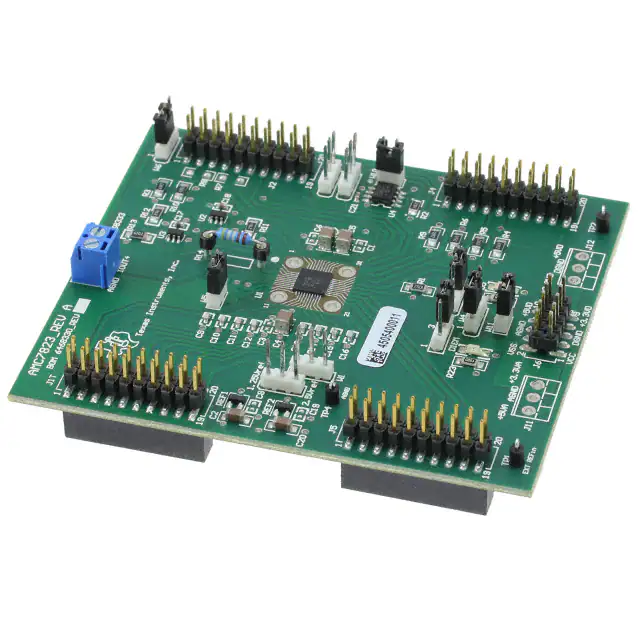
AMC7823 Evaluation Module
This user’s guide describes the characteristics, operation, and the use of the AMC7823
evaluation module. It covers all pertinent areas involved to properly use this EVM board
along with the devices that it supports. The physical PCB layout, schematic diagram,
and circuit descriptions are included.
1
2
3
4
Contents
EVM Overview ...................................................................................... 1
PCB Design ......................................................................................... 4
EVM Operation...................................................................................... 9
Related Documentation From Texas Instruments ............................................ 14
List of Figures
1
2
3
4
5
6
7
8
9
10
EVM Block Diagram ................................................................................ 3
Top Silkscreen ...................................................................................... 4
Top Layer (Signal Plane) .......................................................................... 5
Internal Layer 1 (Split Ground Plane) ............................................................ 5
Internal Layer 2 (Split Power Plane) ............................................................. 6
Bottom Layer (Signal Plane) ...................................................................... 6
Bottom Silkscreen .................................................................................. 7
Drill Drawing ......................................................................................... 8
Factory Default Jumper Settings ................................................................ 10
Digital Serial Interface Pinout ................................................................... 11
List of Tables
1
2
3
1
Parts List ............................................................................................. 8
Factory Default Jumper Settings ................................................................. 9
Jumper Settings and Functions ................................................................. 11
EVM Overview
This chapter gives a general overview of the AMC7823 evaluation module (EVM) and describes some of
the factors that must be considered in using this module.
1.1
Features
This EVM features the AMC7823 analog monitoring and control circuit device. The AMC7823 EVM is a
simple evaluation module designed for a quick and easy way to evaluate the functionality and
performance of the 12-bit resolution AMC device. The built-in ADC features an eight-channel analog input
with 200 ksps sample rate. The AMC7823 also consists of eight independent 12-bit resolution DACs with
2-µs settling times. Although the AMC7823 has a built-in internal band-gap reference that is software
selectable between 1.25 V and 2.5 V, an external reference source is provided. The internal 1.25-V
reference voltage is the default reference on power up, so the reference voltage should be set to the
desired source and level, if necessary.
SPI is a trademark of Motorola, Inc..
SLAU171 – November 2005
AMC7823 Evaluation Module
1
�www.ti.com
EVM Overview
The SPI™ serial interface of the AMC7823 can communicate with any host microprocessor capable of the
SPI protocol and most TI DSP based systems.
A socket (Samtec, P/N SS-101-T-1C) for a through-hole resistor, R14, is also provided so that the load
current can be precisely set to the desired value required to bias any external component connected to pin
5 (THERM_I_OUTPUT) of the AMC7823.
1.2
Power Requirements
The following sections describe the power requirements of this EVM.
1.2.1
Supply Voltage
The dc analog power supply requirement for the AMC7823 EVM (AVDD) is selectable between +3.3 VA
and +5 VA via jumper headers, W3. The +3.3 VA comes from J6-8 or J11-1 (if installed), and the +5 VA
comes from the J6-3 or J11-3 (if installed) terminals. These power supply voltages are referenced to
ground through the J6-6 or J11-2 (if installed) terminals. All of the analog power supplies are referenced to
analog ground through the J11-2 and J6-6 terminals.
On the other hand, the dc digital power supply requirement for DVDD and IOVDD are also selectable
between +3.3 VD and +5 VD via jumper headers, W4 and W2, respectively. The +3.3 VD comes from the
J6-9 or J12-3 (if installed) terminals, and the +5 VD comes from the J6-10 or J12-1 (if installed) terminals.
All of the digital power supplies are referenced to digital ground through the J6-5 and J12-2 terminals.
Green LED indicators, D1 and D5 for AVDD and DVDD respectively, are included to show that power is
applied on the EVM board.
CAUTION
To avoid potential damage to the EVM board, make sure that the correct
cables are connected to their respective terminals as labeled on the EVM
board. Stresses above the maximum listed voltage ratings may cause
permanent damage to the device.
1.2.2
Reference Voltage
The AMC7823 comes with an internal bandgap reference that is software selectable between 1.25 V and
2.5 V, where the default on power up is 1.25 V. Although the internal reference is included on the DUT, an
external reference circuit is still provided onboard the EVM, as well as the option of providing the user
supplied reference voltage via terminal pin, TP1.
The REF3125 (REF2) and REF3112 (REF1) precision voltage references are provided to supply the
onboard external voltage reference and set the voltage output range of the ADC and DAC of the
AMC7823 device. The 1.25-V or 2.5-V reference voltage can be selected via the W7 jumper. The onboard
external reference or the user supplied reference can also be selected via W1 jumper. The user supplied
reference can be applied to the TP1 test point or J1-20 terminal pins, which are also provided to allow the
user to connect to another external reference source if the onboard reference circuit is not desired. The
external voltage reference should not exceed the specified voltages listed in the data sheet.
The REF3125 and REF3112 precision references are powered by +5 VA or +3.3 VA, selectable through
the W3 jumper.
CAUTION
When applying an external voltage reference through TP1 or J1-20, make
sure that it does not exceed the maximum specified voltage listed in the
data sheet. Otherwise, this can permanently damage the AMC7823, U1,
device under test.
2
AMC7823 Evaluation Module
SLAU171 – November 2005
�www.ti.com
EVM Overview
1.3
EVM Basic Functions
The AMC7823 EVM is designed primarily as a functional evaluation platform to test certain functional
characteristics of the AMC7823 (analog monitoring and control circuit) converter. Functional evaluation of
the AMC7823 device can be accomplished with the use of any microprocessor or TI DSP with SPI
interface capability.
The headers J2 (top side) and P2 (bottom side) are pass through connectors provided for the control
signals and data required to interface a host processor to the AMC7823 EVM using a custom built cable.
The GPIO and alarm pins of the AMC7823 are also mapped to the J2 and J4 headers.
An adapter interface card (5-6k adapter interface) is also available to fit and mate with the TI C5000 and
C6000 DSP starter kit (DSK). This alleviates the troubles involved in building a custom cable. In addition,
there is also an MSP430 based platform (HPA449) that uses the MSP430F449 microprocessor, which this
EVM can connect to and interface with as well. For more details or information regarding the 5-6k adapter
interface card or the HPA449 platform, call Texas Instruments Inc. or email us at
dataconvapps@list.ti.com.
The analog input signals for the ADC can be applied to the J1 and P1 pass through terminals differentially.
The analog inputs are decoupled to ground to eliminate the high frequency noise component that may be
present. In similar fashion, the DAC outputs can be monitored through the even pins of the J5 and P5
pass through header connectors.
The terminal connector, J3, is used for connecting an external component, such as a thermistor that can
be driven via the THERM_I_OUT pin. The current load can be precisely set by selecting the correct value
for R14. Refer to the data sheet for establishing the correct value for R14.
A block diagram of the EVM is shown in Figure 1.
TP1
Reference
1.25V
REF1
W1
W7
J1T
J1B
CH 0
CH 1
CH 2
CH 3
CH 4
CH 5
CH 6
CH 7
M
U
X
CH8
W5
SGND
2.5V
REF2
ADC
Control Signal
On-Chip
Temperature
Sensor
J2
P2
GPIO/DAV /GALR
AGND
AMC7823 BLOCK
DAC0_OUT
DAC1_OUT
DAC2_OUT
DAC3_OUT
J5
P5
DAC4_OUT
DAC5_OUT
DAC6_OUT
DAC7_OUT
DAC 0
Control Signal
J4
P4
GPIO/ALARM
DAC 7
THERM _I_OUT
J3
POWER
J6
P6
R14
Figure 1. EVM Block Diagram
SLAU171 – November 2005
AMC7823 Evaluation Module
3
�www.ti.com
PCB Design
2
PCB Design
This chapter presents the layout design of the PCB thereby describing the physical and mechanical
characteristics of the EVM. The list of components used on the module is also included in this section.
2.1
PCB Layout
The AMC7823 EVM was designed using the double-wide modular EVM form factor developed by Texas
Instruments. This EVM form factor allows direct evaluation of the AMC7823 operating characteristics and
speeds up software development and other prototyping needs.
The AMC7823 EVM board is constructed on a four-layer printed circuit board using a copper-clad FR-4
laminate material. The printed circuit board has dimensions of 93,9800 mm (3.7000 inch) × 81,2800 mm
(3.200 inch), and the board thickness is 1,5748 mm (0.0620 inch). Figure 2 through Figure 8 show the
individual artwork layers.
Figure 2. Top Silkscreen
4
AMC7823 Evaluation Module
SLAU171 – November 2005
�www.ti.com
PCB Design
Figure 3. Top Layer (Signal Plane)
Figure 4. Internal Layer 1 (Split Ground Plane)
SLAU171 – November 2005
AMC7823 Evaluation Module
5
�www.ti.com
PCB Design
Figure 5. Internal Layer 2 (Split Power Plane)
Figure 6. Bottom Layer (Signal Plane)
6
AMC7823 Evaluation Module
SLAU171 – November 2005
�www.ti.com
PCB Design
Figure 7. Bottom Silkscreen
SLAU171 – November 2005
AMC7823 Evaluation Module
7
�www.ti.com
PCB Design
Figure 8. Drill Drawing
2.2
Bill of Materials
Table 1. Parts List
Item
(1)
8
Qty.
Designators
Description
Manufacturer
Mfg. Part Number
1
8
C1, C3, C6, C8, C17,
C18, C19, C21
2
8
C9, C10, C11, C12,
C13, C14, C15, C16
150 pF
TDK
C1608COG1H151J
3
2
C2, C20
0.47 µF
TDK
C3216X7R1H474KT
4
3
C4, C5, C7
10 µF
TDK
C3225X7R1E106KT
5
1
R1
10 kΩ
Panasonic
ERJ-8ENF1002V
6
3
R2, R11, R12
2.7 kΩ
BC Components
2312 396 72702
7
2
R20, R23
150 Ω
Panasonic
ERJ-8GEYJ151V
Ω (1)
0.1 µF (1)
TDK
C1608X7R1E104KT
8
2
R7, R8
0
Panasonic
ERJ-8GEY0R00V
9
1
R13
47 kΩ
Yageo America
RC1206FR-0747KL
10
1
R14
4.99 kΩ (1)
Panasonic
ERO-S2PHF4991
11
6
R3, R4, R5, R6, R9,
R10
49.9 kΩ
Panasonic
ERJ-8ENF4992V
12
4
J1T, J2, J4, J5
20-PIN_IDC
Samtec
TSM-110-01-S-DV-M
C1, C3, C6, C8, C19, J11, J12, R7, and R8 are not installed. R14 leads must be cut and bent to fit sockets from Samtec, P/N
SS-101-T-1C.
AMC7823 Evaluation Module
SLAU171 – November 2005
�www.ti.com
EVM Operation
Table 1. Parts List (continued)
Item
Qty.
13
1
J6
10-PIN_IDC
Samtec
TSM-105-01-T-DV
14
2
J11, J12
3-Pin terminal connector (1)
On-Shore Tech.
ED555/3DS
15
4
J1B, P2, P4, P5
20-PIN_IDC (2)
Samtec
SSW-110-22-S-D-VS-P
Samtec
SSW-105-22-F-D-VS-K
3
Description
Manufacturer
Mfg. Part Number
16
1
P6
10-PIN Isolated power socket,
0.100 (2)
17
3
TP1, TP2, TP4
Turret terminal pin
Mill-Max
2348-2-01-00-00-07-0
Texas Instruments
AMC7823IRTA
SN74LVC1G07DBVR
18
1
U1
QFN-40 (RTA), 12-bit analog
monitoring and control circuit
19
2
U2, U3
Single buffer/driver
Texas Instruments
20
1
U4
64-Kbit EEPROM
Microchip Technology 24LC64-I/ST
21
1
REF1
1.25-V Reference
Texas Instruments
REF3112AIDBZT
22
1
REF2
2.5-V Reference
Texas Instruments
REF3125AIDBZT
23
1
J3
Terminal block 3,5 mm, 2-pos PCB
On-Shore Tech.
ED555/2DS
24
2
D1, D5
2.2-V, 45 mC LED, green
Lumex
SML-LX1206SUGC-TR
25
3
W5, W10, W11
2 Circuit header, 0.100 straight
Molex
22-03-2021
8
W1, W2, W3, W4, W6,
W7, W8, W9
3 Circuit header, 0.100 straight
Molex
22-03-2031
26
(2)
Designators
P2, P4, and P6 parts are not shown in the schematic diagram. All P designated parts are installed in the bottom side of the PC
board opposite the J designated counterpart. Example, J2 is installed on the topside while P2 is installed in the bottom side
opposite of J2.
EVM Operation
This chapter presents in detail the operation of the EVM to provide guidance to the user in evaluating the
onboard AMC and how to interface the EVM to a specific host processor.
Refer to the AMC7823 data sheet (SLAS453) for information about its serial interface and other related
topics.
The EVM board is tested and configured to operate from the factory.
3.1
Factory Default Settings
The EVM board is set to its default configuration at the factory as described in Table 2 to operate in
unipolar mode. The jumper configuration is shown in Figure 9 for clarity.
Table 2. Factory Default Jumper Settings
Reference
Jumper
Position
W1
Open
W2
2-3
Digital logic supply, IOVDD, for the AMC7823 is +3.3 VD.
W3
1-2
Analog supply, AVDD, for the AMC7823 is +5 VA.
W4
1-2
Digital core supply, DVDD, for the AMC7823 is +5 VD.
W5
Closed
W6
1-2
CS signal from J2 is routed through to drive the SS signal pin of the AMC7823.
W7
2-3
The external 2.5-V reference is connected as the external reference voltage source through the W1
header.
W8
Open
Convert pin is floated and ADC internal trigger is used.
LRCLK or BCLK not used for convert signal.
Function
Internal reference voltage is used.
Signal ground for ADC analog input is tied to analog ground.
W9
Open
W10
Closed
Address of EEPROM is set to 0x00.
W11
Closed
Analog ground and digital ground are tied together.
SLAU171 – November 2005
AMC7823 Evaluation Module
9
�www.ti.com
EVM Operation
Samtec Pin Socket
P/N: SS-101-T-1C
1
x
Note: The stencil is incorrect
as shown here. The pin 1
indicator is actually pin 3
and pin 3 indicator is
actually pin 1. The
designator, W3, is also spun
around.
Figure 9. Factory Default Jumper Settings
3.2
Host Processor Interface
As noted in chapter 1 of this manual, the AMC7823 EVM is compatible with the 5-6k interface board
(SLAU104) from Texas Instruments, as well as the HPA449 demonstration board from SoftBaugh, Inc.
Using these boards alleviates the tedious task of building custom cables and allows easy configuration of
a simple evaluation system.
If another system is used that is not directly compatible with this EVM, a custom cable can be made
specific to the host interface platform. The EVM allows interfacing to the host processor through the J2
and J4 header connectors for serial control signals and serial data input. The pinout mapping is shown in
Figure 10.
10
AMC7823 Evaluation Module
SLAU171 – November 2005
�www.ti.com
EVM Operation
1
2
3
4
5
6
7
8
9
10
11
12
13
14
15
16
17
18
19
20
CS
SCLK
CLKR
FSX
FSR
MOSI
MISO
DAV
TOUT
NC
ELDAC
DGND
2
3
4
5
6
7
8
9
10
11
12
13
14
15
16
17
18
19
20
BCLK
GPIO1_B
NC
GPIO2_B
LRCLK
DGND
NC
GALR
NC
RESET
NC
SCL
NC
DGND
NC
SDA
1
NC
GPIO5_A
J2
GPIO 0_A
DGND
GPIO 1_A
GPIO 2_A
DGND
NC
NC
SCL
DGND
SDA
J4
Figure 10. Digital Serial Interface Pinout
The analog signals can be applied directly to the J1T header connector, either single-ended or
differentially. To apply a differential signal into the AMC7823, make sure to disconnect the jumper from
W5 so that the AMC7823 can accommodate the signals correctly. For single-ended signal input, make
sure that W5 is shorted so that the signal ground is connected back to the analog ground.
The DAC outputs can be monitored from the J5 header connector directly. See the schematic and printed
circuit board silkscreen for details.
3.3
Serial EEPROM
This EVM includes a 64-kbit I2C serial EEPROM, U4, to store firmware data. It is intended particularly for
future use with PC graphical user interface applications using a USB–MODEVM interface board or other
similar board.
The serial EEPROM is not used by the EVM itself, so it is not discussed further in this user’s guide.
3.4
Jumper Settings
Table 3 lists the function of each specific EVM jumper setting.
Table 3. Jumper Settings and Functions
Reference
Jumper Setting
1
Function
3
External reference input voltage via TP1 is selected to set the range of the ADC and the DAC.
1
3
W1
Internal reference voltage is used to set the range of the ADC and the DAC.
1
SLAU171 – November 2005
3
External reference input voltage via REF1 or REF2, as selected by W7, is routed to the reference
input pin of the AMC7823 to set the range of the ADC and the DAC.
AMC7823 Evaluation Module
11
�www.ti.com
EVM Operation
Table 3. Jumper Settings and Functions (continued)
Reference
Jumper Setting
1
Function
3
+5-V analog supply is selected for DUT IOVDD.
W2
1
3
+3.3-V analog supply is selected for DUT IOVDD.
1
3
+5-V analog supply is selected for DUT AVDD.
W3
1
3
+3.3-V analog supply is selected for DUT AVDD.
1
3
+5-V digital supply is selected for DUT DVDD.
W4
1
3
+3.3-V digital supply is selected for DUT DVDD.
Signal ground is not connected to analog ground. Use this for differential input signal application.
W5
Signal ground is connected to analog ground. Use this for single-ended input signal application.
1
3
CS signal from J2-1 is routed through to control the SS function of the AMC7823. Normally used
for µC operation.
1
3
FSX signal from J2-7 is routed through to control the SS function of the AMC7823. Normally used
for DSP operation.
1
3
W6
External reference input voltage via REF1 is routed to W1 pin 3.
W7
1
3
External reference input voltage via REF2 is routed to W1 pin 3.
1
3
TOUT signal is used to generate the external trigger for ADC conversion.
1
3
W8
Internal trigger for conversion is used.
1
3
BCLK or LRCLK signal, as selected by W9, is used to generate the external trigger for ADC
conversion.
1
3
BCLK signal from J4-3 is routed through to generate the external trigger for ADC conversion.
Normally used for µC operation.
1
3
LRCLK signal from J4-7 is routed through to generate the external trigger for ADC conversion.
Normally used for µC operation.
W9
12
AMC7823 Evaluation Module
SLAU171 – November 2005
�www.ti.com
EVM Operation
Table 3. Jumper Settings and Functions (continued)
Reference
Jumper Setting
Function
The EEPROM, U4, address is set to 010b. This is only used with a PC graphical user interface
application program. See section 3.3.
W10
The EEPROM, U4, address is set to 000b. This is only used with a PC graphical user interface
application program. See section 3.3.
Digital ground is not connected to analog ground.
W11
Digital ground is connected to analog ground.
Legend:
3.5
indicates the corresponding pins that are shorted or closed.
Schematic
SLAU171 – November 2005
AMC7823 Evaluation Module
13
�1
2
3
4
5
6
Revision History
REV
REF2
IN
3
J1B
OUT
C20
0.47µF
2
+3.3VA
C19
DNP
REF3125
+3.3VD
+5VD
W2
D
1
C3
DNP
AVDD
TP1
EXT_REF_IN
U1
16
W1
REFIN
AVDD
21
R14
5K
Ain0
Ain1
Ain2
Ain3
Ain4
Ain5
Ain6
Ain7
C14
C15
Analog Input
150pF 150pF 150pF 150pF 150pF 150pF 150pF 150pF
15
10
CONVERT
31
3
W8
GALR
GALR
RESET
SCL
C18
SDA
SN74LVC1G07DBV
4
IOVDD
38
DGND
C17
J4
R3 R4 R5 R6 R9 R10
5
SGND
DGND
0.1µF
U3
1
3
5
7
9
11
13
15
17
19
BCLK
50K 50K 50K 50K 50K 50K
LRCLK
4
DVDD
J5
3
2
4
6
8
10
12
14
16
18
20
SN74LVC1G07DBV
GPIO5_A
R12
2.7K
2
4
6
8
10
12
14
16
18
20
GPIO0_A
GPIO1_A
GPIO2_A
GPIO3_A
GPIO4_A
SCL
SDA
Serial Header 2
5
IOVDD
B
U4
IOVDD
8
Analog Output
TP2
+3.3VD+1.8VD +5VA
TP4
VCC
VSS
-5VA +3.3VA +5VD
J11
DNP
J12
R2
2.7K
DNP
C21
0.1µF
4
VCC
VSS
3
24LC64I/SN
1
2
3
2
1
3
2
4
6
8
10
2
1
J6
1
3
5
7
9
C
0.1µF
U2
2
2
B
GPIO1_B
GPIO2_B
Serial Header 1
W9
1
3
5
7
9
11
13
15
17
19
R11
2.7K
ELDAC
27
28
29
30
39
40
AMC7823
AGND
2
4
6
8
10
12
14
16
18
20
1
GPIO0/ALR0
GPIO1/ALR1
GPIO2/ALR2
GPIO3/ALR3
GPIO4
GPIO5
AGND
SGND
W5
R7
DNP
CONVERT
DAC0_OUT
DAC1_OUT
DAC2_OUT
DAC3_OUT
DAC4_OUT
DAC5_OUT
DAC6_OUT
DAC7_OUT
DNP
W6
2
DAV
ELDAC
6
7
8
9
22
23
24
25
C16
SS
1
3
5
7
9
11
13
15
17
19
SCL
C13
R8
WP
C12
J2
CS
SCLK
CLKR
FSX
FSR
MOSI
MISO
DAV
TOUT
GPIO5_B
+3.3VA
+5VA
+5VD
+3.3VD
7
C11
47K
32
33
34
35
SCLK
MOSI
MISO
SS
CH0
CH1
CH2
CH3
CH4
CH5
CH6
CH7
IOVDD
R13
DVDD
IOVDD
26
RESET
ISET_RES
THERM_I_OUT
11
12
13
14
17
18
19
20
REFIN
37
36
DVDD
BVDD
EXT_REF_IN
4
5
J1T
C10
C5
10µF
6
DNP
C1
DNP
C7
10µF
R1
10K
C8
1
C9
C6
DNP
C2
0.47µF
2
REF3112
C4
10µF
5
OUT
2
VCOM1
+5VD
W4
W7
GND
J3
C
+3.3VD
3
IN
3
Analog Input
2
4
6
8
10
12
14
16
18
20
+5VA
W3
REF1
REFIN
1
3
5
7
9
11
13
15
17
19
Fixed J1T drill holes & J3, J11,
J12 & W3 orientation. Added
47K pull-down on ELDAC.
SDA
VCOM1
Ain0
Ain1
Ain2
Ain3
Ain4
Ain5
Ain6
Ain7
2
4
6
8
10
12
14
16
18
20
1
GND
Approved
First Protoytpe Board
Added R11 and R12
A0
A1
A2
D
1
3
5
7
9
11
13
15
17
19
1
2
A
ECN Number
W10
W11
AVDD
DVDD
Note:
D1
A
D5
R23
R20
150
150
GREEN
DNP = Do Not Populate
ti
GREEN
SML-LX1206SUGC-TR
SML-LX1206SUGC-TR
12500 TI Boulevard. Dallas, Texas 75243
Title:
Engineer:
J. PARGUIAN
FILE:
2
3
4
5
AMC7823 Rev A.Sch
AMC7823 EVM
DOCUMENTCONTROL #
REV:
6468332
Drawn By:
1
A
DATE:
19-Aug-2005
SIZE:
6
SHEET:
1
OF:
A
1
�www.ti.com
Related Documentation From Texas Instruments
4
Related Documentation From Texas Instruments
To obtain a copy of any of the following TI documents, call the Texas Instruments Literature Response
Center at (800) 477-8924 or the Product Information Center (PIC) at (972) 644-5580. When ordering,
identify this manual by its title and literature number. Updated documents can also be obtained through
our website at www.ti.com.
Data Sheets:
4.1
Literature Number:
AMC7823
SLAS453
REF3125
SBVS046
REF3112
SBVS046
SN74LVC1G07
SCES296
Questions about this or other Data Converter EVMs?
If you have questions about this or other Texas Instruments Data Converter evaluation modules, feel free
to e-mail the Data Converter Application Team at dataconvapps@list.ti.com. Include in the subject
heading the product you have questions or concerns with.
14
AMC7823 Evaluation Module
SLAU171 – November 2005
�www.ti.com
Related Documentation From Texas Instruments
FCC Warnings
This equipment is intended for use in a laboratory test environment only. It generates, uses, and can radiate radio frequency
energy and has not been tested for compliance with the limits of computing devices pursuant to subpart J of part 15 of FCC rules,
which are designed to provide reasonable protection against radio frequency interference. Operation of this equipment in other
environments may cause interference with radio communications, in which case the user at his own expense will be required to
take whatever measures may be required to correct this interference.
EVM TERMS AND CONDITIONS
Texas Instruments (TI) provides the enclosed Evaluation Module and related material (EVM) to you, the user, (you or user)
SUBJECT TO the terms and conditions set forth below. By accepting and using the EVM, you are indicating that you have read,
understand and agree to be bound by these terms and conditions. IF YOU DO NOT AGREE TO BE BOUND BY THESE TERMS
AND CONDITIONS, YOU MUST RETURN THE EVM AND NOT USE IT.
This EVM is provided to you by TI and is intended for your INTERNAL ENGINEERING DEVELOPMENT OR EVALUATION
PURPOSES ONLY. It is provided “AS IS” and “WITH ALL FAULTS.” It is not considered by TI to be fit for commercial use. As
such, the EVM may be incomplete in terms of required design-, marketing-, and/or manufacturing-related protective considerations,
including product safety measures typically found in the end product. As a prototype, the EVM does not fall within the scope of the
European Union directive on electromagnetic compatibility and therefore may not meet the technical requirements of the directive.
Should this EVM not meet the specifications indicated in the EVM User’s Guide, it may be returned within 30 days from the date of
delivery for a full refund of any amount paid by user for the EVM, which user agrees shall be user’s sole and exclusive remedy.
THE FOREGOING WARRANTY IS THE EXCLUSIVE WARRANTY MADE BY TI TO USER, AND IS IN LIEU OF ALL OTHER
WARRANTIES, EXPRESSED, IMPLIED, OR STATUTORY, INCLUDING ANY WARRANTY OF MERCHANTABILITY, FITNESS
FOR ANY PARTICULAR PURPOSE OR NON-INFRINGEMENT.
TI shall have no obligation to defend any claim arising from the EVM, including but not limited to claims that the EVM infringes third
party intellectual property. Further, TI shall have no liability to user for any costs, losses or damages resulting from any such
claims. User shall indemnify and hold TI harmless against any damages, liabilities or costs resulting from any claim, suit or
proceeding arising from user’s handling or use of the EVM, including but not limited to, (i) claims that the EVM infringes a third
party’s intellectual property, and (ii) claims arising from the user’s use or handling of the EVM. TI shall have no responsibility to
defend any such claim, suit or proceeding.
User assumes all responsibility and liability for proper and safe handling and use of the EVM and the evaluation of the EVM. TI
shall have no liability for any costs, losses or damages resulting from the use or handling of the EVM. User acknowledges that the
EVM may not be regulatory compliant or agency certified (FCC, UL, CE, etc.). Due to the open construction of the EVM it is the
user’s responsibility to take any and all appropriate precautions with regard to electrostatic discharge.
EXCEPT TO THE EXTENT OF THE USER’S INDEMNITY OBLIGATIONS SET FORTH ABOVE, NEITHER PARTY SHALL BE
LIABLE TO THE OTHER FOR ANY INDIRECT, SPECIAL, INCIDENTAL, OR CONSEQUENTIAL DAMAGES WHETHER TI IS
NOTIFIED OF THE POSSIBILITY OR NOT.
TI currently deals with a variety of customers for products, and therefore our arrangement with the user is not exclusive.
TI assumes no liability for applications assistance, customer product design, software performance, or infringement of
patents or services described herein.
User agrees to read the EVM User’s Guide and, specifically, the EVM warnings and Restrictions notice in the EVM User’s Guide
prior to handling the EVM and the product. This notice contains important safety information about temperatures and voltages.
It is user’s responsibility to ensure that persons handling the EVM and the product have electronics training and observe good
laboratory practice standards.
By providing user with this EVM, product and services, TI is NOT granting user any license in any patent or other intellectual
property right.
Mailing Address: Texas Instruments, Post Office Box 655303, Dallas, Texas 75265
Copyright © 2005, Texas Instruments Incorporated
EVM WARNINGS AND RESTRICTIONS
It is important to operate this EVM within the input voltage range of 0 V to 5 V and the output voltage range of 0 V to 5 V.
Exceeding the specified input range may cause unexpected operation and/or irreversible damage to the EVM. If there are
questions concerning the input range, please contact a TI field representative prior to connecting the input power.
Applying loads outside of the specified output range may result in unintended operation and/or possible permanent damage to the
EVM. Please consult the EVM User's Guide prior to connecting any load to the EVM output. If there is uncertainty as to the load
specification, please contact a TI field representative.
SLAU171 – November 2005
AMC7823 Evaluation Module
15
�www.ti.com
Related Documentation From Texas Instruments
EVM WARNINGS AND RESTRICTIONS (continued)
During normal operation, some circuit components may have case temperatures greater than 30°C. The EVM is designed to
operate properly with certain components above 85°C as long as the input and output ranges are maintained. These components
include but are not limited to linear regulators, switching transistors, pass transistors, and current sense resistors. These types of
devices can be identified using the EVM schematic located in the EVM User's Guide. When placing measurement probes near
these devices during operation, please be aware that these devices may be very warm to the touch.
Mailing Address: Texas Instruments, Post Office Box 655303, Dallas, Texas 75265
Copyright © 2005, Texas Instruments Incorporated
16
AMC7823 Evaluation Module
SLAU171 – November 2005
�IMPORTANT NOTICE
Texas Instruments Incorporated and its subsidiaries (TI) reserve the right to make corrections, modifications,
enhancements, improvements, and other changes to its products and services at any time and to discontinue
any product or service without notice. Customers should obtain the latest relevant information before placing
orders and should verify that such information is current and complete. All products are sold subject to TI’s terms
and conditions of sale supplied at the time of order acknowledgment.
TI warrants performance of its hardware products to the specifications applicable at the time of sale in
accordance with TI’s standard warranty. Testing and other quality control techniques are used to the extent TI
deems necessary to support this warranty. Except where mandated by government requirements, testing of all
parameters of each product is not necessarily performed.
TI assumes no liability for applications assistance or customer product design. Customers are responsible for
their products and applications using TI components. To minimize the risks associated with customer products
and applications, customers should provide adequate design and operating safeguards.
TI does not warrant or represent that any license, either express or implied, is granted under any TI patent right,
copyright, mask work right, or other TI intellectual property right relating to any combination, machine, or process
in which TI products or services are used. Information published by TI regarding third-party products or services
does not constitute a license from TI to use such products or services or a warranty or endorsement thereof.
Use of such information may require a license from a third party under the patents or other intellectual property
of the third party, or a license from TI under the patents or other intellectual property of TI.
Reproduction of information in TI data books or data sheets is permissible only if reproduction is without
alteration and is accompanied by all associated warranties, conditions, limitations, and notices. Reproduction
of this information with alteration is an unfair and deceptive business practice. TI is not responsible or liable for
such altered documentation.
Resale of TI products or services with statements different from or beyond the parameters stated by TI for that
product or service voids all express and any implied warranties for the associated TI product or service and
is an unfair and deceptive business practice. TI is not responsible or liable for any such statements.
Following are URLs where you can obtain information on other Texas Instruments products and application
solutions:
Products
Applications
Amplifiers
amplifier.ti.com
Audio
www.ti.com/audio
Data Converters
dataconverter.ti.com
Automotive
www.ti.com/automotive
DSP
dsp.ti.com
Broadband
www.ti.com/broadband
Interface
interface.ti.com
Digital Control
www.ti.com/digitalcontrol
Logic
logic.ti.com
Military
www.ti.com/military
Power Mgmt
power.ti.com
Optical Networking
www.ti.com/opticalnetwork
Microcontrollers
microcontroller.ti.com
Security
www.ti.com/security
Telephony
www.ti.com/telephony
Video & Imaging
www.ti.com/video
Wireless
www.ti.com/wireless
Mailing Address:
Texas Instruments
Post Office Box 655303 Dallas, Texas 75265
Copyright 2005, Texas Instruments Incorporated
�