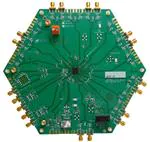
L M K 0 4 8 1 6
E V A L U A T I O N
B O A R D
O P E R A T I N G
I N S T R U C T I O N S
LMK04816
Low-Noise Clock Jitter Cleaner with Dual Loop PLLs
LMK04816 Evaluation Board Operating Instructions
Texas Instruments
June 2012
1
SNLU107
�L M K 0 4 8 1 6
E V A L U A T I O N
B O A R D
O P E R A T I N G
I N S T R U C T I O N S
Table of Contents
TABLE OF CONTENTS.............................................................................................................................................. 2
GENERAL DESCRIPTION .......................................................................................................................................... 4
EVALUATION BOARD KIT CONTENTS ..................................................................................................................................4
AVAILABLE LMK04816 EVALUATION BOARDS ....................................................................................................................4
AVAILABLE LMK04816 FAMILY DEVICES ...........................................................................................................................4
QUICK START ......................................................................................................................................................... 5
DEFAULT CODELOADER MODES FOR EVALUATION BOARDS....................................................................................................6
EXAMPLE: USING CODELOADER TO PROGRAM THE LMK04816 ............................................................................. 7
1. START CODELOADER 4 APPLICATION..............................................................................................................................7
2. SELECT DEVICE ..........................................................................................................................................................7
3. PROGRAM/LOAD DEVICE.............................................................................................................................................8
4. RESTORING A DEFAULT MODE ......................................................................................................................................8
5. VISUAL CONFIRMATION OF FREQUENCY LOCK ..................................................................................................................9
6. ENABLE CLOCK OUTPUTS .............................................................................................................................................9
PLL LOOP FILTERS AND LOOP PARAMETERS......................................................................................................... 11
PLL 1 LOOP FILTER ......................................................................................................................................................11
122.88 MHz VCXO PLL ........................................................................................................................................11
PLL2 LOOP FILTER .......................................................................................................................................................12
EVALUATION BOARD INPUTS AND OUTPUTS ....................................................................................................... 13
RECOMMENDED TEST EQUIPMENT...................................................................................................................... 21
PROGRAMMING 0-DELAY MODE IN CODELOADER .............................................................................................. 22
OVERVIEW..................................................................................................................................................................22
DUAL LOOP 0-DELAY MODE EXAMPLES ...........................................................................................................................22
Programming Steps ............................................................................................................................................22
Details ................................................................................................................................................................22
SINGLE LOOP 0-DELAY MODE EXAMPLES .........................................................................................................................24
Programming Steps ............................................................................................................................................24
Details ................................................................................................................................................................24
APPENDIX A: CODELOADER USAGE ...................................................................................................................... 26
PORT SETUP TAB .........................................................................................................................................................26
CLOCK OUTPUTS TAB ...................................................................................................................................................27
PLL1 TAB...................................................................................................................................................................29
Setting the PLL1 VCO Frequency and PLL2 Reference Frequency .......................................................................30
PLL2 TAB...................................................................................................................................................................31
BITS/PINS TAB ............................................................................................................................................................32
REGISTERS TAB ............................................................................................................................................................37
APPENDIX B: TYPICAL PHASE NOISE PERFORMANCE PLOTS ................................................................................. 38
PLL1 .........................................................................................................................................................................38
122.88 MHz VCXO Phase Noise ..........................................................................................................................38
Clock Output Measurement Technique ..............................................................................................................39
Buffered Phase Noise .........................................................................................................................................39
CLOCK OUTPUTS (CLKOUT) ...........................................................................................................................................40
2
SNLU107
�L M K 0 4 8 1 6
E V A L U A T I O N
B O A R D
O P E R A T I N G
I N S T R U C T I O N S
LMK04816B CLKout Phase Noise ........................................................................................................................40
LMK04816B OSCout Phase Noise .......................................................................................................................41
APPENDIX C: SCHEMATICS ................................................................................................................................... 43
POWER SUPPLIES .........................................................................................................................................................43
LMK04816B DEVICE WITH LOOP FILTER AND CRYSTAL CIRCUITS .........................................................................................44
REFERENCE INPUTS (CLKIN0, CLKIN1, & CLKIN2), EXTERNAL VCXO (OSCIN) & VCO CIRCUITS ...............................................45
CLOCK OUTPUTS (OSCOUT0, CLKOUT0 TO CLKOUT3) ......................................................................................................46
CLOCK OUTPUTS (CLKOUT4 TO CLKOUT7) ......................................................................................................................47
CLOCK OUTPUTS (CLKOUT8 TO CLKOUT11) ....................................................................................................................48
UWIRE HEADER, LOGIC I/O PORTS AND STATUS LEDS........................................................................................................ 49
USB INTERFACE...........................................................................................................................................................50
APPENDIX D: BILL OF MATERIALS ........................................................................................................................ 51
APPENDIX E: PCB LAYERS STACKUP ..................................................................................................................... 56
APPENDIX F: PCB LAYOUT .................................................................................................................................... 57
LAYER #1 – TOP ..........................................................................................................................................................57
LAYER #2 – RF GROUND PLANE (INVERTED) .....................................................................................................................58
LAYER #3 – VCC PLANES ...............................................................................................................................................59
LAYER #4 – GROUND PLANE (INVERTED)..........................................................................................................................60
LAYER # 5 – VCC PLANES 2............................................................................................................................................61
LAYER #6 – BOTTOM....................................................................................................................................................62
LAYERS #1 AND 6 – TOP AND BOTTOM (COMPOSITE) .........................................................................................................63
APPENDIX G: PROPERLY CONFIGURING LPT PORT ............................................................................................... 65
LPT DRIVER LOADING ...................................................................................................................................................65
CORRECT LPT PORT/ADDRESS .......................................................................................................................................65
CORRECT LPT MODE ....................................................................................................................................................66
APPENDIX H: TROUBLESHOOTING INFORMATION ............................................................................................... 67
1)
2)
3)
CONFIRM COMMUNICATIONS ...............................................................................................................................67
CONFIRM PLL1 OPERATION/LOCKING ....................................................................................................................67
CONFIRM PLL2 OPERATION/LOCKING ....................................................................................................................68
3
SNLU107
�L M K 0 4 8 1 6
E V A L U A T I O N
B O A R D
O P E R A T I N G
I N S T R U C T I O N S
General Description
The LMK04816 Evaluation Board simplifies evaluation of the LMK04816B Low-Noise Clock
Jitter Cleaner with Dual Loop PLLs. Texas Instruments‟s CodeLoader software can be used to
program the internal registers of the LMK04816B device through the MICROWIRETM interface.
The CodeLoader software will run on a Windows 2000 or Windows XP PC and can be
downloaded from http://www.ti.com/tool/codeloader/.
Evaluation Board Kit Contents
The evaluation board kit includes:
(1) LMK04816 Evaluation Board from Table 1
(1) CodeLoader uWire cable (LPT uWire)
Available LMK04816 Evaluation Boards
The LMK04816 Evaluation Board supports any of the four devices offered in the LMK04816
Family. A commercial-quality VCXO is also mounted to the board to provide a known
reference point for evaluating device performance and functionality.
Table 1: Available Evaluation Board Configurations
Evaluation Board ID
Device
LMK04816BEVAL
LMK04816B
PLL1 VCXO
122.88 MHz Crystek VCXO
Model CVHD-950-122.880
Available LMK04816 Family Devices
Table 2: LMK04816B Devices
Device
Reference
Inputs
LMK04816B
3
Buffered/
Divided
OSCin
Outputs
1
4
Programmable
LVDS/LVPECL/
LVCMOS
Outputs
12
VCO Frequency
2370 to 2600 MHz
SNLU107
�L M K 0 4 8 1 6
E V A L U A T I O N
B O A R D
O P E R A T I N G
I N S T R U C T I O N S
Quick Start
Full evaluation board instructions are downloadable from the LMK04816B device product folder
at www.ti.com.
1. Connect a power supply voltage of 5 V to the Vcc SMA connector. The onboard
LP3878-ADJ LDO regulator will output a low-noise 3.3 V supply to operate the device.
2. Connect a reference clock from a signal source to the CLKin1 SMA port. Use 122.88
MHz for default. The reference frequency depends on the device programming.
3. Connect the uWire header to a PC parallel port using the CodeLoader cable. A USB
interface is also available (search for “USB2UWIRE-IFACE” at www.ti.com).
4. Program the device with a default mode using CodeLoader. Ctrl+L must be pressed at
least once to load all registers. Alternatively click menu “Keyboard Controls” “Load
Device”. CodeLoader can be downloaded from www.ti.com/tool/codeloader/.
5. Measurements may be made on an active output clock port via its SMA connector.
5.0 V
CLKout0
CLKout0*
Power
CLKout2
CLKout2*
1
5.0 V
3.3 V
(LDO)
CL
CL Kou
Ko t4
ut4
*
Factory default is LDO is used.
Customer may reconfigure to
power LMK directly.
*
t1 0
o u t1 0
K
CL Kou
CL
LMK04816
uWire
header
OSCout0
OSCout0*
0
Kin
C L n0 *
Ki
CL in2
K
C L n 2*
Ki
CL
Reference clock from
signal generator or other
external source.
122.88 MHz
(Default)
2
CL
CL Kou
Ko t8
u t8
*
CL
CL Kout
Ko 6*
u t6
Parallel Port Ribbon Cable
C
i n1
LK
4
Program with CodeLoader
Be sure to press ‘Ctrl - L’
Reference
3
Parallel Port
Connector
Laptop or PC
Figure 1: Quick Start Diagram
5
SNLU107
�L M K 0 4 8 1 6
E V A L U A T I O N
B O A R D
O P E R A T I N G
I N S T R U C T I O N S
Default CodeLoader Modes for Evaluation Boards
CodeLoader saves the state of the selected LMK04816B device when exiting the software. To
ensure a common starting point, the following modes listed in Table 3 may be restored by
clicking “Mode” and selecting the appropriate device configuration, as shown in Figure 2 in the
case of the LMK04816 device. Similar default modes are available for each LMK04816B
device in CodeLoader. Choose a mode with CLKin0 for differential clock signal or CLKin1 for a
single ended signal.
Figure 2: Selecting a Default Mode for the LMK04816 Device
After restoring a default mode, press Ctrl+L to program the device. The default modes also
disable certain outputs, so make sure to enable the output under test to make measurements.
Table 3: Default CodeLoader Modes for LMK04816
Default CodeLoader Mode
122.88 MHz CLKin1, 122.88 MHz
VCXO
122.88 MHz CLKin1, Dual Loop 0delay, 122.88 MHz VCXO
122.88 MHz CLKin1, 122.88 MHz
VCXO
122.88 MHz CLKin1, 122.88 MHz
VCXO
122.88 MHz CLKin1, Dual Loop 0delay, 122.88 MHz VCXO
122.88 MHz CLKin1, 122.88 MHz
VCXO
Device Mode
CLKin
Frequency
OSCin
Frequency
Dual PLL, Internal VCO
122.88 MHz
122.88 MHz
122.88 MHz
122.88 MHz
122.88 MHz
20.48 MHz
122.88 MHz
122.88 MHz
122.88 MHz
122.88 MHz
122.88 MHz
20.48 MHz
Dual PLL, Internal VCO,
0-Delay with Internal
Feedback
Dual PLL, Internal VCO,
PLL2 Crystal Oscillator
Enabled
Dual PLL, Internal VCO
Dual PLL, Internal VCO,
0-Delay with Internal
Feedback
Dual PLL, Internal VCO,
PLL2 Crystal Oscillator
Enabled
The next section outlines step-by-step procedures for using the evaluation board with the
LMK04816. For boards with another part number, make sure to select the corresponding part
number under the “Device” menu.
6
SNLU107
�L M K 0 4 8 1 6
E V A L U A T I O N
B O A R D
O P E R A T I N G
I N S T R U C T I O N S
Example: Using CodeLoader to Program the LMK04816
The purpose of this section is to walk the user through using CodeLoader 4 to make some
measurements with the LMK04816 device as an example. For more information on CodeLoader
refer to Appendix A: CodeLoader Usage or the CodeLoader 4 instructions located at
http://www.ti.com/tool/codeloader/.
Before proceeding, be sure to follow the Quick Start section above to ensure proper connections.
1. Start CodeLoader 4 Application
Click “Start” “Programs” “CodeLoader 4” “CodeLoader 4”
The CodeLoader 4 program is installed by default to the CodeLoader 4 application group.
2. Select Device
Click “Select Device” “Clock Conditioners” “LMK04816”
Once started CodeLoader 4 will load the last used device. To load a new device click “Select
Device” from the menu bar, then select the subgroup and finally device to load. For this
example, the LMK04816B is chosen. Selecting the device does cause the device to be
programmed.
Figure 3 – Selecting the LMK04816B device
7
SNLU107
�L M K 0 4 8 1 6
E V A L U A T I O N
B O A R D
O P E R A T I N G
I N S T R U C T I O N S
3. Program/Load Device
Assuming the Port Setup settings are correct, press the
“Ctrl+L” shortcut or click “Keyboard Controls”
“Load Device” from the menu to program the device to
the current state of the newly loaded LMK04816 file.
Figure 4 – Loading the Device
Once the device has been initially loaded, CodeLoader
will automatically program changed registers so it is
not necessary to re-load the device upon subsequent
changes in the device configuration. It is possible to disable this functionality by ensuring there
is no checkmark by the “Options” “AutoReload with Changes.”
Because a default mode will be restored in the next step, this step isn‟t really needed but included
to emphasize the importance of pressing “Ctrl+L” to load the device at least once after starting
CodeLoader, restoring a mode, or restoring a saved setup using the File menu.
See Appendix A: CodeLoader Usage or the CodeLoader 4 instructions located at
http://www.ti.com/tool/codeloader/ for more information on Port Setup. Appendix H:
Troubleshooting Information contains information on troubleshooting communications.
4. Restoring a Default Mode
Click “Mode” “LMK04816, 122.88 MHz VCXO, 122.88 MHz CLKin1”; then press Ctrl+L.
Figure 5: Setting the Default mode for LMK04816
For the purpose of this walkthrough, a default mode will be loaded to ensure a common starting
point. This is important because when CodeLoader is closed, it remembers the last settings used
for a particular device. Again, remember to press Ctrl+L as the first step after loading a default
mode.
8
SNLU107
�L M K 0 4 8 1 6
E V A L U A T I O N
B O A R D
O P E R A T I N G
I N S T R U C T I O N S
5. Visual Confirmation of Frequency Lock
After a default mode is restored and loaded, LED D5 should illuminate when PLL1 and PLL2
are locked to the reference clock applied to CLKin1. This assumes LD_MUX = PLL1/2 DLD
and LD_TYPE = Active High, which are the default settings.
6. Enable Clock Outputs
While the LMK04816B offers programmable clock output buffer formats, the evaluation board
is shipped with preconfigured output terminations to match the default buffer type for each
output. Refer to the CLKout port description in the Evaluation Board Inputs and Outputs section.
To measure phase noise at one of the clock outputs, for example, CLKout0:
1. Click on the Clock Outputs tab,
2. Uncheck “Powerdown” in the Digital Delay box to enable the channel,
3. Set the following settings as needed:
a. Digital Delay value
b. Clock Divider value
c. Analog Delay select and Analog Delay value (if not “Bypassed”)
d. Clock Output type.
Figure 6: Setting Digital Delay, Clock Divider, Analog Delay, and Output Format for CLKout0
4. Depending on the configured output type, the clock output SMAs can be interfaced to a
test instrument with a single-ended 50-ohm input as follows.
a. For LVDS:
i. A balun (like ADT2-1T) is recommended for differential-to-single-ended
conversion.
b. For LVPECL:
i. A balun can be used, or
ii. One side of the LVPECL signal can be terminated with a 50-ohm load and
the other side can be run single-ended to the instrument.
c. For LVCMOS:
i. There are two single-ended outputs,
CLKoutX and CLKoutX*, and each
output can be set to Normal, Inverted, or
Off. There are nine (9) combinations of
LVCMOS modes in the Clock Output list.
ii. One side of the LVCMOS signal can be
terminated with a 50-ohm load and the
other side can be run single-ended to the
instrument.
iii. A balun may also be used. Ensure
Figure 7: Setting LVCMOS modes
CLKoutX and CLKoutX* states are
complementary to each other, i.e.:
9
SNLU107
�L M K 0 4 8 1 6
E V A L U A T I O N
B O A R D
O P E R A T I N G
I N S T R U C T I O N S
Norm/Inv or Inv/Norm.
5. The phase noise may be measured with a spectrum analyzer or signal source analyzer.
See Appendix B: Typical Phase Noise Performance Plots for phase noise plots of the clock
outputs.
National‟s Clock Design Tool can be used to calculate divider values to achieve desired clock
output frequencies. See: http://www.ti.com/tool/codeloader/.
10
SNLU107
�L M K 0 4 8 1 6
E V A L U A T I O N
B O A R D
O P E R A T I N G
I N S T R U C T I O N S
PLL Loop Filters and Loop Parameters
In jitter cleaning applications that use a cascaded or dual PLL architecture, the first PLL‟s
purpose is to substitute the phase noise of a low-noise oscillator (VCXO or crystal resonator) for
the phase noise of a “dirty” reference clock. The first PLL is typically configured with a narrow
loop bandwidth in order to minimize the impact of the reference clock phase noise. The reference
clock consequently serves only as a frequency reference rather than a phase reference.
The loop filters on the LMK04816 evaluation board are setup using the approach above. The
loop filter for PLL1 has been configured for a narrow loop bandwidth (< 100 Hz), while the loop
filter of PLL2 has been configured for a wide loop bandwidth (> 100 kHz). The specific loop
bandwidth values depend on the phase noise performance of the oscillator mounted on the board.
The following tables contain the parameters for PLL1 and PLL2 for each oscillator option.
National‟s Clock Design Tool can be used to optimize PLL phase noise/jitter for given
specifications. See: http://www.ti.com/tool/codeloader/.
PLL 1 Loop Filter
Table 4: PLL1 Loop Filter Parameters for Crystek 122.88 MHz VCXO
122.88 MHz VCXO PLL
Phase Margin
49˚
Kφ (Charge Pump)
100 uA
Loop Bandwidth
12 Hz
Phase Detector Freq
VCO Gain
1.024 MHz
2.5 kHz/Volt
Reference Clock
Frequency
122.88 MHz
Output Frequency
122.88 MHz (To PLL 2)
Loop Filter
Components
C1_A1 = 100 nF
C2_A1 = 680 nF
R2_A1 = 39 kΩ
Note: PLL Loop Bandwidth is a function of K , Kvco, N as well as loop components. Changing
K and N will change the loop bandwidth.
11
SNLU107
�L M K 0 4 8 1 6
E V A L U A T I O N
B O A R D
O P E R A T I N G
I N S T R U C T I O N S
PLL2 Loop Filter
Table 5: PLL2 Loop Filter Parameters for LMK04816B
C1_A2
C2_A2
C3 (internal)
C4 (internal)
R2_A2
R3 (internal)
R4 (internal)
Charge Pump
Current, K
Phase Detector
Frequency
Frequency
Kvco
N
Phase Margin
Loop
Bandwidth
LMK04816B
0.047
3.9
0
0
0.62
0.2
0.2
nF
nF
nF
nF
kΩ
kΩ
kΩ
3.2
mA
122.88
MHz
2457.6
18.8
20
75
MHz
MHz/V
321
kHz
degrees
Note: PLL Loop Bandwidth is a function of K , Kvco, N as well as loop components. Changing
K and N will change the loop bandwidth.
12
SNLU107
�L M K 0 4 8 1 6
E V A L U A T I O N
B O A R D
O P E R A T I N G
I N S T R U C T I O N S
Evaluation Board Inputs and Outputs
The following table contains descriptions of the inputs and outputs for the evaluation board.
Unless otherwise noted, the connectors described can be assumed to be populated by default.
Additionally, some applicable CodeLoader programming controls are noted for convenience.
Refer to the LMK04816 Family Datasheet for complete register programming information.
Table 6: Evaluation Board Inputs and Outputs
Connector Name
Signal Type,
Input/Output
Description
Clock outputs with programmable output buffers.
The output terminations by default on the evaluation
board are shown below, and the output type selected by
default in CodeLoader is indicated by an asterisk (*):
Clock output pair
Populated:
CLKout0, CLKout0*,
CLKout2, CLKout2*,
CLKout4, CLKout4*,
CLKout6, CLKout6*,
CLKout8, CLKout8*,
CLKout10, CLKout10*
Not Populated:
CLKout1, CLKout1*,
CLKout3, CLKout3*,
CLKout5, CLKout5*,
CLKout7, CLKout7*,
CLKout9, CLKout9*,
CLKout11, CLKout11*
CLKout0
CLKout1
CLKout2
CLKout3
CLKout4
CLKout5
CLKout6
CLKout7
CLKout8
CLKout9
CLKout10
CLKout11
Analog,
Output
Default Board
Termination
LVPECL*
LVPECL
LVPECL*
LVPECL
LVDS* / LVCMOS
LVDS / LVCMOS
LVDS* / LVCMOS
LVDS / LVCMOS
LVDS* / LVCMOS
LVDS / LVCMOS
LVPECL*
LVPECL
Each CLKout pair has a programmable LVDS,
LVPECL, or LVCMOS buffer. The output buffer type
can be selected in CodeLoader in the Clock Outputs
tab via the CLKoutX_TYPE control.
All clock outputs are AC-coupled to allow safe testing
with RF test equipment.
All LVPECL clock outputs are source-terminated using
240-ohm resistors.
If an output pair is programmed to LVCMOS, each
output can be independently configured (normal,
inverted, or off/tri-state).
13
SNLU107
�L M K 0 4 8 1 6
Connector Name
E V A L U A T I O N
B O A R D
Signal Type,
Input/Output
O P E R A T I N G
I N S T R U C T I O N S
Description
Buffered output of OSCin port.
The output terminations on the evaluation board are
shown below, the output type selected by default in
CodeLoader is indicated by an asterisk (*):
Default Board
OSC output pair
Termination
OSCout0
LVDS* / LVCMOS
Populated:
OSCout0, OSCout0*,
Analog,
Output
Only OSCout0 has a programmable LVDS, LVPECL,
or LVCMOS output buffer. The OSCout0 buffer type
can be selected in CodeLoader on the Clock Outputs
tab via the OSCout0_TYPE control.
OSCout0 is AC-coupled to allow safe testing with RF
test equipment.
If OSCout0 is programmed as LVCMOS, each output
can be independently configured (normal, inverted,
inverted, and off/tri-state).
Main power supply input for the evaluation board.
A 3.9 V DC power source applied to this SMA will, by
default, source the onboard LDO regulators that power
the inner layer planes that supply the LMK04816B and
its auxiliary circuits (e.g. VCXO).
Vcc
Power,
Input
Populated:
J1
Power,
Input
Populated:
VccVCO/Aux
Power,
Input
The LMK04816B contains internal voltage regulators
for the VCO, PLL and other internal blocks. The clock
outputs do not have an internal regulator, so a clean
power supply with sufficient output current capability
is required for optimal performance.
On-board LDO regulators and 0 resistor options
provide flexibility to supply and route power to various
devices. See schematics for more details.
Alternative power supply input for the evaluation board
using two unshielded wires (Vcc and GND).
Apply power to either Vcc SMA or J1, but not both.
Optional Vcc input to power the VCO circuit if
separated voltage rails are needed. The VccVCO/Aux
input can power these circuits directly or supply the onboard LDO regulators. 0 Ω resistor options provide
flexibility to route power.
14
SNLU107
�L M K 0 4 8 1 6
Connector Name
Populated:
VccVCXO/Aux
E V A L U A T I O N
B O A R D
O P E R A T I N G
I N S T R U C T I O N S
Signal Type,
Input/Output
Description
Power,
Input
Optional Vcc input to power the VCXO circuit if
separated voltage rails are needed. The
VccVCXO/Aux input can power these circuits directly
or supply the on-board LDO regulators. 0 Ω resistor
options provide flexibility to route power.
15
SNLU107
�L M K 0 4 8 1 6
Connector Name
E V A L U A T I O N
B O A R D
Signal Type,
Input/Output
O P E R A T I N G
I N S T R U C T I O N S
Description
Reference Clock Inputs for PLL1 (CLKin0, 1, 2).
CLKin1 can alternatively be used as an External
Feedback Clock Input (FBCLKin) in 0-delay mode or
an RF Input (Fin) in External VCO mode.
Reference Clock Inputs for PLL1 (CLKin0, 1, 2)
FBCLKin/CLKin1* is configured by default for a
single-ended reference clock input from a 50-ohm
source. The non-driven input pin (FBCLKin/CLKin1)
is connected to GND with a 0.1 uF. CLKin0/CLKin0*
is configured by default for a differential reference
clock input from a 50-ohm source.
Populated:
CLKin0, CLKin0*,
FBCLKin*/CLKin1*
CLKin2/CLKin2*
Not Populated:
FBCLKin/CLKin1
CLKin1* is the default reference clock input selected in
CodeLoader. The clock input selection mode can be
programmed on the Bits/Pins tab via the
CLKin_Select_MODE control. Refer to the
LMK04816 Family Datasheet section “Input Clock
Switching” for more information.
Analog,
Input
AC coupled Input Clock Swing Levels
Input
Mode
Min Max
Differential
Bipolar or
0.5
3.1
CMOS
Single Ended
0.25 2.4
Units
Vpp
Vpp
External Feedback Input (FBCLKin) for 0-Delay
CLKin1 is shared for use with FBCLKin as an external
feedback clock input to PLL1 for 0-delay mode. See
section, Programming 0-Delay Mode in CodeLoader
below, for more details on using 0-delay mode with the
evaluation board and the evaluation board software.
RF Input (Fin) for External VCO
CLKin1 is also shared for use with Fin as an RF input
for external VCO mode using the onboard VCO
footprint (U3) or add-on VCO board. To enable Dual
PLL mode with External VCO, the following registers
must be properly configured in CodeLoader:
MODE = (3) Dual PLL, Ext VCO (Fin), (5)
Dual PLL, Ext VCO, 0-Delay, (11) PLL2, Ext
VCO (Fin)
16
SNLU107
�L M K 0 4 8 1 6
Connector Name
E V A L U A T I O N
B O A R D
Signal Type,
Input/Output
O P E R A T I N G
I N S T R U C T I O N S
Description
Feedback VCXO clock input to PLL1 and Reference
clock input to PLL2.
By default, these SMAs are not connected to the traces
going to the OSCin/OSCin* pins of the LMK04816B.
Instead, the single-ended output of the onboard VCXO
(U2) drives the OSCin* input of the device and the
OSCin input of the device is connected to GND with
0.1 uF.
Not populated:
OSCin, OSCin*
Analog,
Input
A VCXO add-on board may be optionally attached via
these SMA connectors with minor modification to the
components going to the OSCin/OSCin* pins of
device. This is useful if the VCXO footprint does not
accommodate the desired VCXO device.
A single-ended or differential signal may be used to
drive the OSCin/OSCin* pins and must be AC coupled.
If operated in single-ended mode, the unused input
must be connected to GND with 0.1 uF.
Test point:
VTUNE1_TP
Not populated:
Vtune1
Test point:
VTUNE2_TP
Refer to the LMK04816 Family Datasheet section
“Electrical Characteristics” for PLL2 Reference Input
(OSCin) specifications.
Tuning voltage output from the loop filter for PLL1.
Analog,
Output
Analog,
Output
If a VCXO add-on board is used, this tuning voltage
can be connected to the voltage control pin of the
external VCXO when this SMA connector is installed
and connected through R72 by the user.
Tuning voltage output from the loop filter for PLL2.
10-pin header for uWire programming interface and
programmable logic I/O pins for the LMK04816B.
Populated:
uWire
Test points:
DATAuWire_TP
CLKuWIRE_TP
LEuWIRE_TP
CMOS,
Input/Output
The uWire interface includes CLKuWire,
DATAuWire, and LEuWire signals.
The programmable logic I/O signals accessible through
this header include: SYNC, Status_Holdover,
Status_LD, Status_CLKin0, and Status_CLKin1.
These logic I/O signals also have dedicated SMAs and
test points.
17
SNLU107
�L M K 0 4 8 1 6
Connector Name
E V A L U A T I O N
B O A R D
Signal Type,
Input/Output
O P E R A T I N G
I N S T R U C T I O N S
Description
Programmable status output pin. By default, set to
output the digital lock detect status signal for PLL1 and
PLL2 combined.
In the default CodeLoader modes, LED D5 will
illuminate green when PLL lock is detected by the
LMK04816B (output is high) and turn off when lock is
lost (output is low).
Test point:
LD_TP
Not populated:
Status_LD
CMOS,
Output
The status output signal for the Status_LD pin can be
selected on the Bits/Pins tab via the LD_MUX control.
Refer to the LMK04816 Family Datasheet section
“Status Pins” and “Digital Lock Detect” for more
information.
Note: Before a high-frequency internal signal (e.g. PLL
divider output signal) is selected by LD_MUX, it is
suggested to first remove the 270 ohm resistor to
prevent the LED from loading the output.
Programmable status output pin. By default, set to the
output holdover mode status signal.
In the default CodeLoader mode, LED D8 will
illuminate red when holdover mode is active (output is
high) and turn off when holdover mode is not active
(output is low).
Test point:
Holdover_TP
Not populated:
Status_Hold
CMOS,
Output
The status output signal for the Status_Holdover pin
can be selected on the Bits/Pins tab via the
HOLDOVER_MUX control.
Refer to the LMK04816 Family Datasheet section
“Status Pins” and “Holdover Mode” for more
information.
Note: Before a high-frequency internal signal (e.g. PLL
divider output signal) is selected by
HOLDOVER_MUX, it is suggested to first remove the
270 ohm resistor to prevent the LED from loading the
output.
18
SNLU107
�L M K 0 4 8 1 6
Connector Name
E V A L U A T I O N
B O A R D
Signal Type,
Input/Output
O P E R A T I N G
I N S T R U C T I O N S
Description
Programmable status I/O pins. By default, set as input
pins for controlling input clock switching of CLKin0
and CLKin1.
These inputs will not be functional because
CLKin_Select_MODE is set to 0 (CLKin0 Manual) by
default in the Bits/Pins tab in CodeLoader. To enable
input clock switching, CLKin_Select_MODE must be
3 or 6 and Status_CLKinX_TYPE must be 0 to 3 (pin
enabled as an input).
Test point:
CLKin0_SEL_TP
CLKin1_SEL_TP
Not populated:
Status_CLKin0,
Status_CLKin1
Input Clock Switching – Pin Select Mode
When CLKin_SELECT_MODE is 3, the
Status_CLKinX pins select which clock input is active
as follows:
Status_CLKin1 Status_CLKin0 Active Clock
0
0
CLKin0
0
1
CLKin1
1
0
Reserved
1
1
Holdover
CMOS,
Input/Output
Input Clock Switching – Auto with Pin Select
When CLKin_SELECT_MODE is 6, the active clock is
selected using the Status_CLKinX pins upon an input
clock switch event as follows:
Active
Status_CLKin1 Status_CLKin0
Clock
X
0
CLKin0
1
0
CLKin1
0
0
Reserved
Refer to the LMK04816 Family Datasheet section
“Input Clock Switching” for more information.
Status Outputs
When Status_CLKinX_TYPE is 3 to 6 (pin enabled as
an output), the status output signal for the
corresponding Status_CLKinX pin can be programmed
on the Bits/Pins tab via the Status_CLKinX_MUX
control.
Refer to the LMK04816 Family Datasheet section
“Status Pins” for more information.
19
SNLU107
�L M K 0 4 8 1 6
Connector Name
E V A L U A T I O N
B O A R D
Signal Type,
Input/Output
O P E R A T I N G
I N S T R U C T I O N S
Description
Programmable status I/O pin. By default, set as an
input pin for synchronize the clock outputs with a fixed
and known phase relationship between each clock
output selected for SYNC. A SYNC event also causes
the digital delay values to take effect.
Test point:
SYNC_TP
Not populated:
SYNC
CMOS,
Input/Output
In the default CodeLoader mode, SYNC will asserted
when the SYNC pin is low and the outputs to be
synchronized will be held in a logic low state. When
SYNC is unasserted, the clock outputs to be
synchronized are activated and will be initially phase
aligned with each other except for outputs programmed
with different digital delay values.
A SYNC event can also be programmed by toggling
the SYNC_POL_INV bit in the Bits/Pins tab in
CodeLoader.
Refer to the LMK04816 Family Datasheet section
“Clock Output Synchronization” for more information.
Status Output
When SYNC_MUX is 3 to 6 (pin enabled as output), a
status signal for the SYNC pin can be selected on the
Bits/Pins tab via the SYNC_MUX control.
20
SNLU107
�L M K 0 4 8 1 6
E V A L U A T I O N
B O A R D
O P E R A T I N G
I N S T R U C T I O N S
Recommended Test Equipment
Power Supply
The Power Supply should be a low noise power supply, particularly when the devices on the
board are being directly powered (onboard LDO regulators bypassed).
Phase Noise / Spectrum Analyzer
To measure phase noise and RMS jitter, an Agilent E5052 Signal Source Analyzer is
recommended. An Agilent E4445A PSA Spectrum Analyzer with the Phase Noise option is also
usable although the architecture of the E5052 is superior for phase noise measurements. At
frequencies less than 100 MHz the local oscillator noise of the E4445A is too high and
measurements will reflect the E4445A‟s internal local oscillator performance, not the device
under test.
Oscilloscope
To measure the output clocks for AC performance, such as rise time or fall time, propagation
delay, or skew, it is suggested to use a real-time oscilloscope with at least 1 GHz analog input
bandwidth (2.5+ GHz recommended) with 50 ohm inputs and 10+ Gsps sample rate. To
evaluate clock synchronization or phase alignment between multiple clock outputs, it‟s
recommended to use phase-matched, 50-ohm cables to minimize external sources of skew or
other errors/distortion that may be introduced if using oscilloscope probes.
21
SNLU107
�L M K 0 4 8 1 6
E V A L U A T I O N
B O A R D
O P E R A T I N G
I N S T R U C T I O N S
Programming 0-Delay Mode in CodeLoader
Overview
When enabling the 0-Delay mode the feedback path of the VCO is altered to include a clock
output. See the datasheet for more details on 0-Delay functionality.
The current version of the CodeLoader software does not include this extra divider in the
frequency calculations when in holdover mode. To successfully lock the LMK04816 device in a
0-Delay mode the user must program the device “manually” account for this divider.
Programming “manually” means that the VCO frequency and therefore the clock output
frequencies displayed by the CodeLoader software may be incorrect. For the LMK04816 device
to lock properly the divider values must be programmed correctly. The frequencies displayed in
the application are only for the benefit of the user and for proper automatic programming of the
OSCin_FREQ register which will not be affected by 0-Delay.
When using the device in Dual Loop mode vs. Single Loop mode different procedures are used
to cause the device to lock when using the CodeLoader software. The following two sections
describe the process for when the LMK04816 device is programmed for a Dual Loop mode and
Single Loop mode respectively. Each section contains a brief introduction, the programming
steps to execute to make the device lock, and finally a detailed section discussing the
workaround and some example cases.
Dual Loop 0-Delay Mode Examples
In Dual Loop 0-Delay Modes, MODE = 2 or MODE = 5, the feedback from the VCXO of PLL1
to the PLL1 N divider is broken and a clock output will drive the PLL1 N divider. This permits
phase alignment between the clock output and the clock input (0-Delay). As such, the PLL1_N
and PLL1_R divide values may need to be adjusted to permit the LMK04816 to lock.
Programming Steps
1. Program a Dual Loop 0-Delay mode.
2. Enable the feedback mux. EN_FEEDBACK_MUX = 1.
3. Select clock output for feedback with the feedback mux. FEEDBACK_MUX = User
value.
4. Program the VCXO (VCO) frequency of PLL1 tab to the clock output frequency selected
by the feedback mux.
If for any reason the CLKout frequency is less than the phase detector frequency, the PLL1 R
divider must be increased so that the phase detector is at the same or lower value than the
CLKout frequency.
Details
When using the CodeLoader software in Dual Loop 0-Delay mode, programming the VCXO
(VCO) frequency of the PLL1 tab to the frequency of the fed back output clock will re-program
the PLL1 N divider to allow the LMK04816 will be able to lock. The PLL1 loop has been
altered and actual VCXO no longer directly feeds into PLL1 N divider. The VCXO is only used
22
SNLU107
�L M K 0 4 8 1 6
E V A L U A T I O N
B O A R D
O P E R A T I N G
I N S T R U C T I O N S
by the reference input of PLL2 now. The PLL2 reference frequency will remain at the VCXO
frequency.
When the PLL1 VCXO frequency is different from the PLL2 reference frequency, a warning
will be displayed on the clock outputs tab informing the user that PLL1 VCO and PLL2
reference frequency are mismatched and the one or more of the PLLs are out of lock. While
there still could be an error in the divider values which may cause a non-locked PLL, this
warning by itself may no longer be assumed true. It is up to the user to ensure the PLL dividers
are programmed correctly.
To illustrate the proper programming of the LMK04816 device in dual loop 0-delay mode the
following case examples are provided. Note that in one of the cases, the feedback frequency
from the clock output matches the VCXO frequency and CodeLoader will display the proper
frequency values.
Dual Loop 0-Delay (MODE=2 or 5) Case 1: For example the default configuration, 122.88 MHz
CLKin, 122.88 MHz VCXO, of the LMK04816 has the following register programming.
Case2:
Default 0-Delay
Mode
(CLKout8 =
122.88 MHz)
Case 3:
Default 0-Delay
Mode (Updated
CLKout8 =
245.76 MHz)
Case 4:
Default 0-Delay
Mode (Updated
CLKout8 =
61.44 MHz)
122.88
122.88
122.88
122.88
122.88
122.88
61.44
245.76
120
120
60
240
2949.12 MHz
2949.12 MHz
2949.12 MHz
2949.12 MHz
2949.12 MHz
2949.12 MHz
2949.12 MHz
2949.12 MHz
12
2
Bypassed
12
12
2
Bypassed
24
12
2
Bypassed
12
12
2
Bypassed
48
245.76 MHz
122.88 MHz
245.76 MHz
61.44 MHz
245.76 MHz
122.88 MHz
245.76 MHz
61.44 MHz
Case 1:
Default Mode
No 0-Delay
Actual PLL1
VCXO Frequency
Reported PLL1
VCXO Frequency
PLL1 N
Actual PLL2
VCO Frequency
Reported PLL2
VCO Frequency
PLL2_N
PLL2_P (Pre-N)
PLL2 VCO Divider
CLKout8 Divide
Actual CLKout8
Output Frequency
Reported CLKotu8
Output Frequency
23
SNLU107
�L M K 0 4 8 1 6
E V A L U A T I O N
B O A R D
O P E R A T I N G
I N S T R U C T I O N S
Single Loop 0-Delay Mode Examples
In Single Loop 0-Delay Mode, MODE = 8, the feedback from the VCO of PLL2 to the
PLL2_P/PLL2 N divider is broken and a fed back clock output will drive the PLL2 N divider
directly. This permits phase alignment between the clock output and the OSCin input (0-Delay).
As such, the PLL2_N, PLL2_R, and PLL2_N_CAL divide values may need to be adjusted to
permit the LMK04816 to lock.
Programming Steps
1. Program the Single Loop 0-Delay mode.
2. Enable the feedback mux. EN_FEEDBACK_MUX = 1.
3. Select clock output for feedback with the feedback mux. FEEDBACK_MUX = User
value.
4. Program the VCO frequency of PLL2 tab to: The actual VCO frequency * PLL2_P
(which is PLL2 PreN) / CLKout Divider.
Entered CodeLoader 4 VCO Frequency = Actual VCO Frequency * PLL2_P /
CLKout Divider.
5. Updated the PLL2_N_CAL register on the Bits/Pins tab to the N value when in non-0Delay mode.
6. Press Ctrl-L to cause all registers to be programmed.
The reason is to cause the programming of register R30 to start the VCO
calibration routine now that the proper PLL2_N_CAL value is programmed.
PLL2_N_CAL value is automatically updated when a new VCO frequency is
entered and the PLL2_N value is calculated. In this case the VCO frequency
entered is wrong and the PLL2_N_CAL value will be incorrect.
If for any reason the CLKout frequency is less than the phase detector frequency, the PLL2 R
divider must be increased so that the phase detector is at the same or lower value than the
CLKout frequency.
Details
The 0-Delay mode for Single Loop mode is more complicated to program than for Dual Loop
mode in part because of the PLL2_N_CAL register. When performing the VCO calibration the
device uses PLL2_N_CAL for in non-0-Delay mode. Once the VCO is calibrated the device
enters 0-Delay mode. For more information on the PLL programming equations, refer to PLL
PROGRAMMING in the applications section of the datasheet.
In Table 7 case 1 illustrates the register programming when note using 0-Delay.
Case 2 shows 0-Delay with a clock out divider of 2. Since PLL2_P = 2, this substitution of
which circuit is performing the divide by two results in no impact o the software. All the values
display correctly.
Case 3 shows 0-Delay mode with a CLKout divider not equal to the PLL2_P value. So the
proper frequency to program in the VCO to lock the VCO to 2949.12 MHz will be 491.52 MHz.
This is calculated by Actual VCO Frequency * PLL2_P / CLKoutX_Y_DIV.
24
SNLU107
�L M K 0 4 8 1 6
E V A L U A T I O N
B O A R D
O P E R A T I N G
I N S T R U C T I O N S
Case 4 shows 0-Delay mode with CLKout divider not equal to the PLL2_P value; however the
CLKout frequency will be less than the current phase detector frequency. This requires PLL2_R
to be increased from a value of 1 to 2 to reduce the PLL2 phase detector frequency from 122.88
MHz to 61.44 MHz. Now the adjusted VCO frequency can be programmed to allow PLL2 to
lock.
In any case where the actual VCO frequency and the display VCO frequency are not equal the
user is required to manually update the PLL2_N_CAL register with the PLL2_N value to be
used as if the device were operating in the non-0-Delay mode. Once this update has been
performed, Ctrl-L will reload the part and cause the VCO calibration to occur with the proper
PLL2_N_CAL value.
Table 7 - Single PLL 0-Delay Operation Examples
Case 2:
Default 0-Delay
Mode
(CLKout8 =
1474.56 MHz)
Case 3:
Default 0-Delay
Mode (Updated
CLKout8 =
245.76 MHz)
Case 4:
Default 0-Delay
Mode (Updated
CLKout8 =
61.44 MHz)
2949.12 MHz
2949.12 MHz
2949.12 MHz
2949.12 MHz
2949.12 MHz
2949.12 MHz
491.52 MHz
122.88 MHz
1
12
12
2
Bypassed
12
1
12
12
2
Bypassed
2
1
2
12
2
Bypassed
12
2
1
24
2
Bypassed
48
245.76
1474.56 MHz
245.76 MHz
61.44 MHz
245.76
1474.56 MHz
40.96 MHz
2.56 MHz
Case 1:
Default Mode
No 0-Delay
Actual PLL2
VCO Frequency
Reported PLL2
VCO Frequency
PLL2_R
PLL2_N
PLL2_N_CAL
PLL2_P (Pre-N)
PLL2 VCO Divider
CLKout8 Divide
Actual CLKout8
Output Frequency
Reported CLKout8
Output Frequency
25
SNLU107
�L M K 0 4 8 1 6
E V A L U A T I O N
B O A R D
O P E R A T I N G
I N S T R U C T I O N S
Appendix A: CodeLoader Usage
Code Loader is used to program the evaluation board with either an LPT port using the included
CodeLoader cable or with a USB port using the optional USB-to-uWire cable available from
http://store.ti.com/. The part number is USB2UWIRE-IFACE.
Port Setup Tab
Figure 8: Port Setup tab
On the Port Setup tab, the user may select the type of communication port (USB or Parallel) that
will be used to program the device on the evaluation board. If parallel port is selected, the user
should ensure that the correct port address is entered.
The Pin Configuration field is hardware dependent and normally does not need to be changed by
the user. Figure 8 shows the default settings.
26
SNLU107
�L M K 0 4 8 1 6
E V A L U A T I O N
B O A R D
O P E R A T I N G
I N S T R U C T I O N S
Clock Outputs Tab
Figure 9: Clock Outputs tab
The Clock Outputs tab allows the user to control the output channel blocks, including:
Clock Group Source from either VCO or OSCin (via OSC Mux1 and OSC Mux2)
Channel Powerdown (affects digital and analog delay, clock divider, and buffer blocks)
Digital Delay value and Half Step
Clock Divide value
Analog Delay value and Delay bypass/enable (per output)
Clock Output format (per output)
This tab also allows the user to select the VCO Divider value (2 to 8). Note that the total PLL2
N divider value is the product of the VCO Divider value and the PLL N Prescaler and N Counter
values (shown in the PLL2 tab), and is given by:
PLL2 N Total = VCO Divider * PLL2 N Prescaler * PLL2 N Counter
27
SNLU107
�L M K 0 4 8 1 6
E V A L U A T I O N
B O A R D
O P E R A T I N G
I N S T R U C T I O N S
Clicking on the cyan-colored PLL2 block that contains R, PDF and N values will bring the
PLL2 tab into focus where these values may be modified, if needed.
Clicking on the values in the box containing the Internal Loop Filter component (R3, C3, R4,
C4) allow one to step through the possible values. Left click to increase the component value,
and right click to decrease the value. These values can also be changed in the Bits/Pins tab.
The Reference Oscillator value field may be changed in either the Clock Outputs tab or the
PLL2 tab. The PLL2 Reference frequency should match the frequency of the onboard VCXO or
Crystal (i.e. VCO frequency in the PLL1 tab); if not, a warning message will appear to indicate
that the PLL(s) may be out of lock, as highlighted by the red box in Figure 10.
Figure 10: Warning message indicating mismatch between
PLL1 VCO frequency (30.72MHz) and PLL2 reference frequency (122.88 MHz)
28
SNLU107
�L M K 0 4 8 1 6
E V A L U A T I O N
B O A R D
O P E R A T I N G
I N S T R U C T I O N S
PLL1 Tab
Figure 11: PLL1 tab
The PLL1 tab allows the user to change the following parameters in Table 8.
Table 8: Registers Controls and Descriptions in PLL1 tab
Control Name
Reference Oscillator
Frequency (MHz)
Phase Detector Frequency
(MHz)
Register Name
n/a
VCO Frequency (MHz)
n/a
R Counter
PLL1_R
Description
CLKin frequency of the selected reference
clock.
PLL1 Phase Detector Frequency (PDF).
This value is calculated as:
PLL1 PDF = CLKin Frequency / (PLL1_R *
CLKinX_PreR_DIV), where
CLKinX_PreR_DIV is the predivider value
of the selected input clock.
The VCO Frequency should be the OSCin
frequency, except when operating in Dual
PLL with 0-delay feedback. This value is
calculated as:
VCO Freq (OSCin freq) = PLL1 PDF *
PLL1_N.
In Dual PLL mode with 0-delay feedback,
the VCO frequency should be set to the
feedback clock input frequency. See the
section Setting the PLL1 VCO Frequency
and PLL2 Reference Frequency for details.
PLL1 R Counter value (1 to 16383).
n/a
29
SNLU107
�L M K 0 4 8 1 6
E V A L U A T I O N
B O A R D
N Counter
Phase Detector Polarity
PLL1_N
PLL1_CP_POL
Charge Pump Gain
PLL1_CP_GAIN
Charge Pump State
PLL1_CP_TRI
O P E R A T I N G
I N S T R U C T I O N S
PLL1 N Counter value (1 to 16383).
PLL1 Phase Detector Polarity.
Click on the polarity sign to toggle polarity
“+” or “–”.
PLL1 Charge Pump Gain.
Left-click/right-click to increase/decrease
charge pump gain (100, 200, 400, 1600 uA).
PLL1 Charge Pump State.
Click to toggle between Active and Tri-State.
Setting the PLL1 VCO Frequency and PLL2 Reference Frequency
When operating in Dual PLL mode without 0-delay feedback, the VCO frequency value on the
PLL1 tab must match the Reference Oscillator (OSCin) frequency value on the PLL2 tab;
otherwise, the one or both PLLs may be out of lock. Updating the Reference Oscillator
frequency on the PLL2 tab will automatically update the value of OSCin_FREQ on the
Bits/Pins tab.
However, when operating in Dual PLL mode with 0-delay feedback, it may be valid for the VCO
frequency value on the PLL1 tab to be different from the Reference Oscillator (OSCin)
frequency value on the PLL2 tab. This is because in 0-delay mode, the PLL1 feedback clock is
taken from an output clock instead of the OSCin clock. For example, if the CLKin frequency (to
PLL1_R) is 30.72 MHz, the 0-delay feedback clock frequency (to PLL1_N) is 30.72 MHz, and
the VCXO frequency is 122.88 MHz, then the VCO frequency value on the PLL1 tab should be
30.72 MHz (0-delay feedback frequency) and the Reference Oscillator frequency value on the
PLL2 tab should be 122.88 MHz (VCXO frequency). Because of the mismatched frequencies, a
warning message will indicate this condition on the Clock Outputs tab but may be disregarded
in a case like this.
30
SNLU107
�L M K 0 4 8 1 6
E V A L U A T I O N
B O A R D
O P E R A T I N G
I N S T R U C T I O N S
PLL2 Tab
Figure 12: PLL2 tab
The PLL2 tab allows the user to change the following parameters in Table 9.
Table 9: Registers Controls and Descriptions in PLL2 tab
Control Name
Reference Oscillator
Frequency (MHz)
Phase Detector Frequency
(MHz)
Register Name
OSCin_FREQ
VCO Frequency (MHz)
n/a
Doubler
EN_PLL2_REF_2X
R Counter
N Counter
PLLN Prescaler
PLL2_R
PLL2_N
PLL2_P
n/s
31
Description
OSCin frequency from the External VCXO
or Crystal.
PLL2 Phase Detector Frequency (PDF).
This value is calculated as:
PLL2 PDF = OSCin Frequency
*(2EN_PLL2_REF_2X) / PLL2_R.
Internal VCO Frequency should be within
the allowable range of the LMK04816B
device.
This value is calculated as:
VCO Frequency = PLL2 PDF * (PLL2_N *
PLL2_P * VCO divider value).
PLL2 Doubler.
0 = Bypass Doubler
1 = Enable Doubler
PLL2 R Counter value (1 to 4095).
PLL2 N Counter value (1 to 262143).
PLL2 N Prescaler value (2 to 8).
SNLU107
�L M K 0 4 8 1 6
E V A L U A T I O N
B O A R D
Phase Detector Polarity
PLL2_CP_POL
Charge Pump Gain
PLL2_CP_GAIN
Charge Pump State
PLL2_CP_TRI
O P E R A T I N G
I N S T R U C T I O N S
PLL2 Phase Detector Polarity.
Click on the polarity sign to toggle polarity
“+” or “–”.
PLL2 Charge Pump Gain.
Left-click/right-click to increase/decrease
charge pump gain (100, 400, 1600, 3200
uA).
PLL2 Charge Pump State.
Click to toggle between Active and Tri-State.
Changes made on this tab will be reflected in the Clock Outputs tab. The VCO Frequency
should conform to the specified internal VCO frequency range for the LMK04816B device (per
Table 2).
Bits/Pins Tab
Figure 13: Bits/Pins tab
The Bits/Pins tab allows the user to program bits directly, many of which are not available on
other tabs. Brief descriptions for the controls on this tab are provided in Table 10 to supplement
the datasheet. Refer to the LMK04816 Family Datasheet for more information.
TIP: Right-clicking any register name in the Bits/Pins tab will display a Help prompt with the
register address, data bit location/length, and a brief register description.
32
SNLU107
�L M K 0 4 8 1 6
E V A L U A T I O N
B O A R D
O P E R A T I N G
I N S T R U C T I O N S
Table 10: Register Controls and Descriptions on Bits/Pins tab
Group
Register Name
RESET
POWERDOWN
MODE
Mode Control
PD_OSCin
FEEDBACK_MUX
OSCin_FREQ
VCO_MUX
uWire_LOCK
CLKin_Select_MODE
EN_CLKin1
CLKin
EN_CLKin0
EN_CLKin2
CLKinX_BUF_TYPE
EN_LOS
LOS_TIMEOUT
IO
Control
Crystal
EN_PLL2_XTAL
XTAL_LVL
LD_MUX
LD_TYPE
HOLDOVER_MUX
Description
Resets the device to default register values. RESET
must be cleared for normal operation to prevent an
unintended reset every time R0 is programmed.
Places the device in powerdown mode.
Selects the operating mode (topology) for the
LMK04816 device.
Powers down the OSCin buffer. For use in Clock
Distribution mode if OSCin path is not used.
Selects the feedback source for 0-delay mode.
Must be set to the OSCin frequency range for
PLL2. Used for proper operation of the internal
VCO calibration routine.
Entering a reference oscillator frequency on PLL2
tab will automatically update OSCin_FREQ to the
proper frequency range.
Selects between VCO and VCO divider to drive the
clock distribution path. The VCO divider is only
valid if MODE is selecting the Internal VCO.
When checked, no other uWire programming will
have effect. Must be unchecked to enable uWire
programming of registers R0 to R30.
Selects operational mode for how the device selects
the reference clock for PLL1.
Enables CLKin1 as a usable reference input during
auto switching mode.
Enables CLKin0 as a usable reference input during
auto switching mode.
Enables CLKin2 as a usable reference input during
auto switching mode.
Selects the CLKinX input buffer to Bipolar
(internal 0 mV offset) or MOS (internal 55 mV
offset).
Enable the Loss-Of-Signal (LOS) detect circuitry.
Sets the timeout value for the LOS detect circuitry
to assert a loss of signal state on a clock input.
Enables Crystal Oscillator
Sets peak amplitude on the tunable crystal. Values
listed are for a 20.48 MHz crystal.
Sets the selected signal on the Status_LD pin.
Sets I/O pin type on the Status_LD pin.
Sets the selected signal on the Status_HOLDOVER
pin.
33
SNLU107
�L M K 0 4 8 1 6
E V A L U A T I O N
B O A R D
O P E R A T I N G
I N S T R U C T I O N S
DAC/Holdover
IO Control – Sync
HOLDOVER_TYPE
Status_CLKin0 _MUX
Status_CLKin0_TYPE
Status_CLKin1_MUX
Status_CLKin1_TYPE
CLKin_Sel_INV
Sets I/O pin type on the Status_Holdover pin.
Sets the selected signal on the Status_CLKin0 pin.
Sets I/O pin type on the Status_CLKin0 pin.
Sets the selected signal on the Status_CLKin1 pin.
Sets I/O pin type on the Status_CLKin1 pin.
Inverts the Status_CLKin0/1 pin polarity when set
to an input type. Significant when
CLKin_SELECT_MODE is 3 or 6.
SYNC_MUX
Sets the selected signal on the SYNC pin.
SYNC_TYPE
Sets I/O pin type on the SYNC pin.
SYNC_POL_INV
Sets polarity on SYNC input to active low when
checked. Toggling this bit will initiate a SYNC
event.
SYNC_PLL1_DLD
Engage SYNC mode until PLL1 DLD is true
SYNC_PLL2_DLD
Engage SYNC mode until PLL2 DLD is true
NO_SYNC_CLKoutX_Y Synchronization will not affect selected clock
outputs, where X = even-numbered output and Y =
odd-numbered output.
SYNC_QUAL
Sets the SYNC to qualify mode for dynamic digital
delay.
EN_SYNC
Must be set when using SYNC, but may be cleared
after the SYNC event. When using dynamic digital
delay (SYNC_QUAL = 1), EN_SYNC must always
be set.
Changing this value from 0 to 1 can cause a SYNC
event, so clocks which should not be SYNCed
when setting this bit should have the
NO_SYNC_CLKoutX_Y bit set.
NOTE: This bit is not a valid method of generating
a SYNC event. Use one of the other SYNC
generation methods to ensure a proper SYNC
occurs.
SYNC_EN_AUTO
Enable auto SYNC when R0 to R5 is written.
HOLDOVER_MODE
Sets holdover mode to be disabled or enabled.
FORCE_HOLDOVER
Engages holdover when checked regardless of
HOLDOVER_MODE value. Turns the DAC on.
EN_TRACK
Enables DAC tracking. DAC tracks the PLL1
Vtune to provide for an accurate HOLDOVER
mode. DAC_CLK_DIV should also be set so that
DAC update rate is