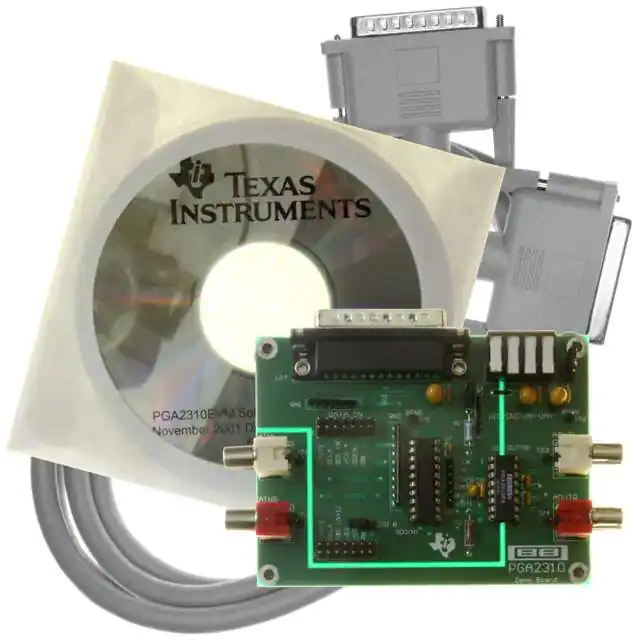
PGA2310-EVM
SBOU012 – NOVEMBER 2001
FEATURES
● COMPLETE EVALUATION MODULE FOR THE
PGA2310 STEREO AUDIO VOLUME CONTROL
● RCA JACKS FOR ANALOG INPUTS AND
OUTPUTS
● 14-PIN HEADERS FOR DATA INPUT AND
OUTPUT
● INCLUDES SOFTWARE AND PARALLEL PORT
CABLE FOR USE WITH COMPUTERS RUNNING MICROSOFT WINDOWS® 95/98
Windows is a registered trademark of Microsoft.
● DB-25 CONNECTOR FOR INTERFACING WITH
A PC PARALLEL (PRINTER) PORT
Please be aware that an important notice concerning availability, standard warranty, and use in critical applications of
Texas Instruments semiconductor products and disclaimers thereto appears at the end of this data sheet.
Copyright © 2001, Texas Instruments Incorporated
PRODUCTION DATA information is current as of publication date.
Products conform to specifications per the terms of Texas Instruments
standard warranty. Production processing does not necessarily include
testing of all parameters.
www.ti.com
�HARDWARE SETUP
This section provides an overview of the evaluation module
hardware for setup purposes. Complete schematics at the
end of the data sheet are provided.
The DATA OUT header is used to connect to the DATA IN
header of another PGA2310-EVM when using a daisy-chain
configuration. Daisy-chain operation is discussed in more
detail under “Dual DUT (or Daisy-Chain) Operation”.
ANALOG INPUT AND OUTPUT CONNECTORS
POWER SUPPLIES
The PGA2310-EVM includes a power-supply connector, labeled PS on the circuit board. Four locking terminals are
provided for the analog power supplies (VA+ and VA–), a
digital power supply (VD+), and a common ground (GND).
There are two configuration modes for the power supplies:
Three-Supply operation and Two-Supply operation.
In the case of Three-Supply operation, jumper J1 is installed,
while jumper J2 is open circuit. Separate supplies are required for VD+, VA+, and VA–. The supplies share a common ground connection at the GND terminal. Table I shows
the supply configuration details.
Supply
Designator
VD+
VA+
VA–
Typical
Supply Voltage
Supply Voltage Range
+5V
+15V
–15V
+4.5V to +5.5V
+4.5V to +16V
–4.5V to –16V
NOTE: Install jumper at J1. Remove jumper from J2 (open circuit).
TABLE I. Requirements for Three-Supply Operation.
In the case of Two-Supply operation, jumpers J1 and J2 are
installed. The J2 jumper connects the VA+ terminal to the VD+
terminal, with VA+ providing both the positive analog and
digital supplies. Separate supplies are required for VA+ and
VA–. The supplies share a common ground connection at the
GND terminal. Table II shows the supply configuration details.
Supply
Designator
VA+
VA–
Typical
Supply Voltage
Supply Voltage Range
+5V
–5V
+4.5V to +5.5V
–4.5V to –5.5V
NOTE: Install jumpers at J1 and J2.
The evaluation module includes RCA jacks for connection to
waveform generators, signal analyzers, and commercial audio equipment. The input jacks are labeled AINL and AINR,
while the output jacks are labeled AOUTL and AOUTR. The
‘L’ and ‘R’ at the end of the reference designators refer to the
left and right audio channels, respectively.
The analog inputs and outputs are unbalanced (referenced
to ground). The analog input or output swing must not
exceed 27Vp-p with ±15V analog power supplies, or 7Vp-p
with ±5V analog supplies.
REGISTER LOOPBACK JUMPER
The evaluation module contains a loop-back jumper, labeled
SDO R. The purpose of this jumper is to allow read back of
the previously programmed gain register values for one or
more devices. This is helpful when diagnosing problems with
the PC parallel port or host controller communications.
The serial interface is basically a 16-bit serial in, serial out
shift register. The SDI pin is the input, while SDO is the
output. As 16-bits of new data is shifted into the PGA2310,
the previously programmed 16-bits are being shifted out.
This allows the user to read back the values to determine if
the device is being programmed correctly. It also allows
multiple PGA2310 devices to be cascaded, or daisy-chained,
to form a 16 x N-bit long shift register, where N is the number
of devices included in the chain. This arrangement allows a
3-wire interface to program multiple PGA2310 devices connected in a daisy-chain fashion. Daisy-chain operation is
discussed in more detail in “Dual DUT (or Daisy-Chain)
Operation”.
SOFTWARE INSTALLATION
TABLE II. Requirements for Two-Supply Operation.
SYSTEM REQUIREMENTS
PC PARALLEL PORT INTERFACE
The supplied software will run on personal computers designed for use with Windows 95® and 98.
The evaluation module includes a DB-25 connector, labeled
LPT, which is used to interface the PGA2310-EVM with a PC
parallel (or printer) port. The parallel port is used by the
evaluation module software to communicate with the
PGA2310’s serial interface. An interface cable is supplied as
part of the evaluation module package.
DATA IN AND DATA OUT HEADERS
Two 14-pin headers are included on the evaluation module.
They are labeled DATA IN and DATA OUT. The DATA IN
header provides an alternative connection for host communications with the PGA2310’s serial interface. It also provides
a means for interfacing to another PGA2310-EVM when
using a daisy-chain configuration.
2
A CD-ROM drive is required for installation of program files
and access to support documents. Approximately 4MB of
hard disk space is required for installation.
INSTALLATION PROCEDURE
The following procedure assumes familiarity with navigating
the Windows desktop to find folders and files located on
mounted volumes. Should you need assistance with this,
please consult the Windows Help system.
Step 1: Insert the accompanying CD into your CD-ROM
drive.
Step 2: Locate the PGA2310-EVM folder on the CD, using
either My Computer or Windows Explorer.
PGA2310-EVM
SBOU012
�Step 3: Double-click the PGA2310-EVM folder icon, and then
locate the Package folder. Double-click on the Package
folder icon to open the folder. Locate the file named Setup.exe.
Double-click the Setup.exe icon to start the installation process. Follow the on-screen instructions to complete the
installation procedure.
STARTING UP THE SOFTWARE:
THE MAIN PANEL
The setup program installs a Texas Instruments folder in the
Programs folder of the Start menu. Within the Texas Instruments folder is the PGA2310-EVM program. Selecting this
program will startup the applications software.
Once the program is started, the Main panel will be displayed, as shown in Figure 1. The Main panel allows the user
to select the parallel (or printer) port address, and either
Single or Dual DUT operation. The ‘Reset All’ button will
revert all settings to their startup defaults. Pressing the
‘DUT1 Panel’ button will open a panel containing the PGA2310
control objects, as shown in Figure 2.
DETERMINING AND SETTING
THE PRINTER PORT ADDRESS
The parallel port address for your PC can be found by going
to the Start menu and selecting the Control Panel item in the
Settings menu. When the Control Panels window opens, find
the System icon and double click it. From the System
window, select the Device Manager tab by clicking on it once.
Scroll down the list of devices until you see the Ports entry.
Double click on the Ports entry to list the PC ports. One of the
FIGURE 1. The Main Panel.
ports should be a Printer Port. Double click on the Printer Port
entry to open the Printer Port window. From the Printer Port
window, select the Resources tab by clicking on it once. The
Input/Output Range is displayed (ex/ 0378 –037F). Write
down the starting number in the range (ex/ 0378), and go to
the Main panel of the evaluation module program and select
the port address that matches this number.
SINGLE OR DUAL DUT?
Most users will select Single DUT, since they will have only
one evaluation module. This will enable the DUT1 control
panel, as shown in Figure 2. If you have two demo boards
and are connecting them in a daisy-chain fashion, select Dual
DUT (Daisy-Chain). “Dual DUT (or Daisy-Chain) Operation”,
provides more details regarding daisy-chain operation.
FIGURE 2. The DUT1 Panel.
PGA2310-EVM
SBOU012
3
�PROGRAMMING THE PGA2310
THE DUT PANEL
All controls for the PGA2310 are contained within the DUT
panel (see Figure 2). This section describes the functions
contained within this panel.
GAIN CONTROLS
The Gain Controls occupy the bottom half of the DUT panel.
There are three gain sliders for the PGA2310, one each for left
and right channel, and a Gang slider for controlling both left
and right channels simultaneously. When the PGA2310 first
powers up, it will reset to maximum attenuation (or mute). The
software also defaults to maximum attenuation (shown as –Inf
to the right of the sliders). A display to the right of each slider
displays the currently selected gain setting.
The Ramp radio buttons to the right of each slider are used to
select the gain slider to be automated when using the Ramp
controls in the upper right-hand corner of the DUT panel.
The Pan slider functions as a Balance control, simultaneously gaining one channel while attenuating the other. It
behaves just like the balance control on your home or car
stereo system.
RAMP CONTROLS
The Ramp controls allow automation of the gain settings for
one or both channels. The user enters the top and bottom
points for the ramp, along with the desired step size and
delay between steps. The ramp may be generated from
bottom to top (Ramp Up) or from top to bottom (Ramp Down)
for the given range.
The ramp step size may be set from 0.5dB to 3.0dB in 0.5dB
increments. The ramp step delay may be set using relative
delay settings of 0, 1, 2, 5, 10, 20, or 50.
The channel selection for the automated ramp is selected
using the radio buttons located to the right of the gain sliders
in the Gain Control section of the DUT panel.
DUAL DUT (OR DAISY-CHAIN)
OPERATION
As mentioned previously in this document, the PGA2310
serial interface allows multiple devices to be cascaded, or
daisy-chained, which allows a three-wire control interface to
write the gain settings for all of the devices connected to the
control port. Figure 3 illustrates the daisy-chain connection of
multiple PGA2310 devices.
MODE CONTROLS
The Mode control section resides in the upper left-hand
corner of the DUT panel. Several functions are accessible
from this section.
The Zero-Cross Detection checkbox is used to enable and
disable the zero crossing detector circuit inside the PGA2310
device. The default setting is zero crossing detection disabled.
The Mute by Pin checkbox is used to enable or disable the
MUTE pin function of the PGA2310. When MUTE is LOW,
the PGA2310 sets both left and right channel attenuation to
maximum (or mute). The default setting is mute disabled.
Two buttons allow the user to quickly set the gain of both left
and right channels to either 0dB or –Inf dB (or mute). The –Inf
dB button differs from the Mute by Pin checkbox in that it
programs maximum attenuation for both left and right channels using the PGA2310’s gain control registers, as opposed
to using the MUTE pin.
SDI
VINL
SCLK
Audio
Input
VINR
CS
PGA2310
#1
VOUTL
100kΩ
SDO
VOUTR
SDI
Audio
Input
100kΩ
VINL
Controller
SCLK
VINR
CS
PGA2310
#2
VOUTL
SDO
VOUTR
REGISTER LOOPBACK CONTROLS
With the SDO R jumper installed, the user can test the
function of the PGA2310 serial interface by using the Register Loopback control. Simply press the Interrogate button to
read back the value being programmed. This function is
included primarily for diagnostics, to ensure that the PC
parallel port and PGA2310 are communicating properly.
SDI
Audio
Input
VINL
SCLK
VINR
CS
PGA2310
#N
VOUTL
SDO
VOUTR
When using the Dual DUT setup, the SDO R jumper should
be installed on the second evaluation module, and left open
circuit on the first evaluation module to ensure proper loopback functionality.
FIGURE 3. Daisy-Chain Connection of Multiple PGA2310
Devices.
4
PGA2310-EVM
SBOU012
�Using the supplied software, two PGA2310-EVM modules
may be connected together using the Dual DUT option in the
Main panel, as shown in Figure 4. Selecting the Dual DUT
radio button will enable the DUT1 and DUT2 control panels.
The DUT1 panel was shown previously in Figure 2, while the
DUT2 panel is shown in Figure 5. Simply set the controls as
previously discussed in the section, “Programming the
PGA2310: The DUT Panel” for each device using the appropriate panel.
CONNECTING TWO PGA2310-EVM
BOARDS IN DUAL DUT MODE
As shown in Figure 6, connecting two evaluation modules is
accomplished using the DATA OUT and DATA IN connectors on the corresponding EVM boards. The DATA OUT
connector of EVM–1 is connected to the DATA IN connector
of EVM–2 using a straight through, flat ribbon cable. The
SDO_R jumper on EVM–1 is open circuit (no jumper), while
a jumper is installed on SDO R for EVM–2. This allows the
Register Loopback function in the DUT1 and DUT2 panels to
interrogate the gain setting values for both PGA2310’s.
PC
LPT
PGA2310-EVM
#1
LPT
PGA2310-EVM
#2
DATA OUT
DATA IN
Parallel Interface Cable
(supplied with PGA2310-EVM)
Straight-Through
14-Pin Flat Ribbon Cable
FIGURE 4. Dual DUT Configuration.
FIGURE 6. Connecting Two PGA2310-EVM Boards for Dual
DUT Operation.
FIGURE 5. The DUT2 Panel.
PGA2310-EVM
SBOU012
5
�FIGURE 7. Schematic Drawing.
LPT
PIN 25
PIN 24
PIN 23
PIN 22
PIN 21
PIN 20
PIN 19
PIN 18
PIN 17
PIN 16
PIN 15
PIN 14
PIN 13
PIN 12
PIN 11
PIN 10
PIN 9
PIN 8
PIN 7
PIN 6
PIN 5
PIN 4
PIN 3
PIN 2
PIN 1
SDI(1)
1
3
1
3
1
4
4
2
2
3
2
7
5
5
7
6
8
8
4
6
5
CS
RN1
47kΩ
SCLK
MUTE
SCLK
MUTE
12
11
10
9
6
12
11
10
9
RB
RB
SDI(N + 1)
CS
SDI(N + 1)
ZCEN
ZCEN
6
PGA2310-EVM
SBOU012
7
5
3
1
8
6
4
2
SDO R
14
DATA OUT
13
9
RNZ
10kΩ
10
14
DATA IN
13
19
1
9
8
7
6
5
4
3
2
GND
VCC
Y8
Y7
Y6
Y5
Y4
Y3
Y2
Y1
SDO (N)
SN74NC541N
G2
G1
A8
A7
A6
A5
A4
A3
A2
A1
U2
10
20
11
12
13
14
15
16
17
18
C7
0.01µF
SDO
MUTE
SCK
C8
1uF
25V
C9
0.1uF
SDI
CS
8
7
6
5
4
3
2
1
100kΩ
C2
0.1uF
ZCEN
TP7
C1
10uF
35V
MUTE
SDATA OUT
SCLK
DGND
VD+
J3
R1
10Ω 1%
1/8W
SDATA IN
CS
ZCEN
U1
TP5
L1
IND
AINR
AGNDR
AOUTR
VA+
VA–
AOUTL
AGNDL
AINL
TP6
J1
9
10
11
12
13
14
15
16
VD+
J2
GND
C3
10uF
35V
C10
0.1uF
VA+
C11
0.1uF
C4
0.1uF
VA–
TP2
TP4
TP3
TP1
C5
10uF
35V
C6
0.1uF
�IMPORTANT NOTICE
Texas Instruments and its subsidiaries (TI) reserve the right to make changes to their products or to discontinue
any product or service without notice, and advise customers to obtain the latest version of relevant information
to verify, before placing orders, that information being relied on is current and complete. All products are sold
subject to the terms and conditions of sale supplied at the time of order acknowledgment, including those
pertaining to warranty, patent infringement, and limitation of liability.
TI warrants performance of its semiconductor products to the specifications applicable at the time of sale in
accordance with TI’s standard warranty. Testing and other quality control techniques are utilized to the extent
TI deems necessary to support this warranty. Specific testing of all parameters of each device is not necessarily
performed, except those mandated by government requirements.
Customers are responsible for their applications using TI components.
In order to minimize risks associated with the customer’s applications, adequate design and operating
safeguards must be provided by the customer to minimize inherent or procedural hazards.
TI assumes no liability for applications assistance or customer product design. TI does not warrant or represent
that any license, either express or implied, is granted under any patent right, copyright, mask work right, or other
intellectual property right of TI covering or relating to any combination, machine, or process in which such
semiconductor products or services might be or are used. TI’s publication of information regarding any third
party’s products or services does not constitute TI’s approval, warranty or endorsement thereof.
PGA2310-EVM
SBOU012
7
�EVM IMPORTANT NOTICE
Texas Instruments (TI) provides the enclosed product(s) under the following conditions:
This evaluation kit being sold by TI is intended for use for ENGINEERING DEVELOPMENT OR EVALUATION
PURPOSES ONLY and is not considered by TI to be fit for commercial use. As such, the goods being provided
may not be complete in terms of required design-, marketing-, and/or manufacturing-related protective
considerations, including product safety measures typically found in the end product incorporating the goods.
As a prototype, this product does not fall within the scope of the European Union directive on electromagnetic
compatibility and therefore may not meet the technical requirements of the directive.
Should this evaluation kit not meet the specifications indicated in the EVM User’s Guide, the kit may be returned
within 30 days from the date of delivery for a full refund. THE FOREGOING WARRANTY IS THE EXCLUSIVE
WARRANTY MADE BY SELLER TO BUYER AND IS IN LIEU OF ALL OTHER WARRANTIES, EXPRESSED,
IMPLIED, OR STATUTORY, INCLUDING ANY WARRANTY OF MERCHANTABILITY OR FITNESS FOR ANY
PARTICULAR PURPOSE.
The user assumes all responsibility and liability for proper and safe handling of the goods. Further, the user
indemnifies TI from all claims arising from the handling or use of the goods. Please be aware that the products
received may not be regulatory compliant or agency certified (FCC, UL, CE, etc.). Due to the open construction
of the product, it is the user’s responsibility to take any and all appropriate precautions with regard to electrostatic
discharge.
EXCEPT TO THE EXTENT OF THE INDEMNITY SET FORTH ABOVE, NEITHER PARTY SHALL BE LIABLE
TO THE OTHER FOR ANY INDIRECT, SPECIAL, INCIDENTAL, OR CONSEQUENTIAL DAMAGES.
TI currently deals with a variety of customers for products, and therefore our arrangement with the user is not
exclusive.
TI assumes no liability for applications assistance, customer product design, software performance, or
infringement of patents or services described herein.
Please read the EVM User’s Guide and, specifically, the EVM Warnings and Restrictions notice in the EVM
User’s Guide prior to handling the product. This notice contains important safety information about temperatures
and voltages. For further safety concerns, please contact the TI application engineer.
Persons handling the product must have electronics training and observe good laboratory practice standards.
No license is granted under any patent right or other intellectual property right of TI covering or relating to any
machine, process, or combination in which such TI products or services might be or are used.
Mailing Address:
Texas Instruments
Post Office Box 655303
Dallas, Texas 75265
Copyright • 2001, Texas Instruments Incorporated
8
PGA2310-EVM
SBOU012
�EVM WARNINGS AND RESTRICTIONS
It is important to operate this EVM within the absolute maximum supply voltage of ±16V and
the corresponding input/output voltage range of 29.0Vp-p. The device is industrial grade, so
it can be operated over the –40°C to +85°C temperature range.
Exceeding the specified input range may cause unexpected operation and/or irreversible
damage to the EVM. If there are questions concerning the input range, please contact a TI
field representative prior to connecting the input power.
Applying loads outside of the specified output range may result in unintended operation and/or
possible permanent damage to the EVM. Please consult the EVM User’s Guide prior to
connecting any load to the EVM output. If there is uncertainty as to the load specification,
please contact a TI field representative.
During normal operation, some circuit components may have case temperatures greater than
+60°C. The EVM is designed to operate properly with certain components above +60°C as
long as the input and output ranges are maintained. These components include but are not
limited to linear regulators, switching transistors, pass transistors, and current sense
resistors. These types of devices can be identified using the EVM schematic located in the
EVM User’s Guide. When placing measurement probes near these devices during operation,
please be aware that these devices may be very warm to the touch.
Mailing Address:
Texas Instruments
Post Office Box 655303
Dallas, Texas 75265
Copyright • 2001, Texas Instruments Incorporated
PGA2310-EVM
SBOU012
9
�IMPORTANT NOTICE
Texas Instruments Incorporated and its subsidiaries (TI) reserve the right to make corrections, modifications, enhancements,
improvements, and other changes to its products and services at any time and to discontinue any product or service without notice.
Customers should obtain the latest relevant information before placing orders and should verify that such information is current and
complete. All products are sold subject to TI’s terms and conditions of sale supplied at the time of order acknowledgment.
TI warrants performance of its hardware products to the specifications applicable at the time of sale in accordance with TI’s
standard warranty. Testing and other quality control techniques are used to the extent TI deems necessary to support this
warranty. Except where mandated by government requirements, testing of all parameters of each product is not necessarily
performed.
TI assumes no liability for applications assistance or customer product design. Customers are responsible for their products and
applications using TI components. To minimize the risks associated with customer products and applications, customers should
provide adequate design and operating safeguards.
TI does not warrant or represent that any license, either express or implied, is granted under any TI patent right, copyright, mask
work right, or other TI intellectual property right relating to any combination, machine, or process in which TI products or services
are used. Information published by TI regarding third-party products or services does not constitute a license from TI to use such
products or services or a warranty or endorsement thereof. Use of such information may require a license from a third party under
the patents or other intellectual property of the third party, or a license from TI under the patents or other intellectual property of TI.
Reproduction of information in TI data books or data sheets is permissible only if reproduction is without alteration and is
accompanied by all associated warranties, conditions, limitations, and notices. Reproduction of this information with alteration is an
unfair and deceptive business practice. TI is not responsible or liable for such altered documentation.
Resale of TI products or services with statements different from or beyond the parameters stated by TI for that product or service
voids all express and any implied warranties for the associated TI product or service and is an unfair and deceptive business
practice. TI is not responsible or liable for any such statements.
TI products are not authorized for use in safety-critical applications (such as life support) where a failure of the TI product would
reasonably be expected to cause severe personal injury or death, unless officers of the parties have executed an agreement
specifically governing such use. Buyers represent that they have all necessary expertise in the safety and regulatory ramifications
of their applications, and acknowledge and agree that they are solely responsible for all legal, regulatory and safety-related
requirements concerning their products and any use of TI products in such safety-critical applications, notwithstanding any
applications-related information or support that may be provided by TI. Further, Buyers must fully indemnify TI and its
representatives against any damages arising out of the use of TI products in such safety-critical applications.
TI products are neither designed nor intended for use in military/aerospace applications or environments unless the TI products are
specifically designated by TI as military-grade or "enhanced plastic." Only products designated by TI as military-grade meet military
specifications. Buyers acknowledge and agree that any such use of TI products which TI has not designated as military-grade is
solely at the Buyer's risk, and that they are solely responsible for compliance with all legal and regulatory requirements in
connection with such use.
TI products are neither designed nor intended for use in automotive applications or environments unless the specific TI products
are designated by TI as compliant with ISO/TS 16949 requirements. Buyers acknowledge and agree that, if they use any
non-designated products in automotive applications, TI will not be responsible for any failure to meet such requirements.
Following are URLs where you can obtain information on other Texas Instruments products and application solutions:
Products
Applications
Amplifiers
amplifier.ti.com
Audio
www.ti.com/audio
Data Converters
dataconverter.ti.com
Automotive
www.ti.com/automotive
DSP
dsp.ti.com
Broadband
www.ti.com/broadband
Interface
interface.ti.com
Digital Control
www.ti.com/digitalcontrol
Logic
logic.ti.com
Military
www.ti.com/military
Power Mgmt
power.ti.com
Optical Networking
www.ti.com/opticalnetwork
Microcontrollers
microcontroller.ti.com
Security
www.ti.com/security
RFID
www.ti-rfid.com
Telephony
www.ti.com/telephony
Low Power
Wireless
www.ti.com/lpw
Video & Imaging
www.ti.com/video
Wireless
www.ti.com/wireless
Mailing Address: Texas Instruments, Post Office Box 655303, Dallas, Texas 75265
Copyright © 2007, Texas Instruments Incorporated
�