19-5053; Rev 0; 11/09
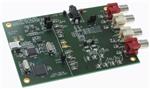
MAX97000 Evaluation Kit
Features
The MAX97000 evaluation kit (EV kit) is a fully assembled
and tested PCB that evaluates the MAX97000 mono
Class D audio power amplifier and stereo Class H
DirectDriveM headphone amplifier communicating over
a 2-wire I2C interface. The EV kit features an on-board
microcontroller for communicating with the I2C interface
of the MAX97000. Pads are provided for accessing the
analog inputs and amplifier outputs.
S 2.7V to 5.5V Single-Supply Operation
The MAX97000 EV kit requires a 2.7V to 5.5V power
supply. The on-chip LDO generates an internal 1.8V supply from the 2.7V to 5.5V supply.
S Windows 2000-, Windows XP-, and Windows Vista
WindowsM 2000-, Windows XPM-, and Windows VistaMcompatible software is provided to facilitate configuration. The software controls an on-board microcontroller
over USB, which generates I2C commands.
S Proven Audio PCB Layout
S On-Board USB Interface Circuit Generates I2C-
Compatible Signals
S PCB Pads for User-Supplied I2C-Compatible
Signals
S Surface-Mount Components
(32-Bit)-Compatible Software
S Fully Assembled and Tested
Ordering Information
PART
TYPE
MAX97000EVKIT+
EV Kit
+Denotes lead(Pb)-free and RoHS compliant.
Component List
DESIGNATION
QTY
DESCRIPTION
C1, C3–C10,
C17
10
0.1FF Q10%, 16V X7R ceramic
capacitors (0603)
Murata GRM188R71C104K
C2
1
DESIGNATION
QTY
DESCRIPTION
C20
1
3300pF Q10%, 50V X7R ceramic
capacitor (0603)
Murata GRM188R71H332K
4.7FF Q10%, 6.3V X5R ceramic
capacitor (0603)
Murata GRM188R60J475K
C26–C29,
C39–C42
0
Not installed, ceramic capacitors
(0402)
2
2
10pF Q5%, 50V C0G ceramic
capacitors (0603)
Murata GRM1885C1H100J
C31, C33
0.1FF Q10%, 16V X7R ceramic
capacitors (0402)
Murata GRM155R71C104K
C13, C15, C32,
C34
C43–C47
5
4
10FF Q10%, 6.3V X5R ceramic
capacitors (0603)
Murata GRM188R60J106M
0.22FF Q10%, 10V X5R ceramic
capacitors (0402)
Murata GRM155R61A224K
D1
1
Green LED (0603)
C14, C16,
C22–C25, C30,
C35–C38
1FF Q10%, 10V X5R ceramic
capacitors (0402)
Murata GRM155R61A105K
GND
1
Black miniature test point
11
HPJK
1
3.5mm stereo phone jack, SMT,
3-position, nonswitch
HPL
1
White miniature test point
2
22pF Q5%, 50V C0G ceramic
capacitors (0603)
Murata GRM1885C1H220J
HPR
1
Red miniature test point
JINA1, JINB1
2
White RCA jacks (left)
C11, C12
C18, C19
DirectDrive is a registered trademark of
Maxim Integrated Products, Inc.
Windows, Windows XP, and Windows Vista are registered
trademarks of Microsoft Corp.
________________________________________________________________ Maxim Integrated Products 1
For pricing, delivery, and ordering information, please contact Maxim Direct at 1-888-629-4642,
or visit Maxim’s website at www.maxim-ic.com.
Evaluates: MAX97000
General Description
�Evaluates: MAX97000
MAX97000 Evaluation Kit
Component List (continued)
DESIGNATION
QTY
JINA2, JINB2
2
Red RCA jacks (right)
JU1, JU2, JU3
3
2-pin headers
JU4
1
L1, L2
0
DESCRIPTION
DESIGNATION
QTY
U2
1
32-bit microcontroller (68 QFN-EP*)
Maxim MAXQ2000-RAX+
3-pin header
U3
1
93C46 type 3-wire EEPROM (8 SO)
Not installed, inductors (provided
with EV kit)
TOKO A916CY-220M
U4
1
UART-to-USB converter (32 TQFP)
U5
1
3.3V regulator (5 SC70)
Maxim MAX8511EXK33+
(Top Mark: AEI)
U6
1
3.3V regulator (5 SC70)
Maxim MAX8511EXK25+
(Top Mark: ADV)
Y1
1
16MHz crystal (HCM49)
Hong Kong X’tals
SSM16000N1HK188F0-0
Y2
1
6MHz crystal (HCM49)
Hong Kong X’tals
SSL60000N1HK188F0-0
—
1
USB high-speed A-to-mini B
cable, 2m
OUT-, OUT+
2
Test points
P1
1
USB mini type-B receptacle connector
R1, R10–R15,
R18, R19
9
0I Q5% resistors (0402)
R2
1
220I Q5% resistor (0603)
R3
1
10kI Q5% resistor (0603)
R4
1
2.2kI Q5% resistor (0603)
R5, R8, R9
3
1.5kI Q5% resistors (0603)
DESCRIPTION
R6, R7
2
27I Q5% resistors (0603)
R16, R17
0
Not installed, resistors (0603)
R20, R21
2
0I Q5% resistors (0603)
R22, R23
2
22I Q5% resistors (0402)
—
4
Shunts
0
Not installed, multipurpose test
points
—
1
PCB: MAX97000 EVALUATION
KIT+
1
Mono Class D speaker and Class
H headphone amplifier (25 WLP)
Maxim MAX97000EWA+
TP1, TP2
U1
*EP = Exposed pad.
Component Suppliers
SUPPLIER
PHONE
WEBSITE
Hong Kong X’tals Ltd.
852-35112388
www.hongkongcrystal.com
Murata Electronics North America, Inc.
770-436-1300
www.murata-northamerica.com
TOKO America, Inc.
847-297-0070
www.tokoam.com
Note: Indicate that you are using the MAX97000 when contacting these component suppliers
MAX97000 EV Kit Files
FILE
INSTALL.EXE
DESCRIPTION
Installs the EV kit files on your computer
MAX97000_1_2.EXE
Application program
FTD2XX.INF
USB device driver file
UNINST.INI
Uninstalls the EV kit software
USB_Driver_Help.PDF
USB driver installation help file
2 _______________________________________________________________________________________
�MAX97000 Evaluation Kit
Required Equipment
• 5V, 1A DC power supply (PVDD)
• Speaker
• Headphones
• User-supplied Windows 2000, Windows XP, or
Windows Vista PC with a spare USB port
• MAX97000 EV kit (cable included)
Note: In the following sections, software-related items
are identified by bolding. Text in bold refers to items
directly from the EV kit software. Text in bold and underlined refers to items from the Windows operating system.
Procedure
The MAX97000 EV kit is fully assembled and tested. Follow the steps below to verify board operation.
Caution: Do not apply power to VDD.
1) Visit www.maxim-ic.com/evkitsoftware to download the latest version of the EV kit software,
MAX97000_1_2xx.ZIP. Save the EV kit software to a
temporary folder and uncompress the ZIP file.
2) Install the EV kit software on the computer by running the INSTALL.EXE program inside the temporary folder.
6) Connect the USB cable from the PC to the EV kit
board. A New Hardware Found window pops up
when installing the USB driver for the first time.
If a window is not seen that is similar to the one
described above after 30s, remove the USB cable
from the board and reconnect it. Administrator privileges are required to install the USB device driver
on Windows.
7) Follow the directions of the Found New Hardware
window to install the USB device driver. Manually
specify the location of the device driver to be C:\
Program Files\MAX97000_1_2 (default installation
directory) using the Browse button. During device
driver installation, Windows may show a warning
message indicating that the device driver Maxim
uses does not contain a digital signature. This is
not an error condition and it is safe to proceed
with installation. Refer to the USB_Driver_Help.PDF
document included with the software for additional
information.
8) Connect the 5V power supply across the PVDD and
GND pads.
9) Connect the speaker across the OUT+ and OUTtest points.
10) Connect the headphones to HPJK.
3) Verify that shunts are installed on jumpers JU1 and
JU2. This configures the I2C inputs to receive signals from the USB interface circuitry.
11) Enable the power supply.
4) Verify that a shunt is installed on jumper JU3.
13) Observe as the program automatically detects the
address of the MAX97000 and starts the main program.
5) Verify that a shunt is installed in the 2-3 position
on jumper JU4. This is the hardware enable. The
MAX97000 has a software enable that is also
required to turn on the MAX97000.
12) Start the MAX97000 EV kit software by selecting its
icon in the Start | Programs menu.
14) The MAX97000 is now ready for evaluation.
_______________________________________________________________________________________ 3
Evaluates: MAX97000
Quick Start
�Evaluates: MAX97000
MAX97000 Evaluation Kit
Figure 1. MAX97000 Evaluation Kit Software Main Control Tab
4 _______________________________________________________________________________________
�MAX97000 Evaluation Kit
Graphical User Interface (GUI)
If the USB cable is connected to the EV kit, but power
is not applied to PVDD, the EV kit GUI acts like it is in
demo mode. In such a case, the EV kit is connected to
the PC through USB, and I2C commands can be sent to
the MAX97000. However, without power, the MAX97000
does not acknowledge the I2C commands. When power
is applied, press the Reset button to detect the presence of the MAX97000.
The MAX97000 EV kit software Main Control tab (Figure
1) divides the EV kit functions into logical blocks. The
MAX97000 EV kit software Registers tab (Figure 2)
displays each register’s individual bit logic-level status.
A data bit in bold indicates a logic-high, while a data
bit that is not bold indicates a logic-low. Clicking on the
individual data bit toggles the bit and performs a write
command. The new command is shown in the edit box at
the right. Write commands can be written to the registers
alternatively by typing a hex value in the edit box and
pressing the Enter key on the keyboard.
The Write All button writes the current settings to all
of the registers on the GUI. The EV kit software GUI
performs I2C write commands as changes occur on
the GUI. The Read All button changes the GUI settings
to match the MAX97000 register settings. To change
settings one time, enter demo mode by selecting the
Options | Demo Mode menu item, change the GUI
to the required settings, exit demo mode by selecting
Options | Demo Mode, and then press the Write All
button. If further changes are not required, enter demo
mode to disable communication to the MAX97000. To
obtain the MAX97000 settings, exit demo mode and
press the Read All button. The Reset button clears the
EV kit software GUI and reprograms the MAX97000 to
the default values.
Note: Text in bold refers to items in the EV kit software.
The MAX97000 EV kit software GUI (Figures 1 and
2) provides a convenient way to test the features of
the MAX97000. Figure 1 shows the MAX97000 EV kit
software’s Main Control tab, while Figure 2 shows the
Registers tab. Actions on the two tabs generate I2C
commands to update the MAX97000 internal memory
registers.
Software Startup
Upon starting the program, the MAX97000 EV kit software automatically searches for the USB interface circuit and then for the MAX97000 device address. The
MAX97000 EV kit enters the normal operating mode
when the USB connection is detected and has found the
device address. If jumper JU4 (hardware shutdown) is
in the 1-2 position (off), the MAX97000’s I2C bus is not
active. The ENABLE checkbox is the software shutdown
and requires JU4 to be in the 2-3 position (on). The
ENABLE checkbox in the Main Control tab enables the
EV kit if the hardware enable is also on. If the USB connection is not detected, the software prompts the user to
retry or enter the demo mode.
Demo Mode
The MAX97000 EV kit software enters the demo mode
when the USB connection is not detected or by selecting the Options | Demo Mode menu item in the main
window. When in demo mode, all software communication to the EV kit circuit is disabled; however, most of the
software GUI is functional. Demo mode allows the user
to evaluate the software without hardware connectivity.
Write All/Read All/Reset
MAX97000 Master Controls
The MAX97000 EV kit software’s MAX97000 Master
Controls group box contains ENABLE, Volume Slew
Disable, and Zero Crossing Detection Disable checkboxes. The ENABLE checkbox, which is also called the
software shutdown, enables or disables the MAX97000.
The Volume Slew Disable checkbox, when checked,
disables the volume slewing. The Zero Crossing
Detection Disable checkbox, when checked, disables
the zero-crossing detection (ZCD) during a volumechange operation. When enabled (unchecked), the ZCD
forces all volume adjustment to be made when the output signal is crossing zero, thus reducing audio clicks
during volume changes.
Input Gain
The MAX97000 EV kit software’s Input Gain group
box selects the input channel preamp gain for the
MAX97000. The MAX97000 input channel preamp gain
is selectable between -6dB, -3dB, 0dB, +3dB, +6dB,
+9dB, and +18dB.
_______________________________________________________________________________________ 5
Evaluates: MAX97000
Detailed Description of Software
�Evaluates: MAX97000
MAX97000 Evaluation Kit
Figure 2. MAX97000 Evaluation Kit Software Registers Tab
6 _______________________________________________________________________________________
�MAX97000 Evaluation Kit
Distortion Limiter
The distortion limiter limits distortion based on the
defined THD level and has programmable release time.
Switch Enable
The MAX97000 features an internal switch that can be
enabled by checking the Switch Closed checkbox in
the Analog Switch group box. The internal switch is
closed by default. The software shutdown has no effect
on the internal switch. Under a hardware shutdown, the
switch is open.
Low-Power Mode
The MAX97000’s low-power mode minimizes current
consumption when only using the headphone amplifier.
Low-power mode transmits a single-ended audio signal
to the headphone amplifier from either INA or INB, or a
differential signal from INA and INB. Low-power mode
is enabled by selecting LP Mode from the drop-down
list. The volume control and mixer are bypassed in this
mode.
Mixer
The speaker, left headphone, and right headphone
each have an independent mixer. The MAX97000 EV kit
accepts a pair of single-ended audio inputs for stereo
operation, or a pair of differential audio inputs for mono
operation. The single-ended input signals for the speaker and headphones are defined as IN_1 (left) and IN_2
(right). In the Input Configuration group box, select the
Stereo (S/E) for single-ended stereo operation or Mono
(DIF) for differential mono operation. Depending on the
selection, the speaker and headphone mixers provide
options for selecting the audio source for the SPKR
Mixer, Left HP Mixer, and Right HP Mixer.
Speaker Amplifier
The MAX97000 EV kit software’s Speaker Amplifier
group box contains the speaker mixer, speaker volume,
and speaker enable control. Check the Speaker Enable
checkbox to enable the speaker amplifier. The Speaker
Volume track bar sets the speaker volume between
-30dB (min) to +20dB (max). Alternatively, the user can
enter a numerical value inside the Speaker Volume edit box.
Headphone Amplifier
The Headphone Amplifier group box enables or disables the headphone outputs. The Left Headphone
Volume and Right Headphone Volume track bars
set the headphone volume. The Left HP Enable and
Right HP Enable checkboxes enable the headphone
amplifiers.
The Left Headphone Volume and Right Headphone
Volume track bars set the left and right headphone
volume, respectively, to between -64dB (min) to +6dB
(max). Alternatively, the user can enter a numerical
value inside the Left Headphone Volume and Right
Headphone Volume edit boxes.
I2C Interface Indicator
The MAX97000 EV kit software Interface group box displays the MAX97000’s I2C Device Address, Register
Address, and the last Data Sent. The MAX97000 I2C
device address is internally set to 0x9A.
Simple I2C Commands
There are three methods for communicating with the
MAX97000 EV kit, through the Main Control tab (Figure
1), the Registers tab (Figure 2), or by using low-level
SMBusK commands available in the Advanced User
Interface window (Figure 3). Select Options | Interface
(Advanced User Interface) to display the Advanced
User Interface window that allows I2C operations, such
as SMBusReadByte and SMBusWriteByte.
SMBus is a trademark of Intel Corp.
_______________________________________________________________________________________ 7
Evaluates: MAX97000
Charge Pump
The MAX97000 features an internal charge pump for
Maxim’s Class H DirectDrive architecture. The charge
pump operates in two modes, fixed mode and high-efficiency mode. By default, the MAX97000 charge pump
operates in high-efficiency mode. High-efficiency mode
on the charge pump dynamically changes the internal
supply rails. To have fixed internal supply rails, check the
Fixed Mode checkbox in the Charge Pump group box.
Within fixed mode, there are two options for the supply
rails shown in the drop-down list, Q1.8V and Q0.9V.
�Evaluates: MAX97000
MAX97000 Evaluation Kit
Figure 3. Advanced User Interface Window (2-Wire Interface Tab)
8 _______________________________________________________________________________________
�MAX97000 Evaluation Kit
The MAX97000 EV kit evaluates the MAX97000 Class
D audio amplifier and stereo DirectDrive headphone
amplifier, which communicates over I2C. The EV kit demonstrates the MAX97000 features such as user-defined
input configuration, input gain, input source, output
enable, and volume control.
The EV kit uses the MAX97000 IC in a 25-bump WLP
(2mm x 2mm) package on a proven six-layer PCB
design. The MAX97000 EV kit operates from a 2.7V to
5.5V DC power supply.
Filtered Output
Audio analyzers typically cannot accept pulse-widthmodulated (PWM) signals at their inputs. Therefore, the
MAX97000 EV kit includes a pair of lowpass filters at
the output to ease evaluation. To use the filtering output
pads (FOUT+/FOUT-), install inductors L1 and L2 (provided with the EV kit), connect the load between FOUT+
and FOUT-, and connect the filtered output to the audio
analyzer. The lowpass filters at the speaker outputs are
optimized for an 8I speaker.
Filterless Output
The MAX97000 EV kit’s filterless outputs (OUT+/OUT-)
can be connected directly to a speaker load without
any filtering. Use the OUT+/OUT- test points to connect
the speaker directly to the MAX97000 outputs using a
twisted-pair cable. Do not install inductors L1 and L2 for
maximum efficiency.
Table 1. MAX97000 Jumper Table
JUMPER
JU1
JU2
JU3
JU4
SHUNT POSITION
Closed*
Open
Closed*
Open
Closed*
Open
DESCRIPTION
On-board I2C. Connects on-board SCL signal to the SCL pad.
User-supplied I2C. Open the jumper and apply the SCL signal to the SCL pad.
On-board I2C. Connects on-board SDA signal to the SDA pad.
User-supplied I2C. Open the jumper and apply the SDA signal to the SDA pad.
Connects LDOIN input to PVDD. Do not apply power to the LDOIN pad in this case.
Does not connect LDOIN input to PVDD. Externally supply LDOIN.
1-2
Hardware shutdown of the MAX97000. MAX97000 I2C bus is not active.
2-3*
Hardware enable of the MAX97000.
*Default position.
_______________________________________________________________________________________ 9
Evaluates: MAX97000
Detailed Description of Hardware
�Evaluates: MAX97000
MAX97000 Evaluation Kit
Figure 4a. MAX97000 EV Kit Schematic (Sheet 1 of 2)
10
�������������������������������������������������������������������������������������
�MAX97000 Evaluation Kit
Evaluates: MAX97000
Figure 4b. MAX97000 EV Kit Schematic (Sheet 2 of 2)
______________________________________________________________________________________ 11
�Evaluates: MAX97000
MAX97000 Evaluation Kit
1.0”
Figure 5. MAX97000 EV Kit Component Placement Guide—Component Side
1.0”
Figure 6. MAX97000 EV Kit PCB Layout—Component Side
12
�������������������������������������������������������������������������������������
�MAX97000 Evaluation Kit
Evaluates: MAX97000
1.0”
Figure 7. MAX97000 EV Kit PCB Layout—GND Layer 2
1.0”
Figure 8. MAX97000 EV Kit PCB Layout—GND Layer 3
______________________________________________________________________________________ 13
�Evaluates: MAX97000
MAX97000 Evaluation Kit
1.0”
Figure 9. MAX97000 EV Kit PCB Layout—PWR Layer 4
1.0”
Figure 10. MAX97000 EV Kit PCB Layout—GND Layer 5
14
�������������������������������������������������������������������������������������
�MAX97000 Evaluation Kit
Evaluates: MAX97000
1.0”
Figure 11. MAX97000 EV Kit PCB Layout—Solder Side
Maxim cannot assume responsibility for use of any circuitry other than circuitry entirely embodied in a Maxim product. No circuit patent licenses are implied.
Maxim reserves the right to change the circuitry and specifications without notice at any time.
Maxim Integrated Products, 120 San Gabriel Drive, Sunnyvale, CA 94086 408-737-7600
© 2009
Maxim Integrated Products
15
Maxim is a registered trademark of Maxim Integrated Products, Inc.
�