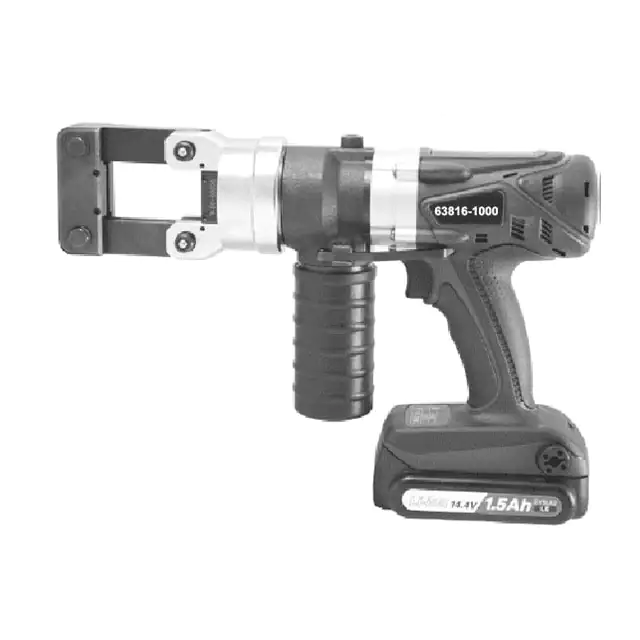
Battery Powered Crimping Tool
Battery Powered Crimping Tool
Operation Manual
Order No. 63816-1000 (115V)
Order No. 63816-1050 (230V)
Description
Operation
Maintenance
Order No: TM-638161000
Revision: D
Release Date: 04-03-13
Revision Date: 12-16-15
UNCONTROLLED COPY
Page 1 of 21
�Battery Powered Crimping Tool
Table of Contents
Contents
Battery Powered Crimping Tool ........................................................................................................................................1
Order No. 63816-1000 (115V) ..........................................................................................................................................1
Order No. 63816-1050 (230V) ..........................................................................................................................................1
Table of Contents .............................................................................................................................................................2
Section 1 ..........................................................................................................................................................................6
General Description ..................................................................................................................................................................... 6
1.1. Features....................................................................................................................................................................... 7
1.2. Principal Mechanical Parts of the 63816-1000 Battery Powered Tool. ........................................................................ 7
1.3. Technical Specifications .............................................................................................................................................. 8
1.4. Delivery Check............................................................................................................................................................. 8
Section 2 ..........................................................................................................................................................................9
Set-Up and Adjustments .............................................................................................................................................................. 9
2.1 Set-Up........................................................................................................................................................................ 10
2.2 Operation ................................................................................................................................................................... 11
2.3 Preventive Instructions .............................................................................................................................................. 12
Section 3 ........................................................................................................................................................................ 13
General Terminal Specifications and Crimping Operation ......................................................................................................... 13
3.1 Scope......................................................................................................................................................................... 14
3.2 Crimping Terminals.................................................................................................................................................... 14
Section 4 ........................................................................................................................................................................ 15
Preventive Maintenance ............................................................................................................................................................ 15
4.1 Periodic Cleaning....................................................................................................................................................... 16
4.2 Battery and Battery Charger ...................................................................................................................................... 17
4.3 Disposal ..................................................................................................................................................................... 18
4.4 Warranty .................................................................................................................................................................... 18
Section 5 ........................................................................................................................................................................ 19
5.1
5.2
Parts List and Assembly Drawings ............................................................................................................................ 20
Troubleshooting ......................................................................................................................................................... 21
Order No: TM-638161000
Revision: D
Release Date: 04-03-13
Revision Date: 12-16-15
UNCONTROLLED COPY
Page 2 of 21
�Battery Powered Crimping Tool
Safety Warnings and Information
Read and understand all of the instructions and safety information in this
manual before operating or servicing this tool.
Keep this manual available when using this tool.
Replacement manuals are available for download at no charge at
www.molex.com.
SAFETY ALERT SYMBOL
This symbol is used to call your attention to hazards or unsafe practices which could result in an injury
or property damage. The signal word, defined below, indicates the severity of the hazard. The message
after the signal word provides information for preventing or avoiding the hazard.
DANGER
DANGER:
Indicates an imminently hazardous situation which, if not avoided, could result in death
Or serious injury.
WARNING
WARNING:
Indicates a potentially hazardous situation which, if not avoided, could result in death
or serious injury.
CAUTION:
Indicates a potentially hazardous situation which, if not avoided, may result in minor
or moderate injury.
CAUTION may also be used to alert against unsafe practices associated with events that
could lead to personal injury.
CAUTION
WARNING
Always wear proper eye protection when
Operating or servicing this tool.
Failure to wear eye protection could result in
serious eye injury from flying debris or hydraulic oil.
WARNING
Inspect tool and dies before use. Replace any
worn or damaged parts. A damaged or
improperly assembled tool can break and strike
someone nearby.
Failure to observe this warning could result in
severe injury or death.
WARNING
Never operate, service, install, or adjust this
tool without proper instruction and without
first reading and understanding the instructions
in this manual and all applicable manuals.
Order No: TM-638161000
Revision: D
Release Date: 04-03-13
Revision Date: 12-16-15
WARNING
Always wear proper ear protection when
Operating or servicing this tool.
WARNING
Electric shock hazard:
This tool is not insulated. When using this unit
Near energized electrical lines, use proper
Personal protective equipment.
Failure to observe this warning could result in
severe injury or death
WARNING
Pinch points:
Keep hands away from the crimping head
When crimping.
Failure to observe this warning could result in
severe injury or death.
UNCONTROLLED COPY
Page 3 of 21
�Battery Powered Crimping Tool
WARNING
WARNING
An incomplete crimp can cause a fire.
Use proper die, connector, and cable combinations.
Improper combinations can result in an
incomplete crimp.
The relief valve will sound to indicate a completed
crimp. If you do not hear the sound of the relief,
valve the crimp is not complete.
Failure to observe these warnings could result in severe
injury or death.
Do not use solvents or flammable liquids
to clean the crimping tool.
Solvents or flammable liquids could ignite
and cause serious injury or property damage.
WARNING
WARNING
Do not use compressed air to clean this tool.
The forces created by compressed air can
force debris into the tool.
Do not dispose of the battery in a fire.
It will vent fumes and may explode.
Failure to observe this warning could result in
severe injury from harmful fumes or burns from
flying debris
Failure to observe these precautions may
result in injury or property damage.
CAUTION
Do not operate the tool without the dies. Damage to the ram or crimping head can result.
Do not operate with the crimping head open. Damage to the ram or seals can result.
This tool is not designed for continuous use. After 100 crimping cycles, allow the crimping tool to cool down for 15 minutes.
Do not place the tool in a vise. The crimping tool is designed for hand-held operation only.
This tool may be used in damp or wet environments; however, we recommend air-drying the tool before use if it becomes soaked.
Use this tool for the manufacturer’s intended purpose only.
Failure to observe these precautions may result in injury or property damage
CAUTION
Do not allow anything to contact the battery’s terminals.
Do not immerse the battery in liquid. Liquid may create a short circuit and damage the battery.
If the battery is immersed, contact your service center for proper handling.
Do not place the battery into a pocket, tool pouch, or tool box with conductive objects.
Conductive objects may create a short circuit and damage the battery.
Do not place a battery on moist ground or grass. Moisture may create a short circuit and damage the battery.
Failure to observe these precautions may result in injury or property damage.
CAUTION
Do not store the battery at more than 60 °C (140 °F). Damage to the battery can result.
Do not use another manufacturer’s charger. Other manufacturers’ chargers may overcharge and damage the battery.
Do not attempt to open the battery. It contains no user-serviceable parts.
Failure to observe these precautions may result in injury or property damage.
CAUTION
Never perform any service or maintenance other than as described in this manual.
Never modify, alter or misuse the equipment
Molex crimp specifications are valid only when used with Molex terminals, applicators and tooling.
Failure to observe this precaution may result in injury and property damage.
Order No: TM-638161000
Revision: D
Release Date: 04-03-13
Revision Date: 12-16-15
UNCONTROLLED COPY
Page 4 of 21
�Battery Powered Crimping Tool
Tooling Technical Assistance
Molex offers tooling technical assistance for customers who may need some guidance for tooling adjustments.
This support can be obtained by calling either of the two numbers listed below and asking for the Molex Tooling
Group.
Call Toll Free 1-800-786-6539 (US) 1-630-969-4550 (Global).
This assistance is limited to the operation and set-up of a customer’s Molex tool. Questions with regard to Molex
connector products or how to identify the proper tooling and/ or tooling documentation should be directed to your
local Molex personnel or Customer Service Representative.
When calling for service on this tool, a copy of the Tooling Manual and Specific Application Tooling Specification
(ATS) Sheet should be present and a person that is familiar with this tool should be present. Be sure the following
information is supplied:
1.
2.
3.
4.
5.
6.
7.
8.
Customer name
Customer address
Person to contact such as (name, title, e-mail, and telephone number
Power tool order number (Lease number also if applicable)
Serial number (Lease number also if applicable)
Molex Connector product order number
Urgency of request
Nature of problem
Molex Application Tooling Group
2200 Wellington Court
Lisle, IL 60532, USA
Tel: +1 (630) 969-4550
Fax:+1 (630) 505-0049
Visit our Web site at http://www.molex.com
Order No: TM-638161000
Revision: D
Release Date: 04-03-13
Revision Date: 12-16-15
UNCONTROLLED COPY
Page 5 of 21
�Battery Powered Crimping Tool
Section 1
General Description
1.1 Features
1.2 Principal Mechanical Parts of the 63816-1000 Battery Powered Tool
1.3 Technical Specifications
1.4 Delivery Check
Order No: TM-638161000
Revision: D
Release Date: 04-03-13
Revision Date: 12-16-15
UNCONTROLLED COPY
Page 6 of 21
�Battery Powered Crimping Tool
Description
The Molex Battery Powered Tool is designed to crimp large terminals with the use of interchangeable crimp heads and die
kits. This tool has a trigger actuated retraction system which returns the crimping dies to the starting position after the
maximum force is reached. It is equipped with a special brake that will stop the forward motion of the crimping dies when the
trigger is released. The crimping head can be rotated 360° for better access in difficult working situations.
1.1. Features
Crimps a wide range of products with interchangeable modular crimp heads or adapters and tool kits, which
reduce the overall cost and provide production flexibility.
Power crimp heads and dies are easily and quickly interchanged to reduce production down time.
Complete portable system that allows the tool to be moved and stored easily.
1.2. Principal Mechanical Parts of the 63816-1000 Battery Powered Tool.
The Battery charger is not shown.
6
7
5
1
Figure 1-1
3
2
4
Item
Description
Function
1
Operating Switch
Release of the crimping process
2
Label
Type description, manufacturer information and technical data
3
Battery Release
Release Button for the battery
4
Battery
Battery Li-lon
5
Return Lever
For opening of the die sets after the crimping process is done
6
Locking Bolts
For locking and releasing the adapter
7
Adjusting Unit Adapter Adjusting unit for the cutting head and adapters with die sets
The serial number can be found on the housing near the battery connection
Order No: TM-638161000
Revision: D
Release Date: 04-03-13
Revision Date: 12-16-15
UNCONTROLLED COPY
Page 7 of 21
�Battery Powered Crimping Tool
1.3. Technical Specifications
Dimensions (without crimp heads and with battery)
Length
254mm (10.00”)
Width
212.85mm (8.38”)
Depth
79.25mm (3.12”)
Weight with battery
3.6 kg (7.9 lbs.)
Production Rate
250 cycles per hour maximum, depending on operator skill and tool kit installed.
Battery
Voltage
Capacity
Charging Time
Crimps/battery-charge
14.4 V DC
1.5 Ah Li-Ion
15 minutes
150 at a medium force
Operating Parameters
Maximum Force
Cycle Time
Stroke Length
130 kN (14.6 ton-force)
7 seconds
18.00mm (.709”)
1.4. Delivery Check
Carefully remove the Battery Powered Tool from its shipping container and determine that the following items
are included in the package.
For the 63816-1000 (115V):
63816-1000
Battery Crimping Tool
63816-1002
Battery (2)
63816-1010
Charging unit
Carrying Case
TM-638161000 Operation Manual
1
2
1
1
1
For the 63816-1050 (230V):
63816-1050
Battery Crimping Tool
63816-1002
Battery (2)
63816-1010
Charging unit
Carrying Case
TM-638161000 Operation Manual
1
2
1
1
1
Order No: TM-638161000
Revision: D
Release Date: 04-03-13
Revision Date: 12-16-15
UNCONTROLLED COPY
Page 8 of 21
�Battery Powered Crimping Tool
Section 2
Set-Up and Adjustments
2.1.
Set-up
2.2.
Operation
2.3.
Preventive Instructions
Order No: TM-638161000
Revision: D
Release Date: 04-03-13
Revision Date: 12-16-15
UNCONTROLLED COPY
Page 9 of 21
�Battery Powered Crimping Tool
2.1 Set-Up
Installing the Crimp Head
WARNING: Remove the battery from the crimping tool before installing and removing the crimp head.
CAUTION: Do not try to remove the crimp head if it is closed or under pre-load.
1. Select the appropriate power crimp head with the proper tooling kit inserted for the application needed (The
crimp head and tooling kits are sold separately).
2. Switch off the battery powered crimping tool and remove the battery.
UPPER DIE
HOLDER
CRIMP
HEAD
LOWER DIE
HOLDER
LOCKING
PINS
DIES
Figure 2-2
Figure2-1
3. Install the desired crimping dies into the upper and lower crimp head components. See Figure 2.1.
4. Slide out the locking pins on the Power Crimping Tool to allow for installation of the crimp head. Then, snap
the lower die holder into the mounting hole on the top of the crimping tool (dies not shown).
5. Attach the upper portion of the crimp head to the Power Crimping Tool and slide the pins back through the
mating holes in the crimp head to secure it to the Power Crimping Tool. See Figure 2-2
6. Check the crimp head to insure that the locking pins are fully inserted.
WARNING: Electric shock hazard:
This tool is not insulated. When using this unit near energized electrical lines, use proper personal
protective equipment.
Failure to observe this warning could result in severe injury or death
WARNING: Wear eye protection when operating or servicing this tool.
Failure to wear eye protection could result in serious eye injury from flying debris or hydraulic oil.
Install the Battery
1. Insert the battery by aligning the grey latches on the top of the battery with the arrows on the mating end of the
crimping tool and then pushing upward.
2. To lock the battery in place, slide it back until the latch locks it in place.
3. When removing the battery, push the grey battery lock button while sliding the battery in the forward direction.
Order No: TM-638161000
Revision: D
Release Date: 04-03-13
Revision Date: 12-16-15
UNCONTROLLED COPY
Page 10 of 21
�Battery Powered Crimping Tool
2.2 Operation
1. Insert the terminal into the crimp profile. See Figure 2-3.
2. Press the operating switch until the lower crimp die set drives upward and holds the terminal in position. Be
careful not to crimp the terminal before loading the wire. See Figure 2-4.
TERMINAL
IN CRIMP
PROFILE
TERMINAL
IN POSITION
Figure 2-3
3. Insert the correct stripped wire into the terminal. See Figure 2-5.
4. Press the operating switch until the crimp is completely closed (The tool will make a clicking sound when the
crimping is complete).
5. Push the return lever button (see Item 5 in Figure 1) to bring the stroke back to the starting position.
6. Take the crimped terminal out of the profile. See Figure 2-6.
CRIMPED
TERMINAL
WIRE
Figure 2-5
Figure 2-6
7. The crimping operation can be interrupted at any time during the cycle by releasing the trigger.
8. The crimping cycle is complete when the dies are completely closed and the maximum crimping force is
reached.
Note: In case of an error or emergency, the ram can be retracted before the crimping cycle is complete. To do
this, push the return lever button.
Warning: An incomplete crimp can cause a fire.
Use proper die, connector, and cable combinations. Improper combinations can result in an incomplete crimp.
The crimping tool will make a clicking sound to indicate a completed crimp. If you do not hear the clicking
sound, the crimp is not complete. Failure to observe these warnings could result in severe injury or death.
Order No: TM-638161000
Revision: D
Release Date: 04-03-13
Revision Date: 12-16-15
UNCONTROLLED COPY
Page 11 of 21
�Battery Powered Crimping Tool
2.3 Preventive Instructions
WARNING: Do not dispose of the battery in a fire. It will vent fumes and may explode.
Failure to observe this warning could result in severe injury from harmful fumes or burns from flying debris
WARNING: Inspect tool and dies before use. Replace any worn or damaged parts. A damaged or
improperly assembled tool can break and strike someone nearby. Failure to observe this warning could result
in severe injury or death.
CAUTION:
Do not operate the tool without the dies. Damage to the ram or crimping head can result.
Do not operate with the crimping head open. Damage to the ram or seals can result.
This tool is not designed for continuous use. After 100 crimping cycles, allow the crimping tool to cool down for
15 minutes.
Do not place the tool in a vise. The crimping tool is designed for hand-held operation only.
This tool may be used in damp or wet environments; however, we recommend air-drying the tool before use if it
becomes soaked.
Use this tool for the manufacturer’s intended purpose only.
Failure to observe these precautions may result in injury or property damage.
CAUTION:
Do not allow anything to contact the battery’s terminals.
Do not immerse the battery in liquid. Liquid may create a short circuit and damage the battery.
If the battery is immersed, contact your service center for proper handling.
Do not place the battery into a pocket, tool pouch, or tool box with conductive objects.
Conductive objects may create a short circuit and damage the battery.
Do not place a battery on moist ground or grass. Moisture may create a short circuit and damage the battery.
Failure to observe these precautions may result in injury or property damage.
Avoid dropping this tool. Extreme shock may damage the internal mechanism and result in malfunction of the tool.
Order No: TM-638161000
Revision: D
Release Date: 04-03-13
Revision Date: 12-16-15
UNCONTROLLED COPY
Page 12 of 21
�Battery Powered Crimping Tool
Section 3
General Terminal Specifications and Crimping Operation
3.1.
Scope
3.2.
Crimping terminals
Order No: TM-638161000
Revision: D
Release Date: 04-03-13
Revision Date: 12-16-15
UNCONTROLLED COPY
Page 13 of 21
�Battery Powered Crimping Tool
3.1 Scope
This tool is designed to crimp various Molex terminals and splices using our offering of crimping heads.
Testing
Mechanical
The tensile test, or pull test, is a means of evaluating the mechanical properties of the crimped connections. The
following charts show the UL specifications for various wire sizes. The tensile strength is shown in pound-force,
which indicates the minimum acceptable force to break or separate the terminal from the conductor.
Wire Size (AWG)
22
20
18
16
14
12
10
8
6
4
2
1
1/0
2/0
3/0
4/0
Tooling Color Code
Red
Blue
Yellow
Red
Blue
Blue
Yellow
Red
Blue
*UL – 486A
8
13
20
30
50
70
80
90
100
140
180
200
250
300
350
450
**UL – 486C
8
10
10
15
25
35
40
45
50
-
***MIL-T-7928
225
300
400
550
650
700
750
825
875
*UL – 486A – Terminals (Copper Conductors Only)
**UL – 486C – Butt Slices and Parallel Slices (Over 6 AWG use 486A values)
***MIL-T-7928 - Military Approved Terminals only as listed
3.2 Crimping Terminals
Specifications and Instructions for crimping are included with the individual Modular Crimp Heads.
These documents are called the Application Tooling Specification (ATS) Sheets.
These come with complete Module Crimp Heads. If another copy is needed search on the www.Molex.com for the
hand tool order number desired. In the section Specification & Other Documents click on the Application
Tooling Specification (PDF) (ATS-EN).
Order No: TM-638161000
Revision: D
Release Date: 04-03-13
Revision Date: 12-16-15
UNCONTROLLED COPY
Page 14 of 21
�Battery Powered Crimping Tool
Section 4
Preventive Maintenance
4.1
Periodic Cleaning
4.2
Battery and Battery Charger
4.3
Disposal
4.4
Warranty
Order No: TM-638161000
Revision: D
Release Date: 04-03-13
Revision Date: 12-16-15
UNCONTROLLED COPY
Page 15 of 21
�Battery Powered Crimping Tool
4.1 Periodic Cleaning
Always clean tool after use and keep moving parts clear of dirt and debris.
This tool is basically maintenance free, only the bolt joints at the crimping head have to be oiled regularly.
Before use:
1. Inspect dies for wear or damage such as cracks, gouges, or chips.
2. Inspect the tool for damage or leaks. If damage is detected, return the tool to a Molex representative for
inspection.
After use:
1. Wipe all tool surfaces clean with a damp cloth and mild detergent. Excessive dirt and grit can contribute to the
premature wear of the tool’s internal mechanical parts. If this tool becomes dirty with excessive debris it may
jam and become damaged during operation.
2. Fully retract the ram. Place the tool in the carrying case. Store in a cool, dry place.
3. Charge the battery.
WARNING: Do not use compressed air to clean this tool. The forces created by compressed air can force
debris into the tool. Failure to observe these precautions may result in injury or property damage.
WARNING: Do not use solvents or flammable liquids to clean the crimping tool. Solvents or flammable
liquids could ignite and cause serious injury or property damage.
Monthly:
Thoroughly clean all surfaces.
A routine should be established to keep the tool as free from dirt as possible.
An example of a maintenance chart is shown below. Copy and use this chart to track the maintenance of this
crimping tool or use this as a template to create your own schedule or use your company’s standard chart, if
applicable.
Preventive Maintenance Chart
CHECK SHEET
MONTH
Daily
Use
Week
YEAR _________
Days of the Week
MON TUE WED THU FRI SAT
SUN
Solution
1
2
3
4
Cleaning
Lubrication
Hydraulic oil
Daily
(2) bolts in crimping head
After use
Use SAE 10W
Schedule should be adjusted up or down depending on usage. Molex recommends that a log of preventive
maintenance be kept with the tool.
Order No: TM-638161000
Revision: D
Release Date: 04-03-13
Revision Date: 12-16-15
UNCONTROLLED COPY
Page 16 of 21
�Battery Powered Crimping Tool
4.2 Battery and Battery Charger
WARNING: Do not dispose of the battery in a fire. It will vent fumes and may explode.
Failure to observe this warning could result in severe injury from harmful fumes or burns from flying debris
CAUTION:
Do not store the battery at more than 60 °C (140 °F). Damage to the battery can result.
Do not use another manufacturer’s charger. Other manufacturers’ chargers may overcharge and damage
the battery.
Do not attempt to open the battery. It contains no user-serviceable parts.
Failure to observe these precautions may result in injury or property damage.
CAUTION:
Do not allow anything to contact the battery’s terminals.
Do not immerse the battery in liquid. Liquid may create a short circuit and damage the battery.
If the battery is immersed, contact your service center for proper handling.
Do not place the battery into a pocket, tool pouch, or tool box with conductive objects.
Conductive objects may create a short circuit and damage the battery.
Do not place a battery on moist ground or grass. Moisture may create a short circuit and damage the
battery.
Failure to observe these precautions may result in injury or property damage.
The 63816-1000 Crimping Tool is supplied with two batteries and a battery charger. New batteries must be
charged before use.
The charging unit is run with a nominal voltage of 115V or 230V (for Europe) and a frequency of 50-60Hz.
Battery Charger indicator lights:
Meaning
Constant Glowing Flashing Glow
Green
Battery is charging. Status of charging < 80 %
Green
(Slowly)
Green
(Quickly)
Yellow
Yellow
Order No: TM-638161000
Revision: D
Battery is charging: Status of charging: = 80 %
Battery is completely charged.
The battery charger has no power.
Please check the connection with the power.
The battery pack is warm
The battery pack is too hot. Charging will begin when
the temperature of the battery pack drops
Release Date: 04-03-13
Revision Date: 12-16-15
UNCONTROLLED COPY
Page 17 of 21
�Battery Powered Crimping Tool
CAUTIONS:
1. Charging the battery at low temperatures under 5°C (41°F) is not possible. The battery temperature must be
warmed up before starting the battery cycle again.
2. Do not expose the charging unit to rain or snow.
3. Do not charge the battery in or around explosive materials or gases.
4. Do not use any other (dry or car) battery with the charging unit or the crimping tool.
5. Do not use the cord as a handle to carry the battery unit.
6. Do not pull the cord out of a wall socket with force.
7. Do not pull out the plug of the charging unit until after the battery has been charged.
8. Do not insert foreign objects into the charging unit.
9. Do not disassemble the charging unit.
10. Do not place the battery in your pocket or a tool box, if there are conductive materials such as coins, keys,
tools or other metallic parts, they may cause injury or property damage.
4.3 Disposal
When this tool is no longer operating properly the different components of this tool will need to be disposed of
separately.
1. The battery must be disposed of according to the Rechargeable Battery Recycling Corporation (RBRC) in the
USA, or other applicable guidelines in other countries.
2. The remaining parts of this tool must be disposed of according to the domestic environmental standards or the
Environmental Protection Agency (EPA) in the USA, or other applicable guidelines in other countries.
3. Because of possible environmental damage, we recommend disposal of the tool by a professional company.
Do not dispose of this tool in your residential or commercial waste, as it would be hazardous to the environment.
4.4 Warranty
All tools are warranted to be free of manufacturing defects for a period of 30 days. Should such a defect occur, we
will repair or exchange the tool free of charge. This repair or exchange will not be applicable to altered, misused,
or damaged tools. This tool is designed for hand use only. Any clamping, fixturing, or use of handle extensions
voids this warranty. After one year Molex recommends the crimping tool be returned to a Molex representative for
inspection. Only the heads of the crimping tool are permitted to be changed by the operator.
Do not damage the seals of this tool.
If seals are damaged the warranty is void.
CAUTION: Molex crimp specifications are valid only when used with Molex terminals and tooling.
Order No: TM-638161000
Revision: D
Release Date: 04-03-13
Revision Date: 12-16-15
UNCONTROLLED COPY
Page 18 of 21
�Battery Powered Crimping Tool
Section 5
Parts List, Assembly Drawings, and Troubleshooting
5.1.
Parts List and Assembly Drawing
5.2.
Troubleshooting
Order No: TM-638161000
Revision: D
Release Date: 04-03-13
Revision Date: 12-16-15
UNCONTROLLED COPY
Page 19 of 21
�Battery Powered Crimping Tool
5.1 Parts List and Assembly Drawings
Item
Order No
Description
Quantity
1
63816-1000 or 63816-1050 Battery Powered Tool (110 V) or Battery Powered Tool (220 V)
1
2
63816-1002
Battery Unit
2
Battery Charger (110 V) or (220 V) Not Shown
3
63816-1010 or 63816-1060
1
1
Figure 5-1
2
Order No: TM-638161000
Revision: D
Release Date: 04-03-13
Revision Date: 12-16-15
UNCONTROLLED COPY
Page 20 of 21
�Battery Powered Crimping Tool
Note:
The following Modular Crimp Heads, Adapters and Cutting Head are sold separately and are not included with the
63816-1000 Battery Powered Tool.
The chart below shows applications for the Battery Powered Tool. See Figure 5-2 to 5-5.
Applications for the Battery Powered Tool
Crimp Head Order No. (Sold separately) Tool Order no. Tool Description
Figure 5-2
DIN style
63816-1100
Battery Powered
Figure 5-3
U-Die
63816-1200
63816-1000
Crimping Tool
130 kN
Figure 5-4 Cutting Tool 63816-1400
Power Crimp and Cutting Heads (Dies not included with Crimp Heads)
63816-1100 DIN style Crimp Head
63816-1200 U-Die Crimp Head
Figure 5-2
Figure 5-3
63816-1400 Cutting Tool Head
Figure 5-4
5.2 Troubleshooting
Make sure the battery is charged before toubleshooting this tool.
Symptom
Tool is inoperative
Dies stop
during operation
Cause
Dirt, contaminants, etc.,in ram area of tool.
Battery unit contacts corroded.
Battery unit contacts damaged.
Tool parts worn or damaged.
Battery charge is low.
Solution
Clean the tool.
Clean contacts with pencil eraser or contact cleaner.
Reform the contacts.
Contact a Molex representative.
Charge or replace battery unit.
Visit our Web site at http://www.molex.com
Order No: TM-638161000
Revision: D
Release Date: 04-03-13
Revision Date: 12-16-15
UNCONTROLLED COPY
Page 21 of 21
�