Hand Crimp Tool for 2.00mm (.079") Pitch Wire-to-Board Crimp Terminal
HAND CRIMP
TOOL
Application Tooling
Specification Sheet
TYPE 4D
Order No. 63823-9800
FEATURES
�
�
�
�
�
�
A full cycle ratcheting hand tool ensures complete crimps
Ergonomic soft grip handles for comfortable crimping
A precision user-friendly terminal locator wire stop holds terminals in the proper crimping position
Right and Left handed applications
This tool is IPC/WHMA A-620 Class 2 compliant as indicated
This tool is RoHS compliant, however RoHS compliant is not required
SCOPE
Products: 2.00mm (.079") Pitch Wire-to-Board Crimp Terminal, 22 - 26 AWG.
Terminal
Series No.
503657
Terminal Order No.
Wire Size
Insulation Diameter
Strip Length
Loose
●Reel
AWG mm²
mm
In.
mm
In.
503657-1100
503657-1000 22-26 0.3-0.2 0.90-1.50 .035-.059 1.90-2.10 .075-.098
● Customer to cut off terminal from reel: 0.10mm (.004”) maximum Cut-off Tab.
DEFINITION OF TERMS
BEND UP
BRUSH
BELL MOUTH
ROLLING
CONDUCTOR
CRIMP
INSULATION
CRIMP
TWISTING
STRIP
LENGTH
BEND
DOWN
CRIMP HEIGHT
The above terminal drawing is a generic terminal representation. It is not an image of a terminal listed in the
scope.
Doc No: ATS-638239800
Revision: A
Release Date: 04-04-11
Revision Date: 04-04-11
UNCONTROLLED COPY
Page 1 of 7
�Hand Crimp Tool for 2.00mm (.079") Pitch Wire-to-Board Crimp Terminal
CONDITIONS:
After crimping, the conductor profiles should measure the following.
Terminal
Series No.
501647
Wire Size
AWG mm2
22
24
26
Conductor Crimp
Insulation Crimp
Height (Ref.)
Width (Ref.) Height (Ref.) Width (Ref.)
mm
In.
mm
In.
mm
In.
mm
In.
0.78-0.83 .031-.033 1.20 .047 1.65 .065 1.50 .059
0.70-0.75 .027-.029 1.20 .047 1.60 .063 1.50 .059
0.65-0.70 .025-.027 1.20 .047 1.55 .061 1.50 .059
Pull Force
Profile
Minimum
N
Lb. 22 24 26
39.2 8.80 X
29.4 6.60
X
19.6 4.40
X
OPERATION
CAUTION: Install only Molex terminals listed above with this tool. Do not crimp hardened objects as damage can
occur to the tool or die.
Open the tool by squeezing the handles
together. At the end of the closing stroke, the
ratchet mechanism will release the handles and
the hand tool will spring open. See Figure 1.
LOCATOR
IN DOWN
POSTION
HANDLE WILL
SPRING OPEN
Crimping Terminals
1. Select the desired terminal listed in the
preceding charts.
2. Make sure the center of the locator is in the
down position. With the locator attached,
PUSH ON THE
SQUEEZE
push the locator button on the back of the
Figure 2
LOCATOR
BUTTON
HANDLES
hand tool to bring the locator forward
TOGETHER
through the tooling. See Figure 2.
Figure 1
3. While holding the locator button in, load the
terminal into the proper nest opening in the locator based on the wire gauge or terminal type markings on the
hand tooling. See Figure 3.
LOCATOR
PUSHED THRU
TOOLING
RELEASE
LOCATOR
BUTTON
LOCATOR
LOCATOR
BUTTON
PUSHED IN
TERMINAL
Doc No: ATS-638239800
Revision: A
Figure 3
Release Date: 04-04-11
Revision Date: 04-04-11
TERMINAL
UNCONTROLLED COPY
Page 2 of 7
�Hand Crimp Tool for 2.00mm (.079") Pitch Wire-to-Board Crimp Terminal
4. Release the locator button, allowing the locator to return to the crimping
position.
5. Close the tool handle until the first ratchet position engages. See Figure
4.
6. Insert the properly stripped wire through the terminal and against the
wire stop. See Figure 5.
7. Crimp the terminal by squeezing the tool handles until the ratchet
mechanism cycle has been completed. Release the handles to open
the jaws.
TOOLING
PARTIALLY
CLOSED
PARTIALLY
CLOSE HANDLE
OPEN
POSITION
FIRST RATCHET
POSITION
Figure 4
WIRE AGAINST THE
WIRE STOP
WIRE STOP IS PART
OF THE LOCATOR
TERMINAL
PRE-STRIPPED
WIRE
Figure 5
WIRE
TERMINAL
Note: The tamper proof ratchet action will not release the tool until it has been fully closed.
WIRE
8. Remove the crimped terminal from the terminal
locator by pulling on the wire.
9. Visually inspect the crimped terminal for proper
crimp location.
10. On some large O.D. wires, it may not be possible
to insert the wire with the tool partially closed.
Those wires should be inserted with the hand tool
in the open position. Insert the wire above the
terminal in the punch and against the wire stop
then close the tool. See Figure 6.
WIRE STOP
Figure 6
TERMINAL
Doc No: ATS-638239800
Revision: A
Release Date: 04-04-11
Revision Date: 04-04-11
UNCONTROLLED COPY
Page 3 of 7
�Hand Crimp Tool for 2.00mm (.079") Pitch Wire-to-Board Crimp Terminal
Note:
A crimp height chart is provided with this manual
as Reference Only. Due to the wide range of
wires, strands, insulation diameters, and
durometers available, actual crimp height
measurements may very slightly. An occasional,
destructive, pull force test should be performed to
check hand tool crimp. Pull Force value Must
exceed the Minimum pull force specifications
listed.
LOCATOR
SQUEEZE
HERE
SQUEEZE
HERE
Figure 7A
MAKE SURE
CENTER OF LOCATOR
IS IN THE
DOWN POSITION
TOP SLOTS OF
HANDTOOL
TOP HOOKS
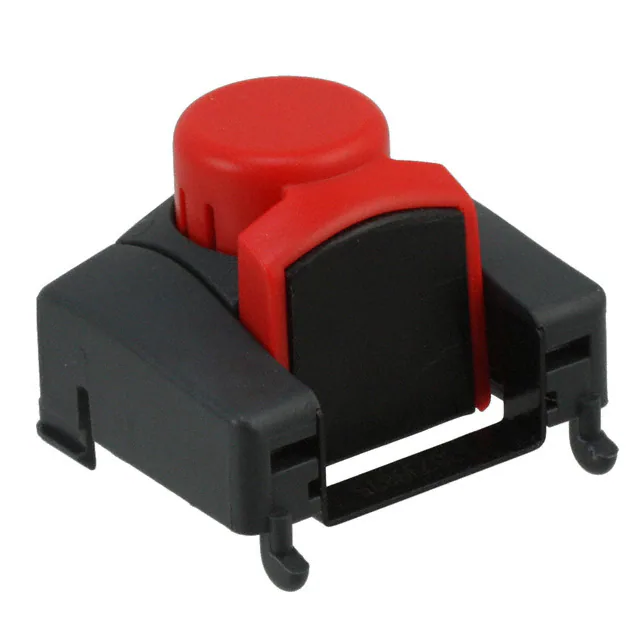
Locator Replacement
See the parts list on the last page of this document
for the proper locator order number. Follow the
steps below to replace the locator.
Figure 7B
LOWER TABS
1. Open the crimp hand tool.
2. Squeeze gently on the lower area shown in
Figure 7A with your thumb and index finger. The lower tabs of the locator should disengage from the hand
tool.
3. Lift and pull away from the hand tool. The top locator hooks should slip out of the top slots easily. See Figure
7A.
4. To reinstall the new locator, make sure the hand tool is in the open position.
5. Press the red insert down as far as it will go as shown in Figure 7B.
6. Holding onto the lower part of the locator with your thumb and index finger, insert the locators top hooks (2)
into the hand tool top slots.
7. Rotate the locator down and press the lower tabs into the two bottom slots of the hand tool. To secure the
locator into place, the lower tabs must snap into
place on the hand tool frame.
JAWS OPEN
Right or Left Hand Operation
This hand tool has an added feature that can be
converted from a right handed application to a left
handed application. It is necessary to reverse the
tooling if using the left handed application along with
the locator. Follow the steps below:
PULL OPEN
TOOLING
TOOLING
M3 BHCS
1. The locator must be removed before reversing
the tooling.
Figure 8
2. Remove the M3 BHCS which is holding the upper
tooling.
PUSH ON
3. Flip the upper tooling to the opposite side and
HANDLE
replace the M3 BHCS. Make sure the small
markings on the front and back of the hand tool frame, match up and are on the outside of the hand tool frame.
See Figure 8 and 9.
Doc No: ATS-638239800
Revision: A
Release Date: 04-04-11
Revision Date: 04-04-11
UNCONTROLLED COPY
Page 4 of 7
�Hand Crimp Tool for 2.00mm (.079") Pitch Wire-to-Board Crimp Terminal
4. Do the same thing with the lower tooling and tighten
the M3 screws. Be sure the small markings line up.
5. Reinstall the locator by following the Instructions in
the locator replacement section.
MATCH
UP MARKS
Figure 9
Maintenance
It is recommended that each operator of the tool be
made aware of, and responsible for, the following
maintenance steps:
FRONT
1. Remove dust, moisture, and other contaminants with a clean brush, or
soft, lint free cloth.
2. Do not use any abrasive materials that could damage the tool.
3. Make certain all pins; pivot points and bearing surfaces are protected
with a thin coat of high quality machine oil. Do not oil excessively.
The tool was engineered for durability but like any other equipment it
needs cleaning and lubrication for a maximum service life of trouble
free crimping. Light oil (such as 30 weight automotive oil) used at the
oil points, every 5,000 crimps or 3 months, will significantly enhance
the tool life.
4. Wipe excess oil from hand tool, particularly from crimping area. Oil
transferred from the crimping area onto certain terminations may affect
the electrical characteristics of an application.
5. When tool is not in use, keep the handles closed to prevent objects
from becoming lodged in the crimping dies, and store the tool in a
clean, dry area.
BACK
LUBRICATION POINTS
(BOTH SIDES) LIGHT OIL
(EVERY 3 MONTHS OR
5,000 CRIMPS)
Figure 10
Miscrimps or Jams
Should this tool ever become stuck or jammed in a partially closed position, Do Not force the handles open or
closed. The tool will open easily by pressing up on the ratchet release lever in the movable handle. See Figure
11.
RATCHET RELEASE
LEVER
How to Adjust Tool Preload (See Figure 12)
This hand tool is factory preset to 25-45 LBS. preload. It may be necessary
over the life of the tool to adjust tool handle preload force. Listed below are
the steps required to adjust the crimping force of the hand tool to obtain
proper crimp conditions:
1. Hold the hand tool in the palm of your hand as shown in Figure 10.
Using the index finger squeeze the link towards the top of the hand tool
frame. This will release the preload adjustment wheel.
Doc No: ATS-638239800
Revision: A
Release Date: 04-04-11
Revision Date: 04-04-11
UNCONTROLLED COPY
Figure 11
Page 5 of 7
�Hand Crimp Tool for 2.00mm (.079") Pitch Wire-to-Board Crimp Terminal
2. Rotate the setting wheel counterclockwise (CCW) to increase handle
force. The numbers will display
higher. To decrease handle force
rotate the setting wheel clockwise
(CW).
3. Release the link to lock the setting
wheel in place.
4. Check the crimp specifications or
conduct a pull test after tool handle
preload force is adjusted.
Warranty
RATCHET
RELEASE LEVER
SQUEEZE
THE LINK IN
THE HANDLE
HOLD THE HAND
TOOL IN POSITION
Figure 12
SETTING
WHEEL
This tool is for electrical terminal crimping
purposes only. This tool is made of the best quality materials. All vital components are long life tested. All tools
are warranted to be free of manufacturing defects for a period of 30 days. Should such a defect occur, we will
repair or exchange the tool free of charge. This repair or exchange will not be applicable to altered, misused, or
damaged tools. This tool is designed for hand use only. Any clamping, fixturing, or use of handle extensions voids
this warranty.
CAUTION: Molex crimp specifications are valid only when used with Molex terminals and tooling.
CAUTIONS:
1. Manually powered hand tools are intended for low volume or field repair. This tool is NOT intended for
production use. Repetitive use of this tool should be avoided.
2. Insulated rubber handles are not protection against electrical shock.
3. Wear eye protection at all times.
4. Use only the Molex terminals specified for crimping with this tool.
Certification
Molex does not certify or re-certify hand tools but rather supplies the following guidelines for customers to re-certify
hand tools.
% This tool is qualified to pull force only. To re-certify, crimp a terminal to a wire, which has been stripped
12.7mm (1/2”) long, so there is no crimping of the insulation. Pull the terminal and wire at a rate no faster than
25mm (1.00”) per minute. See the Molex web site for the Quality Crimp Handbook for more information on pull
testing.
% If the tool does not meet minimum pull force values, handle preload should be increased and the pull test
rerun, (See How to Adjust Preload).
% When the hand tool is no longer capable of achieving minimum pull force, it should be taken out of service and
replaced.
Doc No: ATS-638239800
Revision: A
Release Date: 04-04-11
Revision Date: 04-04-11
UNCONTROLLED COPY
Page 6 of 7
�Hand Crimp Tool for 2.00mm (.079") Pitch Wire-to-Board Crimp Terminal
PARTS LIST
Item Number
REF
1
2
3
Order Number
63823-9800
63823-9875
63810-0104
63810-0105
Description
Hand Crimp Tool
Locator Assembly
Spring, Return
Spring, Ratchet
Quantity
Figure 13
1
1
1
2
1
RATCHET
RELEASE LEVER
3
Figure 13
http://www.molex.com
Doc No: ATS-638239800
Revision: A
Release Date: 04-04-11
Revision Date: 04-04-11
UNCONTROLLED COPY
Page 7 of 7
�