EQ-500
SERIES
ADJUSTABLE RANGE REFLECTIVE
PHOTOELECTRIC SENSOR
Multi-voltage
Amplifier Built-in
Long sensing range 2.5 m
Multi-voltage
EQ50 �
Not affected by background objects
Because it can function with 24 to 240 V AC and 12 to 240 V
DC, almost any power supply anywhere in the world will do.
Because the sensor doesn’t detect objects outside the preset
sensing field by using the 2-segment photodiode adjustable
range system, it will not malfunction even if someone walks
behind the sensing object or machines or conveyors are in
the background.
EQ51�
Introducing the new DC-voltage type
equipped with BGS / FGS function
We’ve added a DC-voltage type with NPN and PNP
transistor outputs all in one sensor. Its BGS / FGS function
controls any background effects for more stable sensing.
Refer to p.196 for the BGS / FGS functions.
194
Impervious to variations color or angle
Due to its advanced optical system, the sensor is not affected
by variations in the object’s angle or gloss compared to
conventional sensors.
Moreover, as the difference in sensing range between black
and white varies by only approx. 5 % (Note), sensing can be
performed at a somewhat constant distance even if the
sensing object is black or white.
Note: Example of the difference in sensing range between
black non-glossy paper (Lightness: 5) and white nonglossy paper when the setting distance is set at 2 m
6.562 ft.
08/2005
�EQ-500
Introducing the 1 m 3.281 ft sensing range type!
Convenient timer function
models
An easy to set adjuster with
indicator
Convenient terminal block
type
Types with an ON-delay / OFF-delay
timer available.
OFF-delay, e.g. useful when the
response of the connected device is
slow, ON-delay, e.g. useful to detect
objects that take a long time to move.
Equipped with a 2-turn adjuster with
indicator, making it easy to set for
short or long distances.
Cabling enabled by way of a terminal
block that eliminates waste.
Adjuster
indicator
Distance adjuster
(2-turn)
Terminal block
• Operation: ON-delay, OFF-delay
• Timer period: 0.1 to 5 sec.
(individual setting possible)
OFF-delay timer
adjuster (Note)
Conduit connector
ON-delay timer
adjuster (Note)
Stable sensing even in harsh environments prone to water or dust.
Little affected by
contamination on lens
Waterproof
Even if the lens surface gets somewhat
dirty from dust particles, there is very
little change in the operation field,
rendering stable and consistent
detection even for objects appearing
close to the front surface of the unit.
IP67 protection per mits use in
environments where water may splash.
APPLICATIONS
Level check within the hopper
Confirmation of the passage of
packages on a conveyor belt
The distance to
the object can be
set to enable
residual amount
sensing in the
hopper regardless of color.
Can accurately detect packages even if
they vary in size and color.
08/2005
195
�EQ-500
BGS / FGS FUNCTIONS MAKE EVEN THE MOST CHALLENGING SETTINGS POSSIBLE!
The BGS function is best suited for the following case
Background not present
BGS (Background suppression) function
When object and background are
separated
The sensor judges that an object is present when light is received at position A of
the light-receiving element (2-segment element). This is useful if the object and
background are far apart. Not affected if the background color changes or
someone passes behind the conveyor.
OFF
ON
Light received at element
B or light not received
Light received at
element A
Background
Element A
Element B
Object
Moving object
in the back
Setting distance
The FGS function is best suited for the following case
Background present
FGS (Foreground suppression) function
When object and background are close
together
When the object is glossy or uneven
The sensor judges that no object is present when light is received at position B of
the light receiving element (2-segment element)(The conveyor is detected). This
function is useful if the object and the background are close together or if the
object is glossy or uneven. However, sensing is impossible if there is no
background (conveyor, etc.)..
OFF in this condition only
Object absent
OFF
ON in all other conditions
Object present
ON
For glossy
object
ON
Element A
Element B
Emitting
element
Lens
Setting
distance
Conveyor
Light received at element B
A conveyor or other
background must be present.
196
08/2005
Conveyor
Light received
at element A
Conveyor
Light is not received at
element B, so an object
is judged to be present
�EQ-500
OPTIONS
Type
Appearance
Sensing range
Model No.
Supply voltage
Output
Timer function
With timer
EQ-501T
EQ-502
With timer
Multi-voltage
EQ-501
0.1 to 2.5 m
0.328 to 8.202 ft
0.1 to 1.0 m
0.328 to 3.281 ft
24 to 240 V AC
ON-delay / OFF-delay timer
(Timer period: 0.1 to 5 sec.)
�10 %
or
12 to 240 V DC
�10 %
Relay contact 1a
ON-delay / OFF-delay timer
(Timer period: 0.1 to 5 sec.)
EQ-502T
With timer
EQ-511T
EQ-512
With timer
DC-voltage
EQ-511
0.1 to 2.5 m
0.328 to 8.202 ft
0.1 to 1.0 m
0.328 to 3.281 ft
EQ-512T
12 to 24 V DC
�10 %
NPN open-collector ON-delay / OFF-delay timer
transistor
(Timer period: 0.1 to 5 sec.)
PNP open-collector
transistor
Equipped with
2 outputs
ON-delay / OFF-delay timer
(Timer period: 0.1 to 5 sec.)
(
)
OPTION
Sensor mounting bracket
Designation
Model No.
Description
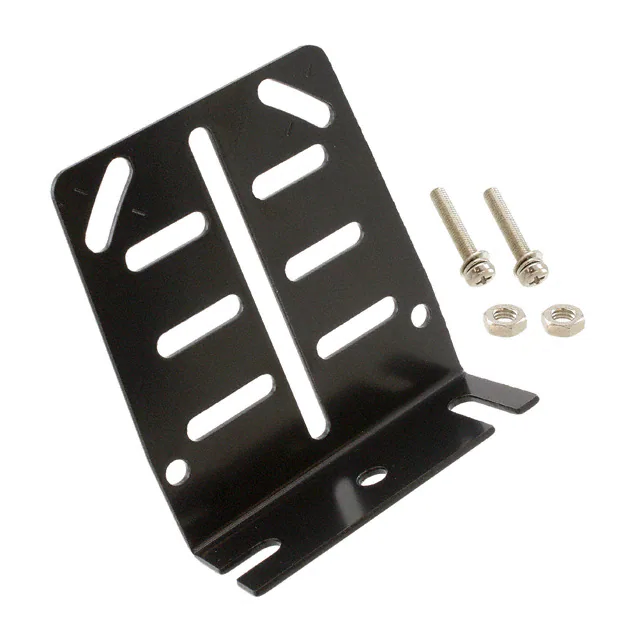
Sensor mounting bracket
MS-EQ5-01
Foot / back angled mounting bracket
08/2005
• MS-EQ5-01
Two M5 (length 30 mm 1.181 in)
screws with washers and two
nuts are attached.
197
�EQ-500
SPECIFICATIONS
Multi-voltage
Type
DC-voltage
With timer
Item
Model No.
EQ-501
EQ-501T
With timer
EQ-502
EQ-502T
With timer
EQ-511
EQ-511T
With timer
EQ-512
EQ-512T
Adjustable range (Note 1) (Note 2) 0.2 to 2.5 m 0.656 to 8.202 ft
0.2 to 1.0 m 0.656 to 3.281 ft
0.2 to 2.5 m 0.656 to 8.202 ft
0.2 to 1.0 m 0.656 to 3.281 ft
Sensing range (at maximum setting distance) (Note 2)
0.1 to 1.0 m 0.328 to 3.281 ft
0.1 to 2.5 m 0.328 to 8.202 ft
0.1 to 1.0 m 0.328 to 3.281 ft
0.1 to 2.5 m 0.328 to 8.202 ft
Hysteresis
Supply voltage
Power / Current consumption
Output
10 % or less of operation distance
24 to 240 V AC �10 % or 12 to 240 V DC �10 %
Ripple P-P 10 % or less
12 to 24 V DC�10 % Ripple P-P 10 % or less
AC: 4 VA or less AC: 5 VA or less AC: 4 VA or less AC: 5 VA or less
DC: 3 W or less DC: 4 W or less DC: 3 W or less DC: 4 W or less
Relay contact 1a
• Switching capacity: 250 V AC 3 A (resistive load)
30 V DC 3 A (resistive load)
• Electrical life: 100,000 or more switching operations
(switching frequency 1,200 operations/hour)
• Mechanical life: 50 million or more switching operations
(switching frequency 18,000 operations/hour)
Output operation
45 mA or less
NPN open-collector transistor
• Maximum sink current: 100 mA
• Applied voltage: 30 V DC or less (between output and 0 V)
• Residual voltage: 1 V or less (at 100 mA sink current)
0.4 V or less (at 16 mA sink current)
PNP open-collector transistor
• Maximum source current: 100 mA
• Applied voltage: 30 V DC or less (between output and �V)
• Residual voltage: 1 V or less (at 100 mA source current)
0.4 V or less (at 16 mA source current)
Switchable either Detection-ON or Detection-OFF
Short-circuit protection
Response time
Incorporated
20 ms or less (For EQ-50�T depends on the setting timer period) 2 ms or less (For EQ-51�T depends on the setting timer period)
Orange LED (lights up when the output is ON)
Operation indicator
Stability indicator
Green LED (lights up under stable operating condition)
Distance adjuster
2-turn mechanical adjuster with indicator
Switchable either BGS or FGS function
Sensing mode
Timer function
Incorporated
with variable
(0.1 to 5 sec.)
ON-delay /
OFF-delay timer
Incorporated
with variable
(0.1 to 5 sec.)
ON-delay /
OFF-delay timer
IP67 (IEC)
Environmental resistance
Protection
�20 to 55 �C �4 to�131 �F (No dew condensation or icing allowed), Storage: �30 to�70 �C �22 to�158 �F
35 to 85 % RH, Storage: 35 to 85 % RH
Ambient humidity
Ambient illuminance
Incorporated
with variable
(0.1 to 5 sec.)
ON-delay /
OFF-delay timer
Incorporated (Note 3)
Automatic interference prevention function
Ambient temperature
Incorporated
with variable
(0.1 to 5 sec.)
ON-delay /
OFF-delay timer
Sunlight: 10,000 ?x at the light-receiving face, Incandescent light: 3,000 ?x at the light-receiving face
Voltage withstandability
2,000 V AC for one min. among supply terminals, non-supply metal parts and relay contact output terminals, 1,000 V AC for one min. between relay contacts
Insulation resistance
100 M , or more, with 500 V DC megger among supply terminals, non-supply metal parts and relay contact output terminals as well as between relay contacts
Vibration resistance
10 to 55 Hz frequency, 1.5 mm 0.059 in amplitude in X, Y and Z directions for two hours each
Shock resistance
500 m/s2 acceleration (50 G approx.) in X, Y and Z directions for three times each
Emitting element
Infrared LED (modulated)
Receiving element
Material
2-segment photodiode
Enclosure: ABS, Front cover: Polycarbonate, Display cover: Polycarbonate
Connection method
Cable
Cable length
Weight
Accessory
Screw-on terminal connection
Suitable for round cable "9 to"11 mm "0.354 to "0.433 in
Extension up to total 100 m 328.084 ft is possible with 0.3 mm2, or more, cabtyre cable
100 g approx.
85 g approx.
Adjusting screwdriver: 1 pc.
Notes: 1) The adjustable range stands for the maximum sensing range which can be set with the distance adjuster. The sensor can also detect an object 0.1 m
0.328 ft, or more, away.
2) The adjustable range and the sensing range are specified for white non-glossy paper (200�200 mm 7.874�7.874 in) as the object.
3) Note that the detection may be unstable depending on the mounting conditions or the sensing object. In the state that this product is mounted, be sure
to check the operation with the actual sensing object. Refer to ‘Automatic interference function’ (p.8) of ‘PRECAUTIONS FOR PROPER USE’ for
details.
198
08/2005
�EQ-500
I/O CIRCUIT AND WIRING DIAGRAMS
EQ-501(T)
EQ-502(T)
I/O circuit diagram
Terminal arrangement diagram
Terminal No.
1
Supply voltage
24 to 240 V AC�10 %
or
12 to 240 V DC�10 %
Sensor circuit
Multi-voltage
circuit
2
1
2
3
4
Output relay
3
Relay contact output
(1a)
4
Internal circuit
EQ-511(T)
EQ-512(T)
I/O circuit diagram
D
1
Sensor circuit
�V
ZD2
Tr2
100 mA max.
4
3
Tr1
Load
Output (PNP)
Load
Output (NPN)
�
�
12 to 24 V DC
�10 %
1
2
3
4
100 mA max.
ZD1
2
Internal circuit
Terminal arrangement diagram
Terminal No.
0V
Users’ circuit
Symbols... D : Reverse supply polarity protection diode
ZD1, ZD2: Surge absorption zener diode
Tr1: NPN output transistor
Tr2: PNP output transistor
SENSING CHARACTERISTICS (TYPICAL)
EQ-501(T)
EQ-511(T)
200�200 mm
7.874�7.874 in
# Non-glossy paper
L
1
3.281
Sensor
Sensor
10
0
10
20
0.394
0.394
0.787
Center
Left
Right
Operating point ?(mm in)
0
20
0.787
0
10
0
10
20
0.394
0.394
0.787
Center
Left
Right
Operating point ?(mm in)
These bars indicate the
sensing range with the respective colors when the
distance adjuster is set to a
sensing range of 2.5 m
8.202 ft / 1 m 3.281 ft long,
respectively, with white nonglossy paper.
The sensing range also
varies depending on material.
2.5
8.202
1
3.281
2.5 m
� � � 8.202 ft
Blue
Gray
(Lightness: 8)
Black
(Lightness: 5)
Green
Red
Brown
Yellow
0
Orange
1m
� � � 3.281 ft
White
Sensing range L (m ft)
Correlation between color
(200�200 mm 7.874�7.874 in non-glossy paper) and sensing range
Emitted beam
Correlation between sensing object size
and sensing range
Setting distance: 2.5 m 8.202 ft
"70 mm
"2.756 in
2.5
8.202
Distance L (m ft)
0
20
0.787
"56 mm
"2.205 in
2
6.562
These bars indicate the
sensing range with the
2.5 m
� � � 8.202 ft respective objects when
the distance adjuster is set
to a sensing range of 2.5 m
1m
� � � 3.281 ft 8.202 ft / 1 m 3.281 ft long,
respectively, with white
non-glossy paper.
1
3.281
Black rubber
2
6.562
2.5
8.202
Plywood
#
3
9.843
Cardboard
L
Black non-glossy paper
Lightness: 5
Black non-grossy
paper (Lightness: 5)
200�200 mm
7.874�7.874 in
Non-glossy paper
0.5
1.640
White nonglossy paper
Sensing range L (m ft)
1
3.281
Sensing range L (m ft)
4
13.123
Black non-glossy paper
Lightness: 5
Setting distance L (m ft)
Setting distance L (m ft)
White nonglossy paper
Correlation between material
(200�200 mm 7.874�7.874 in) and sensing range
• Setting distance: 2.5 m 8.202 ft
White nonglossy paper
Sensing fields
• Setting distance: 1 m 3.281 ft
2.5
8.202
2
6.562
1.5
4.921
"42 mm
"1.654 in
1
3.281
"26 mm
"1.024 in
0.5
1.640
"20mm
"0.787 in
1
3.281
White nonglossy paper
L
Sensor
0
0
08/2005
50
100
150
1.969
3.937
5.906
White non-glossy paper
side length a (mm in)
This curve shows
the characteristics
with the maximum
sensing range set
to 2.5 m 8.202 ft,
with white nonglossy paper
(200�200 mm
7.874�7.874 in).
200
7.874
199
�EQ-500
SENSING CHARACTERISTICS (TYPICAL)
EQ-502(T)
EQ-512(T)
White nonglossy paper
Sensor
0
20
0.787
Sensor
10
0
10
20
0.394
0.394
0.787
Center
Left
Right
Operating point ?(mm in)
0
20
0.787
Sensing range L (m ft)
These bars indicate the
sensing range with the respective colors when the
distance adjuster is set to a
sensing range of 1 m 3.281 ft
/ 0.5 m 1.640 ft long,
respectively, with white nonglossy paper.
The sensing range also
varies depending on material.
1m
� � � 3.281 ft
0.5
1.640
0
10
0
10
20
0.394
0.394
0.787
Center
Left
Right
Operating point ?(mm in)
Correlation between color
(200�200 mm 7.874�7.874 in non-glossy paper) and sensing range
1
3.281
?
Emitted beam
Black rubber
L
Plywood
?
These bars indicate the
sensing range with the
respective objects when
1m
� � � 3.281 ft the distance adjuster is set
to a sensing range of 1 m
3.281 ft / 0.5 m 1.640 ft
0.5 m long, respectively, with
� � � 1.640 ft
white non-glossy paper.
0.5
1.640
Cardboard
L
0.2
0.656
200�200 mm
7.874�7.874 in
Non-glossy paper
0.5
1.640
Black non-grossy
paper (Lightness: 5)
200�200 mm
7.874�7.874 in
Non-glossy paper
0.4
1.312
1
3.281
Correlation between sensing object size
and sensing range
Setting distance: 1 m 3.281 ft
"26 mm
"1.024 in
1
3.281
"20 mm
"0.787 in
0.5
1.640
1
3.281
Sensing range L (m ft)
0.6
1.969
Black non-glossy paper
Lightness: 5
1
3.281
Sensing range L (m ft)
Black non-glossy paper
Lightness: 5
Distance L (m ft)
White nonglossy paper
Setting distance L (m ft)
Setting distance L (m ft)
0.8
2.625
Correlation between material
(200�200 mm 7.874�7.874 in) and sensing range
• Setting distance: 1 m 3.281 ft
White nonglossy paper
Sensing fields
• Setting distance: 0.5 m 1.640 ft
0.5
1.640
White nonglossy paper
L
Sensor
0
Blue
Gray
(Lightness: 8)
Black
(Lightness: 5)
Green
Red
Brown
Orange
White
Yellow
0.5 m
� � � 1.640 ft
This curve shows
the characteristics
with the maximum
sensing range set
to 1 m 3.281 ft,
with white nonglossy paper
(200�200 mm
7.874�7.874 in).
0
50
100
150
1.969
3.937
5.906
White non-glossy paper
side length a (mm in)
200
7.874
PRECAUTIONS FOR PROPER USE
• When a specular body is present below the sensor, use the
sensor by tilting it slightly upwards to avoid faulty operation.
This product is not a safety sensor. Its use is not
intended or designed to protect life and prevent body
injury or property damage from dangerous parts of
machinery. It is a normal object detection sensor.
M5 (length 30 mm 1.181 in)
screw with washers
• The tightening torque
should be 0.8 N � m or
less.
Tilt
Sensor
mounting
blacket
MS-EQ5-01
(Optional)
• This product is not easily affected by the reflected light intensity
since this sensor is the adjustable range reflective type. When
the reflected light intensity is remarkably low, the sensing range
may be affected. In that case, mount the sensor, while checking
light-up of the stable indicator (green).
• The mounting screws of the terminal cover and display cover
should certainly be tightened to maintain water-resistance; the
tightening torque of the screws should be 0.3 to 0.5 N � m.
• Care must be taken regarding the sensor mounting direction with
respect to the object’s direction of movement.
Specular
face
Specular
face
M5 nut
Mounting
Automatic interference prevention function
• When the sensors are mounted closely, use them in the
interference prevented area, as shown below.
Sensing object
• When detecting a specular object (aluminum or copper foil, etc.)
or an object having a glossy surface or coating, please note that
there are cases when the object may not be detected due to a
change in angle, wrinkles on the object surface, etc.
• If a specular body is present in the background, faulty operation
may be caused due to a small change in the angle of the
background body. In that case, install the sensor at an inclination
and confirm the operation with the actual sensing object.
200
08/2005
2
6.562
1
3.281
0
3
9.843
L mm in
or more
Interference
prevented area
20 40 60 80
0.787 1.575 2.362 3.15
Mounting interval L (mm in)
Setting distance (m ft)
Sensing object
Sensing object
Setting distance (m ft)
3
9.843
Do not make the sensor
detect an object in this
direction because it may
cause
unstable
2
6.562
1
3.281
L mm in
or more
L mm in
or more
L mm in
or more
0
Interference
prevented area
50 100 150 200 250
1.969 3.937 5.906 7.874 9.843
Mounting interval L (mm in)
• Note that the detection may be unstable depending on the
mounting conditions or the sensing object to be used.
In the state that this product is mounted, be sure to check the
operation with the actual sensing object to be used.
�EQ-500
PRECAUTIONS FOR PROPER USE
Part description
Wiring
• Make sure that the power supply is off while wiring.
• Check all wiring before applying power since incorrect wiring may
damage the internal circuit. Also, carefully tighten the terminal
screws so that the wires of adjacent terminals do not touch.
• The mounting hole for the terminal cover fixing screws inclines
70 degrees to the terminal cover, as shown in the figure below.
To avoid damaging this product or screw, take care when
tightening or loosening a screw.
Stability indicator (Green)
Distance adjuster (2-turn)
OFF-delay timer adjuster (Note 2)
Adjuster indicator
ON-delay timer adjuster (Note 2)
Operation indicator (Orange)
Operation mode switch (Note 1)
Notes: 1) The operation mode switch of the DC-voltage type is the DIP
switch. Refer to ‘DC-voltage type’ of ‘Operation mode switch’
for details.
2) Incorporated on EQ-5�T only.
Screw for terminal cover fixing
Screwdriver
Operation mode switch
• To maintain water-resistance, the cable should have an outer
diameter between "9 to "11 mm "0.354 to "0.433 in with a
smooth covering material that allows the attached conduit
connector to be securely tightened; the tightening torque of the
screw should be of 1.5 to 2.0 N � m.
• Verify that the supply voltage variation is within the rating.
• If power is supplied from a commercial switching regulator,
ensure that the frame ground (F.G.) terminal of the power supply
is connected to an actual ground.
• In case noise generating equipment (switching regulator, inverter
motor, etc.) is used in the vicinity of this sensor, connect the
frame ground (F.G.) terminal of the equipment to an actual ground.
• Do not run the wires together with high-voltage lines or power
lines or put them in the same raceway. This can cause
malfunction due to induction.
• If an external surge voltage exceeding 4 kV is impressed (DCvoltage type: 1 kV), the internal circuit will be damaged, and a
surge suppressing element should be used.
• Prepare the cable end as shown below.
Multi-voltage type (L-ON / D-ON mode only)
Operation mode switch
Detection-ON mode is obtained when the switch
is turned fully clockwise (L side).
Detection-OFF mode is obtained when the switch
is turned fully counterclockwise (D side).
Note: Turn the operation mode switch gradually and lightly with the attached
screwdriver. Turning with excessive strength will cause damage to the
adjuster.
DC-voltage type
L-ON / D-ON mode
BGS / FGS mode
Timer mode
Not used
Conduit connector construction and cabling
37 mm
1.457 in
Power supply
Output
25 mm
0.984 in
Gland
Note: When assembling the conduit connector, pay attention to the direction
of the gland packing.
Furthermore, in order to maintain water-resistance, fit the gland
packing such that the seating surface of the gland packing contacts
the packing holder part of the terminal cover evenly.
Dimensions of the suitable crimp terminals
"3.6
"0.142
or more
Detectable range
7.5 0.295
or less
3.6 0.142
or more
7 0.276
or less
17 0.669
or less
(After crimping)
7.5 0.295
or less
Setting distance
Non-detectable area
(Unit: mm in)
L-ON
BGS
Y-shaped type
22 0.866
or less
10 0.394
or less
D
FGS
Timer ON
N.C.
• DC-voltage type sensor incorporates BGS / FGS function. Select
either the BGS or FGS function depending on the positions of the
background and sensing object.
BGS / FGS function is set with the operation mode switch.
• Depends on a selection of either BGS or FGS function, the output operation changes as follows.
• The size of conduit is M20�1.5.
• If pressure terminals are to be used, affix the connected
pressure terminals to a terminal (M3.5 screw).
Round type
L
BGS
OFF
N.C.
BGS / FGS function (DC-voltage type only)
Conduit connector
Gland packing (Note)
Description
D-ON
22 0.866
or less
10 0.394
or less
OFF
ON
OFF
L-ON
ON
D-ON
ON
FGS
7 0.276
or less
ON
OFF
OFF
17 0.669
or less
(After crimping)
Note: Use crimp terminals with insulating sleeves.
Recommended crimp terminal: Nominal size 1.25�3.5 0.049�0.138.
• The tightening torque for the terminal screws should be 0.3 to 0.5 N�m.
08/2005
201
�EQ-500
PRECAUTIONS FOR PROPER USE
Distance adjustment
Timer function (EQ-5�T only)
• Turn the distance adjuster gradually and lightly with the attached
adjusting screwdriver. Turning with excessive strength will cause
damage to the adjuster.
• EQ-5�T incorporates an OFF-delay timer, which is useful when
the response of the connected device is slow, etc., and an
ON-delay timer, which is useful for detecting objects that move
slowly, for example.
• The OFF-delay and ON-delay timers can be used simultaneously.
• For DC-voltage type, set the DIP switch for the timer mode to
‘Timer ON’ side.
Multi-voltage type, DC-voltage type • BGS select
Time chart
• For DC-voltage type, be sure to set the BGS / FGS function before
distance adjustment. If the setting is done after the distance adjustment, the sensing area is changed.
Step
1
2
3
Description
Turn the distance adjuster fully counterclockwise
to the minimum sensing range position. (0.2 m
0.656 ft approx.)
Sensing
condition
Distance
adjuster
Operation
OFF
ON
Detection ON-delay
Turn fully
Please an object at the required distance from the
sensor, gradually turn the distance adjuster clockwise to determine point a, where the sensor
changes to the detecting state.
T
T
T
T
T
T
OFF
ON
Non-detection
normal operation
OFF
ON
Non-detection ON-delay
Optimum
position
The optimum position to stably detect objects is
the center point between a and b.
OFF
ON
Detection ON / OFF-delay
Remove the object. Continue turning the adjuster
clockwise until the sensor enters the detecting
state again. Then turn the distance adjuster back
a little untill the sensor returns to the non-detecting state, called point b .
OFF
ON
Detection OFF-delay
If the sensor does not go into the detecting state
even if the adjuster is turned fully clockwise, point b
is regarded as the maximum position on the scale.
4
ON
Detection
normal operation
T
T
T
OFF
ON
Non-detection OFF-delay
T
Non-detection
ON / OFF-delay
T
OFF
ON
T
OFF
Timer period: T = 0.1 to 5 sec. (variable)
Stability indicator
DC-voltage type • FGS select
Step
Description
1
Turn the distance adjuster fully clockwise to the
maximum sensing range position. (2.5 m 8.202 ft
approx., 1.0 m 3.281 ft approx. for EQ-512�)
2
In the state where the sensor detects the background, gradually turn the distance adjuster counterclockwise, to determine point a where the
sensor changes to the non-detecting state.
3
Distance
adjuster
• Since the EQ-500 series uses a 2-segment photodiode as its
receiving element, and sensing is done based on the difference
in the incident beam angle of the reflected beam from the
sensing object, the output and the operation indicator (orange)
operate according to the object distance.
Furthermore, the stability indicator (green) shows the margin of
the setting distance.
Turn fully
Setting distance
Sensing object
Output (Operation indicator)
(In case of Detection-ON)
Place an object at the required distance from the sensor,
turn the adjuster counterclockwise further until the sensor goes into the non-detecting state again. Once entered, turn the adjuster backward a little until the sensor returns to the detecting state, called point b .
Stability indicator
If the sensor does not go into the non-detecting state
even if the adjuster is turned fully counterclockwise, point
b is regarded as the maximum position on the scale.
ON (Lights up)
OFF (Lights off)
Stable operating Lights up
Stable operating
condition
condition
Lights off
Unstable
operating condition
Others
4
202
The optimum position to stably detect objects is
the center point between a and b .
Optimum
position
• Take care that the sensor is not directly exposed to fluorescent
light from a rapid-starter lamp or a high frequency lighting device,
as it may affect the sensing performance.
• Do not use during the initial transient time (50 ms) after the
power supply is switched on.
• This sensor is suitable for indoor use only.
• Its distance adjuster is mechanically operated. Do not drop; avoid
other shocks.
• Do not use this sensor in places having excessive vapor, dust,
etc., or where it may come in direct contact with water, or
corrosive gas.
• Take care that the sensor does not come in direct contact with
water, oil, grease or organic solvents, such as, thinner, etc.
• This sensor cannot be used in an environment containing
inflammable or explosive gases.
• Never disassemble or modify the sensor.
08/2005
�EQ-500
DIMENSIONS (Unit: mm in)
EQ-501(T) EQ-502(T)
EQ-511(T) EQ-512(T) Sensor
Stability indicator (Green)
Assembly dimensions with sensor mounting bracket
MS-EQ5-01 (Optional) (Foot angled mounting)
Operation mode switch (Note 1)
OFF-delay timer adjuster (Note 2)
Distance adjuster (2-turn)
6.5
0.256
Adjuster indicator
ON-delay timer adjuster (Note 2)
(30.5)
(1.201)
29
1.142
Operation indicator (Orange)
"6.5
"0.256
Beamreceiving part
Center of beamemitting
(Center of sensing)
26
1.024
2
0.079
68
2.677
(10)
(0.394)
3-M5 nut seats
(on both sides)
2-M5 (length 30 1.181) screws
3-"5.1 "0.201
mounting holes
68 58
2.677 2.283
Center of beamemitting
(Center of sensing)
22
0.866
5
0.197
5
0.197
4
0.157
6.5
0.256
17.5
0.689
58
(10)
2.283
(0.394)
30
1.181
58
2.283 88
3.465
37
1.457
58
2.283
Notes: 1) The operation mode switch of the DC-voltage type is the DIP switch.
2) EQ-5�T does not incorporate those.
08/2005
18
0.709
26
1.024
29
1.142
5
0.197
58
2.283
78
3.071
t2
t 0.079
203
�