Thumbwheel Switch
A7D/A7DP
CSM_A7D_A7DP_DS_E_2_1
Ultra-small, Low-cost, Push-operated
Switches
• All-in-one design means fewer parts are required. This product
delivers high reliability at a low cost.
• Uses long-lasting resin springs to achieve a long mechanical
durability expectancy of 30,000 operations.
• Models with stoppers for restricting the setting range are available.
• The series includes a complete range of pen-push models that
prevent accidental operation.
Ordering Information
Switches (Single Switch Units)
Model
A7D
Screw mounting (back mounting)
Snap-in (front mounting)
A7DP
Snap-in (front mounting)
Classification
(See note 1.)
Terminals
Color
06 (binary coded decimal)
Output code
number
Light gray
A7D-106
Black
A7D-106-1
PCB terminals
Light gray
Black
A7D-206
A7D-206-1
Light gray
A7DP-206
Black
A7DP-206-1
Note: 1. The classification diagrams show 4 Switch Units combined with End Caps to create 4-digit displays.
2. The model numbers given above are for 1 Switch Unit.
3. Models with stoppers are also available. Add “-S@@” after the “106” or “206” in the model number and specify the display range in the @@. For example, to
specify the range 0 to 6, add “-S06” to the model number (e.g., A7D-106-S06-1).
4. Models with +, - displays are also available. Add “-PM” after the “106” or “206” in the model number (e.g., A7D-106-PM or A7D-106-PM-1).
Accessories (Order Separately)
Use accessories, such as End Caps and Spacers, with the Switch Units.
Classification
Accessory
Color
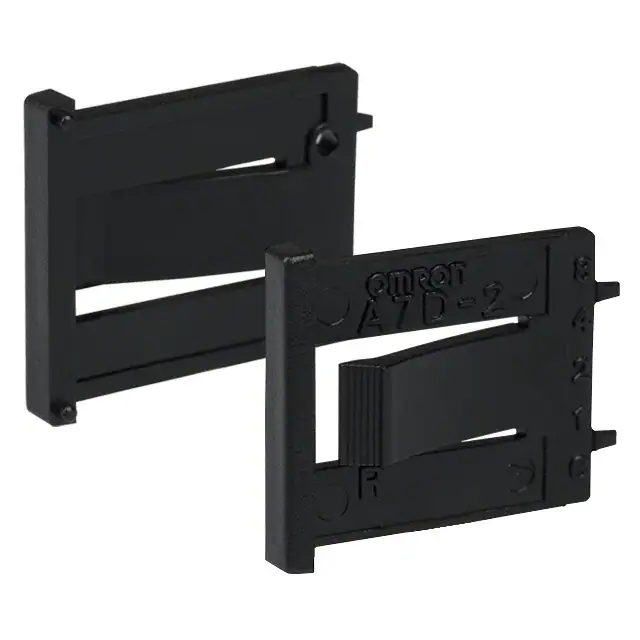
End Caps (1 pair)
Screw mounting (back mounting)
Light gray
Black
A7D-1M *
A7D-1M-1 *
A7D-1P@
A7D-1P@-1
(See note.)
(See note.)
Spacer
Snap-in (front mounting)
Light gray
Black
A7D-2M *
A7D-2M-1 *
A7D-2P@
A7D-2P@-1
(See note.)
(See note.)
Note: The @ in the Spacer model number stands for a letter in the range A to U. (Refer to the table in the following explanation about Spacers.)
* The minimum order is for 10 End Caps.
End Caps
End Caps are used on the Switch Units at each end and allow all the Switch Units to be securely mounted to a panel. They come in pairs, one for
the left and one for the right.
Spacers
• Spacers are used for creating extra space or gaps between the Switch Units and have the same dimensions as the Switch Units themselves.
• There are also Spacers with engraved characters or symbols that can be used for indicating units, such as time and length. (Refer to the following
table.) Consult your OMRON representative for details.
Symbol
Stamp
A
No designation
B
C
D
E
F
G
SEC
MIN
H
g
kg
mm
Q
x 10
SEC
T
U
0
•
Symbol
H
J
K
L
Stamp
cm
m
°C
PCS
1
�A7D/A7DP
Specifications
5 to 30 VDC
1 mA to 0.1 A
100 mA
200 mΩ max.
Switching capacity (resistive load)
Continuous carry current
Contact resistance
Between non-connected
terminals
Insulation
resistance Between terminal and
non-current carrying part
Between non-connected
terminals
Dielectric
strength
Between terminal and
non-current carrying part
Vibration resistance
Shock resistance
Mechanical
Durability
Electrical
10 MΩ min. (at 250 VDC)
100 MΩ min. (at 500 VDC)
250 VAC, 50/60 Hz for 1 min
1,000 VAC, 50/60 Hz for 1 min
10 to 55 Hz, 1.5-mm double amplitude
500 m/s2 min.
30,000 operations min.
20,000 operations min.
Operating: –10°C to 70°C (with no icing)
Storage: –20°C to 80°C
Operating: 45% to 85%
3.43 N max.
Ambient temperature
Ambient humidity
Max. operating force
Dimensions
(Unit: mm)
Switches
A7D-106(-1)
PCB Terminals
C
B
2
A
5.08±0.1
1.6
17
Number of
Switches (n)
1.5
3.7
4.2
1.92
2.8
10
16 14±0.1
8
4
2
1
C
2.2
P=2.54
1.4 14±0.15
0.8
PCB terminal
Panel thickness: 2
1.5
Panel Cutout
14.2+0.4
0
1.85
1.5
P=5.08±0.3
D+0.3
0
(2.2)
Two, M2.6 or
2.8 mm holes
B
Note: Common terminal C is at the bottom when the Switch Unit is viewed
from the front.
A7DP-206(-1)
PCB Terminals
1.5
(2.5)
17.5
1.5
3.7
3.7
A
5.08±0.1
1.92
16
10
2.2
8
4
2
1
C
P=2.54
14±0.15
0.8
PCB terminal
Panel thickness: 1 to 2
1.5
1.4
Panel Cutout
14.2+0.4
0
P=5.08±0.3
B
(1.5)
(2.2)
C+0.3
0
Note: Common terminal C is at the bottom when the Switch Unit is viewed
from the front.
Size A
(n x 5.1 + 3)
Size B
Size C
(n x 5.1 + 8.3) (n x 5.1 + 13.3)
Size D
1
8.1
13.4
18.4
8.4
2
13.2
18.5
23.5
13.5
3
18.3
23.6
28.6
18.6
4
23.4
28.7
33.7
23.7
5
28.5
33.8
38.8
28.8
6
33.5
38.9
43.9
33.9
7
38.6
44.0
49.0
39.0
8
43.7
49.1
54.1
44.1
9
48.8
54.2
59.2
49.2
10
53.9
59.3
64.3
54.3
Note: 1. The dimensions above include both End Caps, and
will increase 5.08 mm for each Spacer inserted.
2. Unless otherwise specified, a tolerance of
±0.4 mm applies to all dimensions.
The tolerance for multiple connection is
±(number of units x 0.4) mm.
Number of
Switches (n)
Size A
(n x 5.1 + 5)
Size B
(n x 5.1 + 3)
Size C
(n x 5.1 + 3.9)
1
10.1
8.1
9
2
15.2
13.2
14.1
3
20.3
18.3
19.2
4
25.4
23.4
24.3
5
30.5
28.5
29.4
6
35.5
33.5
34.5
7
40.6
38.6
39.6
8
45.7
43.7
44.7
9
50.8
48.8
49.8
10
55.9
53.9
54.9
Note: 1. The dimensions above include both End Caps, and
will increase 5.08 mm for each Spacer inserted.
2. Unless otherwise specified, a tolerance of
±0.4 mm applies to all dimensions.
The tolerance for multiple connection is
±(number of units x 0.4) mm.
2
�A7D/A7DP
A7DP-206(-1)
PCB Terminals,
Pen-push Model
17.5
1.5
1.5
(2.5)
3.7
1.6
A
5.08±0.1
1.92
16
10
8
4
2
1
C
2.2
P= 2.54
14±0.15
0.8
PCB terminal
Panel thickness: 1 to 2
1.4
Panel Cutout
P= 5.08±0.3
B
Size A
(n x 5.1 + 5)
Size B
(n x 5.1 + 3)
Size C
(n x 5.1 + 3.9)
1
10.1
8.1
9
2
15.2
13.2
14.1
3
20.3
18.3
19.2
4
25.4
23.4
24.3
5
30.5
28.5
29.4
6
35.5
33.5
34.5
7
40.6
38.6
39.6
8
45.7
43.7
44.7
9
50.8
48.8
49.8
10
55.9
53.9
54.9
Note: 1. The dimensions above include both End Caps, and
will increase 5.08 mm for each Spacer inserted.
2. Unless otherwise specified, a tolerance of
±0.4 mm applies to all dimensions.
The tolerance for multiple connection is
±(number of units x 0.4) mm.
14.2+0.4
0
(1.5)
(2.2)
Number of
Switches (n)
C
Note: Common terminal C is at the bottom when the Switch Unit is viewed
from the front.
Accessories (Order Separately)
End Caps for Push-operated Switches
A7D-1M(-1) Screw Mounting (Back Mounting)
Left Side
Right Side
6.5
1.5
16
2
End Caps for Push-operated Switches
A7D-2M(-1) Snap-in Mounting (Front Mounting)
14
Left Side
6.5
0.8
14
1.5
15.5
0.7
1.5
0.8
1.4
1.5
0.8
16
2
17.5 16
1.5
1.5
0.7
1.5
14
2.6
17.5
1.6
2
2.5
5
16 17.5
1.5
0.8
16
2.5
1.5
5
15.5
Spacers for Push-operated Switches
A7D-1P@(-1) Screw Mounting (Back Mounting)
5.08±0.1
Right Side
3.3
16
0.8
1.4
0.7
1.5
2.6
14
1.5
Spacers for Push-operated Switches
A7D-2P@(-1) Snap-in Mounting (Front Mounting)
5.08±0.1
0.8
14±0.15 16
17.5
1.5
14±0.15 16
1.4
1.4
Note: The @ in the Spacer model number stands for a letter in the range A to U.
(Refer to the table under the explanation about Spacers on page 1.)
Note: The @ in the Spacer model number stands for a letter in the range A to U.
(Refer to the table under the explanation about Spacers on page 1.)
Note: Unless otherwise indicated, dimensional tolerances for dimensions in the models above are ± 0.4 mm.
Output Codes
Output code number
06 (Binary Code)
Internal circuit
Dial display
Terminal
C
1
2
4
8
0
1
●
●
2
3
●
●
●
4
5
●
6
7
●
●
●
●
●
●
8
9
●
●
●
Note: The solid dot ● indicates that the internal switch is ON (i.e., connected to the common terminal).
3
�A7D/A7DP
Ordering Procedure
Place orders as shown in the example below, specifying the model and number.
1
1.
2.
3.
4.
5.
2
3
4
5
1
A7D-2M (End Caps): 1 pair
A7D-206-S@@ (Switch Unit with stopper): 1 piece
A7D-206 (Switch Unit): 1 piece
A7D-2P@ (Spacer): 1 piece
A7D-206 (Switch Unit): 2 pieces
Note: Standard products, such as the Switch Units and End Caps, are not factory-assembled for shipment. Contact your OMRON representative for details on ordering
factory-assembled sets.
Safety Precautions
Refer to Safety Precautions for All Thumbwheel Switches.
Precautions for Correct Use
Handling
• The molded components of the Switch use polyacetal resin and
PBT resin. It is recommended that alcohol is used to wipe off dirt
and smudges from the molded components. Take care to prevent
the alcohol from getting inside.
• Do not use thinner or other solutions which might damage the resin.
• Terminals can withstand a force of 4.9 N for 10 seconds or more
(the mating strength of the case and seal), and survive bending of
20° without breaking after returning to original position. Do not use
excessive force or apply repetitive external force, however, when
handling terminals. In particular, take care to avoid dropping them
as the terminals might bend or break.
Soldering
• Using a Soldering Iron
Use a 30-W soldering iron at a temperature of 350°C for a maximum
of 3 seconds, and flush as described above.
Do not apply force to the terminals during soldering and for 3 minutes
after soldering is completed. Doing so may result in conduction or
operation failure.
Ensure that soldering flux and alcohol do not penetrate into the Switch
interior
Setting Numbers
Pen-push Type
Press the setting switch with the tip of a ball-point pen. Do not use
pencil point or mechanical pencil point to press the setting switch,
otherwise the lead of the pencil or mechanical pencil may be broken
and A7DP malfunctions may result due to fragments of the broken
lead.
• The setting buttons can withstand 19.6 N for 1 minute, but do not
push the (+) and (-) buttons at the same time.
Screw-mounting Models
Tighten mounting screws to a torque between 0.2 to 0.24 N·m, using
M2.6 screws. Use plain washers or spring washers together with the
screws.
4
�
很抱歉,暂时无法提供与“A7D-2M-1”相匹配的价格&库存,您可以联系我们找货
免费人工找货