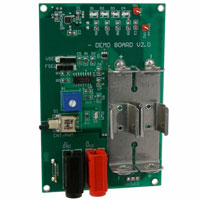
Test Procedure for the NCP5603 Evaluation Board
10.5.2004
TEST CONDITIONS
Note: the demo board can operate with either an external power supply, or with two dry cell 1.5V, AA type, and battery. The mechanical switch S4 is
used to select one of the two power sources. The system is not designed to run the two power sources simultaneously and such connection must be
avoided.
Using an external power supply:
1- Select a DC power supply with 500mA output current capability (minimum), adjust the output voltage to 3.60V
2- Connect the positive wire to the RED socket, connect the negative wire to the BLACK socket
3- Toggle switch S4 to turn on the system
Using dry cell battery:
1 – Make sure no external power supply is attached to the RED and BLACK sockets
2 - Insert two 1.5V, AA type cell in the holder. Make sure the polarity is properly respected
3 – Toggle switch S4 to turn on the system
System operation :
4- Select the Output Voltage ( 4.5V or 5.0V) by toggling the switch S3, B1
5- Select the operating frequency ( 260kHz or 630kHz) by toggling the switch S2, FSEL. Note: turn system off before switching frequency.
6- Select the Normal or PWM mode by toggling the switch S1. A RED LED turns On when the PWM mode is activated. The brightness of the
LED ( if necessary ) can be adjusted ( when the PWM mode is activated ) by means of the potentiometer P1.
�
很抱歉,暂时无法提供与“NCP5603GEVB”相匹配的价格&库存,您可以联系我们找货
免费人工找货