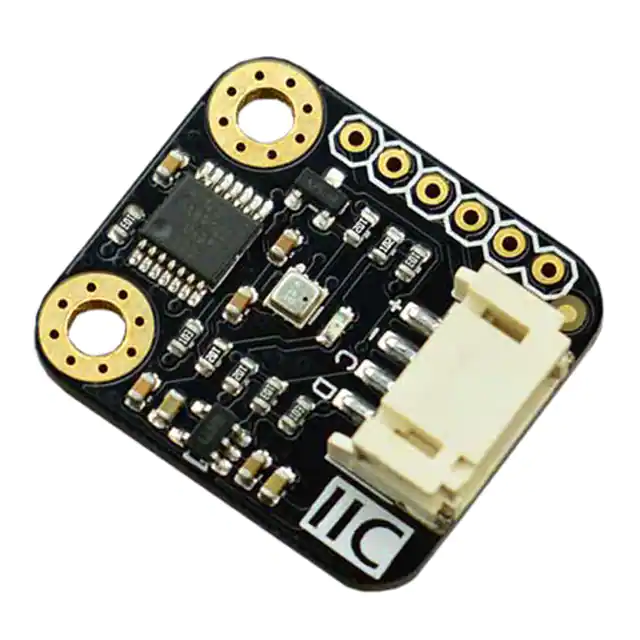
Gravity: I2C BME280 Environmental Sensor
(Temperature, Humidity, Barometer) SKU: SEN0236
Introduction
BME280 is an environmental sensor that integrates onboard temperature sensor, humidity sensor
and barometer. The sensor is of high precision, multiple functions, and small size etc. It provides
both SPI and I2C interfaces, which make it easy to make a fast prototypes. It can be widely used in
environmental monitoring, story height measurement and Internet of Things (IoT) control and so on.
Gravity I2C BME280 Environmental Sensor has based on BoSCH newest MEMS sensor (MicroElectro-Mechanical System). It is very stable to compare with other kind of sensors, especially the
air pressure measurement, the offset temperature coefficient is ±1.5 Pa/K, equiv. to ±12.6 cm at 1 °C
temperature change. Therefore, the stable and multi-function make BME280 become a good choice
in many scenes.
�Specification
Working Voltage:3.3V~5.0V
Working Current:2mA
Working Temperature:-40 ~+85
Temperature Measuring Range: -40 ~+85 , resolution of 0.1 , deviation of ±0.5
Humidity Measuring Range: 0~100%RH, resolution of 0.1%RH, deviation of ±2%RH
Pressure Measuring Range: 300~1100hPa
Humidity Sampling Time: 1s
Dimension: 22 * 25 mm/ 0.87 * 0.98 inches
Weight: 12g
Board Overview
Num
Label
Description
1
+
3.3~5V
2
-
GND
3
C
SCL
4
D
SDA
Gravity: I2C BME280
Environmental Sensor
Layout
Tutorial
BME280 Environmental Sensor has two interface: I2C and SPI. In this section, we'll show you two
examples about how to use.
Requirements
Hardware
DFRduino UNO x 1
Gravity: I2C BME280 Environmental Sensor x1
M-M/F-M/F-F Jumper wires
Software
Arduino IDE (Version requirement: V1.8+), Click to Download Arduino IDE from Arduino®
BME280 Environmental Sensor Arduino Library (Github) How to install Libraries in Arduino IDE
�Arduino I2C Connection Diagram
Arduino I2C Connection
Arduino I2C Sample Code
/*!
* @file basicTestI2C.ino
* @brief DFRobot's Temperature、Pressure、Humidity and Approx altitude
* @n [Get the module here]
* @n This example read the Temperature、Pressure、Humidity and Altitude from
BME280, and then print them
* @n [Connection and Diagram]
*
* @copyright
[DFRobot](http://www.dfrobot.com), 2016
* @copyright GNU Lesser General Public License
*
* @author [yangyang]
* @version
* @date
*/
V1.0
2017-7-5
�#include
#define SEA_LEVEL_PRESSURE
1013.25f
#define BME_CS 10
DFRobot_BME280 bme; //I2C
float temp, pa, hum, alt;
void setup() {
Serial.begin(115200);
// I2c default address is 0x77, if the need to change please modify bme.b
egin(Addr)
if (!bme.begin()) {
Serial.println("No sensor device found, check line or address!");
while (1);
}
Serial.println("-- BME280 DEMO --");
}
void loop() {
temp = bme.temperatureValue();
pa = bme.pressureValue();
hum = bme.humidityValue();
alt = bme.altitudeValue(SEA_LEVEL_PRESSURE);
Serial.print("Temp:");
Serial.print(temp);
Serial.println(" C");
Serial.print("Pa:");
�Serial.print(pa);
Serial.println(" Pa");
Serial.print("Hum:");
Serial.print(hum);
Serial.println(" %");
Serial.print("Alt:");
Serial.print(alt);
Serial.println(" m");
Serial.println("------END------");
delay(1000);
}
Expected Results
Arduino Serial Monitor
�Arduino SPI Connection Diagram
Arduino SPI Connection
Arduino SPI Sample Code
/*!
* @file basicTestSPI.ino
* @brief DFRobot's Temperature、Pressure、Humidity and Approx altitude
* @n [Get the module here]
* @n This example read the Temperature、Pressure、Humidity and Altitude from
BME280, and then print them
* @n [Connection and Diagram]
*
* @copyright
[DFRobot](http://www.dfrobot.com), 2016
* @copyright
GNU Lesser General Public License
*
* @author [yangyang]
* @version
* @date
V1.0
2017-7-5
�*/
#include
#define SEA_LEVEL_PRESSURE
1013.25f
#define BME_CS 10
DFRobot_BME280 bme(BME_CS); //SPI
float temp, pa, hum, alt;
void setup() {
Serial.begin(115200);
// I2c default address is 0x77, if the need to change please modify bme.b
egin(Addr)
if (!bme.begin()) {
Serial.println("No sensor device found, check line or address!");
while (1);
}
Serial.println("-- BME280 DEMO --");
}
void loop() {
temp = bme.temperatureValue();
pa = bme.pressureValue();
hum = bme.humidityValue();
alt = bme.altitudeValue(SEA_LEVEL_PRESSURE);
Serial.print("Temp:");
Serial.print(temp);
Serial.println(" C");
�Serial.print("Pa:");
Serial.print(pa);
Serial.println(" Pa");
Serial.print("Hum:");
Serial.print(hum);
Serial.println(" %");
Serial.print("Alt:");
Serial.print(alt);
Serial.println(" m");
Serial.println("------END------");
delay(1000);
}
Expected Results
https://www.dfrobot.com/wiki/index.php/Gravity:_I2C_BME280_Environmental_Sensor_(Temperature,_Humidity,_Barometer)_SKU:_SEN02368-15-17
�
很抱歉,暂时无法提供与“SEN0236”相匹配的价格&库存,您可以联系我们找货
免费人工找货