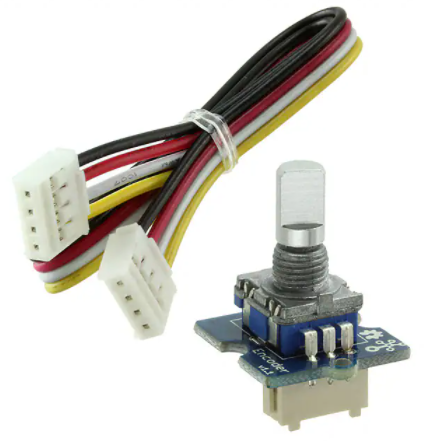
Grove – Encoder
This module is an incremental rotary encoder. It encodes the rotation signal from the
axis and output the signal by electronic pulse. The Grove – Encoder is one of the Grove
series and has a standard Grove interface. When you need to add a rotary knob to your
project, for example a volume knob for a speaker, a selection panel or a digital input,
this will be your first choice.
Features
Incremental encoder.
Grove Interface.
360 degree rotary.
Specification
Item
Min
Typical
Max
Unit
Voltage
4.5
5
5.5
V
Current
10
20
30
mA
Dimension
20x 20
mm
Net Weight
12
g
�Platforms Supported
Arduino
Raspberry Pi
BeagleBone
Wio
LinkIt ONE
Caution
The platforms mentioned above as supported is/are an indication of the module's
software or theoritical compatibility. We only provide software library or code examples
for Arduino platform in most cases. It is not possible to provide software library / demo
code for all possible MCU platforms. Hence, users have to write their own software
library.
Getting Started
Note
If this is the first time you work with Arduino, we firmly recommend you to see Getting
Started with Arduinobefore the start.
Play With Arduino
Hardware
Step 1. Prepare the below stuffs:
Seeeduino V4.2
Base Shield
Grove ‐ Circular LED
Grove ‐ Encoder
Step 2. Connect Grove-Encoder to port D2 of Grove-Base Shield.
Step 3. Connect Grove-Circular LED to port D5 of Grove-Base Shield.
Step 4. Plug Grove-Base Shield into Seeeduino.
Step 5. Connect Seeeduino to PC via a USB cable.
�Note
If we don't have Grove Base Shield, We also can directly connect Grove-Encoder and
Connect Grove-Circular LED to Seeeduino as below.
Seeeduino
5V
GND
D3
D2
Grove-Encoder
Red
Black
White
Yellow
Seeeduino
5V
GND
D6
D5
Grove-Circular LED
Red
Black
White
Yellow
Note
If you want to change to other port for Grove-Encoder, please change the digitalRead(2)
and digitalRead(3) in Encoder.cpp.
Software
Step 1. Download the Encoder Library, CircularLED Library, TimerOne Library from Github.
Step 2. Refer How to install library to install library for Arduino.
Step 3. Copy the code into Arduino IDE and upload. If you do not know how to upload the
code, please check how to upload code.
�1#include
2#include
3#include
4CircularLED circularLED(6,5);
5
6unsigned int LED[24];
7int index_LED;
8void setup()
9{
10 encoder.Timer_init();
11}
12void loop()
13{
if (encoder.rotate_flag ==1)
14
15 {
if (encoder.direct==1)
16
{
17
index_LED++;
18
if (index_LED>23)
19
index_LED=24;
20
SenttocircularBar(index_LED);
21
}
22
else
23
{
24
index_LED--;
25
if(index_LED
很抱歉,暂时无法提供与“111020001”相匹配的价格&库存,您可以联系我们找货
免费人工找货