Page 1 of 2
MikroProg for Kinetis
From MikroElektonika Documentation
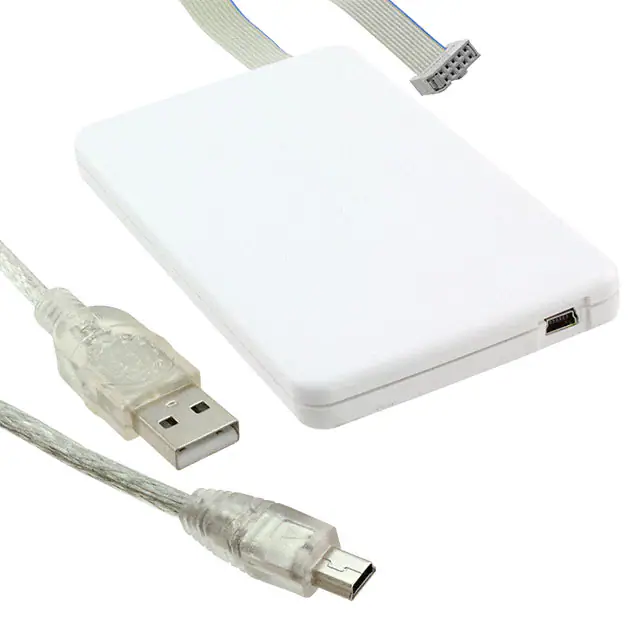
mikroProg™ for Kinetis is a fast programmer and hardware debugger. Smart engineering allows
mikroProg™ to support all Kinetis ARM® Cortex™-M4 devices in a single programmer! Outstanding
performance, easy operation, elegant design and low price are it’s top features. It is supported in
mikroElektronika, as well as in other ARM® compilers.
mikroProg for Kinetis
Contents
◾
◾
◾
◾
◾
1
2
3
4
5
Key features
Connecting to a PC
mikroProg Suite™ for ARM® software
Connecting with a target device
Resources
Key features
◾ Hardware Debugging ◾ No need for firmware updates
◾ New microcontrollers supported via latest version of mikroProg Suite™ for ARM® software
What you see
◾
◾
◾
◾
◾
◾
◾
Flat cable
Micro USB connector
DATA transceiver indication LED
ACTIVE indication LED
LINK indication LED
POWER indication LED
Driver installation
mikroProg for Kinetis programmer and debugger
Supported A total of 35 Kinetis K MCUs
devices
Website
www.mikroe.com/mikroprog/kinetis/
(http://www.mikroe.com/mikroprog/kinetis/)
On-board mikroProg™ requires drivers in order to work. Drivers can be found on our site (http://www.mikroe.com/mikroprog/kinetis/).
When you download the drivers, please extract files from the ZIP archive. The folder with extracted files contains folders with drivers for different operating
systems.
When you locate the drivers, please extract the setup file from the ZIP archive. You should be able to locate the driver setup file. Double click the setup file to
begin installation of the programmer drivers.
Connecting to a PC
After driver installation is complete, you can connect the programmer with your PC using USB cable provided with the package. Green POWER LED should
turn ON, indicating the presence of power supply. Amber-colored LINK LED will turn ON when link between mikroProg™ for Kinetis and PC is established.
Link can be established only when correct drivers are installed on your PC.
mikroProg Suite™ for ARM® software
mikroProg™ for Kinetis programmer requires special programming software called mikroProg Suite™ for ARM®. This software is used for programming all of
Kinetis ARM® Cortex™-M4 microcontroller families. It features intuitive interface and SingleClick™ programming technology. Software installation is
available on following link (http://www.mikroe.com/downloads/get/2589/mikroprog-suite-arm-programming-software-setup-v140.zip).
After downloading, extract the package and double click the executable setup file to start the installation.
Connecting with a target device
For connection with a target device mikroProg™ uses IDC10 JTAG connector. In order to make a proper connection with the target board, it is necessary to pay
attention to IDC10 connector pinout. Every pin has a different purpose and for easy orientation IDC10 connector is marked with a little knob and incision
between pins number 9 and 7.
Resources
�Page 2 of 2
- mikroProg Suite for ARM (http://www.mikroe.com/downloads/get/2589/mikroprog-suite-arm-programming-software-setup-v140.zip)
- MikroC for ARM (http://www.mikroe.com/mikroc/arm/)
- mikroBasic for ARM (http://www.mikroe.com/mikrobasic/arm/)
- mikroPascal for ARM (http://www.mikroe.com/mikropascal/arm/)
Retrieved from "http://docs.mikroe.com/index.php?title=MikroProg_for_Kinetis&oldid=443"
◾ This page was last modified on 20 June 2016, at 19:00.
◾ Content is available under Creative Commons Attribution unless otherwise noted.
http://docs.mikroe.com/index.php?title=MikroProg_for_Kinetis&printable=yes
7/11/2016
�
很抱歉,暂时无法提供与“MIKROE-2331”相匹配的价格&库存,您可以联系我们找货
免费人工找货- 国内价格
- 1+1247.57768
- 5+1197.65375
- 国内价格 香港价格
- 1+1418.573611+183.10983