Page 1 of 2
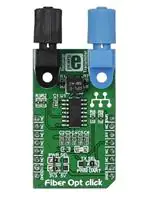
Fiber Opt click
From MikroElektonika Documentation
Fiber Opt click is a compact and easy solution for adding fiber-optic communication to your design. It
features IF-D91 fiber-optic photodiode, IF-E97 fiber-optic LED diode as well as two operational
amplifiers. Provided plastic optic connectors feature an internal micro-lens and a precision-molded PBT
housing to ensure efficient optical coupling with plastic fiber cable. Data rates of up to 512 Kbps can be
achieved. Fiber Opt click communicates with the target MCU via UART interface or directly through the
GPIO pins. UART position is set by default. Board is designed to use either 3.3V or 5V power supply.
Fiber Opt click
Features and usage notes
The combination of a fiber-optic photodiode and a
fiber-optic diode constitutes a system for sending
and receiving data. The configuration of components
makes Fiber Opt click suitable for both analog and
digital data links.
Schematic also available in PDF (http://cdndocs.mikroe.com/images/7/70/Fiber_Opt_Click_Sche
Quoting from the manufacturer's data sheet, "the IFE97 is a high-optical-output, visible red LED housed
in a “connector-less” style plastic fiber optic
package. The output spectrum is produced by a
GaAlAs die which peaks at 660 nm, one of the
optimal transmission windows of PMMA plastic
optical fiber. The device package features an internal
micro-lens and a precision-molded PBT housing to
ensure efficient optical coupling with standard 1000
μm core plastic fiber cable."
The optical response of the corresponding IF-D91 is from 450 to 1100 nm.
Fiber Opt click
IC/Module
IF-D91 fiber-optic photodiode
(http://i-fiberoptics.com/pdf/ifd91.pdf)
IF-E97 fiber-optic LED diode
(http://i-fiberoptics.com/pdf/ife97.pdf)
Interface
RX, TX, INT, PWM
You can either transmit data using UART, or, if you switch the position of the onboard UART/GPIO
jumper, you can send a PWM signal through the optical cable.
Power
3.3V, 5V
Another onboard jumper is for setting the power supply at either 3.3V or 5V.
Website
supply
www.mikroe.com/click/fiber-opt
(http://www.mikroe.com/click/fiber-opt)
Programming
This simple code snippe demonstrates how to set up Fiber Opt click to transmit ADC values.
1
2
3
4
5
6
7
8
9
10
11
12
13
14
15
16
17
18
void main()
{
char txt[20];
unsigned int adc_value = 0;
UART1_Init(19200); // Initialize UART module at 19200 bps
Delay_ms(100);
// Wait for UART module to stabilize
}
}
// Every 2 seconds transmit the ADC value over Fiber Optic
while(1)
{
adc_value = adc_read(0);
IntToStr( txt, adc_value );
UART1_Write_Text( Ltrim( txt ) );
Delay_ms( 2000 );
}
A more elaborate example that demonstrates the use of Fiber Opt click with MikroElektronika hardware, written for mikroC, mikroBasic and mikroPascal for
PIC, is available on Libstock (http://libstock.mikroe.com/projects/view/728/fiber-opt-click-example).
We also recomment the learn.mikroe.com article Going the distance with fiber optics (https://learn.mikroe.com/going-distance-fiber-optics/) for those who are
looking for a deeper undestanding on how this click board works.
Resources
- IF-D91 fiber-optic photodiode Manufacturer's data sheet (http://i-fiberoptics.com/pdf/ifd91.pdf)
- MikroElektronika Fiber Opt click on learn.mikroe.com (https://learn.mikroe.com/going-distance-fiber-optics/)
- IF-E97 fiber-optic LED diode (http://i-fiberoptics.com/pdf/ife97.pdf)
�Page 2 of 2
- MikroElektronika Fiber Opt click on learn.mikroe.com (https://learn.mikroe.com/going-distance-fiber-optics/)
- mikroBUS standard specifications (http://download.mikroe.com/documents/standards/mikrobus/mikrobus-standard-specification-v200.pdf)
Retrieved from "http://docs.mikroe.com/index.php?title=Fiber_Opt_click&oldid=271"
◾ This page was last modified on 11 May 2016, at 20:07.
◾ Content is available under Creative Commons Attribution unless otherwise noted.
http://docs.mikroe.com/index.php?title=Fiber_Opt_click&printable=yes
6/15/2016
�
很抱歉,暂时无法提供与“MIKROE-1940”相匹配的价格&库存,您可以联系我们找货
免费人工找货- 国内价格
- 1+327.25483
- 5+320.70453







 工商网监
湘ICP备2023018690号
工商网监
湘ICP备2023018690号