Color 3 click - MikroElektonika Documentation
Page 1 of 2
Color 3 click
From MikroElektonika Documentation
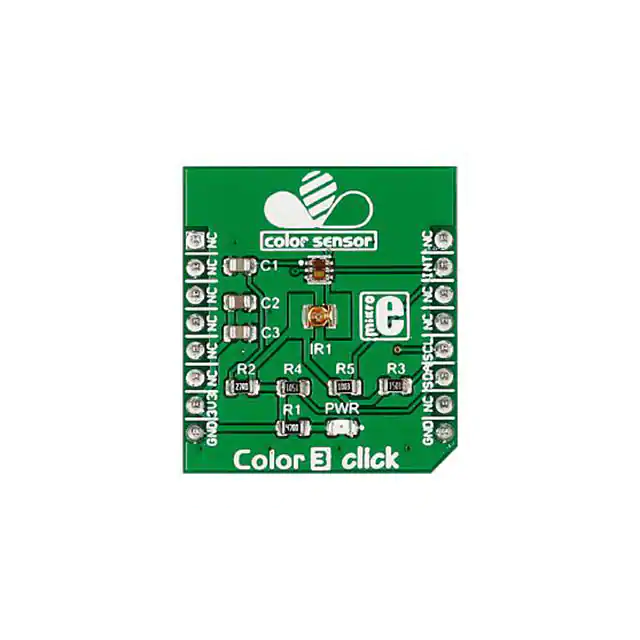
Color 3 click is a mikroBUS™ add-on board with a TCS3771 color sensor (also known as a light-todigital converter) and a narrow beam Infrared LED. The circuit can also function as a proximity sensor.
Color 3 click
Features and usage notes
TCS3771 is a RGBC sensor (red, green, blue and
clear). It consists of an array of 4x4 photodiodes and
integrated amplifiers, 16-bit ADCs, accumulators,
clocks, buffers, comparators and state machines.
The IC performs well under a variety of lighting
conditions and can be covered with different
attenuation materials.
Schematic also available in PDF (http://cdndocs.mikroe.com/images/0/0b/Color_3_click_schema
Paired with an onboard IR LED, the TCS3771
device works a proximity sensor (the emitted IR
LED is reflected back to the photodiodes). Since the
sensor has a large dynamic range of operation, Color
3 click can take both short distance measurements
behind dark glass; or it can be configured for longer
distance measurement, for example, human presence
detection in front of monitors or laptops.
For power-saving, TCS3771 has an internal state machine that can put the device into a low power mode
between successive RGBC and proximity measurements.
TCS3771 is also fast enough to give off proximity information at a high rate of repetition. This makes it
useful for proximity detection in portable devices (such as a phone coming near to a speaker’s ear).
Color 3 click communicates with the target MCU through the mikroBUS™ I2C interface, with
additional functionality provided by an INT pin. Designed to use a 3.3 power supply only.
Color 3 click
IC/Module TCS3771
(http://ams.com/eng/Products/LightSensors/Color-Sensors-ProximityDetection/TCS37717)
Interface
I2C, INT
Power
supply
3.3V
Website
www.mikroe.com/click/color-3
(http://www.mikroe.com/click/color-3)
Programming
The following code snippet shows how to send temperature readings from Color 3 click to a TFT display.
1 void main()
2 {
3
//Local Declarations
4
uint8_t _i2c_address = 0x29;
5
color_t my_color;
6
7
// GPIOs
8
GPIO_Digital_Input( &GPIOD_BASE, _GPIO_PINMASK_10 );
9
Delay_ms(300);
10
// I2C
11
I2C1_Init_Advanced( 100000, &_GPIO_MODULE_I2C1_PB67 );
12
Delay_ms(300);
13
14
//Color 3
15
color_3_init( _i2c_address );
16
Delay_ms(300);
17
18
color_3_get_rgb_data( &my_color );
19
20
while(1)
21
{
22
23
}
24
25 }
Code examples that demonstrate the usage of Color 3 click with MikroElektronika hardware, written for mikroC for ARM, AVR, dsPIC, FT90x, PIC and PIC32
are available on Libstock (http://libstock.mikroe.com/projects/view/1925/color-3-click).
Resources
◾ Vendor’s data sheet (http://ams.com/eng/Products/Light-Sensors/Color-Sensors-Proximity-Detection/TCS37717)
◾ Color 3 click Libstock example (http://libstock.mikroe.com/projects/view/1925/color-3-click)
◾ mikroBUS™ standard specification (http://download.mikroe.com/documents/standards/mikrobus/mikrobus-standard-specification-v200.pdf)
Retrieved from "http://docs.mikroe.com/index.php?title=Color_3_click&oldid=1239"
http://docs.mikroe.com/index.php?title=Color_3_click&printable=yes
11/2/2016
�Color 3 click - MikroElektonika Documentation
Page 2 of 2
Category: Home page
◾ This page was last modified on 7 October 2016, at 09:50.
◾ Content is available under Creative Commons Attribution unless otherwise noted.
http://docs.mikroe.com/index.php?title=Color_3_click&printable=yes
11/2/2016
�
很抱歉,暂时无法提供与“MIKROE-2103”相匹配的价格&库存,您可以联系我们找货
免费人工找货- 国内价格
- 1+183.70659
- 5+180.02934