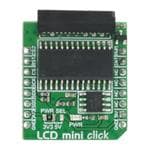
LCD mini click
PID: MIKROE-2453
Weight: 37 g
LCD mini click displays 2x16 monochrome characters on an LMB162XFW LCD display. It features
the MCP23S17 port expander and the MCP4161 digital potentiometer, both from Microchip. LCD mini
click is designed to run on either 3.3V or 5V power supply. It communicates with the target
microcontroller over SPI interface and the following pins on the mikroBUS™ line: PWM, INT, RST, AN.
�LCD and backlight control
The PWM pin onboard the LCD mini click is used for backlight control. While the digital
potentiometer is used for contrast adjustments.
2x16 LCD display features
2x16 LDC displays are ideal for displaying short messages and numbers. They can display 16
characters per one line, 32 in total. The 5x8 dot font displays characters, symbols, and numbers
clearly and vividly.
Key features
16x2 monochrome display
LMB162XFW LCD
o White LED backlight
o Outline dimension: 53.0x20.0x9.1MAX
o Display color: deep blue, light yellow green
MCP23S17 IC
o External Reset input
o Low standby current: 1 µA (max.)
MCP4161 IC
o Low Wiper Resistance: 75Ω (typical)
o Serial Interface Inactive current (2.5 uA typical)
Interface: SPI
3.3V or 5V power supply
Specification
Product Type
LCD
Interfacing 2x16 LED displays with mikroBUS™ compatible development
Applications
boards
On-board
MCP23S17 port expander, MCP4161 digital potentiometer - both from
modules
Microchip
Adapter for connecting 2x16 LCD displays, MCP23S17 port expander,
Key Features
MCP4161 digital potentiometer
Onboard port expander for LCD control, digital potentiometer for contrast
Key Benefits
settings, PWM for backlight control.
Interface
SPI
Power Supply
3.3V or 5V
Compatibility
mikroBUS
Click board size S (28.6 x 25.4 mm)
�Pinout diagram
This table shows how the pinout on LCD mini click corresponds to the pinout on the
mikroBUS™ socket (the latter shown in the two middle columns).
Notes
Pin
Pin
Notes
mikroBUStm
Digipot CS CS2 1 AN
Reset for the port expander RST 2 RST
SPI chip select CS 3
PWM 16 PWM Pulse‐Width Modulation
INT 15 INT INT from the port expander
CS
RX 14 NC Not connected
SPI clock SCK 4 SCK
TX 13 NC Not connected
SPI Master Input Slave Output MISO 5 MISO
SDA 12 NC Not connected
SPI Master Output Slave Input MOSI 6 MOSI
SDA 11 NC Not connected
Power supply +3.3V 7 3.3V
Ground GND 8 GND
5V 10 +5V Power supply
GND 9 GND Ground
Programming
The demo shows how to use the SPI LCD library to communicate with the LCD (with HD44780
compliant controllers) in 4-bit mode via the SPI interface. It also uses the PWM for the backlight
and the on board digital potentiometer, for controlling display contrast, which can be accessed
through SPI. The demo iterates through all the values for the backlight and the contrast intensity.
Code snippet
The main function of the demo.
01 void main()
02 {
03
system_init();
04
05
SPI_Lcd_Out(1, 6, "mikroE");
06
SPI_Lcd_Out(2, 2, "LCD mini click");
�07
08
09
10
11
12
13
14
15
16
17
18
19
20
21 }
set_bcklight(0xFF);
set_contrast(0xDF);
Delay_ms(5000);
while (1)
{
set_bcklight(value);
set_contrast(value);
value++;
delay_ms(40);
}
https://shop.mikroe.com/click/display/lcd-mini 2/24/2017
�
很抱歉,暂时无法提供与“MIKROE-2453”相匹配的价格&库存,您可以联系我们找货
免费人工找货- 国内价格
- 1+183.64802
- 5+179.97194







 工商网监
湘ICP备2023018690号
工商网监
湘ICP备2023018690号