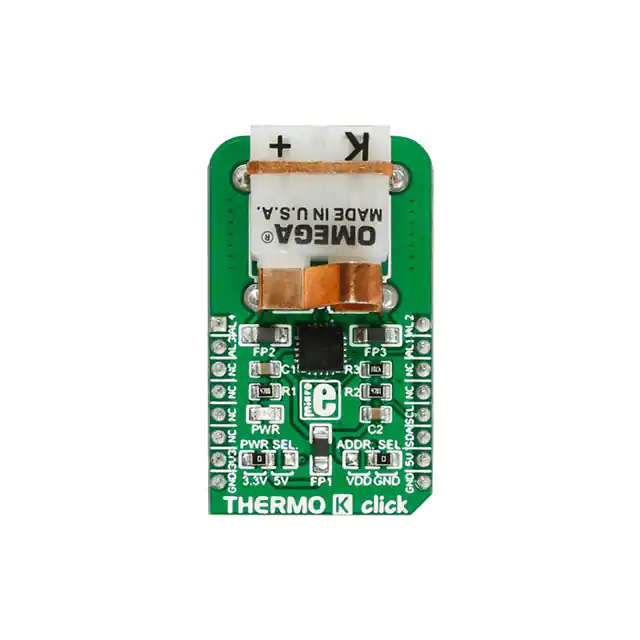
THERMO K click
1
THERMO K click
THERMO K click
THERMO K click
IC/Module
Interface
MCP9600 datasheet
[1]
I2C
Power supply 3.3V or 5V
Product page shop.mikroe.com/click/sensors/thermo-k [2]
Schematic
THERMO K click schematic
[3]
THERMO K click carries the MCP9600 IC from Microchip and and depending on the type of probe it uses, the
click can measure temperatures from −200 °C to +1372 °C. THERMO K click is designed to run either on 3.3V or
5V power supply. It communicates with the target MCU through I2C interface.
Features and usage notes
Temperature range
With the type-K probe, available in our store [4], this click can measure temperature up to +480 °C.
MCP9600 from Microchip
The MCP9600 IC converts thermocouple EMF to degree Celsius with integrated Cold-Junction compensation. It
corrects the thermocouple nonlinear error characteristics of eight thermocouple types and outputs ±1.5°C accurate
temperature data.
4 alert outputs
THERMO K click has 4 alert outputs onboard that can be used to detect multiple temperature zones. You can define
on which specific temperature the THERMO K click will send an alarm.
�THERMO K click
2
Low power modes
Low-Power modes are available for battery-powered applications. In shut-down mode the module uses only 2 µA.
Thermocouple probe
In order to use THERMO K click you need to connect the appropriate K-type thermocouple probe (not included in
the package) into the PCC-SMP connector.
Key features
• MCP9600 IC from Microchip
• Four Programmable Temperature Alert Outputs
• Operating Current: 300 µA (typical)
• Shutdown Current: 2 µA (typical)
• Interface: I2C
• 3.3V or 5V power supply
Jumpers and settings
Designator Name
Default
Position
Default
Option
Description: describe the use + list all options with respective descriptions
JP1
PWR.SEL.
Left
3V3
Power Supply Voltage Selection 3V3/5V, left position 3v3, right position 5V
JP2
ADDR.
SEL.
Right
GND
I2C address Selection. Left position (VDD) is 1100111x and right position (GND) is
1100000x .
Additional information
Our store [5] offers Thermocouple Type-K Glass Braid Insulated probes.
Pinout diagram
This table shows how the pinout on THERMO K click corresponds to the pinout on the mikroBUS™ socket (the
latter shown in the two middle columns).
Notes
Pin
Pin
Notes
mikroBUStm
Alert 4 output ALERT4 1 AN
X PWM 16 ALERT2 Alert 2 output
Alert 3 output ALERT3 2 RST
INT
15 ALERT1 Alert 1 output
Not connected NC
3 CS
TX
14 NC
Not connected
Not connected NC
4 SCK
RX
13 NC
Not connected
Not connected NC
5 MISO
SCL
12 SCL
I2C Clock
Not connected NC
6 MOSI
SDA
11 SDA
I2C Data
Power supply
+3.3V
7 +3.3V
+5V
10 +5V
Power supply
Ground
GND
8 GND
GND 9
GND
Ground
�THERMO K click
Programming
The demo shows the temperature on the TFT or LCD display.
It measures every half a second.
We have examples for PIC, dsPIC, PIC32, ARM, AVR and FT90x compilers.
The code snippet is from the Example folder of the PIC compiler and P18F87K22 MCU.
This example is a temperature reading routine.
First, we are reading the “Thermocouple Temperature Register” and then we are converting the value to a
temperature in the Celsius scale.
float Read_Temperature()
{
float Temperature;
tmp_data[0] = MCP9600_TH;
I2C1_Start();
I2C1_Wr( MCP9600_I2C_ADDR );
I2C1_Wr( tmp_data[ 0 ] );
I2C1_Stop();
Delay_us( 50 );
I2C1_Start();
I2C1_Wr( MCP9600_I2C_ADDR | 1 );
tmp_data[ 0 ] = I2C1_Rd( 1 );
tmp_data[ 1 ] = I2C1_Rd( 0 );
I2C1_Stop();
if((tmp_data[0] & 0x80) == 0x80)
{
tmp_data[0] = tmp_data[0] & 0x7F;
Temperature = 1024 - (tmp_data[0]*16 + tmp_data[1] / 16);
}
else
{
Temperature = (tmp_data[0] * 16 + (float)tmp_data[1] / 16);
}
return Temperature;
}
3
�THERMO K click
Resources
•
•
•
•
THERMO K schematic [3]
MCP9600 datasheet [1]
Libstock Library [6]
mikroBUS™ standard specifications [7]
References
[1]
[2]
[3]
[4]
[5]
[6]
[7]
http:/ / ww1. microchip. com/ downloads/ en/ DeviceDoc/ 20005426B. pdf
https:/ / shop. mikroe. com/ click/ sensors/ thermo-k
http:/ / cdn-docs. mikroe. com/ images/ 3/ 3e/ THERMO_K_click_schematic. pdf
https:/ / shop. mikroe. com/ accessories/ sensors/ thermocouple-type-k-glass-braid-insulated
https:/ / shop. mikroe. com/ accessories/ sensors/ thermocouple-type-k-glass-braid-insulated?search_query=thermocouple& results=2
http:/ / libstock. mikroe. com/ projects/ view/ 1976/ thermo-k-click
http:/ / download. mikroe. com/ documents/ standards/ mikrobus/ mikrobus-standard-specification-v200. pdf
4
�Article Sources and Contributors
Article Sources and Contributors
THERMO K click Source: http://docs.mikroe.com/index.php?oldid=3004 Contributors: Lana.vulic
Image Sources, Licenses and Contributors
File:THERMO K click.jpg Source: http://docs.mikroe.com/index.php?title=File:THERMO_K_click.jpg License: unknown Contributors: Lana.vulic
File:mikrobus logo.png Source: http://docs.mikroe.com/index.php?title=File:Mikrobus_logo.png License: unknown Contributors: Vojislav.gvozdic
License
Creative Commons Attribution
https:/ / creativecommons. org/ licenses/ by/ 4. 0/
5
�
很抱歉,暂时无法提供与“MIKROE-2501”相匹配的价格&库存,您可以联系我们找货
免费人工找货- 国内价格 香港价格
- 1+326.461251+42.23648