Page 1 of 2
Force click
From MikroElektonika Documentation
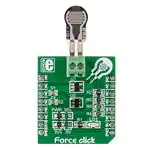
Force click is a mikroBUS™ add-on board with circuitry for implementing Interlink
Electronics’ Force Sensing Resistors into your projects (with a single zone force
sensing resistor included with the click). The Force Sensing Resistor is a thin sensor
made of two membranes that are separated by a spacer around the edges. When
pressed, the gap between two membranes gets closed. This shorts the two
membranes together, with a resistance that is proportional to applied force. The
outputted analog voltage is thus a measure of force applied. The force sensitivity
range is from about 0.2N to 20N (although it depends on the implementation). Force
click communicates with the target MCU through the mikroBUS™ AN pin. It is
designed to use either a 3.3V or 5V power supply.
Force click
Features and usage notes
Schematic also available in PDF (http://cdndocs.mikroe.com/images/6/65/Force_click_schematic
Force click is shipped with a
Force Sensitive Resistor you can
use right away. The sensor,
however, is not permanently
affixed. It’s connected to the
click through screw terminals.
This allows you to swap the
existing sensor with different
models. Interlink Electronic’s
offer Force Sensitive Resistors
in different packages. Interlink
even offers to create custom
sensors in different shapes, sizes,
with graphic overlays and from
different materials, depending on
customer’s needs.
Force click
IC/Module Interlink Electronics FSR® Force Sensing Resistor®
(http://www.interlinkelectronics.com/datasheets/Datasheet_FSR.pdf)
Interface
AN
Power
3.3V, 5V
supply
Website
www.mikroe.com/click/force (http://www.mikroe.com/click/force)
The Force Resistive Sensor has a declared value range from ~0.2 to 20N but the achieved accuracy depends on the implementation.
For best implementation results, adhere to the FSR integration guide document. Page 29 lists an assortement of do’s and dont’s.
Programming
The following code snippet reads voltage on the analogue pin and displays the result on LCD.
1
2
3
4
5
6
7
8
9
10
11
12
13
adc_rd = ADC_Get_Sample(2);
Delay_ms(10);
if(adc_rd > 0)
{
adc_rd = ((double)adc_rd * Vadc_33);
FloatToStr(adc_rd, &txt);
txt[5] = 0;
Lcd_Out(2,8,txt);
Delay_ms(200);
}
Code examples that demonstrate the usage of Force click with MikroElektronika hardware, written for mikroC, mikroBasic and mikroPascal for ARM, AVR,
dsPIC, FT90x, PIC and PIC32 are available on Libstock (http://libstock.mikroe.com/projects/view/1863/force-click).
Resources
- FSR® 400 Series Data Sheet (http://www.interlinkelectronics.com/datasheets/Datasheet_FSR.pdf)
- Force Sensing Resistors integration guide (http://www.interlinkelectronics.com/integration_guides/FSR400Series_IG.zip)
- Force Sensing Resistor CAD Model (http://www.interlinkelectronics.com/cad_models/FSR400Short_CM.zip)
- Force click code example on Libstock (http://libstock.mikroe.com/)
Retrieved from "http://docs.mikroe.com/index.php?title=Force_click&oldid=518"
�Page 2 of 2
◾ This page was last modified on 18 July 2016, at 17:16.
◾ Content is available under Creative Commons Attribution unless otherwise noted.
http://docs.mikroe.com/index.php?title=Force_click&printable=yes
8/8/2016
�
很抱歉,暂时无法提供与“MIKROE-2065”相匹配的价格&库存,您可以联系我们找货
免费人工找货- 国内价格 香港价格
- 1+335.437541+43.39780
- 国内价格
- 1+303.43839
- 5+297.36712