Page 1 of 2
TouchClamp click
From MikroElektonika Documentation
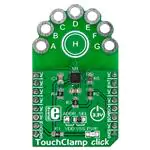
TouchClamp click is a mikroBUS™ addon board with NXP’s MPR121 proximity
capacitive touch sensor controller. It has
seven plated holes for clamps which can
be used to connect any – literally any –
conductive object in order to use it as an
input button to send an interrupt to the
target board MCU. It’s great for creating
installations where users interact with the
environment in unexpected ways.
TouchClamp click communicates with the
target MCU through the mikroBUS™ INT
pin and I2C interface (SCL, SDA). The
board has an onboard ADDR. SEL.
jumper for choosing I2C addresses.
Designed to use a 3.3V power supply
only.
TouchClamp click
Features and usage notes
The easiest way to experiment with
TouchClamp click is to use wires with
alligator clips. Let your imagination roam
free when choosing conductive objects.
Cans, fruit, jar lids, and much more. The
MPR121 chip has several features that
simplify development and integration.
First, it applies 3 levels of digital filtering
TouchClamp click
IC/Module MPR121 (http://cache.nxp.com/files/sensors/doc/data_sheet/MPR121.pdf?fpsp=1&WT_TYPE=Data%
20Sheets&WT_VENDOR=FREESCALE&WT_FILE_FORMAT=pdf&WT_ASSET=Documentation&fileExt=.pdf)
Interface
INT, I2C (SCL, SDA)
Power
3.3V
supply
Website
www.mikroe.com/click/touchclamp (http://www.mikroe.com/click/touchclamp)
to the raw ADC data to remove high and low frequency noise, ensuring that the interrupts are properly
registered in a broad range of applications.
Additionally, MPR121 has an auto-calibration function. According to the vendor's data sheet, it "continually
learns the background baseline capacitance of each individual electrode, so the system only has to program
the amount of small change from these baselines that represents a touch or release."
Finally, the electrodes are auto-configurable. Given a target charge level, the chip can automatically run to
get an optimized setting of charge current and charge time for each electrode without knowing the specific
capacitance value on the electrode input.
In additioan to the seven plated holes marked A through G, a central capacitive button "H" is also available.
Schematic also available in PDF (http://cdndocs.mikroe.com/images/3/31/TouchClamp_click_sch
Another interesting applications is to use conductive paint to draw your own input surfaces in whichever way
you want.
Our learn.mikroe.page has an interesting example scenario that could be applied in a retail store. We wired jars with different types of food in them to
TouchClamp click. Placing your hand on any of the lids displays the nutritional values of the content inside.
Programming
The following code snippet shows how to identify which electrode was pressed using on a TFT display.
1
2
3
4
5
6
7
8
9
tc_hal_init( 0x5A );
tc_default_config();
Delay_ms( 200 );
while( 1 )
{
if( tc_get_ts( ELE_A ) )
UART1_Write_Text( "Electrode A touch detected" );
}
Code examples that demonstrate the usage of TK click with MikroElektronika hardware, written for mikroC for ARM, AVR, dsPIC, FT90x, PIC and PIC32 are
available on Libstock (http://libstock.mikroe.com/projects/view/1789/touchclamp-click).
Resources
�Page 2 of 2
- Learn.mikroe.com tutorial on TouchClamp click (http://learn.mikroe.com/energy-cost-effective-touchclamp/)
- TouchClamp click code examples on Libstock (http://libstock.mikroe.com/projects/view/1789/touchclamp-click)
- MPR121 vendor's data sheet (http://cache.nxp.com/files/sensors/doc/data_sheet/MPR121.pdf?fpsp=1&WT_TYPE=Data%
20Sheets&WT_VENDOR=FREESCALE&WT_FILE_FORMAT=pdf&WT_ASSET=Documentation&fileExt=.pdf)
Retrieved from "http://docs.mikroe.com/index.php?title=TouchClamp_click&oldid=331"
◾ This page was last modified on 20 May 2016, at 22:38.
◾ Content is available under Creative Commons Attribution unless otherwise noted.
http://docs.mikroe.com/index.php?title=TouchClamp_click&printable=yes
6/15/2016
�
很抱歉,暂时无法提供与“MIKROE-2294”相匹配的价格&库存,您可以联系我们找货
免费人工找货