ROTARY click
From MikroElektonika Documentation
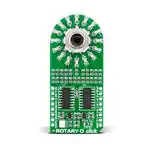
Rotary click carries a 15-pulse incremental rotary encoder with detents, surrounded by a ring of 16
orange LEDs. The board is available in five different LED colors: red, green, blue, yellow and orange.
Rotary click
Features and usage notes
Rotary click with its LED ring is a perfect solution
for implementing an input knob into your design (in
contrast to a potentiometer, a rotary encoder can be
spun round continuously). A single rotation is
divided into 15 discrete steps. The encoder outputs A
and B signals (out of phase to each other). The knob
is also a push-button outputted through the interrupt
line. The LED ring are controlled through the SPI
interface.
Schematic also available in PDF (http://cdndocs.mikroe.com/images/a/a3/Rotary_O_click_schem
In addition to the SPI lines (CS, SCK, MISO,
MOSI), Rotary clicks have three additional lines for
outputting the Encoder info: ENCB OUT, ENCA
OUT and SW (in place of the standard AN, RST and
INT pins, respectively).
Rotary click
All Rotary click boards can be used with either a 3.3V or 5V power supply. The configuration is set up
with an onboard jumper (zero ohm resistor). By default, it’s set to 3.3V
IC/Module [Rotary encoder surrounded by ring of LEDs]
Interface
SPI, ENCA, ENCB
Programming
Power
supply
3.3V, 5V
The following code snippet demonstrates the write procedure of Rotary click.
Website
1 void HC595_Write( int value )
2 {
3
char first_byte, second_byte;
4
5
second_byte = value;
6
value = value >> 8;
7
first_byte = value;
8
SPI1_write( first_byte );
9
SPI1_write( second_byte );
10
HC595_cs = 0;
11
asm{ nop };
12
asm{ nop };
13
asm{ nop };
14
HC595_cs = 1;
15
16 }
www.mikroe.com/click/rotary-r
(http://www.mikroe.com/click/rotary-r)
www.mikroe.com/click/rotary-g
(http://www.mikroe.com/click/rotary-g)
www.mikroe.com/click/rotary-b
(http://www.mikroe.com/click/rotary-b)
www.mikroe.com/click/rotary-y
(http://www.mikroe.com/click/rotary-y)
www.mikroe.com/click/rotary-o
(http://www.mikroe.com/click/rotary-o)
Code examples that demonstrate the usage of Rotary click with MikroElektronika hardware, written for mikroC for ARM, AVR, dsPIC, FT90x, PIC and PIC32
are available on Libstock (http://libstock.mikroe.com/projects/view/1227/rotary-click).
Resources
- Rotary click Libstock example (http://libstock.mikroe.com/projects/view/1227/rotary-click)
- mikroBUS™ standard specifications (http://download.mikroe.com/documents/standards/mikrobus/mikrobus-standard-specification-v200.pdf)
- LEDs and bit shifting: a shift register tutorial (http://learn.mikroe.com/leds-bit-shifting-shift-register-tutorial/)
http://docs.mikroe.com/ROTARY_click
9/15/2016
�
很抱歉,暂时无法提供与“MIKROE-2380”相匹配的价格&库存,您可以联系我们找货
免费人工找货