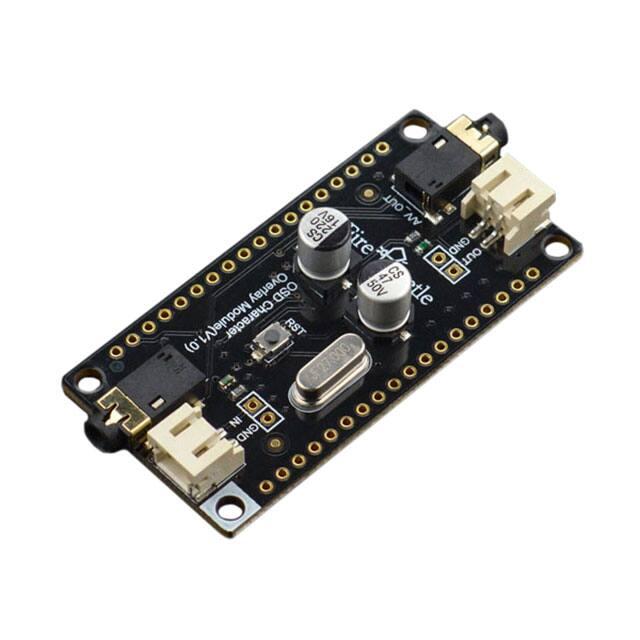
FireBeetle Covers-OSD Character
Overlay Module SKU:DFR0515
Introduction
OSD is the abbreviation of On-screen Display, this is a screen menu adjustment display technology
to add different menu-style characters on the screen display.
FireBeetle OSD Character Overlay Module is a new product presented by DFRobot. It adopts
AT7456E OSD chip. This is a single-channel OSD module, equipped with functions like video drive,
sync separator, video separate switch, etc. It comes with 512 bytes EEPROM user-defined storage
space. After connected to video sources (AV Signals), the display covers 540x192 pixels which can
show 16x30 characters on the screen. Users can also call font library to show characters and
images.
This FireBeetle OSD Character Overlay Module is compatible with FireBeetle series interfaces and
can be directly plugged into FireBeetle mainboards. This module can be widely applied to device
character display and time display of monitor device such as road cameras, home automation.
�Features
•
•
•
•
•
•
•
•
512-byte EEPROM user-defined storage space
Support blink, inverse color and background control characters
Support setting lightness line-by-line
Maximum 16x30 characters display
Support attenuation compensation of video drive output
Built-in sync generator and support external compound sync signal input
Compatible with NTSC and PAL
Built-in characters stock
Specification
•
•
•
•
•
•
•
•
•
•
Operating Voltage: 3.3V~5V
Operating Current: 75mA
Character Display: 16x30
Character Pixel: 18x12
Resolution: 540x192
Color to Show: Single Color (White)
Signal Source: AV I/O
Communication Interface: SPI
Operating Temperature: -10℃~85℃
Dimension: 2.28in x 1.14in/58mm x 29mm
Function Diagram
FireBeetle OSD Character Overlay Module Function Diagram
�•
•
•
•
•
Video Signal Input: RCA A/V_IN or PH2.0 IN
Video Signal Input: RCA A/V_OUT or PH2.0 OUT
OSD (On-screen Display) Control: SPI Interface
RST: Reset button of OSD chip
D2-D5: chip selection is available with dial switch
Board Overview
NOTE: When disconnect NC, VCC is the output voltage of the power supply(USB power
supply: 5V; lithium battery power supply: 3.7V)
�Tutorial
Requirements
•
•
•
•
•
•
Hardware
AV Interface Camera x 1
AV Interface Display x 1
AV Signal Wire x 2
OSD Character Overlay Module (V1.0) x 1
FireBeetle-ESP32 x 1
•
•
•
•
Software
Arduino IDE (Version requirements: V1.6.+), Click to Download Arduino IDE from Arduino®
Please click to download FireBeetle DFRobot_OSD Library. How to install Libraries in Arduino IDE
Matrix software TheDotFactory.exe is included in category tool of Arduino library, you can also
download from github.
Connection Diagram
FireBeetle Covers-OSD Character Overlay Module Connection Diagram
�Operation Steps
•
•
•
Connect OSD Character Overlay Module to FireBeetle-ESP32 according to the connection diagram
and turn on the OSD dial switch (D3 at here).
Connect camera and display to OSD Character Overlay Module according to the connection
diagram.
Connect FireBeetle-ESP32 to PC with USD wire and open Arduino IDE, download and run examples
of DFRobot_OSD library.
NOTE: cs variable is chip select pin and it must be respond to dial switch. E.g. Dial switch D3
respond to IO26 of FireBeetle-ESP32. Here the CS is D3.
EEPROM Character Library
the first page of EEPROM: the first character address is 0x01
�the second page of EEPROM: the second character address is 0x101
Matrix Software Guide
1. Click option button
FireBeetle Covers-OSD Character Overlay Module Tool
�2. Select options as follows: Padding Removal, Line wrap,Byte
FireBeetle Covers-OSD Character Overlay Module Config
3. Input content to the left edit box, click Generate to get matrix.
FireBeetle Covers-OSD Character Overlay Module Putout
�Sample Code
•
Below is the FireBeetle DFRobot_OSD sample code. Please ensure CS is respond to CS pin.
/*!
* file DFRobot_OSD.ino
* character superimposition.
* @n This example Set characters on the screen.
*
* Copyright
[DFRobot](http://www.dfrobot.com), 2016
* Copyright
GNU Lesser General Public License
*
* version
* date
V1.0
2017-10-9
*/
#include
/*select CS pin*/
#ifdef __AVR__
int cs = 3;
#elif defined ESP_PLATFORM
int cs = D3;
#elif defined __ets__
int cs = D3;
#else
#error unknow board
#endif
DFRobot_OSD osd(cs);
/*Define Chinese characters*/
�int buf0[36] = {0x00,0x00,0x40,0x01,0x40,0x02,0x40,0x03,0xFC,0x07,0x44,0x00,0
x44,0x02,0x44,0x02,0x7C,0x02,0x94,0x02,0x94,0x01,0x92,0x01,0x12,0x01,0x9A,0x0
5,0x52,0x06,0x22,0x04,0x00,0x00,0x00,0x00};
int buf1[36] = {0x08,0x00,0x08,0x00,0xC8,0x07,0xBC,0x04,0xA8,0x02,0x98,0x02,0
xFE,0x02,0x88,0x02,0x8C,0x02,0xB4,0x04,0xA6,0x04,0xBC,0x04,0xA4,0x04,0xA4,0x0
6,0xBC,0x00,0x84,0x00,0x00,0x00,0x00,0x00};
int buf2[36] = {0x00,0x00,0x04,0x02,0xC4,0x03,0x44,0x02,0x5E,0x01,0x44,0x01,0
x44,0x05,0xCC,0x06,0x76,0x02,0x76,0x02,0xA6,0x02,0xA6,0x01,0x24,0x01,0x94,0x0
1,0x54,0x02,0x24,0x04,0x00,0x00,0x00,0x00};
int buf3[36] = {0x00,0x00,0x04,0x00,0xF4,0x01,0xAC,0x00,0xB4,0x07,0xA4,0x04,0
xF4,0x05,0xAE,0x03,0xA4,0x02,0xE6,0x02,0xBA,0x06,0xE6,0x05,0xA6,0x01,0x86,0x0
0,0x89,0x00,0xF1,0x07,0x00,0x00,0x00,0x00};
void setup(){
osd.init();
osd.clear();
/* Write the custom character to the OSD, replacing the original character*
/
/* Expand 0xe0 to 0x0e0, the high 8 bits indicate page number and the low 8
bits indicate the inpage address.*/
osd.storeChar(0xe0,buf0);
osd.storeChar(0xe1,buf1);
osd.storeChar(0xe2,buf2);
osd.storeChar(0xe3,buf3);
/*Displays custom characters*/
osd.displayChar(2,2,0xe0);
osd.displayChar(2,3,0xe1);
osd.displayChar(2,4,0xe2);
osd.displayChar(2,5,0xe3);
/*display character*/
osd.displayChar(9,9,0x11d);
osd.displayChar(9,10,0x11e);
osd.displayChar(8,11,0x10f);
/*display String*/
�const char* str1 = "DFRobot";
String str2 = "2017.9.12";
osd.displayString(14,21,str1);
osd.displayString(2,19,str2);
osd.displayString(4,2,"hello world!");
}
void loop(){
}
Expected Results
�Compatibility Test
MCU
Pass Failed Not Tested
Remark
FireBeetle-Board328P √
FireBeetle-ESP32
√
FireBeetle-ESP8266
√
Leonardo
√
Tested with Dupont wire
Arduino Library Functions
DFRobot_OSD Arduino library
•
Construct a function, parameter: CS(Chip Select) pins
•
DFRobot_OSD(int CS);
•
Initialize OSD
•
void init();
•
Clear characters in the display
•
void clear(void);
•
Show EEPROM characters of 16x30. Parameters: row means Y-axis (0,15), col means X-axis
(0,29), addr means characters address value, MSB is page number, LSB is page address
(EEPROM for reference). E.g. 0x28, which means the first page and the page address is 0x28,
refers to EEPROM and it stands for character-d; 0x10F, which means the second page and the page
address is 0x0F, refers to EEPROM and it stands for character-radar.
•
void displayChar(unsigned char row, unsigned char col, unsigned short addr);
•
Display strings, 16x30 characters utmost. Parameters: row means Y-axis (0,15), col means X-axis
(0,29), s means string.
•
void displayString(unsigned char row, unsigned char col, unsigned char *s);
•
Display strings, 16x30 characters utmost. Parameters: row means Y-axis (0,15), col means X-axis
(0,29), s means string.
�•
void displayString(unsigned char row, unsigned char col, String s);
•
Save user-defined characters to OSD designated address. Parameters: addr means OSD address
to save characters, dt is a matrix drawn by matrix software.
•
void storeChar(unsigned short addr,int dt[]);
For any questions, advice or cool ideas to share, please visit the DFRobot Forum.
Compatibility Testing
MCU
PASS Fall None
FireBeetle-Board328P
√
FireBeetle-ESP32
√
FireBeetle-ESP8266
√
Leonardo
√
Note
wire connect
�Dimension
Fig1: FireBeetle Covers-OLED12864 Display
More Documents
•
•
Schematic
AT7456E Datasheet (Chinese)
https://www.dfrobot.com/wiki/index.php/FireBeetle_Covers-OSD_Character_Overlay_Module_SKU:DFR0515 4-3-18
�