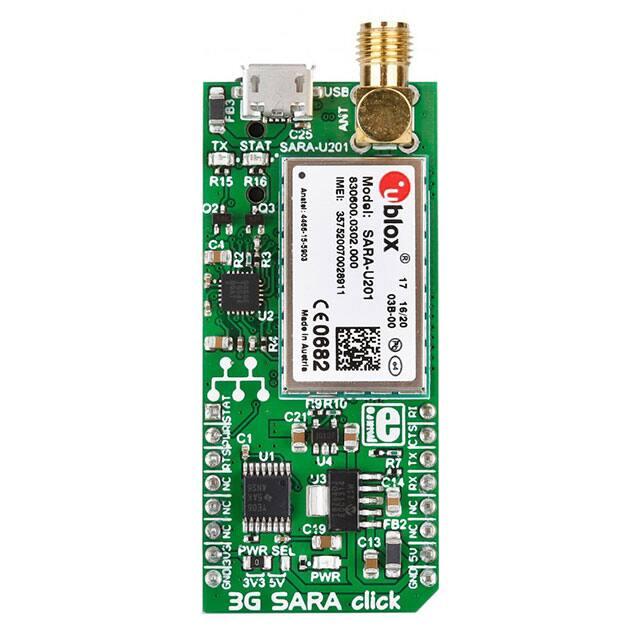
3G SARA click
1
3G SARA click
3G SARA click
3G SARA click
IC/Module
Interface
u-blox U201
[1]
UART, STAT, PWRKEY, RI, CTS
Power supply
3.3V or 5V
Product page
www.mikroe.com/click/3g-sara
Schematic
3G SARA click schematic
[2]
[3]
3G SARA click is a mikroBUS™ add-on board with the smallest UMTS/HSPA cellular modem available today –
the u-blox U201, from the award-winning SARA series. The board has everything you need to add 3G to your
devices and make them respond and react to phone calls and messages – or send/receive data at speeds up to 7.2
Mb/s – from anywhere in the world. The code example we provide will let you put it to use quickly.
Features and usage notes
To start using 3G SARA click you will need a microSIM card and an SMA antenna (sold separately), plus a
mic/earphone headset if you want to send and receive calls. Everything else is already on the board.
Apart from the SIM card slot, SMA antenna connector, audio jack and stereo audio codec IC, 3G SARA click also
has a Micro USB port to connect the module to a PC. The following is a list of specifications of the board and the
module itself:
• u-blox SARA U201 3G module on board:
• 3.75G compatible with HSUPA (5.76 Mb/s), HSDA (7.2 Mb/s), UMTS, GPRS, EDGE
• HSPA/GSM GLOBAL COVERAGE, no regional restrictions (800/850/900/1900/2100 frequency bands)
• Embedded Protocol stacks:
•
•
•
•
•
Dual stack IPv4/IPv6
Embedded TCP/IP, UDP/IP
HTTP/FTP/SSL (Secure Socket Layer)
SSL TLS 1.2 (for embedded TCP/IP)
Ethernet over USB
�3G SARA click
•
•
•
•
•
•
•
• eSIM and Bearer-Independent-Protocol
MAX9860 16-Bit Mono Audio Voice Codec IC
4-Pole (TRRS) 3.5 mm Audio jack for mic/earphone headset
SIM Card slot
SMA Antenna connector (antenna sold separately)
Micro USB port for connecting to PC
MikroBUS™ UART interface (+ several additional pins)
3.3V, or 5V power supply
u-blox provides a free PC app [4] for controlling and testing the 3C SARA click from your computer. Developers can
also write their own custom applications using the USB-UART communication line.
u-blox evaluation software
As described u-blox, "The m‑center cellular evaluation software, available free-of-charge, is a powerful and easy to
use tool for evaluating, configuring, and testing of u‑blox cellular modules. It includes an intuitive, easy to
understand and easy to use graphical interface. m‑center provides a convenient means to configure u‑blox cellular
modules and save the configuration in the module EPROM. It is also possible to view and edit SIM phonebook
entries, send text messages, and communicate with the wireless module using AT commands. m‑center can be used
to restore the cellular module’s factory default settings and to perform traces."
2
�3G SARA click
3
Pinout diagram
This table shows how the pinout on 3G SARA click corresponds to the pinout on the mikroBUS™ socket (the latter
shown in the two middle columns).
Notes
Pin
Pin
Notes
mikroBUStm
Network Status
STAT
1 AN
Power ON/OFF
PWRKEY 2 RST
X PWM 16 RI
Incoming ring detection
INT
15 CTS
3 CS
RX
14 TXD UART data Transmit
4 SCK
TX
13 RXD UART data Receive
5 MISO
SCL
12
6 MOSI
SDA
11
+3.3V
7 +3.3V
+5V
10 +5V
GND
8 GND
GND 9
UART Request To Send RTS
UART Clear To Send
GND
STAT pin (#1) shows the network status The pin configured to provide the “Network status indication” function is
set as:
• Continuous Low: if no service (no network coverage or not registered)
• Cyclically High for 100 ms, Low for 2 s: if registered home 2G network
• Cyclically High for 50 ms, Low for 50 ms, High for 50 ms, Low for 2 s: if registered home 3G network
• Cyclically High for 100 ms, Low for 100 ms, High for 100 ms, Low for 2 s: if registered visitor 2G network
(roaming)
• Cyclically High for 50 ms, Low for 50 ms, High for 50 ms, Low for 100 ms: if registered visitor 3G network
(roaming)
• Continuous High: if voice or data 2G/3G call enabled
3G SARA click can run on either a 3.3V or a 5V power supply. 3.3V is selected by default. To switch to 5V, use the
onboard jumpers (zero ohm resistors).
Programming
The code example we provide requires you to provide PIN definitions inside your project, to match the mikroBUS™
socket where the click is placed. You will also need to edit the interrupt routine inside “dev_hal.c” file if needed –
depending on the UART BUS used.
The idea of the demo is to make a remote lock for a gate which locks on unlocks the gate using relay click by calling
the phone number which is inserted to 3G Sara click board. Only phone numbers stored in “approved” variable inside
the “3G_sara_gate.c” file can toggle the relay. User can also edit “platoform.pld” file to have everything logged on
UART bus for debug.
�3G SARA click
4
Code example
This routine checks caller ID and compares it to the numbers stored in “approved” variable. If the same number
exists this function toggles the relay and sends confirmation message about the relay state.
void reply_info_to_caller( void )
{
int check;
char tmp_cmd[ 50 ] = { 0 };
for( check = 0; check < SUBSCRIBERS; check++ ){
if( !strcmp( tmp_num, approved[check] ) ){
strcpy(
sting for new
strcat(
at_cmd(
tmp_cmd, "AT+CMGS=" );
SMS with caller ID
tmp_cmd, tmp_num );
tmp_cmd );
// Check caller ID
// Compose
if( !RELAY_1 )
at_cmd_addition( "Access granted!" );
else
at_cmd_addition( "Gate locked!" );
RELAY_1 = ~RELAY_1;
// Toggle relay
}
}
}
Code examples for 3G-SARA click, written for MikroElektronika hardware and compilers are available on
[Libstock].
Resources
•
•
•
•
•
u-blox U201 3G SARA click data sheet [1]
Demo code / Library [5]
Tutorial: 2G, 3G and 4G [6]
Tutorial: AT commands and parsers [7]
mikroBUS™ standard specifications [8]
�3G SARA click
References
[1]
[2]
[3]
[4]
[5]
[6]
[7]
[8]
https:/ / www. u-blox. com/ sites/ default/ files/ SARA-U2_DataSheet_%28UBX-13005287%29. pdf
http:/ / www. mikroe. com/ click/ 3g-sara
http:/ / cdn-docs. mikroe. com/ images/ c/ ca/ 3G_SARA_click_schematic. pdf
https:/ / www. u-blox. com/ en/ product/ m-center
http:/ / libstock. mikroe. com/ projects/ view/ 1938/ 3g-sara-click
http:/ / learn. mikroe. com/ 2g-3g-4g-speed/
http:/ / learn. mikroe. com/ gsm-part-2-parser/
http:/ / www. mikroe. com/ mikrobus/
5
�Article Sources and Contributors
Article Sources and Contributors
3G SARA click Source: http://docs.mikroe.com/index.php?oldid=2711 Contributors: Andrea.galizia, Lana.vulic, Srdjan.misic
Image Sources, Licenses and Contributors
File:3G SARA click.jpg Source: http://docs.mikroe.com/index.php?title=File:3G_SARA_click.jpg License: unknown Contributors: Srdjan.misic
File:U-blox-app.png Source: http://docs.mikroe.com/index.php?title=File:U-blox-app.png License: unknown Contributors: Srdjan.misic
File:mikrobus logo.png Source: http://docs.mikroe.com/index.php?title=File:Mikrobus_logo.png License: unknown Contributors: Vojislav.gvozdic
License
Creative Commons Attribution
https:/ / creativecommons. org/ licenses/ by/ 4. 0/
6
�
很抱歉,暂时无法提供与“MIKROE-2244”相匹配的价格&库存,您可以联系我们找货
免费人工找货- 国内价格 香港价格
- 1+1100.894561+142.52032