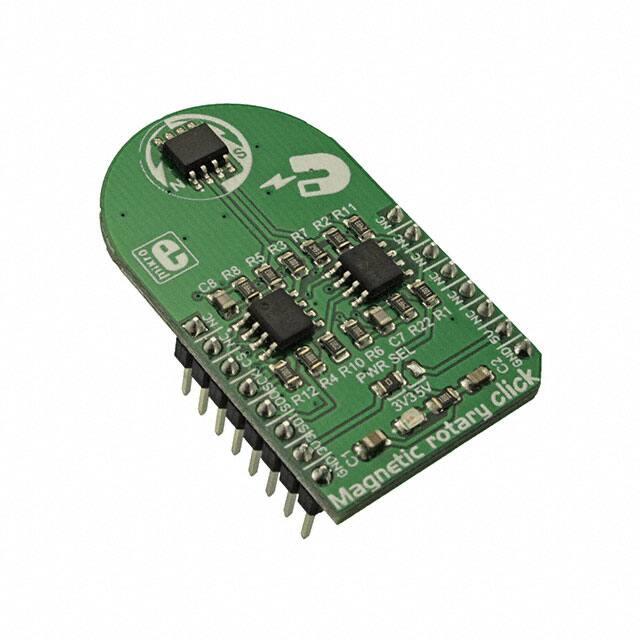
Magnetic rotary click
PID: MIKROE‐3275
Weight: 23 g
Magnetic rotary click is a very accurate position sensing Click board™ which
utilizes the HMC1512, a magnetic field displacement sensor IC. This
integrated sensor uses two coplanar saturated-mode Wheatstone bridges
which consist of four magneto-resistive elements per bridge. The precision of
up to 0.05° in the angular range of ±90° can be easily achieved using the
Magnetic rotary click, making it far more accurate than the commonly used
Hall-effect sensors.
It comes in the package which also includes the mikroSDK™ software and a
library with all the functions. The Click board™ comes as a fully tested and
approved prototype, making it a reliable device ready to use on the
development board.
�The HMC1512 sensor IC produces a highly linear voltage output signal in
respect to the magnetic field angle, available directly from two bridges via
differential output pins. To allow simplified usage, the Magnetic rotary click
features an additional dual A/D converter, making it a complete solution for
the rapid development of various contactless position and direction sensing
applications, HMI interfaces, precision measurement applications, proximity
detection applications, contactless rotary applications, etc.
How does it work?
The main component of Magnetic rotary click is the HMC1512, a magnetic
displacement sensor, from Honeywell. The key feature of the HMC1512 IC is
the high accuracy of the magnetic field sensing. Unlike most of the magnetic
sensors on the market which rely on the Hall-effect, the integrated sensors
of the HMC1512 IC are produced using the Honeywell proprietary Anisotropic
Magneto-Resistive (AMR) technology, which yields an absolute magnetic field
position sensing with the angular error of only 0.05° in the range of ±90°.
The magneto-resistive sensing elements form a saturated-mode Wheatstone
bridge, positioned in the XZ plane (parallel with the surface of the IC). The
HMC1512 contains two such integrated bridges, bridge A, and bridge B.
These bridges are positioned at the middle of the IC casing, which is the
optimal position for rotary applications. One bridge is physically rotated by
45° from the other, allowing the HMC1512 IC to cover the full range of ±90°
(2x45°), maintaining its sensing accuracy. The IC outputs an analog
differential voltage with respect to the angle of the magnetic field.
�The voltage from the selected mikroBUS™ power rail is directly applied to
the internal Wheatstone bridge of the HMC1512. By construction, in the
absence of the magnetic field, its outputs will be set at half the supply
voltage (with the small offset of 3mV/V typically). If there is a magnetic field
positioned at 0° in respect to one of the bridges, it will cause no disbalance
of the magneto-resistive elements for that bridge. However, in the other
bridge, the same magnetic field will cause it to reach its peak output value,
since that bridge is rotated by 45°. The voltage change on the outputs can
be then calculated using the following formulas:
Bridge A: ΔV= VS· S · sin(2Θ)
The second bridge which is physically rotated by 45°, will have its output
defined by this formula:
Bridge B: ΔV= ‐VS· S · cos(2Θ)
Where:
ΔV is a differential output voltage
VS is the power supply voltage (3.3V or 5V)
S is the material constant (12mV/V)
Θ is the angle of the magnetic field
The datasheet of the HMC1512 offers a more detailed explanation, along
with some use cases. However, Magnetic rotary click is supported by the
mikroSDK library, which offers easy to use functions. All necessary
calculations are encapsulated in these functions, allowing rapid application
development. The included example application can be used as a reference
and a starting point for a custom design.
The outputs of the Wheatstone bridges are routed to the dual operational
amplifier, which serves as the buffer for the A/D converter. As a dual
operational amplifier, the MCP6022 from Microchip is used. This op-amp is
biased to half the power supply voltage and has a gain of 25. Two buffered
signals are then used as inputs for each channel of the A/D converter.
Magnetic rotary click uses the MCP3202, a two-channel, 12-bit A/D
converter (ADC) with SPI Interface, by Microchip. This ADC has a high
resolution which can be used even for more demanding applications. At 0°,
the ADC will output half of its full-scale (FS) value, and it will swing towards
0 if the sign of the orientation of the magnetic field is positioned towards the
negative direction, and 4095 if the orientation of the magnetic field is
positioned towards the positive direction. Each bridge output is routed to a
separate ADC input, so it can be independently converted. The MCP3202
uses the power supply as the reference voltage, allowing ADC conversion
within the range of the input signal. Converted output values can be read via
�the SPI interface, routed to the mikroBUS™ SPI pins for easy interfacing
with a vast number of different microcontrollers (MCUs).
The power supply voltage for the whole circuit can be selected by switching
the SMD jumper, labeled as PWR SEL. It offers a choice of the power supply
voltage between 3.3V and 5V, available from the mikroBUS™.
Specifications
Type
Magnetometer
Applications
Magnetic linear click can be used for development of various
contactless position and direction sensing applications, HMI
interfaces, precision measurement applications, proximity
detection applications, contactless rotary applications, etc.
On-board
modules
HMC1512, a magnetic displacement sensor, from Honeywell;
MCP6022, a dual, rai-to-rail operational amplifier; MCP3202, a
dual, 12-bit A/D converter with SPI interface, by Microchip
Key Features
A very high precision is achieved by implementing the
proprietary Anisotropic magneto-resistive (AMR) technology
from Honeywell, absolute sensing of the magnetic field
direction, very compact size, two internal Wheatstone bridges
expand the sensing range, 12-bit dual ADC on-board, etc.
Interface
SPI
Input Voltage
3.3V or 5V
Compatibility
mikroBUS
Click board
size
M (42.9 x 25.4 mm)
�Pinout diagram
This table shows how the pinout on Magnetic rotary click corresponds to the
pinout on the mikroBUS™ socket (the latter shown in the two middle
columns).
Notes
Pin
Pin
NC
1
AN
PWM
16
NC
NC
2
RST
INT
15
NC
CS
3
CS
RX
14
NC
SPI Clock
SCK
4
SCK
TX
13
NC
SPI Data OUT
SDO
5
MISO
SCL
12
NC
SPI Data IN
SDI
6
MOSI
SDA
11
NC
Power supply
3V3
7
3.3V
5V
10
5V
Ground
GND
8
GND
GND
9
GND
SPI Chip Select
Notes
Power supply
Ground
Onboard Jumpers and Settings
Label
Name
Default
LD1
PWR
-
J1
PWR SEL
Left
Description
Power LED indicator
Power supply voltage selection: left position
3.3V, right position 5V
�Software support
We provide a library for the NB IoT click on our LibStock page, as well as a
demo application (example), developed using MikroElektronika compilers.
The demo can run on all the main MikroElektronika development boards.
Library Description
The library performs a magnetic field angle measurement and calculates
angle value to degrees. The library also performs the all necessary settings
for the AD conversion, for example channel selection and mode setting. For
more details check documentation.
Key functions:
uint16_t magnrotary_readADC( uint8_t cmndByte ) - Function returns a 12bit result of AD
uint16_t magnrotary_outVoltADC( uint8_t cmdByte, uint16_t pwrVolt ) - Function returns
double magnrotary_getFieldAngle( uint8_t cmdByte ) - Function returns a magnetic field
conversion.
ADC voltage value calculated to millivolts, depending on the VDD (power) voltage selection.
angle calculated to degrees, in the range from -90 to 90 degrees.
Examples description
The application is composed of the three sections :
System Initialization - Initializes peripherals and pins.
Application Initialization - Initializes SPI interface for communication with the device.
Application Task - (code snippet) - Reads a magnetic field angle calculated to degrees for
channel A in Single-Ended Mode and logs results on uart terminal. Repeats operation every 300
milliseconds. Note : The angle can be measured in the range from -90 to 90 degrees.
void applicationTask()
{
magnAngle = magnrotary_getFieldAngle( _MAGNROTARY_CHA_POS_GND_NEG | _MAGNROTARY_MSB_ZEROS_
ORDER );
FloatToStr( magnAngle, text );
floatCut();
mikrobus_logWrite( "Angle is : ", _LOG_TEXT );
mikrobus_logWrite( text, _LOG_TEXT );
mikrobus_logWrite( logDeg, _LOG_LINE );
Delay_ms( 300 );
�}
Additional Functions :
void floatCut() - - Makes float value to be rounded on two decimal places.
void plotAngle() - Sends results of angle on serial plotter.
The full application code, and ready to use projects can be found on
our LibStock page.
Other mikroE Libraries used in the example:
Conversion
SPI
UART
Additional notes and information
Depending on the development board you are using, you may need USB UART
click, USB UART 2 click or RS232 click to connect to your PC, for development
systems with no UART to USB interface available on the board. The terminal
available in all MikroElektronika compilers, or any other terminal application
of your choice, can be used to read the message.
mikroSDK
This click board is supported with mikroSDK - MikroElektronika Software
Development Kit. To ensure proper operation of mikroSDK compliant click
board demo applications, mikroSDK should be downloaded from
the LibStock and installed for the compiler you are using.
For more information about mikroSDK, visit the official page.
�
https://www.mikroe.com/magnetic‐rotary‐click/1‐2‐19
�