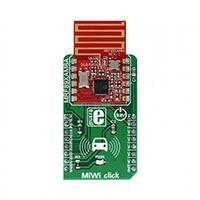
MiWi click
PID: MIKROE-2924
Weight: 24 g
MiWi click is a subgigahertz radio transceiver click board™, which offers a reliable FSK or
OOK communication solution, with the maximum data rates of 40kbps and 16kbps, respectively.
The radio transceiver module used on this click board™ has plenty of features that make it a
perfect choice for compact designs: It has very good reception sensitivity, an onboard PCB
antenna, high level of components integration, built in packet handling routines with automatic
CRC generation, 64 bytes of transmit/receive FIFO buffer, built in Sync Word recognition,
clock/data synchronisation and recovery and many more.
Armed with such a powerful, compact and fully configurable radio transceiver module, MiWi
click offers highly reliable radio communication over a short distance, which can be utilized in
many applications. It can be used for developing home/industrial/building automation
applications, data loggers, applications for remote keyless access, alarms, wireless remote
control and a wide variety of similar short-range radio applications.
�Note: This click board complies with European (ETSI EN 300-220) regulatory standards. For the
United States (FCC Part 15.247 and 15.249) regulatory standards compliant click board, please
visit the product page of the MiWi 2 click.
How does it work?
MiWi click features the MRF89XAM8A, a compact low-power sub-gigahertz radio transceiver
module from Microchip, that operates at a frequency range between 863MHz and 870MHz. This
module has all the necessary components onboard, including a small trace PCB antenna and
matching electronics, allowing compact design, while maintaining the flexibility. It supports
OOK and FSK signal modulation with data rates limited to 16kbps and 40kbps respectively, in
order to be compliant with the ETSI standards. The MRF89XAM8A module is based upon a
base architecture of the generic MRF89XA module, with a few modifications, applied in order to
make this module ETSI compliant.
The module uses the SPI communication protocol. However, it uses two chips select lines,
#CSCON - config block select and #CSDATA - data block select, used to access a different
group of internal registers. These two lines are routed to the mikroBUS™ AN and CS pins,
respectively. It should be noted that the device only supports SPI mode 0, 0 - which means that
the serial clock signal (SCK) is idle LOW. Pulling the #CSCON line to a LOW logic level will
enable communication with the configuration registers. Pulling the #CSDATA will enable host
communication with the FIFO buffer. If both chip select lines are pulled to a LOW logic level,
the #CSCON will have a priority over the #CSDATA.
The data processing section is used to interface the data from the MODEM
(modulator/demodulator) section, with the host MCU access point sections (SPI and IRQ
sections). The data processing section contains several control blocks that manage the data
traffic. The data processing section supports 2 modes of operation of which are available on the
MiWi click:
•
•
Buffered mode - the transmitting or received data is stored in the FIFO buffer and available via
the SPI
Packet mode - packets of certain structure are stored in the FIFO buffer, max 64 bytes
�These modes affect the host MCU processing overhead. In the Buffered mode, the host MCU has
to manage sending or receiving of the preamble, Sync Word, and the actual payload, relying on
the IRQs to get the FIFO buffer status and manually managing the number of sent/received
bytes.
The FIFO (First In First Out) register performs parallel operations and it is 8 bits wide. However,
the RF demodulator section works only with serial data, sending and receiving the information
bit by bit, with the programmed rate. To interface FIFO buffer with the demodulator section, a
shift register has to be employed. The FIFO register serves as a buffer for both data transmission
and reception.
Two interrupt request lines (IRQ0 and IRQ1) of the MRF89XAM8A module are routed to the
mikroBUS™ pins INT and PWM, respectively. These pins can be configured to generate an
interrupt request to the host MCU, depending on the selected events. There are many interrupt
sources that can be selected to trigger an interrupt. Before using interrupts, they have to be
unmasked and enabled. All the interrupt sources and flags are configured through the Interrupt
Configuration registers.
RESET line from the module is routed to the mikroBUS™ RST pin and it is used to reset the
device. After the reset, the device is unavailable for about 5ms. To reset the device, this pin has
to be pulled to a HIGH logic level for at least 100 µs. It is pulled to a LOW logic level by the
pull-down resistor.
The OOK and FSK modulation protocols are commonly used subgigahertz protocols and each
has its own benefits. In OOK mode (On-Off Keying), the carrier signal is amplitude modulated
by switching between no carrier signal for the logical 0 and full carrier amplitude signal for the
logical 1. The FSK (Frequency Shift Keying) modulation is basically frequency modulation with
two different frequency values for the logical 0s and 1s. The MiWi click is able to modulate and
demodulate signals by using both of these protocols.
The provided libraries contain functions for an easy and simplified configuration of the MiWi
click. The included demo application can be used as a reference for future design and it
demonstrates usage of the provided functions.
Specifications
Type
RF Sub 1GHz
Applications
MiWi click can be used for developing home/industrial/building automation applications,
data loggers, applications for remote keyless access, alarms, wireless remote control and
a wide variety of similar short-range radio applications.
On-board
modules
MRF89XAM8A, a compact low-power sub-gigahertz radio transceiver module from
Microchip
�MiWi click is a compact low power subgigahertz transceiver, loaded with functions such
Key Features as automatic packet handling, CRC generation, 64 bytes long FIFO buffer, great reception,
clock/data recovery, clock signal synchronization...
Interface
GPIO,SPI
Input Voltage 3.3V
Click board
size
L (57.15 x 25.4 mm)
Pinout diagram
This table shows how the pinout on MiWi click corresponds to the pinout on the
mikroBUS™ socket (the latter shown in the two middle columns).
Notes
Pin
Pin
Notes
Config Block CS
CSC
1
AN
PWM
16
IN1
IRQ pin 1
Reset
RST
2
RST
INT
15
IN0
IRQ pin 0
Data Block CS
CS
3
CS
RX
14
NC
SPI Clock
SCK
4
SCK
TX
13
NC
SPI Data Out
SDO
5
MISO
SCL
12
NC
SPI Data In
SDI
6
MOSI
SDA
11
NC
Power supply
+3.3V
7
3.3V
5V
10
NC
Ground
GND
8
GND
GND
9
GND
Ground
MiWi click specifications
Description
Min
Typ
Max
Unit
Frequency Range
863
870
MHz
Bit Rate (FSK)
1.56
40
kbps
�Bit Rate (OOK)
1.56
16
kbps
SPI Configure Clock Frequency
6
MHz
SPI Configure Data Frequency
1
MHz
FSK reception sensitivity at 25kbps
-107
dBm
OOK reception sensitivity at 2 kbps
-113
dBm
Typical output power
+10
dBm
Onboard settings and indicators
Label Name Default
LD1 PWR -
Description
Power LED indicator
Software support
We provide a library for MiWi click on our Libstock page, as well as a demo application
(example), developed using MikroElektronika compilers and mikroSDK. The provided click
library is mikroSDK standard compliant. The demo application can run on all the main
MikroElektronika development boards.
Library Description
Library carries generic functions which are enough to have complete control over MiWi click.
Key functions
void miwi_writeReg(uint8_t address, uint8_t value)- Writes
uint8_t miwi_readReg(uint8_t address)- Reads
void miwi_writeFIFO(uint8_t Data)- Writes
uint8_t miwi_readFIFO()- Reads
data to register
data from register
data to FIFO buffer
data from FIFO buffer
Examples Description
Demo application is modified version of Microchip's application for MRF89XA
devices. Application is in the form of a console app with simple UI which allows operations such
as register_read or write but also TX and RX routines.
�This function (code snippet) continuously transmits predefined packet with delay of 100 ms
between each transaction.
void RadioApp_txPredefinedPacket()
{
uint8_t input;
uint8_t tmpPacket[ 6 ] = { 80, 65, 67, 75, 69, 84 };
ConsolePut_constString("Transmitting predefined packet at");
RadioApp_printMiniStatus(PR_TX_MODE);
ConsolePut_constString("Press (Ctrl+z) to exit");
ConsolePut_newLine();
while (1)
{
if (ConsoleGet_ready())
{
input = ConsoleGet();
ConsolePut(input);
if (input == 26)
return;
}
miwi_sendPacket(&tmpPacket[0], 6);
_miwi_rfMode = _MIWI_RF_STANDBY;
Delay_ms( 100 );
}
}
The full application code, and ready to use projects can be found on our Libstock page.
Other MikroElektronika libraries used in the example:
•
•
SPI
UART
Additional notes and information
Depending on the development board you are using, you may need USB UART click, USB
UART 2 click or RS232 click to connect to your PC, for development systems with no UART to
USB interface available on the board. The terminal available in all MikroElektronika compilers,
or any other terminal application of your choice, can be used to read the message.
mikroSDK
This click board is supported with mikroSDK - MikroElektronika Software Development Kit. To
ensure proper operation of mikroSDK compliant click board demo applications, mikroSDK
should be downloaded from the LibStock and installed for the compiler you are using.
�For more information about mikroSDK, visit the official page.
Downloads
mikroBUS™ standard specifications
LibStock: mikroSDK
MiWi click schematic
MRF89XA datasheet
MRF89XAM8A datasheet
MiWi click - 2D and 3D files
Libstock: MiWi click library
https://www.mikroe.com/miwi-click 2-28-18
�








 工商网监
湘ICP备2023018690号
工商网监
湘ICP备2023018690号