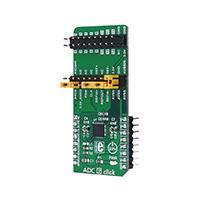
ADC 6 click
PID: MIKROE-2932
Weight: 28 g
A precise ADC module with flexible signal routing
ADC 6 click is an advanced 24bit multichannel analog to digital converter (ADC), with 8
fully differential or 15 single-ended/pseudo differential sampling inputs, and very flexible
routing capabilities. The click board™ has two 2x10 pin headers, used both to configure the
device and connect the input channels. This allows for unrestrained configuration of the
device, so it can use both bipolar and unipolar input sources, with selectable reference
voltages, external clock, auxiliary power switch, and more.
Packed with many features - including a reliable and extensive diagnostic functions among others, ADC 6 click can be used for an analog to digital conversion in various
applications, such as precise temperature or pressure measurement, manufacturing
process control, precise instrumentation in general, and for similar applications that can
benefit from reliable AD conversion with high accuracy.
�How does it work?
The main active component of the ADC 6 click is the AD7124-8, an 8 channel, low noise, low
power, 24bit sigma-delta ADC with reference and programmable gain array, from Analog
Devices. This IC offers several different power modes and input connection configurations,
giving a lot of flexibility to work with. The device can have 8 differential or 15 pseudo
differential analog inputs, as well as any combination between them. All the input channels
can be configured to be either buffered or unbuffered, depending on the input
connection impedance characteristics. The maximum output data rate varies from 2400
SPS up to 19,200 SPS (samples per second), in respect to the selected power mode. An
ultra-low noise operation results with having 22 noise free bits in all available power
modes.
The signal routing in the AD7124-8 ADC is done via the internal multiplexer section, which
is used to reduce the number of IC pins, yet allowing all of the functions to be used on the
existing pins. On a top of these pins, there are four more GPIO pins that can be used for
various tasks, including control of the multiplexer unit. Since the multiplexer is integrated
into the chip, the conversion process stays synchronized with the changes made to the pin
configuration.
The input signal is further managed by so-called setups. There are eight such setups
available on the AD7124-8 ADC module. A single setup consists of four different registers:
configuration register, filter register, gain register and offset register. Those registers are
used to configure the corresponding set of functions for the connected channel(s). The
channel register itself is used to configure the basic settings for the corresponding ADC
channel, and among other options, which of the eight available setups to connect with that
channel. This mechanism allows easy configuration of multiple channels, especially when
the same settings need to be applied to more than one channel, greatly reducing the
software complexity, since the setups can be reused.
�An internal bias voltage generator can be routed to the output pins. It is used to bias the
negative terminal of the selected input channel. This function is useful in thermocouple
applications, as the voltage generated by the thermocouple must be biased around some
DC voltage when the ADC operates from a single power supply.
The AD7124-8 ADC module is clocked by either an internal clock source, which works at
614.4 kHz. The CLK pin can be used either to output the clock signal available on the ADC
or to use the external clock input. This allows synchronizing of several devices by using the
same clock frequency. The internal clock speed is divided, depending on the selected
operating mode. Selecting low power operating modes will have an impact on the samples
per second which this device can perform.
ADC 6 click uses the SPI interface for communication with the host MCU. The SPI bus pins
are routed to the mikroBUS™ SPI pins (MISO, MOSI, SCK, and CS), allowing an easy
integration with the development system. The device uses the SPI mode 3, which means
that the clock signal (SCK) is idle HIGH, and the rising edge of SCLK is the sample edge. The
data is clocked out on the falling edge and clocked in on the rising edge of the clock signal
pulse.
The Data Out pin of the ADC module (DOUT/#RDY) is routed to the mikroBUS™ MISO pin,
and besides for the data output, is also used to signal the presence of the valid data in the
ADC output shift register. When there is a valid reading stored to this register, the #RDY
signal will be pulled to a LOW state, indicating the ready status of the data output register.
It can be used to trigger an interrupt on the host MCU.
The #SYNC pin of the ADC module is used to synchronize reading when more than one
device is used. While pulled to a LOW state, the internal ADC sections are reset and held in
the reset state. This pin is pulled to a HIGH logic level via the onboard resistor. This pin is
routed to the mikroBUS™ RST pin. There is a number of pins routed to the 2x10 standard
pitch of 2.54mm (100mils) header. This allows even easier routing with jumpers or jumper
wires, as the header can be used to further configure the ADC in a way that is impossible by
software, i.e. connecting an external clock source or reference voltages. The complete
layout of this header can be seen on the schematics of the ADC 6 click. The second 2x10
header is used to connect the input signals. The AD7124-8 ADC module allows several
kinds of signals to be routed to these pins via the multiplexing section, allowing diagnostic
functions to be interleaved with the conversion of the analog signals.
To ensure an accurate input signal conversion, the device features a thermal sensor, which
can be used to compensate for the ambient temperature. This thermal sensor is embedded
into the ADC module and it is used to measure the die temperature. It can be selected as a
conversion source so that the die temperature can be calculated according to the formula
that can be found in the AD7124-8 datasheet.
The provided library functions allow easy configuration of the ADC 6 click, as well as
reading the conversion data. The included demo application can be used as a reference for
future designs.
�Specifications
Type
ADC
On-board
modules
Key Features
AD7124-8 ADC module
24bit multichannel analog to digital converter, 8 fully differential or
15 single ended/pseudo differential sampling inputs
Interface
GPIO,SPI
Input Voltage
3.3V
Click board
size
L (57.15 x 25.4 mm)
Pinout diagram
This table shows how the pinout on ADC 6 click corresponds to the pinout on the
mikroBUS™ socket (the latter shown in the two middle columns).
Notes
Pin
Pin
NC
1
AN
PWM
16
NC
Synchronization
SYN
2
RST
INT
15
NC
SPI Chip Select
CS
3
CS
RX
14
NC
SCK
4
SCK
TX
13
NC
SPI Clock
Notes
�SPI Data Out/RDY
SDO
5
MISO
SCL
12
NC
SPI Data In
SDI
6
MOSI
SDA
11
NC
+3.3V
7
+3.3V
5V
10
NC
GND
8
GND
GND
9
GND
Power supply
Ground
Ground
ADC 6 click electrical specifications
Description
Output Data Rate (power mode
dependent)
Absolute Input/Reference Voltage
(unbuffered)
Absolute Input/Reference Voltage
(buffered)
Min
Typ
Max
Unit
1.17
19,200
SPS
AVSS−0.05
AVDD+0.05
V
AVSS+0.1
AVDD-0.1
V
External Reference Voltage Range(1)
1
2.5
AVDD
V
Internal Reference Voltage Range(1)
2.5-0.2%
2.5
2.5+0.2%
V
Note: (1) States the reference/input voltage ranges, not the actual reference/input voltage values. These
voltages can be of both bipolar and unipolar type: e.g. 1V means -0.5V to +0.5V, the same as 0V to +1V
�Onboard settings and indicators
Label
Name
Default
Description
LD1
PWR
-
Power LED indicator
CN1
-
-
I/O Header
CN2
-
On schematic
Configuration Header
Note: The default configuration jumpers position can be seen in the provided schematic of the ADC 6
click board. The pin functions are clearly marked on the print layer of the PCB
Software support
We provide a library for ADC 6 click on our Libstock page, as well as a demo application
(example), developed using MikroElektronika compilers and mikroSDK. The provided click
library is mikroSDK standard compliant. The demo application can run on all the main
MikroElektronika development boards.
Library Description
Initializes and defines SPI bus driver and driver functions which offer a choice to convert
an analog input voltage to a 24-bit digital output value. Functions also offer a choice to
choose which channels we want to use for positive and negative analog input by writing in
configurations registers. Functions can read converted data in two modes, single read,
where we must be sure that converting is done, or continuous read mode, where we only
continuously read converted data without writing anything on SPI, not even a data register
address. Library also defines commands which help us to configure registers. Check the
documentation for more details.
Key functions :
void adc6_writeReg( const uint8_t register_address, const uint32_t
transfer_data ) - Function writes data to the determined register.
uint32_t adc6_readReg( const uint8_t register_address ) - Function reads data
from the determined register.
uint32_t adc6_continuousReadData( void ) - Function continuously reads data from
Data register without writing anything on SPI.
uint32_t adc6_getADCData( const uint8_t mode ) - Function gets data from Data
register in two possible modes. In single read mode first checks ready bit, and when the
�conversion is done (data is ready) reads data from the register. In continuous read mode
only reads data without writing anything on SPI bus.
Examples Description
The application is composed of three sections :
•
System Initialization - Initializes peripherals and pins.
•
Application Initialization - Initializes SPI bus driver and sets configuration which enables channel 0,
puts AIN0 on positive analog input and AIN1 on negative analog input, enables internal reference
voltage (approximately 2.65V, AVDD = 3.3V), and also enables bipolar operation mode and puts the
device on full power mode. When the ADC is configured for unipolar operation, the output code is
natural (straight) binary with a zero differential input voltage resulting in a code of 0x00000000, a
midscale voltage resulting in a code of 0x00800000, and a full-scale input voltage resulting in a
code of 0x00FFFFFF. When the ADC is configured for bipolar operation, the output code is offset
binary with a negative full-scale voltage resulting in a code of 0x00000000, a zero differential input
voltage resulting in a code of 0x00800000, and a positive full-scale input voltage resulting in a code
of 0x00FFFFFF.
•
Application Task - (code snippet) - Gets 24-bit converted data in single read mode and logs data on
USB UART. Repeats operation every 500 ms.
void applicationTask()
{
adc_value = adc6_getADCData( _ADC6_SINGLE_GET_DATA_MODE );
LongWordToStr( adc_value, text );
if ( tmp )
{
mikrobus_logWrite( "** The ADC value is: **", _LOG_LINE );
tmp = 0;
}
mikrobus_logWrite( text, _LOG_LINE );
Delay_ms( 500 );
}
The full application code, and ready to use projects can be found on our LibStock page.
Other mikroE Libraries used in the example:
•
Conversions
•
SPI
•
UART
Additional notes and information
Depending on the development board you are using, you may need USB UART click, USB
UART 2 click or RS232 click to connect to your PC, for development systems with no UART
to USB interface available on the board. The terminal available in all
MikroElektronika compilers, or any other terminal application of your choice, can be used
to read the message.
�mikroSDK
This click board is supported with mikroSDK - MikroElektronika Software Development
Kit. To ensure proper operation of mikroSDK compliant click board demo applications,
mikroSDK should be downloaded from the LibStock and installed for the compiler you are
using.
For more information about mikroSDK, visit the official page.
Downloads
mikroBUS™ Standard specification
LibStock: mikroSDK
Libstock: ADC 6 click library
ADC7124-8 datasheet
ADC 6 click schematic
ADC 6 click - 2D and 3D files
https://www.mikroe.com/adc-6-click 3-9-18
�