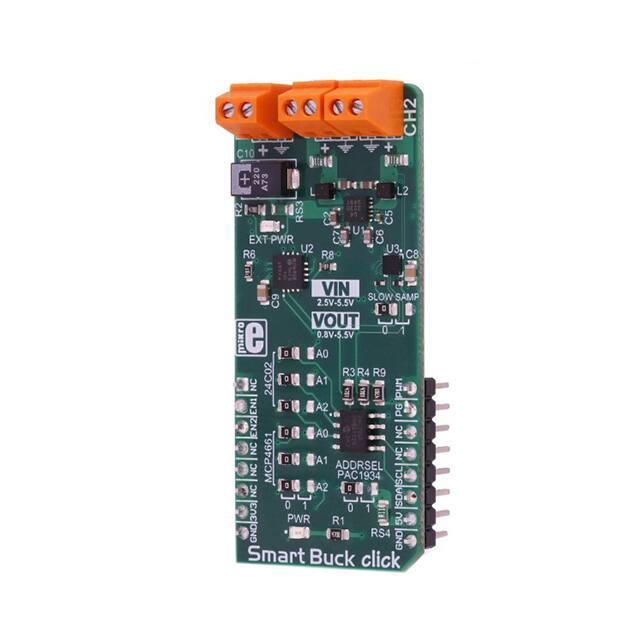
Smart Buck click
PID: MIKROE-3113
Weight: 27 g
Smart Buck click is the two-channel step-down DC/DC converter and regulator, with
plenty of additional functions. It can provide voltage measurement at each of its two
programmable voltage outputs, as well as the measurement of the current consumption.
In addition, it can also provide power consumption measurements of the Click board™
itself, both at the mikroBUS™ +5V power rail, and the external voltage input terminal.
Finally, there is 2kbit of EEPROM at disposal, which can be used for logging the
measurements, storage of the working parameters, or any other type of general
purpose data.
The external power supply should be connected to the VIN terminal, with the voltage
between 2.5 and 5.5V. Smart Buck click provides two independent output voltage
channels, each with the ability to output a regulated voltage in the range between 0.8V
up to 5.5V. It is able to provide up to 800mA for the connected load at each of the
output terminals. With the ability to programmatically set both voltage values
independently while providing reasonably high current, offering 2kbit of non-volatile
memory and voltage and current monitoring for both outputs and two input voltage
points, Smart Buck is a perfect solution for many different applications, especially well
suited for the embedded and IoT applications.
�How does it work?
The hearth of Smart Buck click is the MIC2230, a dual synchronous step-down DC/DC
regulator, by Microchip. This dual buck converter and voltage regulator offers two
independent outputs with their own feedback loops, which allow both outputs to be set
to a specific voltage, independently. The dual buck converter works in synchronous
PWM mode, whenever the load drains more than 100mA. The operating mode of the
converter is switched to so-called Trickle mode when the connected load drains less
than 100mA. Although highly efficient for the light loads, this mode has its downsides,
such as the slightly increased ripple and increased voltage regulation tolerance. For
most cases (when the supplied device enters the standby mode, when the system is
suspended, and similar) this is sufficient, but for some critical low current applications,
the MIC2230 can be set to always operate in synchronous PWM mode at 2.5MHz, with
the output voltage ripple as low as 7mV. To set the PWM mode regardless of the
connected load, it is sufficient to pull the FPWM pin of the MIC2230 to a LOW logic
level. The FPWM pin is routed to the PWM pin of the mikroBUS™.
Two FB pins of the MIC2230 are used to determine the output voltage at each of the
outputs. There is a digitally controlled dual potentiometer IC on the Click board™,
labeled as the MCP4661. This IC is a dual 8-bit digital potentiometer with the nonvolatile memory and the WiperLock function, from Microchip. The WiperLock function
allows permanent storage of the wiper position in the internal EEPROM of the
MCP4661 IC. The internal digital potentiometers are connected as the rheostats, acting
as the second, variable resistor of the feedback voltage dividers. This allows setting the
output voltage, by programming the digital potentiometer values via the I2C interface.
The I2C slave address of the MCP4661 IC can be set by the SMD jumpers, labeled as
A0 to A2, grouped under the MCP4661 label.
�For the power monitoring purposes, Smart Buck click uses the PAC1934, a fourchannel DC power and energy monitor with the accumulator, from Microchip. Due to its
high degree of integration and an integrated real-time offset and gain compensation
circuitry, this device requires only a few sensing resistors to be able to monitor the
voltage and sense the current consumption. This IC also contains a high-performance
digital section, accessible via the I2C interface, which is used to integrate the
measurement results and provide on-chip power calculations, reducing the processing
load of the MCU. Single Shot and Continous modes are at disposal, allowing fine-tuning
of its functionality. It has four channels of which two are used to monitor current and
voltage on the two output terminals. One of the channels is used to monitor a power
consumption on the input supply terminal, and finally, one channel monitors the +5V rail
of the mikroBUS™. This allows power efficiency of the converter to be easily calculated,
as well as the power consumption of the Click board™ as a whole.
The sensing elements which are connected to the PAC1934 are low-value resistors,
ranging from 0.05Ω up to 0.11Ω. The channel inputs are differential pairs, which are
implemented as the Kelvin connection to sensing resistors. Kelvin connection allows
very precise measurements, since the voltage drop along the sensor traces due to their
resistance, is eliminated. The I2C address of the PAC1934 monitoring IC can also be
changed by the onboard SMD jumper, labeled as PAC1934 ADDR SEL. The sampling
rate can also be changed by switching the SLOW SAMP jumper to either 0 or 1.
Switching it to 1 will enable the slow sampling feature of the PAC1934, enforcing the
sample rate of 8sps, regardless of the CTRL register content. The default sampling rate
with the default jumper position (SLOW SAMP at 0) is 1024sps.
An EEPROM module is included onboard as an extra feature of the Smart Buck click.
The 24C02C, an I2C serial EEPROM from Microchip, with the density of 2kbit is used
on the Click board™ to provide storage for any type of data. It has 2kbit of memory,
organized in 256 x 8bit words, which translates to 256 bytes of non-volatile memory,
which can be used to either store working parameters, or some other applicationspecific data. The outstanding quality of the module allows up to one million of
write/erase cycles and data retention of more than 200 years. All its inputs are protected
from noise with the Schmitt triggers, and the module supports fast speed I2C mode, up
to 400kHz. The I2C address of this device is also configurable by a set of SMD jumpers
labeled as A0 to A2, grouped under the 24C02 label.
The input/output facilities include two terminals labeled as the CH1 and CH2, which
output the step-down voltage in the range of 0.8V up to 5.5V, as previously mentioned.
A notice should be taken that an input voltage up to 5.5V should be connected at the
input terminal labeled as the VIN, in order to get a voltage at the output. Also, it should
be noted that the output voltage should be always programmed to a value lower than
the input voltage. The presence of an external power supply at the VIN terminal will be
indicated by a red LED, labeled as EXT PWR. The I2C protocol is used for all the
sections of Smart Buck click. The required pull-up resistors are included onboard. The
Click board™ allows interfacing with 3.3V MCUs, only.
�Specifications
Type
Buck
Applications
Smart Buck click can be used to digitally convert input voltage signals up to
3.3V so that the signals can be analyzed by various mathematical models
and algorithms on the CPU or MCU.
On-board
modules
MIC2230, a dual synchronous step-down DC/DC regulator; MCP4661, an 8bit dual digital potentiometer with non-volatile memory; PAC1934, a fourchannel DC power and energy monitor with accumulator; 24C02C, a 2kbit
serial EEPROM, all devices from Microchip
Key Features
Digitally controlled voltage levels on two independent outputs, low output
voltage ripple, reasonably high output current capability, four power
monitoring channels by a dedicated monitoring IC, 2kbit of non-volatile
memory onboard, and more
Interface
I2C
Input Voltage
3.3V,5V
Click board
size
L (57.15 x 25.4 mm)
Pinout diagram
This table shows how the pinout on Smart Buck click corresponds to the pinout on the
mikroBUS™ socket (the latter shown in the two middle columns).
Notes
Pin
NC
Pin
1
AN
PWM
16
PWM
Notes
PWM Mode
�Chip Enable ch1
EN1
2
RST
INT
15
PG
Power Good INT
Chip Enable ch2
EN2
3
CS
RX
14
NC
NC
4
SCK
TX
13
NC
NC
5
MISO
SCL
12
SCL
I2C Clock
NC
6
MOSI
SDA
11
SDA
I2C Data
Power supply
3.3V
7
3.3V
5V
10
5V
Ground
GND
8
GND
GND
9
GND
Power supply
Ground
Smart Buck click electrical specifications
Description
Min
Typ
Max
Unit
Input voltage (VIN)
2.5
-
5.5
V
Output voltage (VOUT1, VOUT2)
0.8
-
5.5
V
-
-
0.8
A
Output Current Limit
Onboard settings and indicators
Label
Name
Default
Description
PWR
PWR
-
Power LED indicator
EXT PWR
EXT PWR
-
External power indicator
�JP1 - JP3
24C02 (A0 - A2)
Left
24C02 I2C address selection: left
position - I2C Address [3:1] = 0, right
position - I2C Address [3:1] = 1
JP4 - JP6
MCP4661 (A0 - A2)
Left
MCP4661 I2C address selection: left
position - I2C Address [3:1] = 0, right
position - I2C Address [3:1] = 1
Left
PAC1934 I2C address selection: left
position - I2C Address LSB = 0, right
position - I2C Address LSB = 1
Left
PAC1934 Slow Sampling mode
enable: left position 0 (disabled), right
position 1 (enabled)
JP7
JP8
PAC1934
SLOW SAMP
Onboard connectors
Label
Name
Description
VIN
VIN
VOUT 1
VOUT 1
Output regulated voltage terminal 1
VOUT 2
VOUT 2
Output regulated voltage terminal 2
Input power supply terminal
Software support
We provide a demo application for Smart Buck click on our Libstock page, as well as a
demo application (example), developed using MikroElektronika compilers. The demo
can run on all the main MikroElektronika development boards.
Library Description
Library offers a choice to communicate with all devices on Smart Buck click. The library
has the ability to control both regulators, both wipers on the potentiometer, EEPROM
�memory and main sense chip (PAC1934). User can get from driver functions voltage(V),
current(mA) and power(mW) data for each activated channel on click. The user also can
perform desired configurations, that includes a number of activated channels, data
format (unsigned or signed) for each channel, and data selection, which determines a
configuration for conversion cycle, one sample data or more samples (averaged data)
will be converted in one conversion cycle. For more details check the documentation.
Key functions:
uint8_t smartbuck_writePot( uint8_t regAddr, uint16_t dataIn ) - The function writes 16bit data to
the Potentiometer register (MCP4661).
void smartbuck_enRegulator1( uint8_t state ) - Function puts Regulator1 to the desired state.
uint8_t smartbuck_setConfigPAC( uint8_t enChann, uint8_t dataFormat, uint8_t dataSel ) - The
function sets configuration for conversion cycle for PAC1934.
void smartbuck_getData( float *voltage, float *current, float *power ) - The function reads and
calculates the voltage, current and power data from PAC1934 activated channels.
Example description
The application is composed of three sections:
System Initialization - Initializes peripherals and pins.
Application Initialization - Initializes I2C interface and performs the click configuration to work in
Single-Shot Mode with signed averaged data of 64 samples. CH1 and CH3 are only activated
and included in the conversion cycle.
Application Task - (code snippet) - Sends command to update data registers with newly
converted data, waits one second and after that reads new data from data registers. In this way,
a user can get voltage, current and power data for activated channels. Results for activated
channels logs on UART terminal. Note: If we want to update registers with new converted data,
after at least one conversion cycle is done, we should send first REFRESH or REFRESH_V
command, before data be read, which will update registers with new values. Also, these
commands will update the Control register with new desired configurations.
void applicationTask()
{
smartbuck_sendCmdPAC( _SMARTBUCK_REFRESH_V_CMND );
Delay_ms( 1000 );
smartbuck_getData( &voltageRes[0], ¤tRes[0], &powerRes[0] );
checkByte = 0x80;
index = 0;
for (cnt = 0; cnt < 4; cnt++)
{
if ((enabledChann & checkByte) == 0)
{
channelLog();
FloatToStr( voltageRes[ index ], text );
mikrobus_logWrite( text, _LOG_TEXT );
mikrobus_logWrite( "V", _LOG_LINE );
�FloatToStr( currentRes[ index ], text );
mikrobus_logWrite( text, _LOG_TEXT );
mikrobus_logWrite( "mA", _LOG_LINE );
FloatToStr( powerRes[ index ], text );
mikrobus_logWrite( text, _LOG_TEXT );
mikrobus_logWrite( "mW", _LOG_LINE );
index++;
}
checkByte >>= 1;
}
mikrobus_logWrite( "", _LOG_LINE );
}
Additional Functions :
channelLog - Checks which channel is activated (from CH1 to CH4) and logs text on UART.
The full application code, and ready to use projects can be found on our Libstock page.
Other MikroElektronika libraries used in the example:
Conversions
I2C
UART
Additional notes and information
Depending on the development board you are using, you may need USB UART
click, USB UART 2 click or RS232 click to connect to your PC, for development systems
with no UART to USB interface available on the board. The terminal available in all
MikroElektronika compilers, or any other terminal application of your choice, can be
used to read the message.
mikroSDK
This click board is supported with mikroSDK - MikroElektronika Software Development
Kit. To ensure proper operation of mikroSDK compliant click board demo applications,
mikroSDK should be downloaded from the LibStock and installed for the compiler you
are using.
�For more information about mikroSDK, visit the official page.
https://www.mikroe.com/smart‐buck‐click 9‐19‐18
�