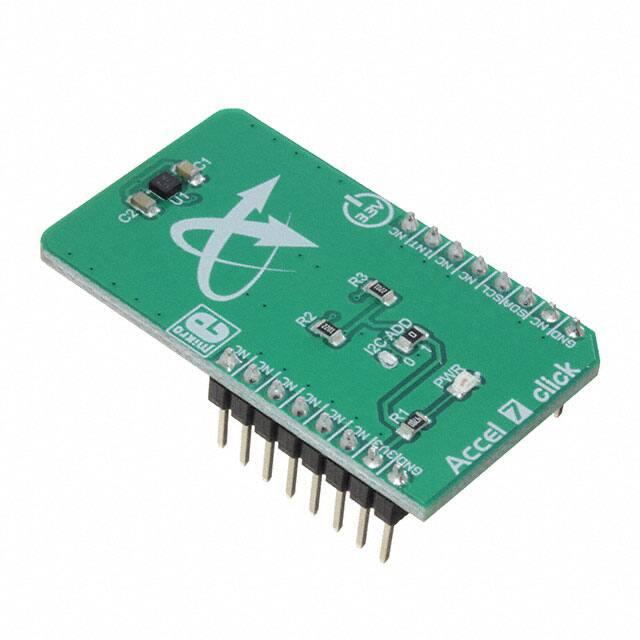
Accel 7 click
PID: MIKROE‐3244
Weight: 24 g
Accel 7 click is a three-axis acceleration sensing Click board™. It uses the KXTJ3-1057, a
14bit tri-axis digital accelerometer, which can sense the acceleration up to ±16 g. This
sensor is built using the proprietary Kionix micromachining technology, which results
with a high accuracy and very good noise immunity. Accel 7 click can be used in a wide
range of applications that require low power consumption, fast response, precision, and
reliability. It can be used for display orientation, HID applications, drop detection
applications (for warranty logging), and similar applications that rely on acceleration and
motion-sensing.
�
It comes in the package which also includes the mikroSDK™ software and a library with
all the functions. The Click board™ comes as a fully tested and approved prototype,
making it a reliable device ready to use on the development board.
The acceleration sensing is based on the principle of measuring the differential
capacitance, which further decreases errors due to manufacturing imperfections,
temperature and other environmental influences. The micro-electromechanical sensor
(MEMS) is coupled with a very advanced application specific integrated circuit (ASIC),
which allows the simplicity of the KXTJ3-1057 design, requiring a low number of
additional external components.
Using the embedded lowpass filtering allows filtering of the abrupt changes in
acceleration readings. Intelligent interrupt engine allows detection of motion, inactivity,
direction, data ready event, and more. Equipped with the KXTJ3-1057 advanced
acceleration sensor, this Click board™ can be used in a wide range of applications that
require low power consumption, fast response, good precision, and reliability. It can be
used for display orientation, HID applications, drop detection applications (for warranty
logging), and similar applications that rely on the reliable acceleration and motionsensing provided by this Click board™.
How does it work?
Accel 7 click carries the KXTJ3‐1057, ±2g / ±4g / ±8g / ±16g tri-axis digital
accelerometer, by Kionix. This sensor utilizes an advanced acceleration sensing method,
based on the differential capacitance. The integrated MEMS, produced with the
proprietary Kionix technology, is composed of two plates. One is fixed to the substrate,
while the other can move freely along a single axis. The acceleration causes the change
in the capacitance between these plates, which is then processed by an integrated ASIC.
The ASIC incorporates a capacitance-to-voltage amplifier which converts the differential
capacitance of the MEMS sensor into an analog voltage, used as the input for the lownoise A/D converter (ADC). The integrated ASIC also contains the logic section used to
set all the operational parameters of the KXTJ3-1057, such as the data rate, filter
settings, interrupts, ADC resolution, and more. The ASIC also incorporates an OTP
memory that contains the calibration parameters and other device-specific settings used
on each power-on reset (POR) cycle.
�
The ADC can be operated with the resolution of 8, 12, or 14 bits. This allows power
consumption to be managed, as the lower resolution typically allows less power
consumption. The power consumption is also affected by the output data rate value
(ODR). The ODR value above 400Hz forces the high-resolution mode (14-bits) so the
power consumption rises exponentially as the ODR changes from 0.781Hz to 1600Hz.
The ADC resolution, as well as the other operating parameters of the KXTJ3-1057 IC can
be adjusted by using two configuration registers. Some options can only be altered
while the IC operates in the Stand-by mode.
The acceleration range can be selected from ±2g to ±16g. The choice of the ADC
resolution is directly related with the number of counts for a certain acceleration range.
For example, using ±2g range with the 8-bit ADC resolution means that the whole range
between -2g and +2g will be covered by 255 values, from -127 to +127. Therefore, the
output of 127 will be equivalent of 2g acceleration (more precisely, 1.984g). The
datasheet of the KXTJ3-1057 offers a comprehensive set of tables with these settings.
However, the Accel 7 click comes with the library that contains simple to use functions
which simplify the acceleration measurements.
The interrupt engine allows interrupt reporting on a dedicated INT pin. There are
multiple interrupt status registers, allowing both combined and individual events to be
read. This allows the INT pin to be used more flexible. Depending on the settings, it is
possible to pulse and latch this pin. When latched, it will stay asserted until the specific
register is read (INT_REL in the datasheet). Pulsed operation will produce a short pulse
on this pin, but the status bits will remain set, until the INT_REL register is read. Unlatched mode allows the status bits to be cleared automatically, so there is no need to
read the INT_REL register.
One distinctive feature of the KXTJ3-1057 is that it can generate a Wake-up (motion
detection) interrupt, when the acceleration measurement exceeds the value stored in
the Wake-up threshold registers. In this case, a bit in the interrupt status register will
�
indicate that a Wake-up event occurred. The Wake-up interrupt features a debouncing
counter: if an acceleration value has exceeded the threshold and remained above this
threshold during a programmed number of counts, an interrupt event will be reported.
To distinguish between two successive movement events, there is yet another
countdown timer, which sets the non-activity time interval before another Wake-up
event can be reported. Note that the thresholds use fixed g-range and resolution,
regardless of user settings.
Each KXTJ3-1057 device is factory calibrated, and its calibration parameters are stored in
the one-time programmable memory (OTP). These parameters include the gain
corrections and offset calibration. After each POR cycle, these calibration values are
automatically applied, reducing the output error. Along with the used MEMS differential
sensing technology, this reduces the measurement error to a virtually unmeasurable
value. A built-in self-test function allows reliable operation of the Accel 7 click.
Specifications
Type
Motion
It can be used for display orientation, HID applications, drop detection
Applications
applications (for warranty logging), and similar applications that rely on
reliable acceleration and motion-sensing.
On-board
modules
KXTJ3-1057, a ±2g / ±4g / ±8g / ±16g tri-axis digital accelerometer, by Kionix
The MEMS is produced using the proprietary Kionix micromachining
technology, resulting in a high accuracy and reliability of the acceleration
Key Features
measurements, reducing the influence of the production imperfections. The
differential capacitance architecture of the MEMS further reduces the influence
of external factors, allowing the sensor to be used in noisy environments
Interface
I2C
�
Input
3.3V
Voltage
Click board
size
M (42.9 x 25.4 mm)
Pinout diagram
This table shows how the pinout on Accel 7 Click corresponds to the pinout on the
mikroBUS™ socket (the latter shown in the two middle columns).
Notes
Pin
Pin
Notes
NC
1
AN
PWM
16
NC
NC
2
RST
INT
15
INT
NC
3
CS
RX
14
NC
NC
4
SCK
TX
13
NC
NC
5
MISO
SCL
12
SCL
I2C Clock
NC
6
MOSI
SDA
11
SDA
I2C Data
Power supply
3.3V
7
3.3V
5V
10
NC
Ground
GND
8
GND
GND
9
GND
Interrupt
Ground
�
Onboard settings and indicators
Label
Name
Default
LD1
PWR
-
JP1
I2C ADD
Right
Description
Power LED indicator
I2C slave address LSB selection: left position 0, right
position 1
Accel 7 click electrical specifications
Description
Min
Typ
Max
Unit
±2
-
±16
g
Output refresh rate (ODR)
0.781
-
1600
A/D Conversion resolution
8
-
Acceleration measurement range
14
Hz
bit
Software support
We provide a library for the Accel 7 click on our LibStock page , as well as a demo
application (example), developed using MikroElektronika compilers. The demo can run on
all the main MikroElektronika development boards.
Library Description
The library initializes and defines the I2C bus driver and drivers that offer a choice for
writing data in register. The library includes function for read X/Y/Z axis data. The user
also has the function for initializes chip and function for read interrupt state.
�
Key functions:
int16_t accel7_getAxis(uint8_t _axis) - Functions for read axis data
uint8_t accel7_init(uint8_t dataRes, uint8_t range) - Functions for initialize the chip
Examples description
The application is composed of the three sections :
System Initialization - Initializes I2C module and set INT pin as INPUT
Application Initialization - Initializes Driver init and settings accelerometer data range and data
resolution which are necessary for the init chip.
Application Task - (code snippet) - Reads the accel X / Y / Z axis data.
void applicationTask()
{
X_axis = accel7_getAxis(_ACCEL7_AXIS_X);
IntToStr(X_axis, demoText);
mikrobus_logWrite("X axis: ", _LOG_TEXT);
mikrobus_logWrite(demoText, _LOG_LINE);
Y_axis = accel7_getAxis(_ACCEL7_AXIS_Y);
IntToStr(Y_axis, demoText);
mikrobus_logWrite("Y axis: ", _LOG_TEXT);
mikrobus_logWrite(demoText, _LOG_LINE);
Z_axis = accel7_getAxis(_ACCEL7_AXIS_Z);
IntToStr(Z_axis, demoText);
mikrobus_logWrite("Z axis: ", _LOG_TEXT);
mikrobus_logWrite(demoText, _LOG_LINE);
mikrobus_logWrite(" ", _LOG_LINE);
Delay_ms( 1000 );
}
�
The full application code, and ready to use projects can be found on our LibStock page.
Other mikroE Libraries used in the example:
SPI
UART
Additional notes and information
Depending on the development board you are using, you may need USB UART
click, USB UART 2 click or RS232 click to connect to your PC, for development systems
with no UART to USB interface available on the board. The terminal available in all
MikroElektronika compilers, or any other terminal application of your choice, can be
used to read the message.
mikroSDK
This click board is supported with mikroSDK - MikroElektronika Software Development
Kit. To ensure proper operation of mikroSDK compliant click board demo applications,
mikroSDK should be downloaded from the LibStock and installed for the compiler you
are using.
For more information about mikroSDK, visit the official page.
https://www.mikroe.com/accel‐7‐click 11‐27‐18
�