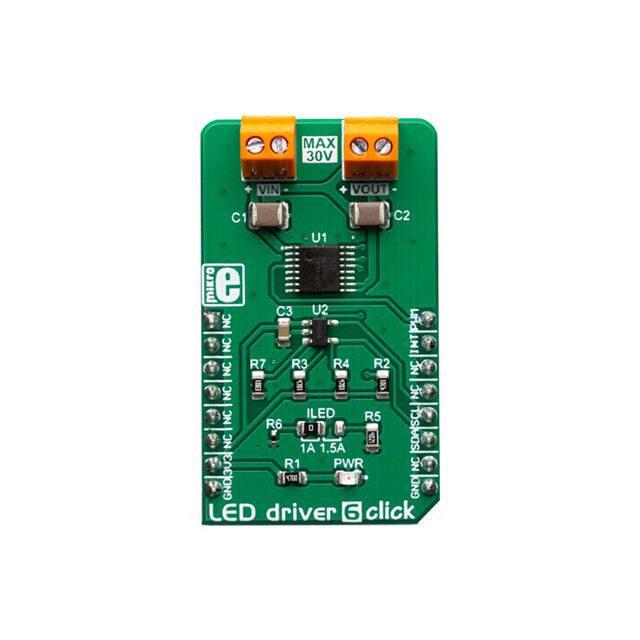
LED DRIVER 6 CLICK
PID: MIKROE-3400
Weight:
LED driver 6 Click is a high brightness LED or LED strip driver, designed to be used in tunable
Smart Connected Lighting (SCL) applications. It is based on the AL1781, a single-channel PWM
dimmable linear LED driver. By utilizing a high-frequency E-flicker free technology with Deep
Dimming capability, it can be used in single-channel tunable white SCL applications. The AL1781 IC
features the Adaptive Thermal Management scheme, reducing the power dissipation. It also
integrates an abundance of protection features for increased reliability: undervoltage, open or short
circuit at the output, and thermal protection.
LED driver 6 Click is supported by a mikroSDK compliant library, which includes functions that
simplify software development. This Click board™ comes as a fully tested product, ready to be used
on a system equipped with the mikroBUS™ socket.
�The AL1781 integrates a low-side current sink which allow LED strips or LED bulbs to
be connected in the common-anode topology for increased effectiveness and power
optimization. This IC is designed with the power optimization in mind: whenever there is
no valid PWM signal on its input pin, it enters the low-power mode, preventing
unnecessary power dissipation. An additional ADC IC is used, allowing advanced power
optimization. Offering good reliability, linear dimming response, and low power
consumption, LED driver 6 click is a perfect solution for smart lighting applications, SCL
LED bulbs, but also for driving LED strips and high-power LEDs.
HOW DOES IT WORK?
LED driver 6 click is based on the AL1781, a single-channel PWM dimmable linear LED
driver by Diodes Incorporated. It is a constant-current driver, which can sink up to
1500mA. It has a low-side current sink which allow LED strips or LED bulbs to be
connected in the common-anode topology for increased effectiveness and power
optimization. The constant current through the connected LED can be selected by a
SMD jumper labeled as ILED, between two values: 1A and 1.5A.
The AL1781 IC can be operated with a PWM signal in the frequency range from 1kHz to
40kHz. By applying the PWM signal with the duty cycle of less than 4ms, it is possible to
tune the light intensity of the connected LED light element. A LOW pulse width of more
than 4ms will set the device into the low-power mode (suspend). The lowest light
intensity that can be reached by applying the PWM frequency of 1kHz is 0.1%, while
40kHz allows the lowest brightness level of 4% of the full light intensity. A High PWM
frequency allows for less visible flickering, but limits the lowest light intensity level, at the
same time. PWM1 and PWM2 pins of the AL1781 are routed to the mikroBUS™ PWM
and CS pins and are labeled as PW1 and PW2.
�Adaptive Thermal Management (ATM) scheme is one of the key features of the
AL1781. It can be used to optimize the power consumption by adjusting the voltage of
the external power supply unit (PSU): the excessive voltage applied to the connected
LED will be dissipated as heat within the AL1781 IC. Therefore, the voltage level of the
external PSU should be kept above the forward voltage of the connected LED plus
minimum voltage headroom (VF + VLED_REG). The ATM injects current through the
LEDPG pin of the AL1781. This current is converted to a voltage level, and it is sampled
by the MCP3221, a low-power 12-bit A/D converter with I2C interface, by Microchip. It
has its I2C pins routed to the respective mikroBUS™ I2C pins, allowing the host MCU to
read the LEDPG voltage and make PSU voltage adjustments. Please note that if an
external PSU with no external regulation is used, its voltage should stay within the
mentioned range (VF of the connected LED element + VLEDx_REG as per AL1781
datasheet). However, the voltage should always stay below 30V.
The AL1781 IC also integrates an abundance of protection features for increased
reliability: undervoltage, open or short circuit at the output, and thermal protection. If any
of these protections become activated, a fault event will be reported on a dedicated pin,
labeled as FAULTB. This pin is routed to the mikroBUS™ INT pin and it is asserted to a
LOW logic level when a fault event occurs.
Deep Dimming Capability helps with power efficiency. Subjective perception of the light
intensity differs from the measured light. For example, the light intensity of 10% (in
respect to the applied duty cycle) is perceived as 32% of the full light intensity. Deep
Dimming Capability helps with energy saving, providing an optimal light output. Deep
Dimming down to 0.1% is possible with the AL1781 IC, since it can be operated with the
pulse width as low as 1 µS, while still providing good linearity.
LED driver 6 click is designed to be used along with an external PSU and an MCU. The
full potential of the LED driver 6 click is achieved when combined with a dedicated
ambient light sensing Click board™ such asAmbient 5 click: by receiving information
about the ambient light intensity from Ambient 5 click, the MCU can generate PWM
signal in respect to the required intensity tuning and send it to LED driver 6 click to
regulate the intensity of the ambient lighting.
This Click Board™ is designed to be operated b
y 3.3V logic levels only. A proper logic voltage level translation should be performed
before the Click board™ is used MCUs which are operated at 5V.
�SPECIFICATIONS
Type
Buck
Applications
LED driver 6 click is a perfect solution for smart lighting applications, SCL
LED bulbs, but also for driving LED strips and high-power LEDs.
On-board
modules
AL1781, a single-channel PWM dimmable linear LED driver by Diodes
Incorporated; MCP3221, a low-power 12-bit A/D converter with I2C
interface, by Microchip.
Key Features
Many protection features for increased reliability: undervoltage, open or
short circuit at the output, thermal protection… High-frequency E-flicker free
technology with Deep Dimming capability, Adaptive Thermal Management
scheme, etc.
Interface
I2C,PWM
Input Voltage
3.3V
Click board
size
M (42.9 x 25.4 mm)
PINOUT DIAGRAM
This table shows how the pinout on LED Driver 6 Click corresponds to the pinout on the
mikroBUS™ socket (the latter shown in the two middle columns).
Notes
Pin
Pin
Notes
NC
1
AN
PWM
16
PW1
PWM Input 1
NC
2
RST
INT
15
INT
Fault status
NC
3
CS
RX
14
NC
�NC
4
SCK
TX
13
NC
NC
5
MISO
SCL
12
SCL
I2C Clock
NC
6
MOSI
SDA
11
SDA
I2C Data
Power Supply
3.3V
7
3.3V
5V
10
NC
Ground
GND
8
GND
GND
9
GND
Ground
ONBOARD SETTINGS AND INDICATORS
Label
Name
Default
Description
PWR
PWR
-
Power LED indicator
VOUT
VOUT
-
LED connector
VIN
VIN
-
External power supply connector
JP1
ILED
Left
LED current selection: left position 1A, right position 1.5A
SOFTWARE SUPPORT
We provide a library for the LED Driver 6 Click on our LibStock page, as well as a demo
application (example), developed using MikroElektronika compilers. The demo can run
on all the main MikroElektronika development boards.
Library Description
Library provides full control of the LEDs illumination. PWM functions are used to control
the brightness temperature of the LEDs. The library also offers reading the current PG
voltage score that serves to regulate lights and alerts.
�Key functions:
uint16_t leddriver6_getPGVoltage() - Reads PG output voltage
uint32_t leddriver6_pwmInit(uint16_t freq) void leddriver6_pwmSetDuty(uint16_t duty) - PWM set duty cycle
Examples description
The application is composed of the three sections :
System Initialization - Initialization I2C module, sets INT pin as INPUT and PWM pin as OUTPUT
Application Initialization - Initialization driver init and pwm init for LED
Application Task - Waits for valid user input and executes functions based on set of valid commands
Commands : '+' - Increase LED light '-' - Decrease LED light 'v' - Display current PG
voltage
void applicationTask()
{
uint8_t dataReady_;
char receivedData_;
dataReady_ = UART_Rdy_Ptr( );
if (dataReady_ != 0)
{
receivedData_ = UART_Rd_Ptr( );
switch (receivedData_)
{
case '+' :
{
_increase();
break;
}
case '‐' :
{
_decrease();
break;
}
case 'v' :
� {
_currentPGVoltage();
break;
}
}
}
}
Additional Functions :
void _increase( ) - Increase LED's light
void _decrease( ) - Decrease LED's light
void _currentPGVoltage( ) - Reads and logs PG voltage
The full application code, and ready to use projects can be found on our LibStock page.
Other mikroE Libraries used in the example:
I2C
PWM
UART
Additional notes and informations
Depending on the development board you are using, you may need USB UART
click, USB UART 2 click or RS232 click to connect to your PC, for development systems
with no UART to USB interface available on the board. The terminal available in all
MikroElektronika compilers, or any other terminal application of your choice, can be
used to read the message.
MIKROSDK
This click board is supported with mikroSDK - MikroElektronika Software Development
Kit. To ensure proper operation of mikroSDK compliant click board demo applications,
mikroSDK should be downloaded from the LibStock and installed for the compiler you
are using.
For more information about mikroSDK, visit the official page.
�v
https://www.mikroe.com/led‐driver‐6‐click//3/27/19
�