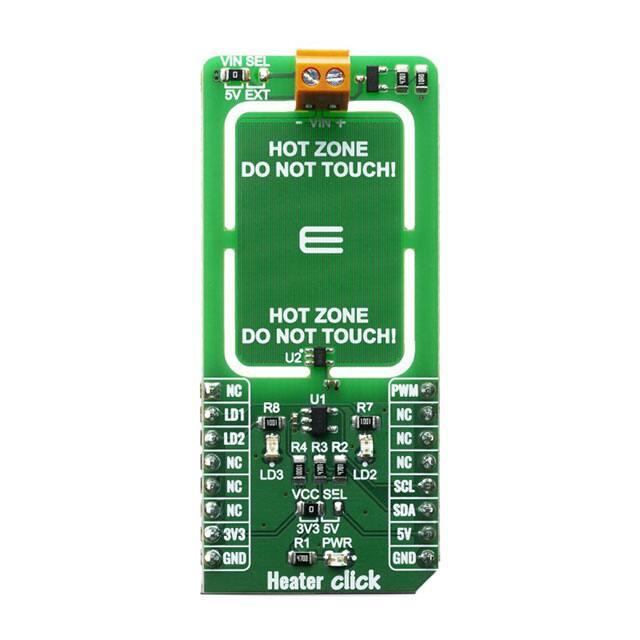
HEATER CLICK
PID: MIKROE-3996
Weight: 19 g
Heater Click is designed with intention of PCB heater concept testing and
useful tool for heating complete casing where staying in specified
temperature range is crucial. Exact PCB temperature can be set and
controlled using TMP235 on board temperature sensor from Texas
Instruments. Heater Click is useful tool for some projects and products that
require some kind of heating, whether to prevent electronics from becoming
too cold, to help control humidity, to heat up a substance, or even to
prevent one material from sticking to another.
Heater Click board™ is supported by a mikroSDK compliant library, which
includes functions that simplify software development. This Click board™
comes as a fully tested product, ready to be used on a system equipped
with the mikroBUS™ socket.
�How does it work?
Heater Click works on a principle of Joule heating, also known as resistance heating (resistive
heating), a process by which the passage of an electric current thrrough a conductor produces
heat. Energy dissipated per unit time is equall to current passing through resistor times electric
potential difference.
Heater Click allows PCB temperature ajusting and monitoring as it have embedded trace resistor
on top layer of PCB. Resistor is made from copper 1oz thick and a pattern of 0.1mm wide track
1950mm long, this give us about 10 ohm resistance at 25 degrees Celsius.
With on bord VIN SEL jumper power supply can be selected as 5V from mikroBUS or any other
voltage from external power supply at therminal block VIN. Using mikroBUS PWM pin power
dissipation can be ajusted and therfore temperature controlled.
Heater Click minimize temperature spread from embedded resistor by having PCB gaps between
it and rest of the click bord and components, by doing so hot zone is easier to warm up and
keeping it at exact temperature without affecting rest of the commponents. LEDs are connected
to LD1 and LD2 GPIO pins and can be used for example to signal user if temperature is ramping
up or achieved, or any other user defined signaling.
Since the temperature rise in a heater is a function of its resistance and voltage, you don’t always
need to design a heater from scratch. So long as you can apply a specific voltage, you should be
able to achieve your desired temperature and monitoring it through I2C.
Temperature is monitored with TMP235 precision CMOS integrated-circuit linear analog
temperature sensor with an output voltage proportional to temperature, The TMP235 device
provides a positive slope output of 10 mV/°C over the full –40°C to +150°C temperature range.
�Using MCP3221 a 12-bit ADC, output voltage from temperature sensor can be red through I2C.
Communication to the MCP3221 is performed using a 2-wire, I2C compatible interface.
Standard (100 kHz) and Fast (400 kHz) I2C modes are available with the device.
Specifications
Type
Temperature
Applications
Seed germination, 3D printer heated beds, humidity control, loads, heater
reference
On‐board modules MCP3221, TMP235
Key Features
Stable temperature adjusting and monitoring
Interface
I2C,PWM
Compatibility
mikroBUS
Click board size
L (57.15 x 25.4 mm)
Input Voltage
3.3V or 5V
Pinout diagram
This table shows how the pinout on Heater Click corresponds to the pinout on the mikroBUS™
socket (the latter shown in the two middle columns).
Notes
Pin
Pin
Notes
NC
1 AN
PWM 16 PWM Pulse width modulation
Red Led
LD1
2 RST
INT
15 NC
Blue Led
LD2
3 CS
RX
14 NC
NC
4 SCK
TX
13 NC
NC
5 MISO SCL
12 SCL
I2C Clock
NC
6 MOSI SDA
11 SDA
I2C Data
�Power Supply
3.3V 7 3.3V
5V
10 5V
Power supply
Ground
GND 8 GND
GND
9 GND
Ground
Onboard settings and indicators
Label Name Default
Description
PWR Green Led ‐
Power LED Indicator
LD2 Red Led ‐
Red LED Indicator
LD3 Blue Led ‐
Blue LED Indicator
Software Support
We provide a library for the Heater Click on our LibStock page, as well as a demo application
(example), developed using MikroElektronika compilers. The demo can run on all the main
MikroElektronika development boards.
Library Description
Library provides control over led pins and function for reading raw ADC data as well a fucntion
for reading converted data in temperature.
Key functions:
uint16_t heater_read_data ( void ); ‐ Function for reading raw ADC data
float heater_read_temp ( void ); ‐ Function that raw data converts in temperature
Examples description
The application is composed of three sections :
System Initialization ‐ Initialization of I2C, UART modules and GPIO pins
Application Initialization ‐ Initialization of PWM module and start heating up
Application Task ‐ Durning the task device is heating up to 50 degree C and then cooling down to
40 degree C
void application_task ( )
{
temp_read = heater_read_temp(
);
if ( ( temp_read > HOT_TEMP ) && ( status_dev == HEATER_WAITING ) )
{
�status_dev = HEATER_COOLING;
}
else if ( ( temp_read < COOL_TEMP ) && ( status_dev == HEATER_WAITING ) )
{
status_dev = HEATER_HEATING;
}
if ( status_dev == HEATER_HEATING )
{
heater_pwm_start( );
heater_set_led1_status( HEATER_LED_ON );
heater_set_led2_status( HEATER_LED_OFF );
status_dev = HEATER_WAITING;
}
else if ( status_dev == HEATER_COOLING )
{
heater_pwm_stop( );
heater_set_led1_status( HEATER_LED_OFF );
heater_set_led2_status( HEATER_LED_ON );
status_dev = HEATER_WAITING;
}
FloatToStr( temp_read, demo_txt );
mikrobus_logWrite( " - Temperature: ", _LOG_TEXT );
mikrobus_logWrite( demo_txt, _LOG_TEXT );
mikrobus_logWrite( log_degree, _LOG_LINE );
mikrobus_logWrite( "***************", _LOG_LINE );
Delay_ms( 1000 );
}
Note:
Device turns red led on when heating up device and blue when cooling down
For this example you should supply device with additional 7V
The full application code, and ready to use projects can be found on our LibStock page.
Other mikroE Libraries used in the example:
I2C
PWM
UART
Conversion
�Additional notes and informations
Depending on the development board you are using, you may need USB UART click, USB
UART 2 click or RS232 click to connect to your PC, for development systems with no UART to
USB interface available on the board. The terminal available in all MikroElektronika compilers,
or any other terminal application of your choice, can be used to read the message.
mikroSDK
This Click board™ is supported with mikroSDK - MikroElektronika Software Development Kit.
To ensure proper operation of mikroSDK compliant Click board™ demo applications,
mikroSDK should be downloaded from the LibStock and installed for the compiler you are
using.
For more information about mikroSDK, visit the official page.
https://www.mikroe.com/heater‐click/2‐20‐20
�
很抱歉,暂时无法提供与“MIKROE-3996”相匹配的价格&库存,您可以联系我们找货
免费人工找货- 国内价格
- 1+142.40923
- 5+139.56625