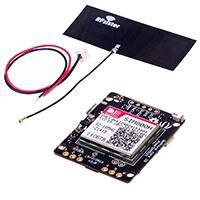
Rephone Core 2G-AtmelSAMD21
SKU 102040046
Introduction
RePhone is one of the most unique and interesting development board platform that created by
Seeed Studio, ever since its first show on the stage of KickStarter, it has received tons of
attention and support from makers all over the world because with RePhone you can not only
DIY a special phone for yourself, but also enchant things around you with cellular connectivity.
�The RePhone Core 2G-AtmelSAMD21 v1.0 is a new Arduino compatible RePhone core 2G
board, which is based on Atmel’s SAMD21 and SIM800H, Most features of RePhone Core 2GAtmelSAMD21 v1.0 is the same as Xadow – GSM+BLE, such as offering rich range of
communication protocols – GSM, GPRS, and Bluetooth, supporting quad-band
850/900/1800/1900Mz, and supporting 2G Nano SD card. But the solution of Atmel’s SAMD21
plus SIM800H has dropped power consumption a lot comparing to Xadow – GSM+BLE. If you
are looking for a high-performance and low power consumption Rephone core to enchant the
world, the this new RePhone core 2G module is the best choice.
Note
The RePhone Core 2G-AtmelSAMD21 v1.0 is compatible with all the Xadow v2.0 except the
Xadow 1.54 inch Touchscreen Please connect a battery to the board if you want to use the GSM
or GPRS function in case the power form USB is not enough and fail to communicate.
Warning
This product DOESN’T include a lopo-battery, and there’s no lipo-battery sold at our Bazaar as
well, any 3.7V lipo-battery will work.
This product DOESN’T include a Mic, Speaker and 3.5mm handset input, you need to buy a
Xadow Audio for those function.
Features
Arduino/Processor
ATSAMD21G18 @ 48MHz with 3.3V logic/power
Arduino compatible (based on Arduino Zero bootloader)
Embedded with lithium battery management chip
User button
SIM800H
Quad band850/900/1800/1900MHz
GPRS multi-slot class 12/10
GPRS mobile station class B
Meet the GSM 2/2 + standard
�o
o
Class 4 (2 W @850/900MHz)
Class 1 (1 W @1800/1900MHz)
bluetooth:compatible3.0+EDR
FM:band limits 76~109MHz,Tuning step by step 50KHz
Via ATcommand control 3GPP TS 27.007, 27.005 and SIMCOM enhance ATcommand set
SIM USAT
Low power
Operating temperature range : -40 ~+85 °C
Specification
Value
Item
Microcontroller
ATSAMD21G18, 32-Bit ARM Cortex M0+
Operating Voltage
3.3V
DC Current per I/O Pin
7 mA
Flash Memory
256 KB
SRAM
32 KB
EEPROM
None
Clock Speed
48 MHz
Lenght
68 mm
Width
30 mm
Weight
12 gr.
�Hardware Overview
o
o
o
1- 11pin Xadow Connector
2- User Button(D3)
3- Micro USB connector for programming and power
4- 35pin Xadow Connector
5- Jst1.0 Battery Connector
6- Nano Sim Card (same to iPhone 5/6/7)
7- ATSAMD21G18 IC
8- Charge status monitor LED
blink - no battery insert
on - charging
off - charge done
9- IC - ETA6003(datasheet)
A- SWD Debug port
B- Antenna Connector
C- I/O PIN pad
D- SIM800H
�Pin map
Note
INT1 connect to D7
INT2 connect to D12
Arduino IDE
After you download and install the latest Arduino IDE, there’s something need to set up. Open
your Arduino IDE, and click on File > Preferences Copy blow code to Additional Boards
Manager URLs, and then OK
https://raw.githubusercontent.com/Seeed‐
Studio/Seeed_Platform/master/package_seeeduino_boards_index.json
�Then let’s go to Tools > Board > Boards Manager
Click on the Install button and wait for minutes before the board is installed.
After the install is completed, you can find RePhone core 2G-AtmelSAMD21 at the bottom of
Tools > Board.
Install the Driver (For Windows)
When the first time to insert the board, you should get a USB COM device name RePhone 2G
SAMD21 that need to install a driver. Click on the below button to download driver for the
board.
�To make sure the driver was installed successful, open your Device Manager to see if RePhone
2G SAMD21 exists.
Hello World
Now we can upload our first demo - Hello World to the board.
Open your Arduino IDE copy the blow code:
void setup()
{
SerialUSB.begin(115200);
}
void loop()
{
SerialUSB.println("Hello world!");
delay(1000);
}
And Then,
Click on Tools > Board > RePhone core 2G-AtmelSAMD21
Click on Tools > Port to select a right port number. (Don’t choose COM1)
�Then click on the Upload button on the left-top of Arduino IDE, seconds later the sketch was
uploaded successful.
�If the uploading is success, you should the some info in red.
Open Serial Monitor of your Arduino IDE and you will get “Hello World” printed per seconds.
AT Command Mode
RePhone core 2G board support AT command mode. TX/RX of SIM800H is connected to
Serial1(D0/D1) of AtemlSAMD21.
�Copy the below code and upload to your board.
#include "atmelsamd21_gprs.h"
void setup()
{
SerialUSB.begin(115200);
while(!SerialUSB);
SerialUSB.println("RePhone core 2G ‐ AtmelSAMD21 AT Command Test");
gsm.preInit(); // power on
while(0 != gsm.init())
{
SerialUSB.println("GSM init error.");
delay(2000);
}
SerialUSB.println("GSM init ok.");
}
void loop()
{
while(SerialUSB.available())Serial1.write(SerialUSB.read());
while(Serial1.available())SerialUSB.write(Serial1.read());
}
Open your Serial monitor and wait for GSM init ok. printed on the monitor, then you can input a
command. Try to input an “AT” to get an “OK”.
�Tip
All command must be end with a new line(\r\n).
Click on below button to get detailed AT command documentation.
Examples
We had made many examples to show you how this module work. At the every beginning,
please
1. Insert a nano SIM card
2. Insert the antenna
3. If you got a lipo-battery, insert it to the board as well
Click on File > Examples then you can open those examples.
AtmelSAMD21_SIM800
Bluetooth_AT_Command_And_Music_Play: Play music via bluetooth
GSM_GPRS_HTTP_GET: Http get hello.txt from mbed.org
GSM_Receive_SMS: Receive SMS
GSM_Voice_Call: Receive voice call
RePhone_API_for_Arduino
gps_test: Xadow GPS v2 example
ledmatrix_test: Xadow LED 5x7 example
nfc_test: Xadow NFC v2 example
sensorhub_test: Xadow Basic Sensors example
ws2812_test: Xadow Duino example
rephone_button
button_test: On-board button test
�rephone_lcm
lcm_display_test: LCD display exampledkdsafdfds
rephone_menu_all
rephone_menu_test
TwilioMessage
message_test: Twilio Message Send/Receive
RePhone Family
There are several chainable add-on modules to extend the features and functionalities – Xadow
Audio, Xadow LED 5x7, Xadow Basic Sensors, Xadow Duino, Xadow GPS v2 and Xadow NFC
v2.
GPS v2
Basic Sensors
NFC v2
�LED 5 x 7
Audio
Xadow GSM Breakout
Help us make it better
Thank you for choosing Seeed. A couple of months ago we initiated a project to improve our
documentation system. What you are looking at now is the first edition of the new
documentation system. Comparing to the old one, here is the progresses that we made:
Replaced the old documentation system with a new one that was developed from Mkdocs, a more widely
used and cooler tool to develop documentation system.
Integrated the documentation system with our official website, now you can go to Bazaar and other
section like Forum and Community more conveniently.
Reviewed and rewrote documents for hundreds of products for the system’s first edition, and will
continue migrate documents from old wiki to the new one.
An easy-to-use instruction is as important as the product itself. We are expecting this new system
will improve your experience when using Seeed’s products. However since this is the first
edition, there are still many things need to improve, if you have any suggestions or findings, you
are most welcome to submit the amended version as our contributor or give us suggestions in the
survey below, Please don’t forget to leave your email address so that we can reply.
Happy hacking
Copyright © 2008-2016 Seeed Development Limited All rights reserved
�
很抱歉,暂时无法提供与“102040046”相匹配的价格&库存,您可以联系我们找货
免费人工找货